
Disclosure: VPNFin is reader-supported. If you buy a VPN through links on this page, we may earn a commission at no extra cost to you. This never affects our ratings — here’s our full disclosure.
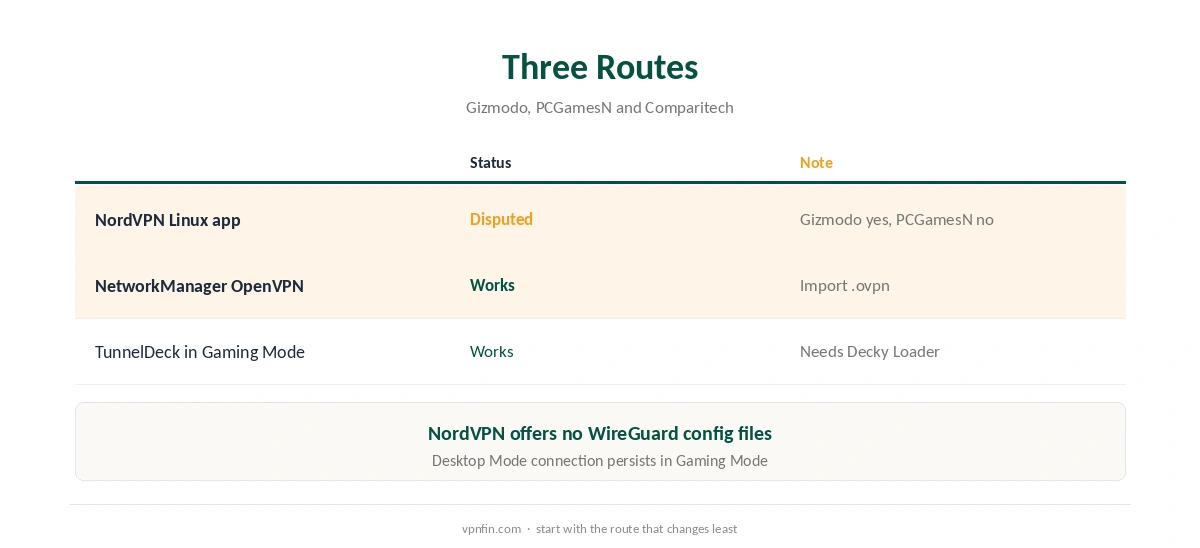
A NordVPN Steam Deck setup is possible, but sources disagree on how. Gizmodo says NordVPN’s Linux app works in Desktop Mode. PCGamesN says the Linux GUI will not run on the Deck. The reliable route is a manual OpenVPN connection in NetworkManager, which keeps working when you switch back to Gaming Mode.
Why the Steam Deck Is Different
SteamOS is a customised Arch Linux with a read-only system partition, Ars Technica reported. Valve warns that anything installed inside that image can vanish with a SteamOS update. Comparitech notes that most VPN providers do not offer ready-made Arch packages, so manual setup is common.
Desktop Mode runs KDE Plasma 6 on SteamOS 3.8.16, released in July 2026, according to Tech Insider. Our NordVPN Linux guide covers the app on standard distributions.
NordVPN Steam Deck Manual Setup
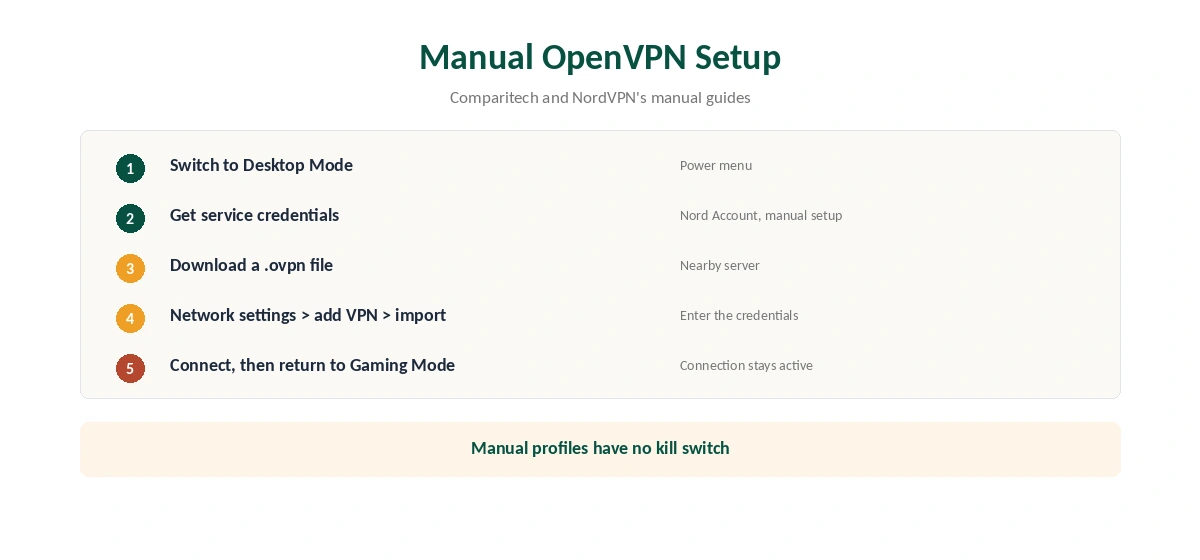
Switch to Desktop Mode. In the Nord Account, get your service credentials and download a .ovpn file for a nearby server; our NordVPN OpenVPN guide shows where. Then open the system’s network settings, add a VPN connection by importing the .ovpn file, and enter the service credentials.
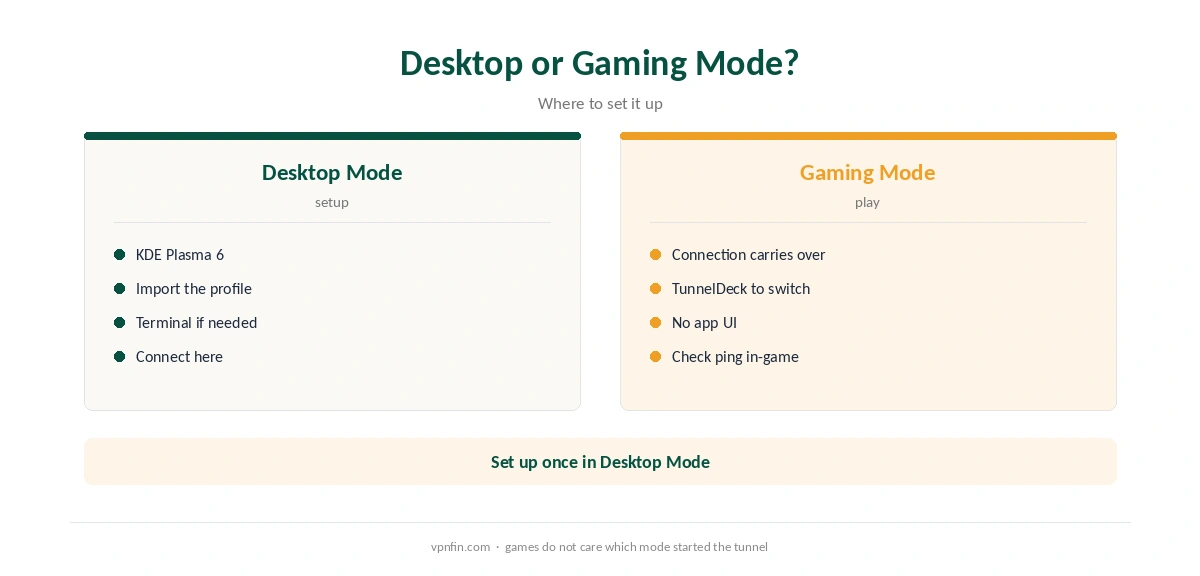
Comparitech notes that a VPN connected in Desktop Mode stays active in Gaming Mode. NordVPN does not offer WireGuard config files, so OpenVPN is the manual route. Our page on Proton VPN on Steam Deck covers the Flatpak, WireGuard files and Gaming Mode.
TunnelDeck and the Read-Only Filesystem
For Gaming Mode control, Comparitech describes TunnelDeck, a plugin for the Decky Loader framework that switches NetworkManager VPN connections without leaving the game. Installing extra packages may require sudo steamos-readonly disable, then enable again afterwards.
Expect updates to undo system changes, as Valve warns. A NetworkManager profile is the lighter option.
NordVPN Steam Deck Use Cases
Gizmodo highlights region switching for the Steam store and early access to content. A VPN also protects the Deck on public Wi-Fi. For ping and DDoS questions, our NordVPN gaming guide applies, and our Steam Deck VPN guide compares providers.
A manual profile has no kill switch, as our kill switch guide explains. A VPN router covers the Deck at home instead; see our router guide. NordVPN belongs to Nord Security, which also owns Surfshark.
Test inside the refund window, as our refund guide explains. Our VPN test page confirms the tunnel. For SOCKS5 in a single app, see our SOCKS5 guide.
More NordVPN Steam Deck Checks
After a NordVPN Steam Deck connection comes up, run our DNS leak test in the browser. Our Warzone guide covers one popular game on the Deck, and our disconnection guide helps if the tunnel drops. Repeat the checks after each SteamOS update.
SteamOS Updates and Your Setup
Valve warns that anything installed inside SteamOS’s read-only system image can vanish with an update, Ars Technica reported. A NetworkManager VPN profile lives in user settings and usually survives. Packages installed after disabling the read-only mode may not.
After each SteamOS update, check that the VPN profile still connects. If it is gone, re-import the .ovpn file. Keep a copy of the file and your service credentials somewhere easy to reach.
Protocol Choice
NordVPN does not offer WireGuard configuration files, so a manual Steam Deck setup uses OpenVPN. UDP files are usually faster for games. TCP files get through networks that disrupt UDP, such as some hotel Wi-Fi.
Download one of each for a nearby server. If the UDP profile fails on a network, switch to TCP. Our NordVPN OpenVPN guide explains the difference.
Steam Store Region
Gizmodo mentions region switching for the Steam store. Steam has its own rules on account region and purchases, and a VPN does not change your account country or payment method. Read Steam’s terms before relying on a VPN for store prices, since accounts can be restricted.
Battery and Performance
A VPN adds some processing work, which costs a little battery on a handheld. OpenVPN asks more of the processor than WireGuard would. On battery, connect only when you need protection, such as on public Wi-Fi.
For online games, measure ping with and without the VPN. Our NordVPN gaming guide covers what to expect.
Gaming Mode Control With TunnelDeck
Comparitech describes TunnelDeck, a plugin for the Decky Loader framework, which switches NetworkManager VPN connections from Gaming Mode. It saves returning to Desktop Mode each time. Installing Decky Loader changes the system more than a plain VPN profile, so expect to reinstall it after some SteamOS updates. Keep the plain profile as your fallback.
If you mostly play offline, the VPN matters only for the store and multiplayer games. Turn it on for public Wi-Fi and leave it off at home to save battery. Reconnect before joining any online lobby away from home.
How We Research
This page draws on Steam Deck VPN guides from Gizmodo, Comparitech, PCGamesN and Tech Insider, plus Ars Technica’s notes on SteamOS. We cross-checked these sources against each other, and where they conflict or something can’t be verified, we say so in the text rather than guessing. We read every source on 5 October 2026. The main source we relied on is Comparitech’s Steam Deck guide. Our full approach lives on the About Us page.
NordVPN on Steam Deck FAQ
Sources disagree: Gizmodo says the Linux app works in Desktop Mode, PCGamesN says the GUI will not run. Manual OpenVPN always works.
Yes. Comparitech notes a VPN connected in Desktop Mode remains active in Gaming Mode.
Not manually; NordVPN provides OpenVPN config files only.
System-level installs can be wiped, Valve warns. A NetworkManager profile is lighter.
A Decky Loader plugin that switches VPN connections from Gaming Mode.
The Verdict
For a NordVPN Steam Deck setup, import an OpenVPN profile in Desktop Mode and let it carry into Gaming Mode. Treat the Linux app claim as unconfirmed, and expect updates to undo deeper changes.