
Disclosure: VPNFin is reader-supported. If you buy a VPN through links on this page, we may earn a commission at no extra cost to you. This never affects our ratings — here’s our full disclosure.
Hulu is harder than Netflix, and the reason is architectural rather than a matter of trying harder.
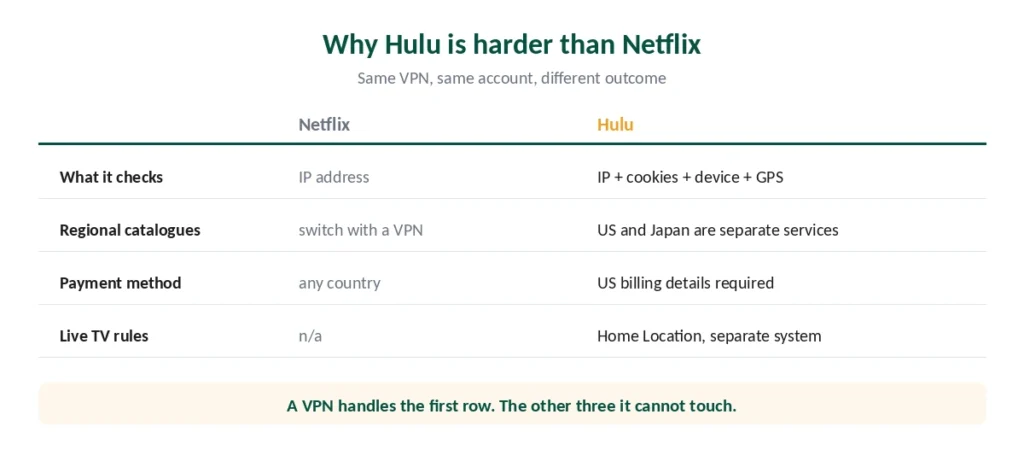
Netflix checks your IP address. Hulu checks your IP address plus cookies and device signals plus, for Live TV, whether your Home Location matches. A VPN that unblocks Netflix reliably can still fail on Hulu with the same account and the same server.
That’s why “switch servers” — the advice that fixes most streaming problems — often doesn’t work here. This guide covers all three layers.
Before Anything Else: Two Things a VPN Can’t Fix
Hulu requires a US payment method. The service is available in the United States and Japan only, and signing up needs American billing details. A VPN changes where you appear to be; it doesn’t change what your card says.
The US and Japanese services are separate products. Unlike Netflix, you cannot switch between regional catalogues with a VPN — they’re different services with different content. Outside the United States that content sits inside Disney+ instead, under the hub renamed from Star to Hulu in October 2025. A Hulu Japan subscriber can use a VPN to reach their own account while travelling, but cannot access the US library.
If you already have a US account and you’re travelling, everything below applies. If you’re trying to sign up from abroad, the payment method is a separate obstacle.
⚠️ Accessing Hulu from outside the US breaches its terms of service. This is a contractual matter rather than a legal one — our legality guide covers the distinction — but the account is the thing at risk, not you.
The Three Layers
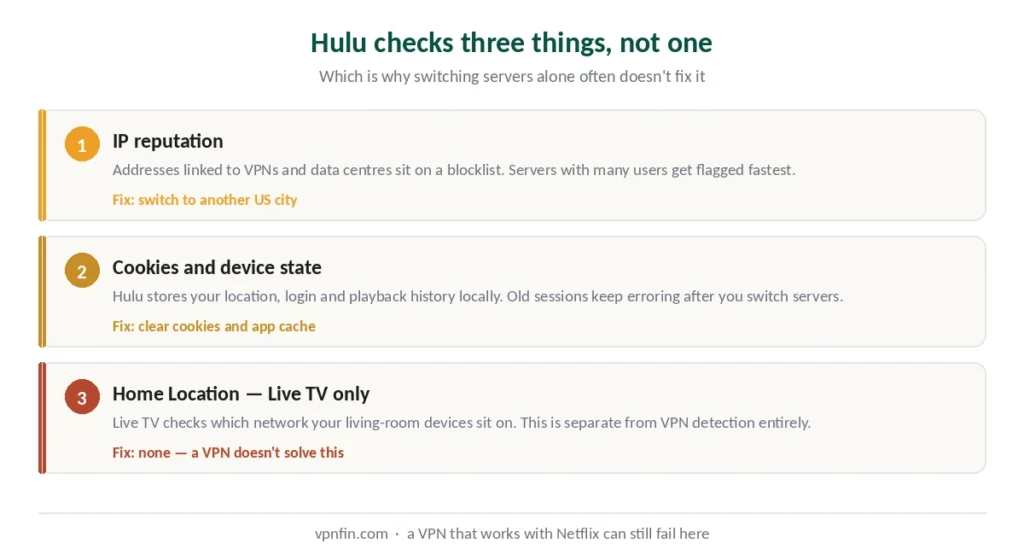
Layer one: IP reputation. Hulu maintains lists of addresses associated with VPNs and data centres. When a server has too many concurrent users, it gets flagged. This is the layer everyone knows about.
Layer two: cookies and device state. Hulu stores location, playback, login and device information locally. If it previously detected a VPN or a non-US location, that stored session keeps producing errors even after you switch to a working server. This is why people switch servers, see the same error, and conclude the VPN is broken. Our page on PureVPN and Hulu covers its US servers, the proxy error and Hulu’s own rules.
Layer three: Home Location, for Live TV. Hulu + Live TV enforces rules about which network your living-room devices sit on. This is a separate system from ordinary streaming and needs separate handling.
Fixing It, in Order
Work down the list. Each step addresses a different layer, and doing them out of order wastes time.
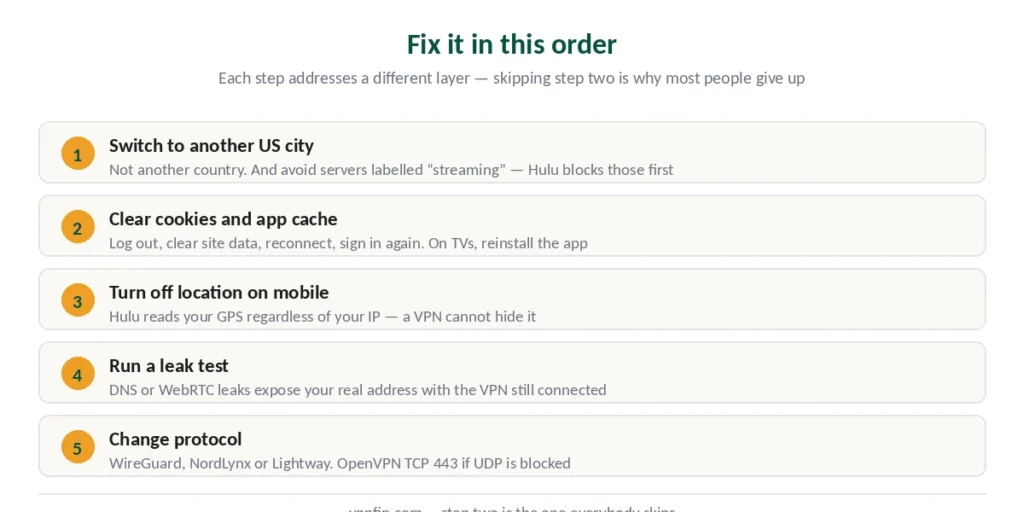
1. Switch to a different US server. Not a different country — a different city. Providers with many US locations give you more attempts.
⚠️ Counterintuitive tip: avoid servers labelled “streaming” or “optimised for Hulu”. Those are the first ones Hulu blacklists, precisely because providers advertise them.
2. Clear cookies and site data. This addresses layer two, and skipping it is the most common reason step one appears to fail. Log out of Hulu, clear cookies and site data for the domain, reconnect to your US server, sign in again.
On mobile: device settings → Apps → Hulu → Clear cache. If that doesn’t work, clear data and sign in again. On Apple TV, Roku and some smart TVs, reinstalling the app is the fastest way to reset stuck session data.
3. Turn off location services on mobile. Hulu reads your device’s GPS, which reports your real position regardless of what your IP says. A VPN cannot hide this. Disable location permissions for the Hulu app specifically.
4. Run a leak test. DNS or WebRTC leaks expose your real address even with the VPN connected. Our setup guide covers the four checks that confirm your connection is clean.
5. Change protocol. WireGuard-based options — NordLynx or Lightway — perform best for streaming. If your network blocks UDP, OpenVPN over TCP port 443 is the fallback.
What Makes a VPN Work Here
Three things, in order of importance.
A large pool of US servers. This is the single biggest factor. When one address gets flagged, you need alternatives — and providers with servers in fifteen or more US cities give you far more attempts than ones with three.
Regularly refreshed addresses. Providers that rotate IPs stay ahead of blacklists. This isn’t something you can check directly, but it shows up as a provider that keeps working month after month.
Speed with headroom. Hulu streams at up to 1080p on most plans, needing 6–8 Mbps, and 4K on some content. Any provider we rank clears that — our speed guide covers where each lands.
One honest note on providers. Independent testers report ExpressVPN struggling with Hulu specifically, with users citing proxy errors and support confirming limited server options. That’s unusual for a provider that performs well elsewhere, and it illustrates the point: Hulu is its own problem, not a general streaming problem. Full detail in our ExpressVPN review.
Live TV Is a Different Problem
If your issue involves Live TV, local channels or sports, treat it separately.
Hulu + Live TV uses Home Location — the network where your account is registered — and enforces rules about which devices can stream from where. Living-room devices in particular are checked against it. YouTube TV works the same way, with a two-changes-a-year limit on top.
A VPN doesn’t solve this, because the check isn’t purely about IP address. If Hulu keeps asking you to confirm your location, that’s the Home Location system rather than VPN detection, and the fixes above won’t help. Our guide to VPN for ESPN Plus covers US-only access, blackouts and what worked.
Which Provider to Choose
NordVPN runs over 3,000 US servers across 15+ cities — the largest pool among the providers we rank, which matters more here than anywhere else. It also posted the best speed result in independent benchmark testing.
Surfshark covers unlimited devices, useful if the household watches on several screens at once, and opens more regional libraries than anything else we examined — see our streaming guide.
CyberGhost labels servers by platform, which cuts the guesswork — though see the warning above about advertised streaming servers being blacklisted first.
Free VPNs will not work. Their address ranges are small, heavily shared and already blacklisted. Our free VPN guide covers what the reputable free tiers do and don’t do.
⚠️ Test on the refund window. Every provider we rank gives at least 30 days, and CyberGhost offers 24 hours on desktop with no card at all. Access changes month to month, so any claim about Hulu — including this one — is a snapshot.
How We Research
This guide draws on published testing and technical analysis from named sources including Comparitech, TheBestVPN, VPNpro and PrivateProxyGuide, alongside our own full reviews of the providers we rank — cross-checked and verified at publication. Several sources carry affiliate relationships with the providers they recommend; we used them for technical detail confirmed elsewhere rather than for rankings. Streaming access shifts constantly, so treat any unblocking claim as a snapshot. Our full approach lives on the About Us page.
Hulu VPN FAQ
Hulu uses stricter and more layered detection. Beyond IP reputation, it reads cookies and device state, and for Live TV it checks Home Location consistency. A VPN that unblocks Netflix can still fail on Hulu with the same account, because the systems check different things.
It means Hulu identified your connection as coming through a VPN or proxy, usually because the server’s IP address is on a known-proxy list. Switching to a different US server is the first fix — but clear your cookies and app cache afterwards, since stored session data keeps producing the error even on a working server.
Yes. Hulu is available in the United States and Japan only, and signing up requires American billing details. A VPN changes where you appear to be located; it does not change what your payment method says. This is a separate obstacle from geo-restriction.
No. Unlike Netflix, where a VPN switches you between regional catalogues of one service, Hulu US and Hulu Japan are entirely separate products with different content and separate subscriptions. A Hulu Japan subscriber can use a VPN to reach their own account while abroad, but not the American library.
Because it reads your device’s GPS, which reports your physical position regardless of your IP address. A VPN cannot hide this. Disable location permissions for the Hulu app specifically in your device settings, then clear the app cache and reconnect.
Counterintuitively, often not. Servers advertised as optimised for streaming are the ones Hulu blacklists first, precisely because providers promote them publicly. An ordinary US server in a large city frequently works better.
The Short Version
Hulu isn’t Netflix. It checks IP reputation, stored cookies and device state, and — for Live TV — Home Location. A VPN that works elsewhere can fail here for reasons that have nothing to do with the VPN.
The fix order matters: different US server, then clear cookies and cache, then disable mobile location services, then check for leaks. Skipping step two is why most people conclude their VPN is broken.
And two things a VPN cannot do: provide a US payment method, or switch you between the American and Japanese services. Those are different products, not different catalogues. Our page on NordVPN and Hulu covers US servers, payment rules and error fixes.