
Disclosure: VPNFin is reader-supported. If you buy a VPN through links on this page, we may earn a commission at no extra cost to you. This never affects our ratings — here’s our full disclosure.
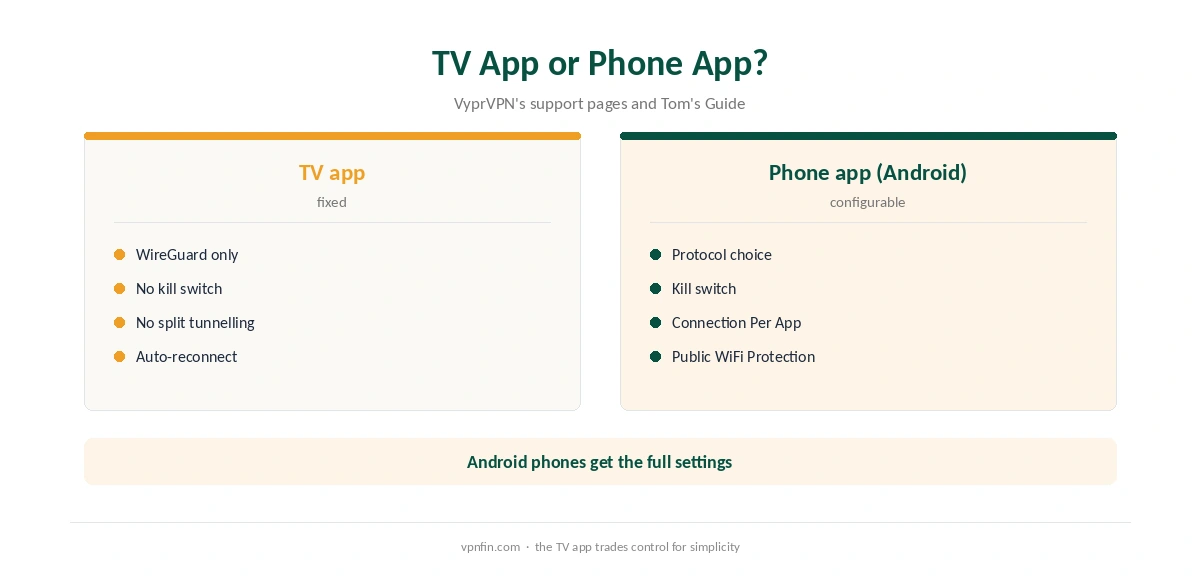
VyprVPN Firestick support comes through VyprVPN for TV, an app for Fire TV, Android TV, Google TV and Apple TV, VyprVPN’s support pages say. It connects to the nearest region by default and stays connected after you leave the app. One limit stands out: VyprVPN fixes the TV app’s settings, disabling the kill switch with no way to turn it on, the protocol set to WireGuard and DNS set to VyprDNS.
This guide covers the setup, choosing a server, the fixed settings and what they mean for streaming.
VyprVPN Firestick Setup
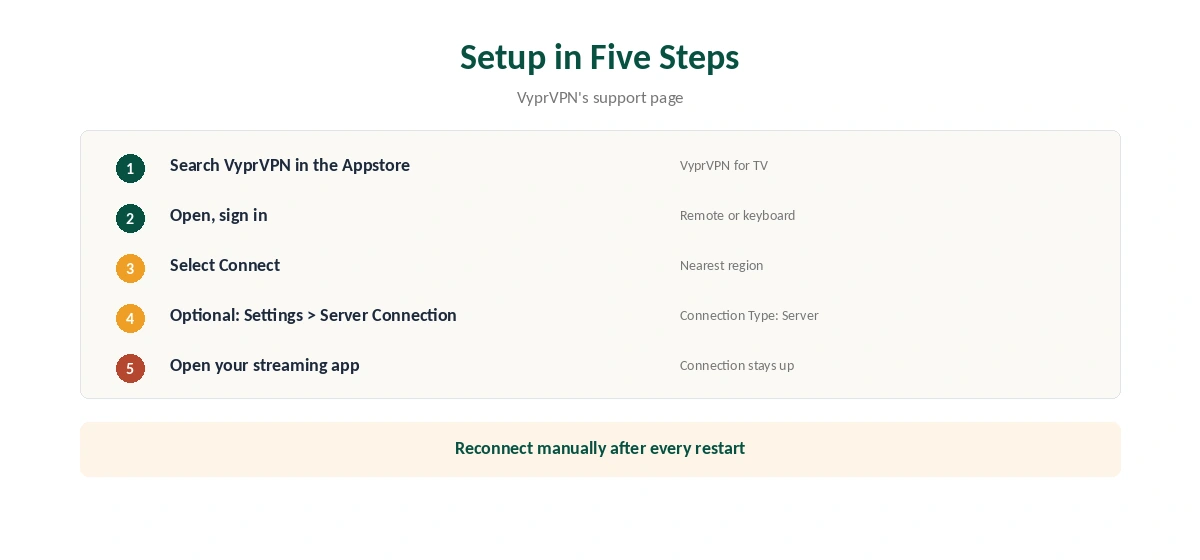
On the Fire TV, search for VyprVPN in the Amazon Appstore, as VyprVPN’s support page advises, and install it. Open the app, sign in and select Connect. VyprVPN connects to the region it detects as closest to you.
Once connected, you can leave the app and open your streaming service; the connection stays up, and VyprVPN reconnects automatically if it drops.
Choosing a Server
VyprVPN’s support page gives the steps. Open Settings at the top, select Server Connection on the left, change Connection Type to Server if you want a specific location, pick it, then select Connect to return to the main screen.
Tom’s Guide traced VyprVPN’s servers to seven hubs, Amsterdam, Chicago, Miami, San Francisco, Singapore, Sydney and Tokyo, with other locations virtual. A hub city near you gives the steadiest stream.
Settings Fixed on the TV App
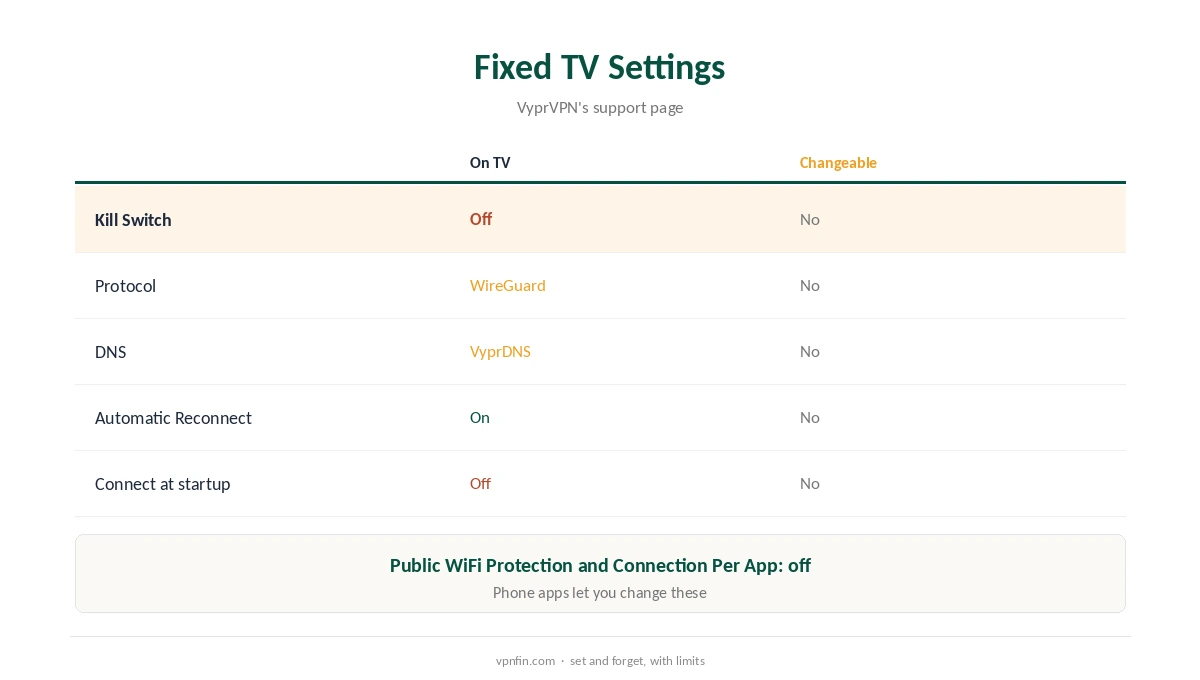
VyprVPN’s support page lists settings you cannot change on the TV app: Public WiFi Protection off, Connection Per App off, Kill Switch off, protocol WireGuard, DNS VyprDNS, automatic reconnect on, and connect at startup off.
Without a kill switch, a drop can briefly expose your real address until the app reconnects. For streaming that rarely matters; for privacy-sensitive use, it does. Our kill switch guide explains the risk.
Connect at Startup Is Off
Because VyprVPN fixes connect at startup to off, open VyprVPN after every Fire TV restart and select Connect before streaming. Otherwise the stick uses your normal connection.
Streaming With VyprVPN
Choose a server in the country of the catalogue you want, then open the streaming app. If the app shows your home library, close it fully and reopen it after connecting. Our Netflix VPN guide covers the rules streaming services set.
When VyprVPN Will Not Connect on Fire TV
Restart the Fire TV, open VyprVPN and connect again. If it still fails, try another region in Server Connection, then reinstall the app from the Appstore. VyprVPN’s support page says its customer team is available around the clock.
Several Fire TVs
Our device table shows sources disagree on VyprVPN’s device limit, five or ten, so count your sticks and phones before installing it everywhere. Each Fire TV needs its own install and sign-in.
VyprVPN Firestick or Phone for Privacy?
For streaming, the TV app’s fixed settings are fine. For privacy-sensitive browsing, the Android phone app is the better tool, since it lets you turn on the kill switch and Connection Per App. Our VyprVPN Windows guide covers the fullest app.
Is VyprVPN Firestick Use Right for You?
For streaming on a stick, VyprVPN Firestick use works with little setup: connect, choose a hub city and watch. People who want a kill switch or connect at startup on the TV itself should look at providers whose Fire TV apps allow both.
Fire TV Remote Tips
Typing a password with a remote is slow. Use the Amazon Fire TV app on your phone as a keyboard when signing in to VyprVPN, or pair a Bluetooth keyboard. The VyprVPN for TV interface is designed for remote navigation once you are in.
A Quick Rule
After every Fire TV restart, open VyprVPN and connect before streaming. Choose a hub city near you, and keep VyprVPN Firestick sessions for streaming rather than privacy-sensitive browsing.
Picture Quality
Distance shows up as lower picture quality. If a stream softens, switch to a hub city closer to you and reopen the app. Our VyprVPN torrenting guide lists the hub cities in more detail.
Quick Check
After connecting, VyprVPN’s main screen should show a connected state, and your streaming app should load the expected library.
Checking the Connection
Open the Silk browser on the Fire TV and visit our VPN test page to confirm the new address. Run our DNS leak guide once too.
VyprVPN’s Record
One VyprVPN audit appears in our audit table, by Leviathan Security in 2018, before Certida LLC of Texas bought it in 2023. Our VyprVPN review covers the rest, and our VPN audit tracker explains why recent audits matter.
Related Guides
Our Firestick VPN guide compares providers for Fire TV.
For rivals, see our NordVPN Firestick guide and Surfshark Firestick guide; the two share an owner, Nord Security.
A third option appears in our CyberGhost Firestick guide.
How We Research
This page draws on VyprVPN’s support pages on VyprVPN for TV and its fixed settings, Tom’s Guide’s VyprVPN review and our audit and ownership tables. We cross-checked these sources against each other, and where they conflict or something can’t be verified, we say so in the text rather than guessing. We checked time-sensitive figures, including prices in US dollars, on 6 October 2026. No affiliate link for this provider; prices on its own site. The main source we relied on is VyprVPN’s TV app overview. Our full approach lives on the About Us page.
VyprVPN Firestick FAQ
Yes, through VyprVPN for TV in the Amazon Appstore.
No. VyprVPN’s support page lists it as disabled and unchangeable on TV.
WireGuard, fixed on the TV app.
No. Connect at startup is off on TV; open the app and connect.
Settings, Server Connection, set Connection Type to Server, then choose.
The Verdict
VyprVPN Firestick support is simple: install, connect and stream. The fixed settings, with no kill switch and no connect at startup, make it better for streaming than for privacy-sensitive use.