
Disclosure: VPNFin is reader-supported. If you buy a VPN through links on this page, we may earn a commission at no extra cost to you. This never affects our ratings — here’s our full disclosure.
CyberGhost Firestick support has a catch that most setup guides skip. The app runs on Fire OS sticks only, so Amazon’s two newest models cannot install it. Before you pay, check which system your stick runs. After that, setup takes about five minutes. The 26-month plan costs $1.99 to $2.19 a month, depending on which CyberGhost page you buy from.
This guide covers the models that work and the sign-in step that trips people up. It also explains the streaming profiles and one refund trap specific to the Amazon Appstore.
Is CyberGhost Good on a Firestick?
Yes, if your stick runs Fire OS. CyberGhost publishes a native Fire TV app in the Amazon Appstore. It is built for the remote, not a phone app squeezed onto a TV. However, Gizmodo and Security.org both reported in September 2026 that CyberGhost has no app for Vega OS. So the Fire TV Stick 4K Select and the 2026 Stick HD cannot use this subscription.
Which Fire TV Sticks Run the CyberGhost Firestick App
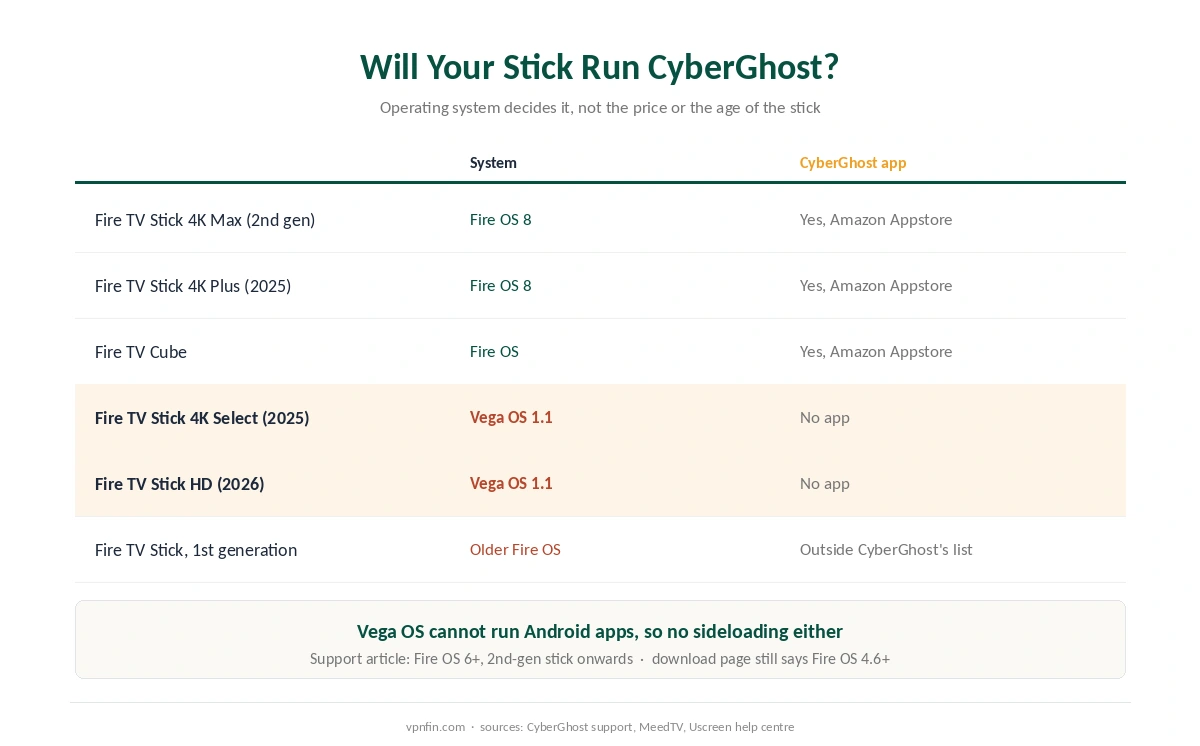
Amazon now sells sticks on two different systems. Fire OS is the Android-based system on every stick back to the second generation. Vega OS, by contrast, runs on Linux and cannot run Android apps. As a result, a Fire OS app does not carry over, and each provider has to write a separate version.
CyberGhost’s support article lists Fire OS 6 or later and the second-generation Fire TV Stick onwards. Its download page, by contrast, still says Fire OS 4.6 and later. We print both because they disagree. The support article is the stricter one. In practice, the first-generation stick falls outside both.
Several rivals did build for Vega. NordVPN, Surfshark, ExpressVPN and IPVanish now publish Vega apps, and NordVPN and Surfshark share an owner, Nord Security. Our NordVPN Firestick guide and Surfshark Firestick guide cover those apps. Meanwhile, ExpressVPN on Fire TV covers its Vega release.
To check your own stick, open Settings, then My Fire TV, then About. A version that starts with Fire OS will run CyberGhost. In contrast, a version shown as OS 1.1 means Vega, and the app will not appear in the store.
How to Install CyberGhost on Firestick
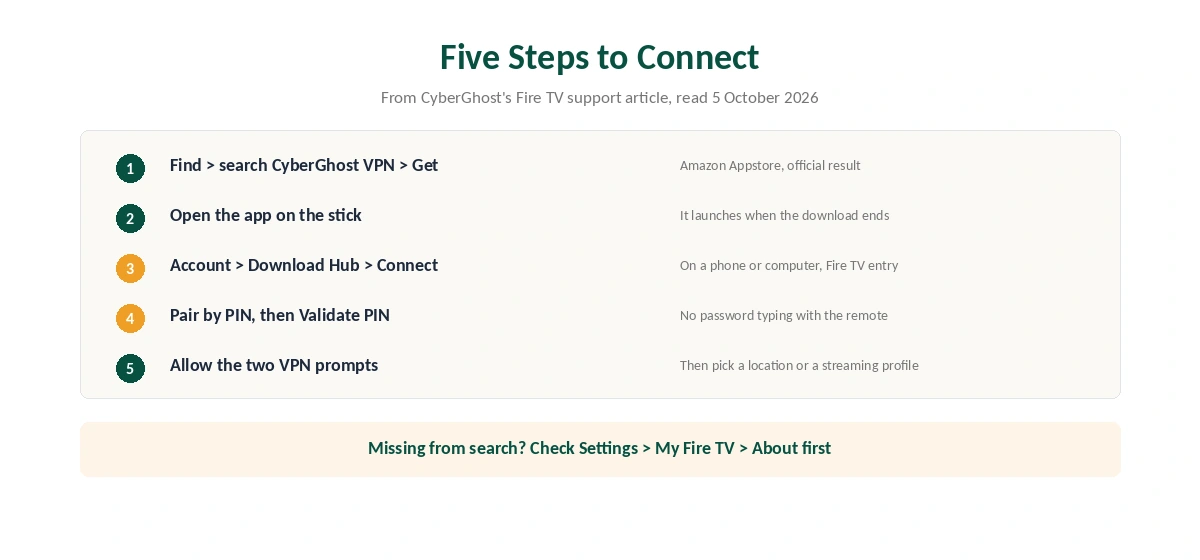
The install follows CyberGhost’s own support article. First, press Find, the magnifying glass on the home screen, and search for CyberGhost VPN. Then select the official result and choose Get. The app opens by itself when the download finishes.
Sign-in is the step that differs from a phone, because you do not type a password with the remote. Instead, open your CyberGhost account on a phone or computer and go to the Download Hub. There, choose Connect next to CyberGhost VPN for Amazon Fire TV. The account page and the stick then pair through a PIN. After that, select Validate PIN on the stick and approve the two Fire TV prompts that allow a VPN connection.
Finally, pick a location or a streaming profile and connect. If the store search shows nothing, check the stick’s generation first and then update Fire OS, as vpnonline suggests.
What the Fire TV App Does Differently
The TV app sorts its servers around services rather than cities. Gizmodo describes a Fire TV list with entries for Netflix US, BBC iPlayer and Hulu rather than city names. vpnonline adds that the app offers Best Location and manual country or city choice as well. Our guide to CyberGhost and Netflix covers streaming servers, test results and fixes.
That labelling saves time, but it does not promise access. Streaming services block VPN addresses on their own schedule, so a profile that works this week can fail next week. Our Netflix VPN guide and BBC iPlayer guide explain what each service checks.
Two gaps matter here. We could not verify which protocols the CyberGhost Firestick app offers. The plan page lists OpenVPN, IKEv2 and WireGuard across all apps, with no per-device breakdown. Also, the app protects only the stick it runs on, not the rest of the home network.
CyberGhost Firestick Problems and Fixes
Most failures fall into four groups, and the order of checks matters. First, if the app is missing from the Appstore, the stick probably runs Vega OS or predates the second generation. No setting fixes that, so the options are a different stick or a VPN on the router. Our router setup guide explains that route.
Second, if a stream shows a proxy error after you connect, the streaming app may still hold your old region. Clear that app’s cache under Settings, Applications, Manage Installed Applications, then try another server in the same country. Third, if the tunnel keeps dropping, look at the Wi-Fi. A stick behind the TV often sits on a weak signal, and lost packets break the connection.
Fourth, for a frozen app, use Force Stop and then Clear Cache. Clear Data comes last, since it signs you out. Our Firestick troubleshooting page covers each step in order. Also, turning the VPN off helps rule it out.
What CyberGhost Costs on a Firestick
On 5 October 2026, CyberGhost showed two prices for the same 26-month plan. The Android TV and Mac download pages listed $2.19 a month, billed $56.94. Meanwhile, the iOS page ran a Fall Special at $1.99, billed $51.74. After 26 months, either plan renews yearly at the same figure it first billed.
In other words, the renewal price matters more than the headline rate. At $56.94 a year, renewal works out near $4.75 a month, still cheaper than ExpressVPN at $99.95 a year. The 6-month plan costs $41.94 and the monthly plan $12.99. Our CyberGhost price breakdown runs the four-year totals.
One account covers 7 devices, so a Firestick, a phone and a laptop fit easily. However, CyberGhost lists no free trial for Fire TV. Its trial page names Windows, macOS, iOS and Android only, as our CyberGhost free trial guide explains.
| Provider | Renewal price | Per month | Tier |
|---|---|---|---|
| NordVPN | $139.08/yr | ~$11.59 | Basic |
| Surfshark | ~$79/yr | ~$6.58 | Starter |
| ExpressVPN | $99.95/yr | ~$8.33 | Basic |
| CyberGhost | $56.94/yr | ~$4.75 | 2-year |
| PureVPN | $47.95/yr | ~$4.00 | Standard, 2-year (1-year renews $57.95) |
| IPVanish | $89.99/yr | ~$7.50 | Essential |
| Windscribe | ~$69/yr | ~$5.75 | Pro |
| Proton VPN | ~$83.88/yr | ~$6.99 | VPN Plus |
| Mullvad | ~$65/yr | ~$5.40 | flat, no tiers |
| Norton VPN | $79.99/yr | ~$6.67 | Standard |
| Hotspot Shield | ~$95.99/yr | ~$8.00 | Premium annual |
| Astrill | $300 every 2 yrs | ~$12.50 | 2-year, same at renewal |
The Amazon Appstore Refund Trap
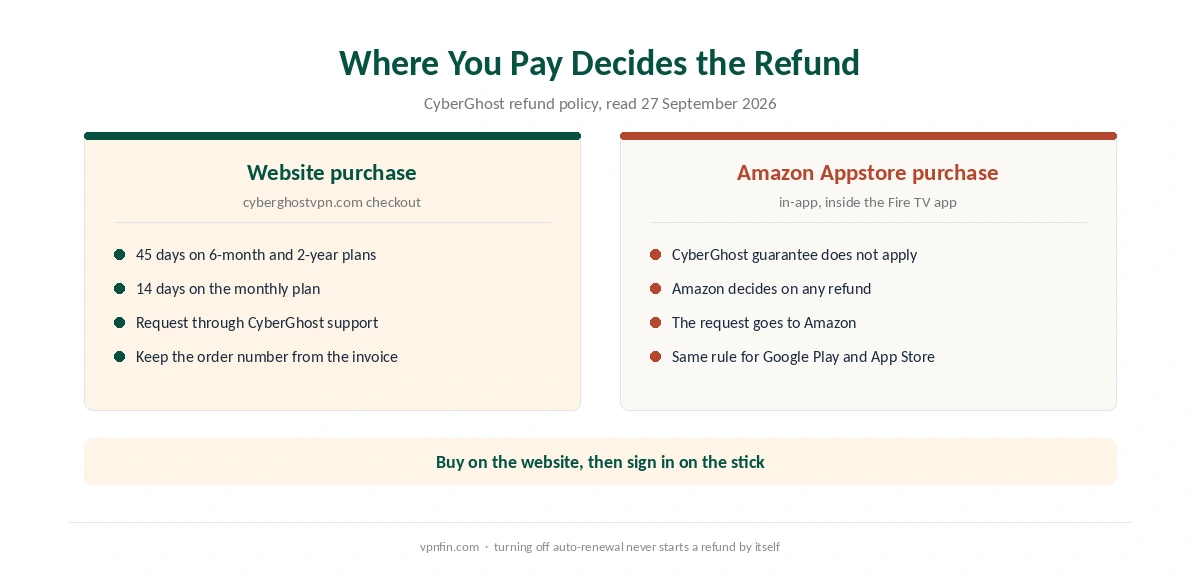
Where you pay changes your refund rights. CyberGhost’s refund policy offers 45 days on the 6-month and 2-year plans, 14 days on the monthly plan. Yet it excludes in-app purchases through Google Play, the App Store and the Amazon Appstore. For those, the store decides. Therefore, a website purchase keeps the 45-day window. A purchase inside the Fire TV app depends on Amazon instead. Our guide to PureVPN on Firestick covers split tunnelling, but no Vega listing.
If you might cancel, buy on the website first and then sign in to the CyberGhost Firestick app. Our CyberGhost refund guide lists the order number and support steps that the request needs.
Who Should Use CyberGhost on a Firestick
CyberGhost on a Firestick suits a household with Fire OS sticks that wants a simple TV app. Labelled streaming profiles and room for seven devices help too. It also suits buyers who want a long refund window and will buy on the website rather than through Amazon. Our page on CyberGhost on Kodi covers running the app on the device and the router route for other boxes.
Who Should Skip It
Skip it if you own a Fire TV Stick 4K Select or the 2026 Stick HD. The app does not exist for Vega OS. Ownership may matter to you as well: CyberGhost belongs to Kape Technologies, a London-based company that also owns ExpressVPN and Private Internet Access. Our VPN ownership map shows the wider picture. For other options, see our Firestick VPN comparison.
How We Research
This page draws on CyberGhost’s Fire TV support article, download page and refund policy. We also read Gizmodo’s and Security.org’s Firestick guides from September 2026 and vpnonline’s guide. We cross-checked these sources against each other, and where they conflict or something can’t be verified, we say so in the text rather than guessing. We checked time-sensitive figures, including prices in US dollars, on 5 October 2026. That day, CyberGhost showed two price grids on different pages. The main source we relied on is CyberGhost’s Fire TV setup article. Our full approach lives on the About Us page.
CyberGhost on Firestick FAQ
No. The 4K Select runs Vega OS. Gizmodo and Security.org both reported in September 2026 that CyberGhost has no Vega OS app. The same applies to the 2026 Fire TV Stick HD.
Open your CyberGhost account on a phone or computer and go to the Download Hub. Choose Connect next to the Fire TV app, pair through the PIN, then select Validate PIN on the stick.
No. Vega OS cannot run Android APK files, and Amazon says only Appstore apps are available to download on it. On Fire OS sticks, the Appstore version is the simpler route anyway.
No. CyberGhost’s trial page lists 24 hours on Windows and macOS, 7 days on iOS and 3 days on Android. The 45-day money-back guarantee applies to plans bought on the website.
The service may have blocked that server, or the Netflix app may still hold your old region. Clear the Netflix app’s cache, reconnect to a different streaming profile and try again.
The Verdict
CyberGhost on a Firestick is easy to recommend for Fire OS owners. The TV app is native, and the streaming profiles save time. Nevertheless, the missing Vega app rules out Amazon’s newest sticks, so check About before you buy. Then buy on the website, where the 45-day refund applies. If you also stream on a TV box, our CyberGhost Android TV guide covers that app.