
Disclosure: VPNFin is reader-supported. If you buy a VPN through links on this page, we may earn a commission at no extra cost to you. This never affects our ratings — here’s our full disclosure.
VyprVPN torrent use is allowed on every server, SafetyDetectives notes in its May 2026 review, and the kill switch on Windows, macOS and Android can stay active even after you close the app. Tom’s Guide found a weak spot: on Windows, apps with their own DNS settings still sent requests while the kill switch was on, and iOS has no kill switch at all. We found no port forwarding option in the sources we read. Our page on VyprVPN for Windows covers the Chameleon protocol and the kill switch caveat.
This guide covers the setup, the kill switch caveats, split tunnelling, the network and the privacy record.
P2P on Every Server
SafetyDetectives says VyprVPN supports torrenting on all its servers, so you do not need a special list. Tom’s Guide counts more than 700 servers in 73 locations across 64 countries, but its testing suggests the hardware sits in seven hubs, Amsterdam, Chicago, Miami, San Francisco, Singapore, Sydney and Tokyo, with the rest virtual.
For downloads, that means a nearby hub city may perform better than a virtual location that routes through a distant one.
The Kill Switch Caveat
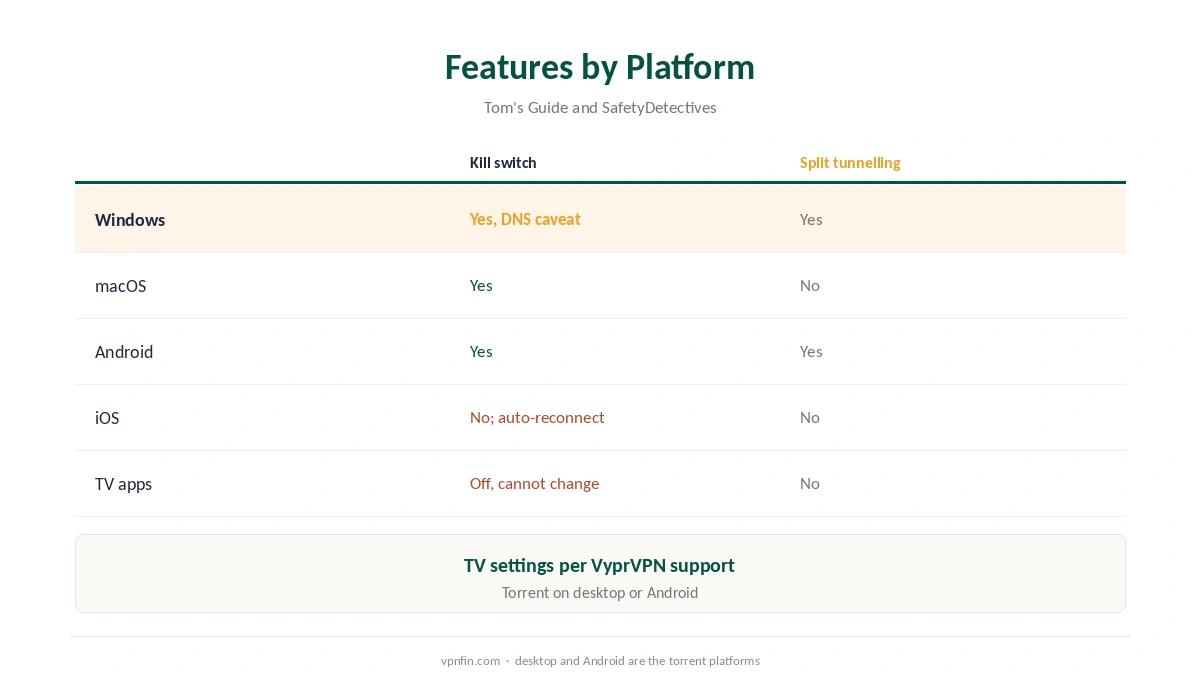
Tom’s Guide found the Windows kill switch blocked WireGuard and OpenVPN traffic when the VPN dropped, but apps using their own custom DNS addresses could still send requests. For a torrent client, that is a reason to bind it to the VPN and run leak tests. SafetyDetectives adds that the kill switch can stay on after you exit the app, blocking the internet until you reconnect.
Our kill switch guide explains why this matters for downloads.
VyprVPN Torrent Setup
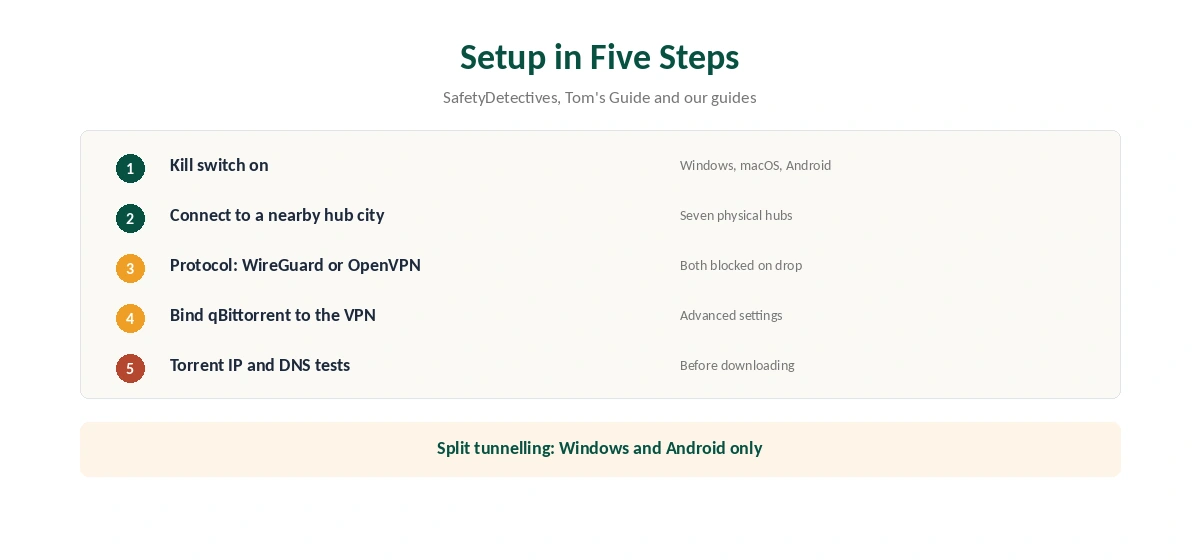
Turn on the kill switch in VyprVPN’s settings, connect to a nearby hub city, and choose WireGuard or OpenVPN. In qBittorrent, bind the client to the VPN’s network interface under advanced settings, so it cannot fall back to your normal connection. Then run a torrent IP check and our DNS leak guide.
Split Tunnelling
VyprVPN calls its split tunnelling Connection Per App, and Tom’s Guide notes it works on Windows and Android only. SafetyDetectives kept torrent speeds fast while streaming HD at the same time by splitting traffic. Route only the torrent client through the VPN if you want everything else at full speed. Our split tunnelling guide explains the idea.
VyprVPN Torrent Speeds and Hub Cities
Since Tom’s Guide traced VyprVPN’s servers to seven hubs, a hub city near you is the natural choice for downloads. A virtual location may route through a distant hub, adding delay. Test two nearby hubs and keep the faster one.
IPv6 and DNS
Given the DNS gap Tom’s Guide found, run a DNS test while a torrent is active, not just when idle. Check IPv6 too with our IPv6 leak guide, since a leaking request can reveal your real address to peers.
Tor and Public Trackers
SafetyDetectives notes VyprVPN supports Tor on all its servers. Public trackers carry malware risk whatever VPN you use, and a VPN does not scan files. Our VPN vs antivirus guide explains why both matter.
No Port Forwarding
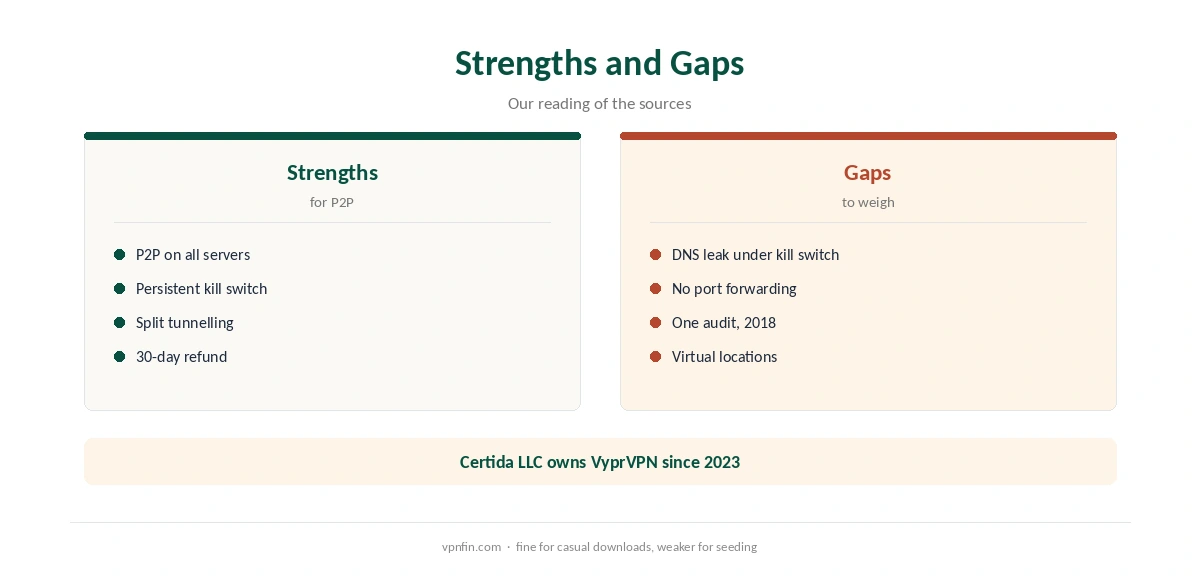
We found no port forwarding in the VyprVPN sources we read. Without an open port, fewer peers can reach you, which slows seeding. Our port forwarding guide explains when it matters.
Privacy Record
Our audit table records one VyprVPN audit, by Leviathan Security in 2018, before Certida LLC of Texas bought the service from Golden Frog in 2023. It is based in the US, inside the Five Eyes. Our VPN audit tracker and VPN ownership guide put that in context.
Is VyprVPN Torrent Use Safe?
For casual VyprVPN torrent downloads, yes, with the kill switch on, the client bound and leak tests passed. The dated audit and US base ask for more trust than providers with recent audits. Compare our NordVPN torrenting guide and Surfshark torrenting guide; the two share an owner, Nord Security. Our CyberGhost torrenting guide covers a third option.
Linux, Routers and Seedboxes
Tom’s Guide lists a command-line Linux app and manual router setup among VyprVPN’s platforms. For a VyprVPN torrent box running around the clock, the Linux app or a router keeps every download inside the tunnel. Bind the client there too, and repeat the leak tests after updates.
A Quick Rule
Casual downloads on desktop or Android? VyprVPN works with the kill switch on and the client bound. Heavy seeding? Choose a provider with port forwarding.
Device Limits and Refunds
Sources give five or ten devices, according to our device table, so check the plan page. SafetyDetectives notes a 30-day money-back guarantee on all subscriptions.
How VyprVPN Compares for Torrenting
Providers with port forwarding and more audits suit heavy seeders better, as the guide linked below explains. For a head-to-head, see our StrongVPN vs VyprVPN page.
How We Research
This page draws on SafetyDetectives’ May 2026 VyprVPN review, Tom’s Guide’s VyprVPN review, VyprVPN’s TV support pages and our audit, ownership and device tables. We cross-checked these sources against each other, and where they conflict or something can’t be verified, we say so in the text rather than guessing. We checked time-sensitive figures, including prices in US dollars, on 6 October 2026. Refund window per SafetyDetectives; device limit disputed. The main source we relied on is Tom’s Guide’s VyprVPN review. Our full approach lives on the About Us page.
VyprVPN Torrent FAQ
Yes, on all servers, per SafetyDetectives.
On Windows, macOS and Android; Tom’s Guide found DNS requests from some apps got through on Windows.
We found none in the sources we read.
On Windows and Android, through Connection Per App.
Once, in 2018, before its 2023 sale, per our audit table.
The Verdict
VyprVPN torrent use works on every server, with a kill switch and split tunnelling on desktop and Android. Bind your client, run leak tests, and remember the missing port forwarding and dated audit. Our page on VyprVPN and SOCKS5 covers the missing proxy and Connection Per App as a substitute.