
Disclosure: VPNFin is reader-supported. If you buy a VPN through links on this page, we may earn a commission at no extra cost to you. This never affects our ratings — here’s our full disclosure.
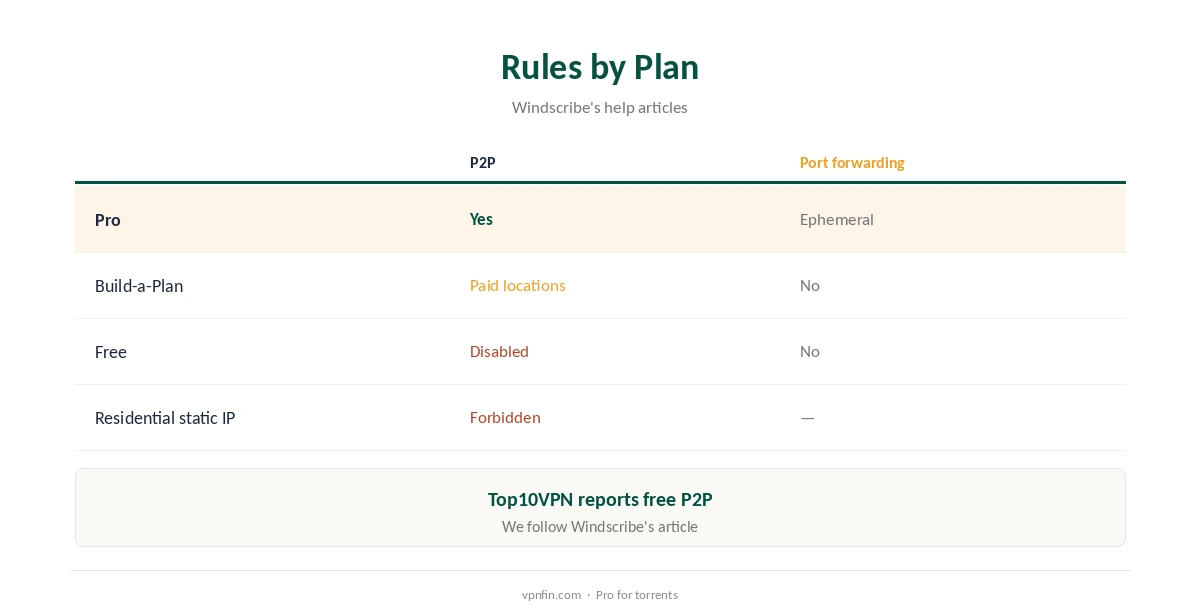
Windscribe P2P rules depend on your plan. Windscribe’s help article says it does not prohibit Pro users from P2P, but it has switched P2P off on its free servers for now, and Build-a-Plan allows it only on the locations you pay for. Some locations block P2P where local law restricts or bans it, and some North American ones block it because of provider rules. Pro adds ephemeral port forwarding.
This guide covers the rules by plan, setup, port forwarding, client settings, speed and the conflicting reports about the free plan.
Windscribe P2P Rules by Plan
Full Pro allows P2P on every location that permits it. Build-a-Plan allows it only on the paid locations in your plan, Windscribe’s help article explains. The free plan does not allow P2P on its servers for now.
Windscribe’s uTorrent guide adds that it explicitly forbids P2P on Residential Static IPs, so do not use one for torrents. Our Windscribe price guide compares the plans.
Conflicting Reports About the Free Plan
Top10VPN’s torrenting guide says the free plan allows torrenting on all 10 free locations. Windscribe’s own current help article says it has switched P2P off on free servers.
We follow Windscribe’s article, since it reflects current policy, and treat the free plan as unsuitable for P2P. If the policy changes, the article is where it will show first. Older reviews may describe an earlier policy.
Locations That Block P2P
Some locations will not carry P2P traffic because those countries restrict or ban it, Windscribe says, and some North American locations block it because of provider restrictions. The app labels locations that are unfriendly to P2P, Top10VPN notes.
Connect to a P2P-friendly location first, before opening your client, and switch if transfers stall. Nearby locations usually give the best speed.
Port Forwarding on Pro
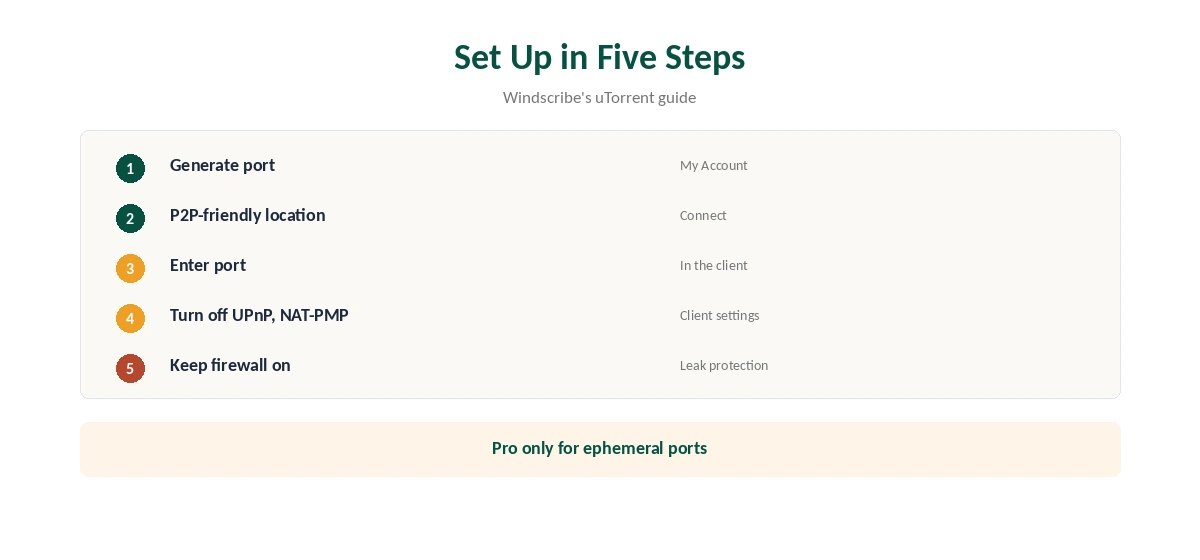
Pro users can generate an ephemeral port at no extra cost in My Account, under Port Forwarding, then connect to a P2P-friendly location and enter the port in the client, Windscribe’s uTorrent guide explains. Build-a-Plan and free accounts get no ephemeral forwarding at all.
Top10VPN found the setup, done on the website rather than in the app, more complicated than it should be. Ephemeral ports also expire, so generate a new one when needed. Our port forwarding guide explains why it helps seeding.
Client Settings
For a privacy-first setup, Windscribe’s guide advises turning off UPnP and NAT-PMP port mapping in the client, and using Windscribe’s own port forwarding if you need incoming connections. Keep Windscribe’s firewall on so traffic stops if the tunnel drops, and bind the client to the VPN where it allows that.
Never exclude your torrent client with split tunnelling, or it will connect to peers from your real address. Our torrenting VPN guide covers client settings in more depth.
Kill Switch and Leaks
Windscribe’s firewall stops traffic if the tunnel drops and blocks IP, DNS and WebRTC leaks, its open-source desktop code shows. On desktop, Always On+ keeps the firewall active even when the app is not connected.
Use Always On+ on a machine that torrents unattended, such as a home server or an always-on PC. Our kill switch guide explains the modes.
Choosing a Plan for Torrents
Pro costs $9 a month or $69 a year with no renewal jump and includes ephemeral port forwarding. Build-a-Plan costs $1 per location, with a $3 minimum and $1 for unlimited data, and allows P2P on those locations but without ephemeral ports.
Seeders should choose Pro; occasional downloaders who need only a couple of countries can use Build-a-Plan. Check that the chosen locations allow P2P before paying.
Speed
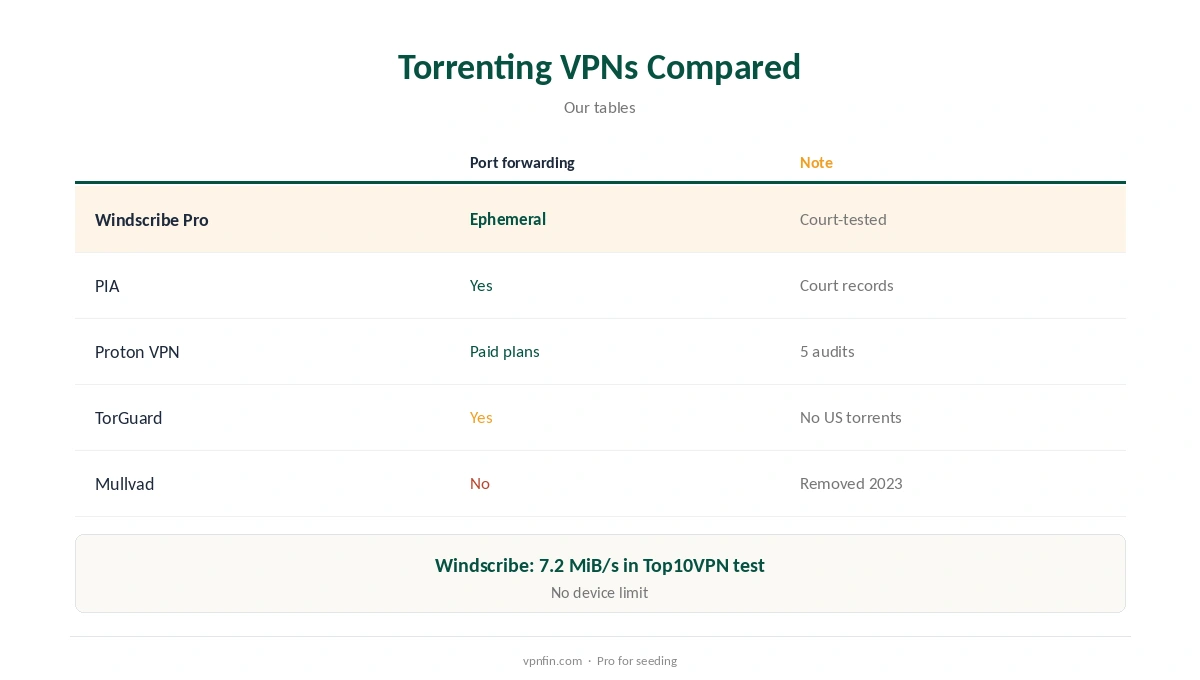
Top10VPN measured Windscribe Pro at 7.2 MiB/s in its torrenting test, slower than other premium VPNs it tested, though safe and reliable. WireGuard is the fastest protocol to use for downloads.
If speed matters most, compare with PIA or Proton, which also offer port forwarding. Test at the hours you usually download, since server load varies.
Privacy Record
An Athens court dismissed charges against Windscribe’s CEO in April 2025 because no user data existed, and a 2021 Ukrainian server seizure exposed a key but no user data. Windscribe cites a 2024 PacketLabs infrastructure audit; Security.org found no audit of its no-logs policy.
Sign-up needs no email, and Windscribe accepts cryptocurrency and cash, our tables record. Our Windscribe safety guide covers the record.
How Windscribe Compares
Windscribe’s no-logs claim held in an Athens court in April 2025, which suits privacy-minded torrenting, and it sets no device limit. PIA, Proton and TorGuard also offer port forwarding, and Mullvad dropped it in 2023, our tables record. Windscribe’s short seven-day refund, void after 10 GB, is its main weakness for testing, so check P2P on Pro within that window. Our Windscribe and SOCKS5 page goes into what to use instead.
Our PIA vs Windscribe and Windscribe vs TorGuard pages compare their torrent tools.
How We Research
This page draws on Windscribe’s P2P help article and uTorrent guide, Top10VPN’s Windscribe torrenting guide and our Windscribe tables. We cross-checked these sources against each other, and where they conflict or something can’t be verified, we say so in the text rather than guessing. We checked time-sensitive figures, including prices in US dollars, on 8 October 2026. The main source we relied on is Windscribe’s uTorrent guide. Our full approach lives on the About Us page.
Windscribe P2P FAQ
On Pro, and on paid Build-a-Plan locations; not on free servers.
Windscribe says it has switched P2P off on free servers; one review disagrees.
Ephemeral ports on Pro, set up in My Account.
Yes, where local law restricts it, and some in North America.
Not on Residential Static IPs.
The Verdict
Windscribe P2P works well on Pro, with ephemeral port forwarding and a court-tested no-logs claim. Skip the free plan for torrents, and pick P2P-friendly locations.