
Disclosure: VPNFin is reader-supported. If you buy a VPN through links on this page, we may earn a commission at no extra cost to you. This never affects our ratings — here’s our full disclosure.
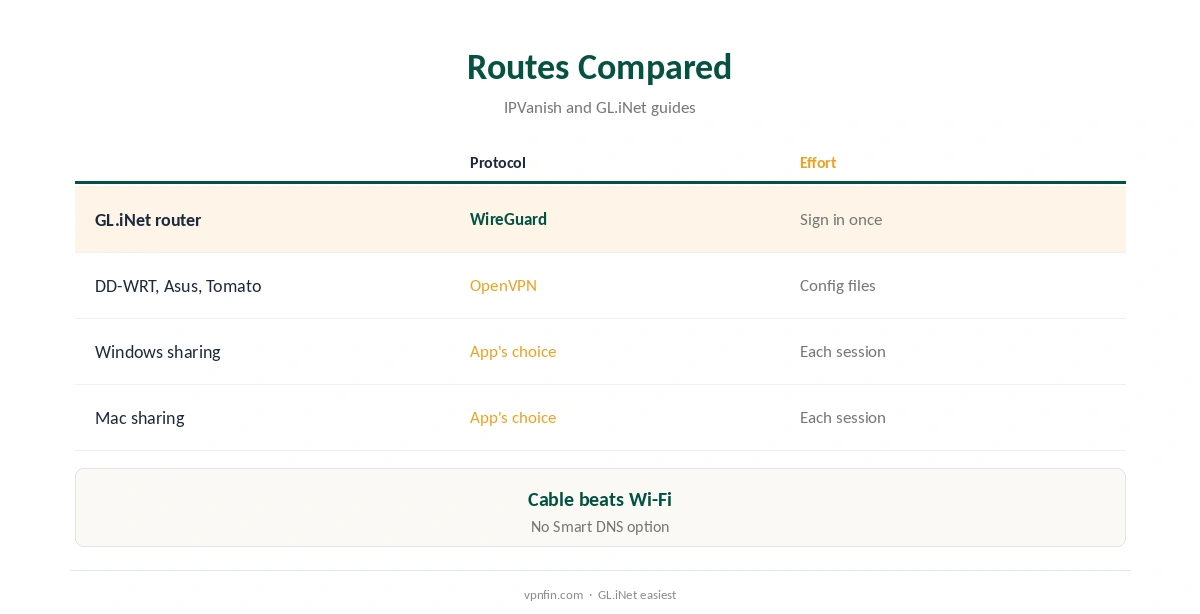
IPVanish PS5 use needs a workaround, since the PS5 cannot install VPN apps. IPVanish also offers no Smart DNS, TheBestVPN noted in August 2026. Two routes encrypt the console’s traffic: a router running IPVanish, with built-in WireGuard on GL.iNet models, or a connection shared from a Windows or Mac computer. Expect a small ping cost and possible NAT changes.
This guide covers both routes, the PS5’s network settings, gaming trade-offs, streaming apps and how to check it works.
Why the PS5 Needs a Workaround
PlayStation consoles have no VPN client and no store entry for one, and Sony has not added either in any update. Every route sends the PS5’s traffic through another device that runs IPVanish, and its unlimited devices mean that device costs nothing extra.
Our PlayStation VPN guide compares providers, including those with Smart DNS.
IPVanish PS5 via a Router
A GL.iNet router connects to IPVanish over WireGuard once you enter your credentials, generating server configurations itself, GL.iNet’s documentation shows. A green dot in its admin panel confirms the connection. DD-WRT, Asus and Tomato routers use IPVanish’s OpenVPN files instead.
Connect the PS5 to the router by an Ethernet cable for the steadiest connection; its wired port beats Wi-Fi for games. Our IPVanish router guide walks through each firmware.
Sharing From Windows or a Mac
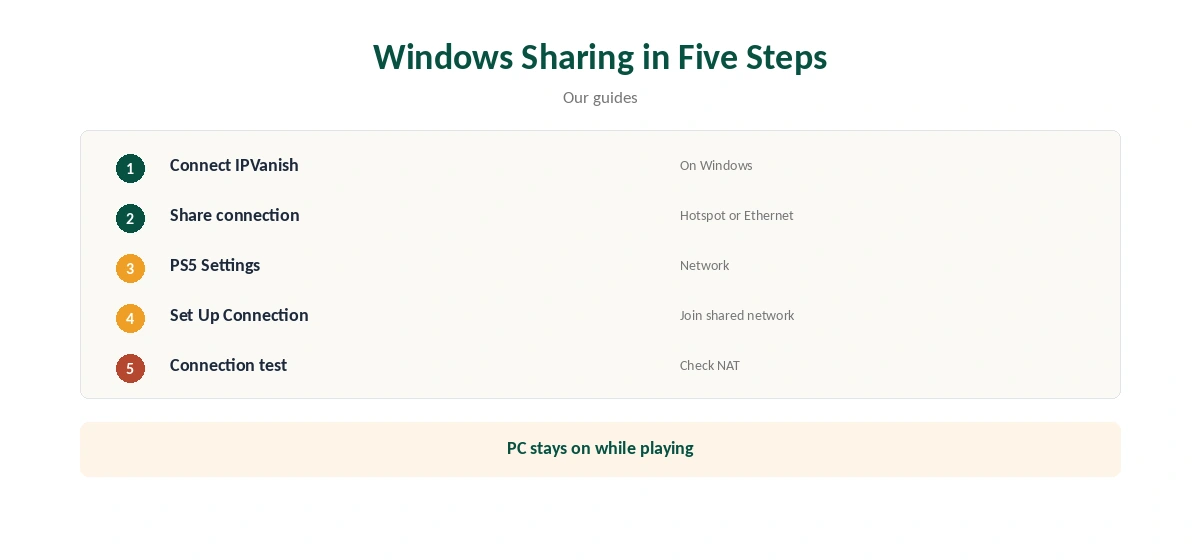
Connect IPVanish on a Windows PC, then share through Mobile hotspot or over Ethernet from the VPN connection’s Sharing tab. On a Mac, use Internet Sharing in System Settings.
On the PS5, open Settings, Network, Settings, Set Up Internet Connection, and join the shared network. The computer must stay on and awake while you play.
IPVanish PS5 Gaming Trade-Offs
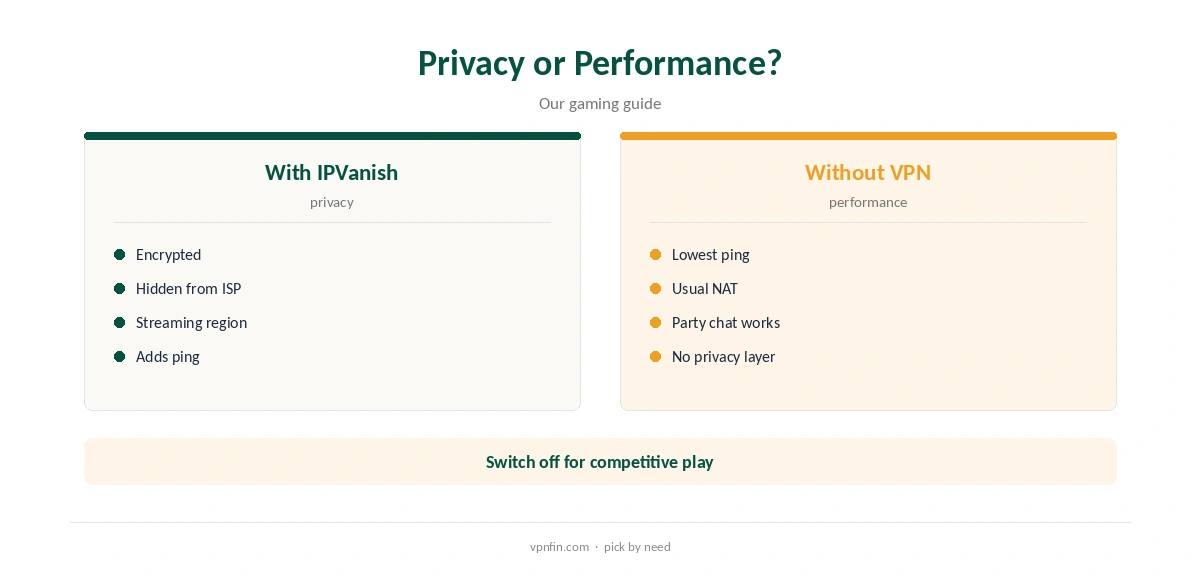
A VPN adds a hop, so ping usually rises, our gaming VPN guide explains. The PS5’s connection test shows the NAT type, which a VPN can change, affecting party chat and matchmaking.
Use a nearby IPVanish location, and keep the console direct for competitive play if latency matters more than privacy. A router with device-based rules can do that automatically.
Using a Travel Router
A small GL.iNet travel router running IPVanish can serve the PS5 alone while the rest of the home stays direct. Plug the console into it by cable, and switching between protected and direct play takes seconds.
It also suits taking the console to a hotel or dorm, where it covers your phone and laptop too.
Remote Play and PlayStation Network
Remote Play and party chat rely on PlayStation Network connections that a VPN can complicate, especially if the NAT type becomes strict. If they fail, test without the VPN first.
Downloads of games and updates also run through the VPN when it covers the console, so a nearby location keeps them fast. Large updates are a good test of your setup’s speed.
Streaming Apps on PS5
Streaming apps on the PS5 use the console’s connection, so a router or shared computer changes the region they see. VPNOverview reached major services with IPVanish in 2026, while VPNpro found its streaming inconsistent.
Restart an app after the connection changes so it checks your region again, and try another server in the same country if it fails.
Checking It Works, and Price
Run the PS5’s connection test after joining the protected network, then check from a phone or laptop on the same router or hotspot that the address shows IPVanish’s chosen location.
If online play fails, switch back to your normal network to confirm the VPN is the cause. Our IPVanish PS4 guide covers the older console.
IPVanish costs $57.22 for the first 24 months and renews at $89.99 a year, VPNOverview lists, with no device limit. Yearly website plans carry a 30-day refund; monthly plans carry none.
Our IPVanish price guide compares the plans.
Smart DNS Alternatives
IPVanish offers no Smart DNS, so it has no quick DNS-only option for the PS5, TheBestVPN notes. Providers such as ExpressVPN offer one for streaming apps, without encryption.
If you only want another region’s streaming apps on the console, and not privacy, that may be simpler than a VPN router; for privacy, the router route is the one that encrypts.
Every PS5 Model
The standard, Digital and Pro versions of the PS5 share the same network settings menus and the same limits, so the routes in this guide apply to all of them. The PS4 follows the same pattern.
A cable to the router gives the steadiest ping on any model.
Privacy
A VPN on the router hides the console’s traffic from your internet provider and from others on shared networks such as dorms. IPVanish’s no-logs policy has two audits in our table, by Leviathan and Schellman. Our guide to IPVanish for Gaming covers ping, servers and the right settings.
Our ExpressVPN PS5 guide compares a provider that also offers smart DNS.
How We Research
This page draws on TheBestVPN’s smart TV guide, GL.iNet’s WireGuard client documentation, Comparitech on IPVanish’s router guides, VPNOverview’s and VPNpro’s IPVanish reviews and our IPVanish tables. We cross-checked these sources against each other, and where they conflict or something can’t be verified, we say so in the text rather than guessing. We checked time-sensitive figures, including prices in US dollars, on 8 October 2026. The main source we relied on is GL.iNet’s WireGuard client guide. Our full approach lives on the About Us page.
IPVanish PS5 FAQ
No; PlayStation consoles cannot install VPN apps.
Through a router running IPVanish or a shared computer connection.
No; it offers none.
A GL.iNet model, which has IPVanish built in.
It can; check in the PS5’s connection test.
The Verdict
IPVanish PS5 use works through a router or a shared computer. Use it for privacy and streaming, and expect a ping trade-off in games.