
Disclosure: VPNFin is reader-supported. If you buy a VPN through links on this page, we may earn a commission at no extra cost to you. This never affects our ratings — here’s our full disclosure.
A CyberGhost Chromebook setup runs through CyberGhost’s Android app from Google Play, which works on Chromebooks from Acer, Dell, HP and other makers, Wizcase notes. The app protects the whole device. CyberGhost also offers a free proxy extension for Chrome, but it covers only the browser. WizCase belongs to Kape, which also owns CyberGhost, so we weigh its findings alongside independent sources.
This guide covers installation, the app settings that matter, the extension, older and managed Chromebooks, and common problems.
Installing the CyberGhost Chromebook App
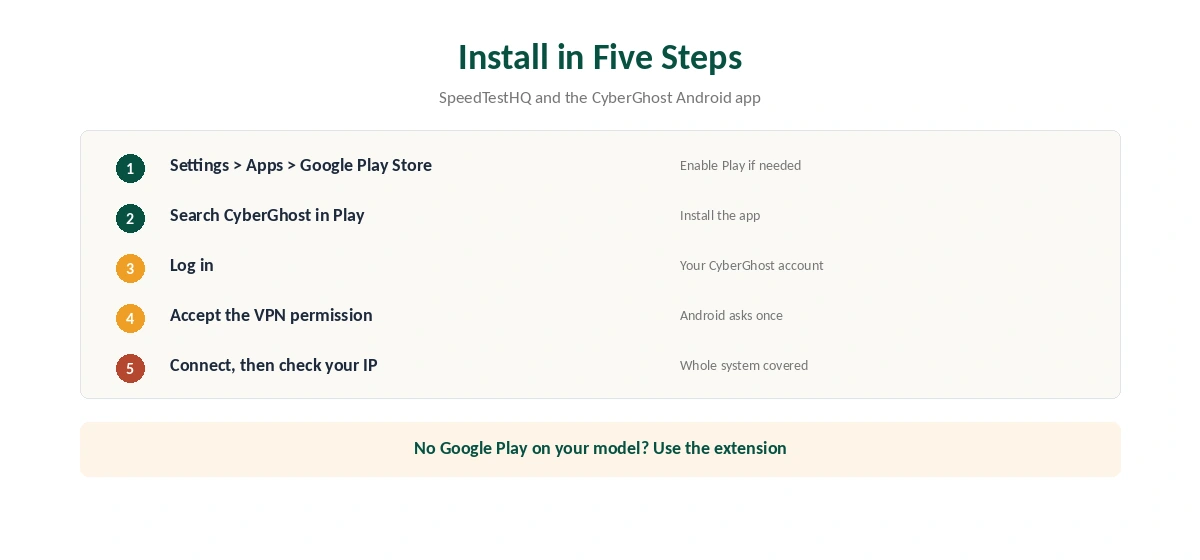
First, check that Google Play is on. SpeedTestHQ gives the path: Settings, Apps, Google Play Store, Enable. Then open the Play Store, search for CyberGhost, and install the app.
Open CyberGhost, log in, and accept the Android VPN permission when it appears. Pick a location or use the quick connect button. SpeedTestHQ notes that Android VPN apps on ChromeOS use a phone-style layout, so the window looks narrow, but the protection covers the whole system.
CyberGhost Chromebook Settings Worth Checking
The Android app is the same one phones use, so its settings carry over. Turn on the kill switch where the app offers it, so a dropped connection does not expose your traffic; our kill switch guide explains why. Pick WireGuard as the protocol for speed, and switch only if a network blocks it.
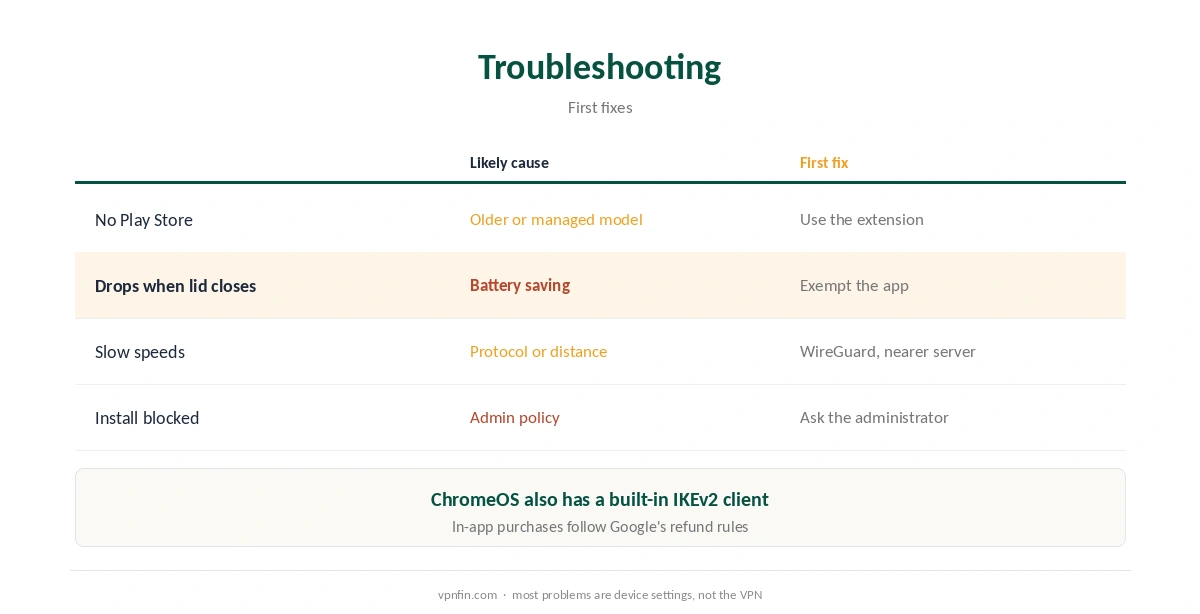
Battery saving on ChromeOS can pause Android apps in the background. If the VPN drops when the lid closes, check the battery settings for the CyberGhost app. Our CyberGhost not connecting guide covers connection failures.
CyberGhost on Older and Managed Chromebooks
Older Chromebooks without Google Play cannot run Android apps, as NordVPN’s own Chromebook support also notes for its service. On those models, the browser extension is the practical option, with the limit that it protects Chrome only. ChromeOS also includes a built-in IKEv2 client under the network settings, according to Google.
School and work Chromebooks follow the administrator’s rules. Google’s admin help shows that administrators can set or block VPN apps, so ask before installing one on a managed device. Our Chromebook VPN off guide covers switching a VPN off again.
App or Extension?
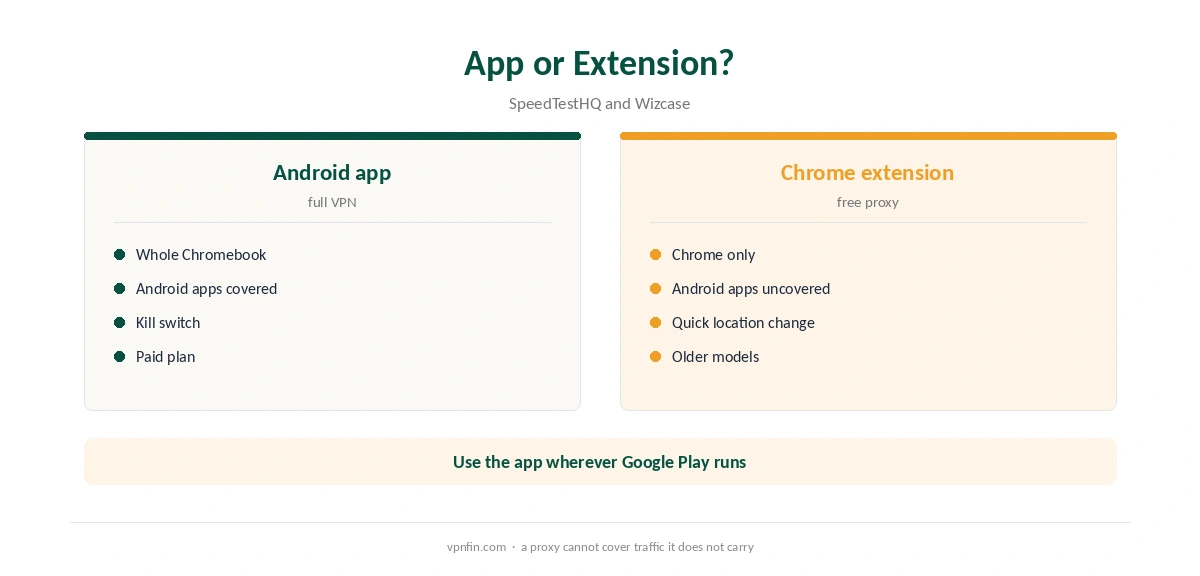
The Android app protects the whole Chromebook, including Android apps and system traffic, SpeedTestHQ explains. The extension routes only Chrome’s traffic, which leaves Android apps on your real IP. Wizcase describes CyberGhost’s Chrome extension as a free proxy, separate from the paid VPN.
Use the app where the Chromebook supports Google Play, and the extension for quick location changes in the browser or on older models. Our Chromebook VPN guide covers the extension, and our WebRTC leak guide explains why browser protection matters.
Speed and Streaming on a Chromebook
Chromebooks often have modest processors, so protocol choice matters. WireGuard is lighter than OpenVPN in the comparisons we read, as our WireGuard vs OpenVPN page explains. If speeds stay low, our CyberGhost speed guide lists the fixes.
For streaming, open the service in Chrome or its Android app after the VPN connects, so it reads the new location.
Price and Refund
CyberGhost’s 45-day money-back guarantee applies to website purchases, as our CyberGhost refund guide explains. Purchases made inside the Android app through Google Play follow Google’s refund rules instead. Buying on the website keeps the longer window.
Testing a CyberGhost Chromebook Connection
After connecting, open Chrome and check your IP with our VPN test page. Then open an Android app that shows location, such as a weather app, to confirm Android traffic uses the tunnel too. That second check is what separates the app from the extension.
Run a DNS test as well; our DNS leak guide shows how. If the CyberGhost Chromebook app connects but sites fail to load, switch protocol or server first, then restart the Chromebook. Our disconnection guide covers drops after a working connection.
On phones, the same app behaves the same way, as our CyberGhost iPhone guide shows for iOS. One CyberGhost plan covers seven devices, so a Chromebook and a phone fit comfortably.
Streaming and Battery Life
Streaming apps on a Chromebook can run as Android apps or in Chrome. Either way, connect the VPN first, then open the service, so it reads the new location. If a catalogue looks wrong, close the app completely and reopen it.
A VPN adds some processing work, which can shorten battery life slightly on low-power Chromebooks. WireGuard is the lighter option in the comparisons we read, so it is the better default when running on battery.
Linux Apps on a Chromebook
Many Chromebooks can also run Linux apps in a separate container. Whether those apps use the Android app’s tunnel depends on the setup, so test any Linux tool you rely on with an IP check from inside the container. If a Linux app ignores the tunnel, a VPN on the router covers it instead.
How We Research
This page draws on Wizcase’s Chromebook VPN guide, SpeedTestHQ’s Chromebook guide, Google’s ChromeOS help and NordVPN’s Chromebook support article. We cross-checked these sources against each other, and where they conflict or something can’t be verified, we say so in the text rather than guessing. We read every source on 5 October 2026. The main source we relied on is SpeedTestHQ’s Chromebook guide. Our full approach lives on the About Us page.
CyberGhost on Chromebook FAQ
Yes, through its Android app from Google Play, which Wizcase says works on Chromebooks from many makers.
No. It is a free proxy that covers only Chrome, according to Wizcase.
Settings, Apps, Google Play Store, Enable, as SpeedTestHQ describes.
Only if the administrator allows VPN apps. Ask first.
No. In-app purchases follow Google’s rules; buy on the website for the 45-day window.
The Verdict
A CyberGhost Chromebook setup is simple with the Android app, which covers the whole device. Keep the free extension for quick browser use, and buy on the website for the 45-day refund. CyberGhost belongs to Kape Technologies, which also owns ExpressVPN and Private Internet Access.