
Disclosure: VPNFin is reader-supported. If you buy a VPN through links on this page, we may earn a commission at no extra cost to you. This never affects our ratings — here’s our full disclosure.
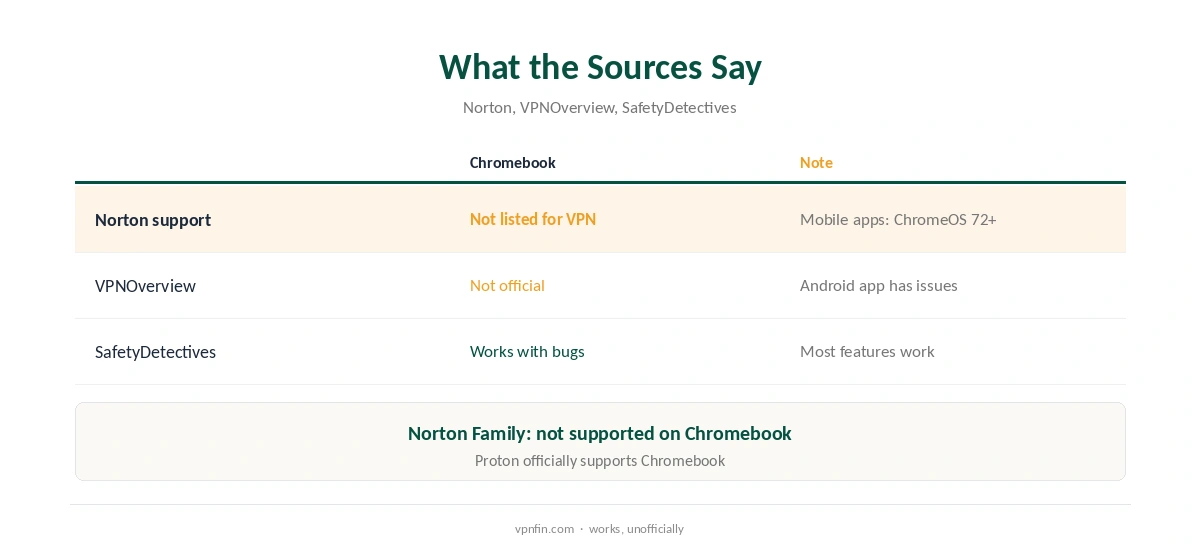
Norton VPN Chromebook use works through the Android app, but not officially. Norton’s support page lists Norton VPN for Windows, Mac, Android, iOS, Google TV and Apple TV, without ChromeOS, though its mobile apps list ChromeOS 72 or later with Google Play. VPNOverview says the Android app runs on Chromebooks but is not optimised and has teething issues, and SafetyDetectives found the VPN worked with some bugs.
This guide covers the setup, the caveats and providers that support ChromeOS directly.
Does Norton VPN Work on Chromebook?
In practice, mostly yes. The Android app installs from the Play Store on Chromebooks that support Android apps, and the VPN connects, SafetyDetectives found. Norton does not name ChromeOS among Norton VPN’s platforms, so support may treat Chromebook problems as unsupported. Norton Family, a separate product, is explicitly not supported on Chromebook.
Norton VPN Chromebook Setup
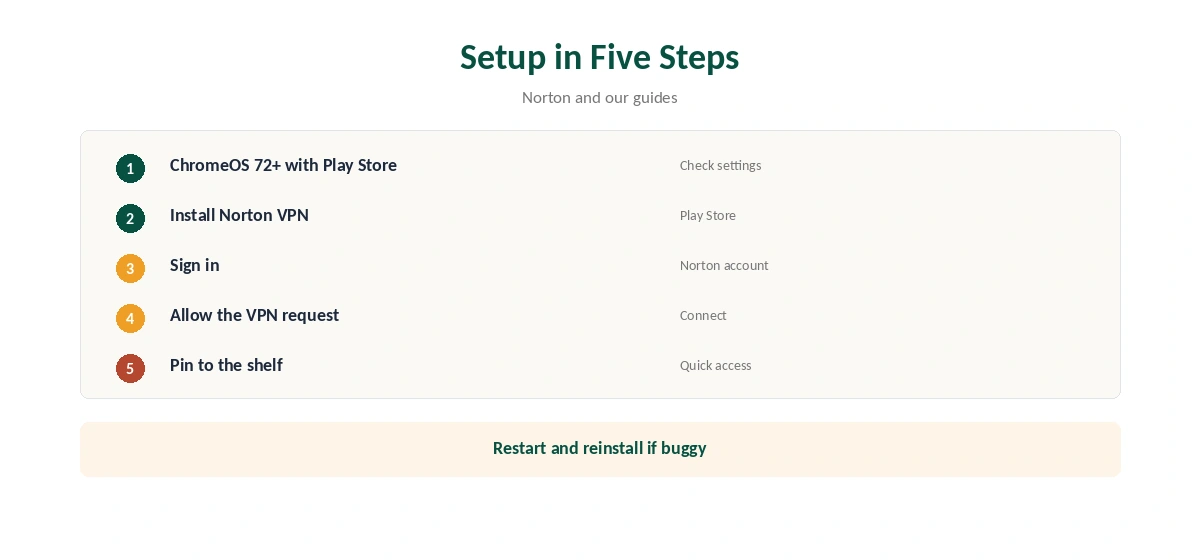
Make sure your Chromebook runs ChromeOS 72 or later with the Play Store enabled. Install Norton VPN from the Play Store, sign in, allow the VPN connection request and connect. Pin the app to the shelf for quick access.
Known Issues
VPNOverview and SafetyDetectives both describe bugs from an app built for phones running on a laptop. Windows may resize oddly, and some features may not behave as on a phone. If the app misbehaves, restart the Chromebook and reinstall.
Free Trial and Refund
Tom’s Guide says Norton offers a seven-day free trial on all VPN plans and a 60-day money-back guarantee. On Google Play, Norton’s listing says the trial requires an annual subscription, and you must cancel in Google Play before it ends to avoid payment.
Norton VPN Chromebook vs Norton 360
Norton’s Google Play listing for Norton 360 bundles antivirus, scam protection and VPN in one app. On a Chromebook, the VPN is the part most likely to matter, since ChromeOS has its own security model. Check which app you install, since Norton publishes both.
School and Work Chromebooks
Managed Chromebooks may block the Play Store or VPN settings. If options look greyed out, the administrator controls them; ask rather than trying to bypass the policy.
Checking the Connection
After connecting, open our VPN test page in Chrome to confirm the new address, then run our DNS leak guide.
A Quick Rule
Already paying for Norton? The Norton VPN Chromebook route through Android is fine for light use. Buying a VPN mainly for a Chromebook? Choose one that supports ChromeOS directly.
Battery and Performance
Android apps on ChromeOS run in a container, which can add some overhead. If the Chromebook feels slow with Norton connected, close other Android apps and test again.
Kill Switch on ChromeOS
Check the Android app’s settings for a kill switch option and turn it on. Behaviour may differ from a phone, so test it by switching Wi-Fi off and on while connected. Our kill switch guide explains the test.
Norton VPN Elsewhere
Norton VPN also runs on Windows, Mac, iOS, Android, Google TV and Apple TV, its support page says. Our Surfshark vs Norton VPN page compares it with a rival.
Travelling With a Chromebook
Connect before joining hotel or airport Wi-Fi. If the Norton app struggles on a network that blocks VPNs, a provider with an obfuscation mode may connect where it cannot. Our public Wi-Fi guide explains the risks.
Quick Check
After installing, switch Wi-Fi off and on while connected. If the Norton VPN Chromebook connection returns on its own, the app is handling network changes well.
Keeping It Updated
The Play Store updates the app automatically. After an update, open Norton VPN, confirm it still connects, and recheck any kill switch setting.
Several Devices
A Chromebook counts as one device on your Norton plan. Check the device count for your plan before adding phones and laptops.
Browser Extension
Norton does not list a VPN browser extension for Chrome in the sources we read, so the Android app is the route on ChromeOS.
Testing Before You Pay
Use the seven-day trial to install and test on your Chromebook before the subscription starts.
Support
Tom’s Guide lists 24/7 live chat and phone support for Norton VPN, which helps if the Chromebook app misbehaves after an update or on a new ChromeOS version.
Providers That Support ChromeOS
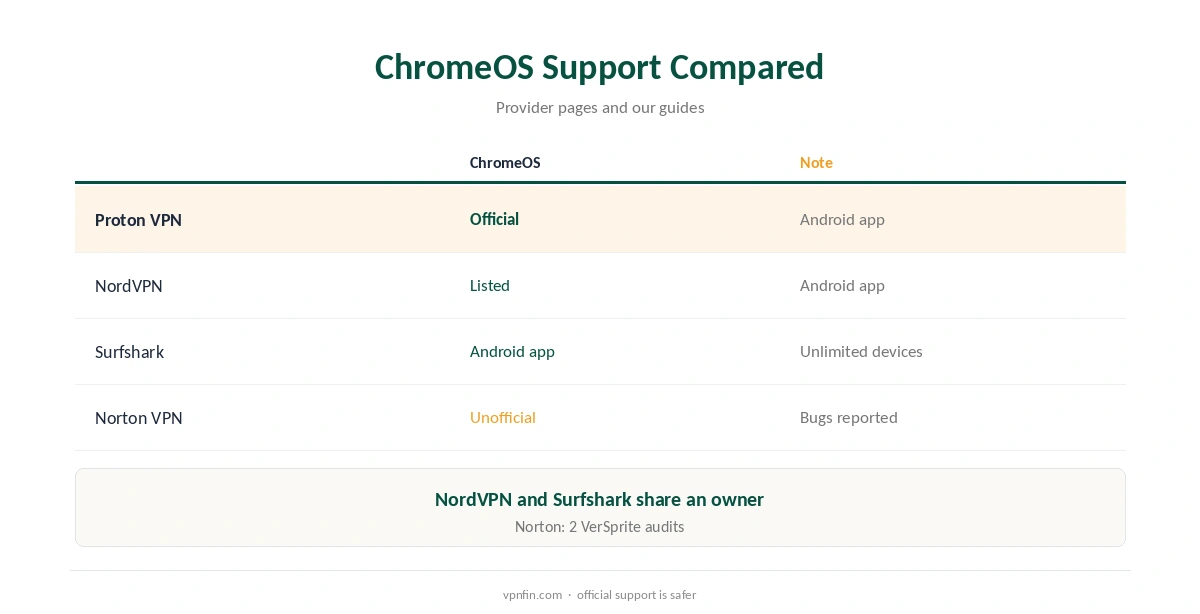
NordVPN’s site lists Chromebook setup through its Android app, and Proton VPN says its Android app officially supports Chromebooks. Our NordVPN Chromebook guide and Surfshark Chromebook guide cover two; NordVPN and Surfshark share an owner, Nord Security.
Norton VPN’s Record
Our audit table records two VerSprite audits for Norton VPN, and Tom’s Guide notes a second no-logs audit published in October 2025. It operates from the US. Our Norton VPN review covers the rest.
How We Research
This page draws on Norton’s system requirements page, Norton 360’s Google Play listing, VPNOverview’s Chromebook roundup, SafetyDetectives, Tom’s Guide’s Norton VPN review and NordVPN’s and Proton VPN’s Chromebook pages. We cross-checked these sources against each other, and where they conflict or something can’t be verified, we say so in the text rather than guessing. We checked time-sensitive figures, including prices in US dollars, on 7 October 2026. The main source we relied on is Norton’s system requirements. Our full approach lives on the About Us page.
Norton VPN Chromebook FAQ
Through the Android app, yes, though Norton does not list ChromeOS officially.
Its mobile apps list ChromeOS 72 or later with Google Play.
VPNOverview and SafetyDetectives report some.
Seven days on all plans, per Tom’s Guide.
Proton VPN says its Android app does; NordVPN lists Chromebook setup.
The Verdict
Norton VPN Chromebook use works through the Android app with some bugs and no official support. If ChromeOS is your main device, a provider that supports it directly is the safer pick.