
Disclosure: VPNFin is reader-supported. If you buy a VPN through links on this page, we may earn a commission at no extra cost to you. This never affects our ratings — here’s our full disclosure.
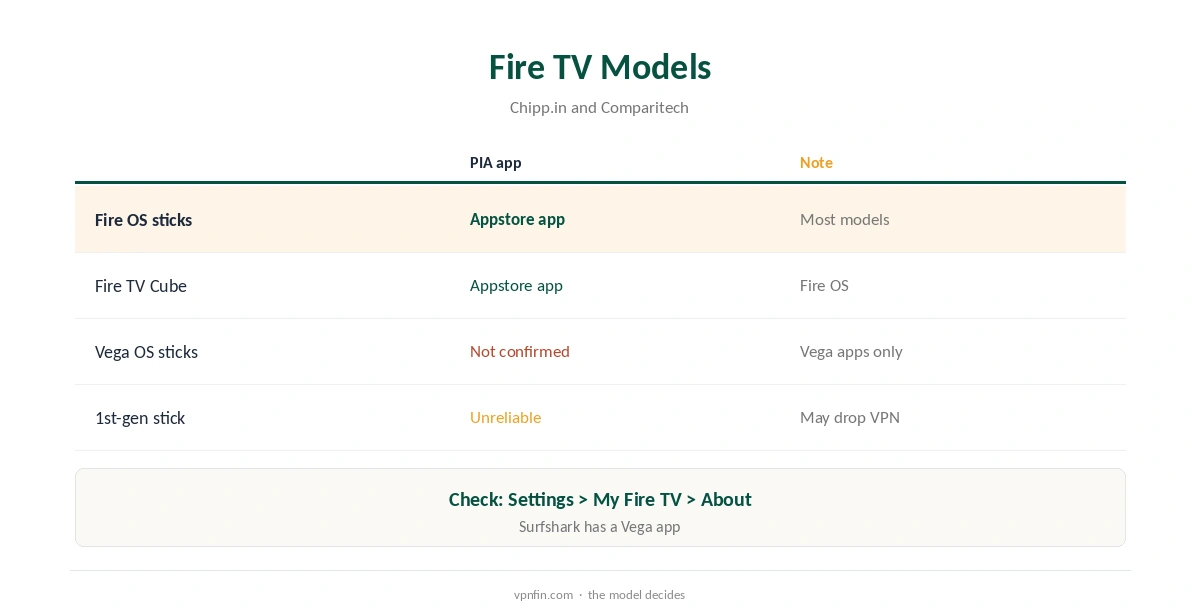
PIA not working on Firestick usually has one of a few causes: an older or newer Fire TV model, a protocol blocked by the network, a stale app after an update, or the Advanced Kill Switch blocking traffic. PIA publishes apps for Fire TV and Android TV, Tom’s Guide notes. Amazon’s newest sticks run Vega OS, which accepts only Appstore apps built for it, and we found no confirmation of a PIA Vega app.
This guide works through the fixes in order, then covers other devices.
PIA Not Working on Firestick: Check the Model
Open Settings, My Fire TV, About, and note the model and operating system. Fire OS sticks run PIA’s Appstore app. Vega OS sticks, such as the latest Fire TV Stick HD, accept only Vega apps, so the Fire OS app may not appear. Very old first-generation sticks may not hold VPN connections reliably, Comparitech notes.
Fix One: Restart and Update
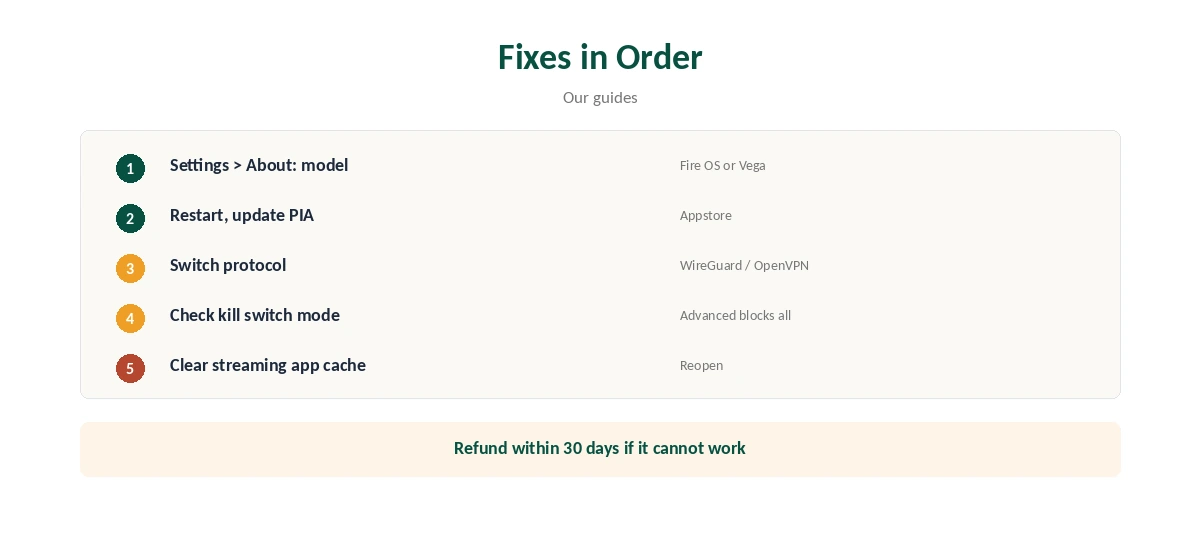
Restart the Fire TV, then check the Appstore for a PIA update. If the app still fails, clear its cache in Settings, Applications, Manage Installed Applications, or reinstall it.
Fix Two: Switch Protocol
PIA offers WireGuard and OpenVPN. If WireGuard will not connect on your network, switch to OpenVPN, and try a different port if the app offers one. Our WireGuard vs OpenVPN guide explains the difference.
Fix Three: Check the Kill Switch
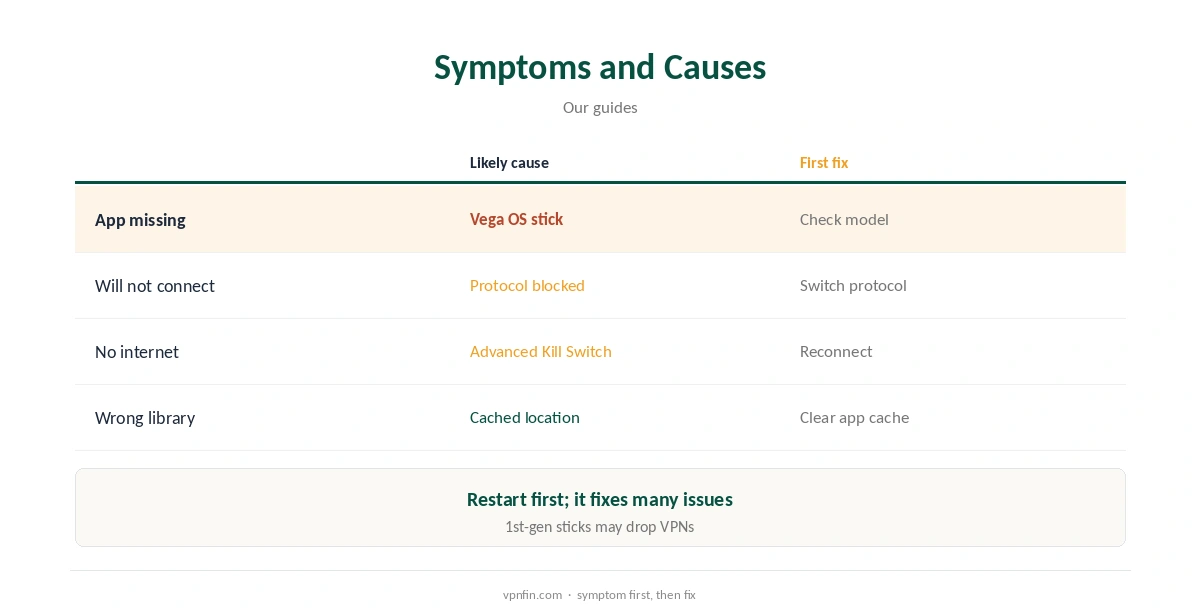
Tom’s Guide describes PIA’s Advanced Kill Switch as blocking internet access at all times unless the VPN is connected. If the tunnel fails, the stick loses internet by design. Reconnect, or switch to the standard kill switch while troubleshooting.
Streaming Apps Still Show the Wrong Library
Connect PIA before opening the streaming app, then close the app fully and clear its cache if the catalogue looks wrong. Try another server in the same country. Our Firestick VPN troubleshooting guide covers more fixes.
PIA Not Working After an Update
App updates can reset protocol and kill switch choices. Open PIA’s settings after each update, reselect your protocol and reconnect. If the app crashes, clear its data and sign in again.
Network Problems
Some home routers or ISPs block VPN ports. Restart the router, then try OpenVPN over TCP if your app version offers it. On public Wi-Fi, sign in to the network’s portal before connecting PIA.
Using a Router Instead
If the stick cannot run PIA, a router running PIA covers the Fire TV and every other device. Note that PIA’s blog says dedicated IPs do not work on router configurations.
Checking the Connection
After connecting, open the Silk browser and our VPN test page to confirm the address, then run our DNS leak guide.
Is PIA Not Working Everywhere?
If PIA not working happens only on the Fire TV, the cause is likely the stick or its app. If it fails on every device on the same network, check the router and your PIA account status instead.
Signing In Again
Sign out of the app, restart the stick and sign in again. Typing passwords with a remote invites mistakes, so check each character, or reset the password from a computer.
Several Devices
PIA sets no device limit, our tables record, so a device count is rarely the reason PIA is not working on a new stick.
When to Contact Support
If nothing works, contact PIA’s support with the stick’s model, operating system and the exact error, so they can tell whether the device is supported.
Kill Switch Modes
PIA offers a standard and an Advanced Kill Switch on desktop, Tom’s Guide notes. On a TV, use the setting that keeps streaming apps working while still protecting you; test it by switching Wi-Fi off and on.
Quick Check
After any fix, open a streaming app and confirm the library matches the server country. If it does, PIA is working.
Other Streaming Sticks
On Android TV and Google TV boxes, PIA’s Play Store app works the same way, with the same fixes. Roku runs no VPN apps, so a router is the only route there.
Time and Date
A wrong clock on the stick can break secure connections. Check the date and time in settings, then reconnect and test again.
Free Trial and Refund
Our PIA free trial guide explains the trial options if you want to test before paying.
PIA Not Working on Other Devices
On Windows and Mac, switching protocol and checking the kill switch mode solve most problems, as our PIA Windows guide explains. On Android TV, our PIA Android TV guide covers the app.
PIA’s Record
PIA belongs to Kape and has three Deloitte audits in our table. Its 30-day refund applies if it cannot work for you, as our PIA refund guide explains.
How We Research
This page draws on Tom’s Guide’s PIA review, PIA’s help centre, Comparitech’s Firestick guidance and our Fire TV and PIA tables. We cross-checked these sources against each other, and where they conflict or something can’t be verified, we say so in the text rather than guessing. We checked time-sensitive figures, including prices in US dollars, on 7 October 2026. The main source we relied on is Tom’s Guide’s PIA review. Our full approach lives on the About Us page.
PIA Not Working FAQ
Check the model first; Vega OS sticks may not offer PIA’s app.
Yes, for Fire OS devices, per Tom’s Guide.
The Advanced Kill Switch blocks traffic when the VPN is down.
Switch between WireGuard and OpenVPN.
Within 30 days.
The Verdict
PIA not working on Firestick is usually the model, the protocol or the kill switch. Check those in order, and use the refund window if your stick runs Vega OS.