
Disclosure: VPNFin is reader-supported. If you buy a VPN through links on this page, we may earn a commission at no extra cost to you. This never affects our ratings — here’s our full disclosure.
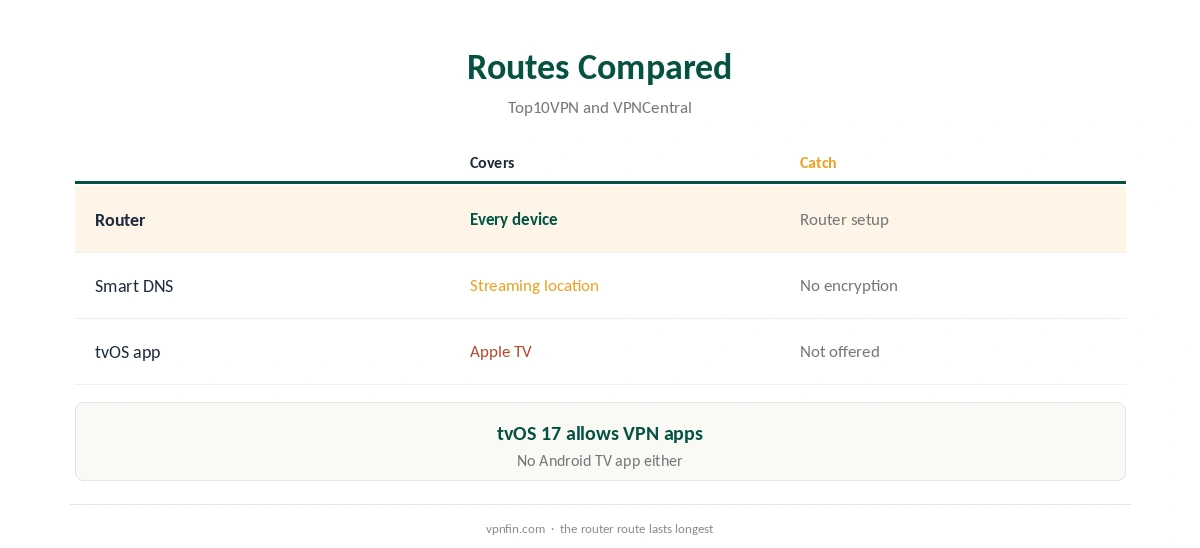
StrongVPN Apple TV support does not come as an app. Top10VPN lists StrongVPN among the providers without apps for Apple TV or Android TV, though it offers apps for Fire TV, phones and computers. The practical route is a router running StrongVPN, which covers every device on the network. Top10VPN also mentions Smart DNS for consoles; check whether it suits your Apple TV before relying on it. Our page on StrongVPN’s DNS covers StrongDNS for TVs and consoles and leak protection on the VPN.
This guide covers the routes, the setup and providers with native tvOS apps.
Route One: A Router
VPNCentral rates StrongVPN’s router range as the widest in its 2026 roundup, with WireGuard configs for 67 locations in 42 countries. A router running StrongVPN covers the Apple TV, smart TVs and consoles at once. Our StrongVPN router guide covers the setup.
StrongVPN Apple TV Setup Through a Router
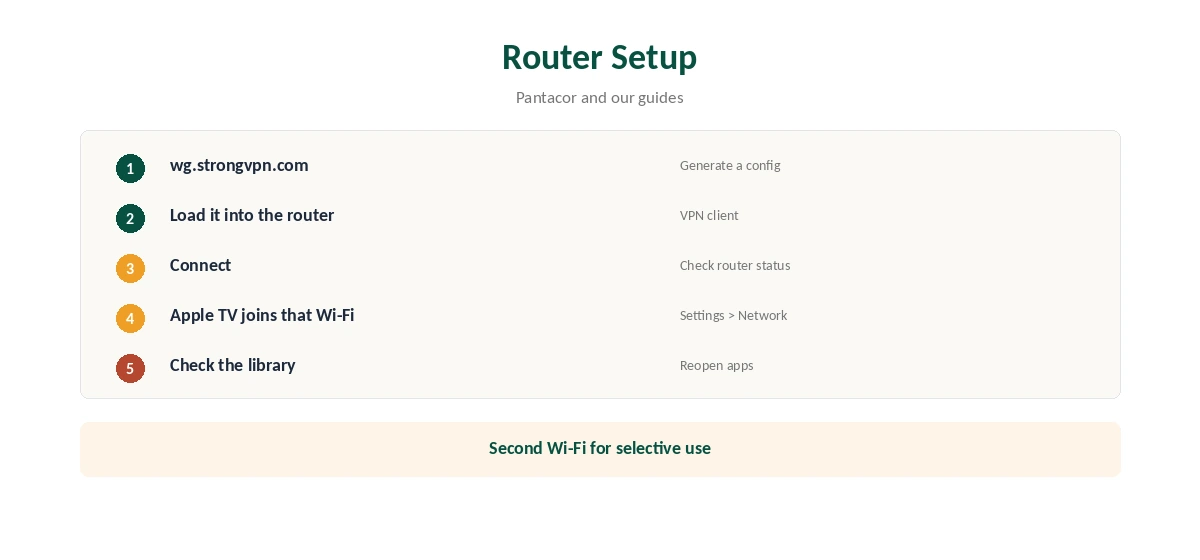
Generate a WireGuard config at wg.strongvpn.com, load it into your router’s VPN client and connect. Then join the Apple TV to that router’s Wi-Fi under Settings, Network. Keep a second, non-VPN network for devices that should skip the tunnel.
Route Two: Smart DNS
Top10VPN mentions Smart DNS for consoles. Smart DNS changes how streaming services see your location without encrypting traffic, so it helps with libraries but not privacy. Check StrongVPN’s support pages for Apple TV instructions before relying on it. Our Smart DNS vs VPN guide explains the difference.
Choosing a Router for StrongVPN Apple TV Use
Any router that runs a WireGuard or OpenVPN client can carry StrongVPN. OpenWrt, DD-WRT and pfSense all can, and many routers ship with a client built in. Prefer a model with a strong processor, since it encrypts traffic for every device. Our router setup guide covers what to look for.
A Second Network for Exceptions
Some devices work better outside the tunnel, such as smart home hubs or a work laptop. Set up a second Wi-Fi network without the VPN for those, and put the Apple TV on the VPN network. Our router or device guide explains the trade-offs.
Turning It Off
To watch without the VPN, move the Apple TV to your normal Wi-Fi, or disable the router’s VPN client. Our guide to turning off a router VPN covers the steps.
Is a StrongVPN Apple TV Setup Worth It?
If you already run StrongVPN on a router, adding the Apple TV costs nothing. If you are choosing a VPN mainly for an Apple TV, a provider with a native app is simpler, and Cloudwards’ streaming results suggest checking your services first.
Testing Before You Commit
StrongVPN’s 30-day guarantee covers yearly plans only. If you are testing a StrongVPN Apple TV setup, buy the yearly plan, set up the router, and check every streaming app you use within the window. Write down which services work.
A Quick Rule
Router you can configure? Run StrongVPN there and the Apple TV is covered. No suitable router? Pick a provider with a native tvOS app. Only need streaming location changes? Ask about Smart DNS first.
Checking for Leaks
From a phone on the same Wi-Fi, run our DNS leak guide. Routers sometimes keep handing out your provider’s DNS servers, which can reveal your real location to streaming apps on the Apple TV. Fix that in the router’s DNS settings before relying on the setup.
Several Devices
StrongVPN allows 12 devices, and a router usually counts as one, so the Apple TV, smart TVs and consoles behind it leave room for phones and laptops on their own apps. Count everything before setting it up, so no device gets refused a connection later.
Restarting After Changes
After changing the router’s VPN settings, restart the Apple TV so apps pick up the new connection cleanly.
Streaming on Apple TV
After connecting the router, open the streaming app and check the library. If it shows your home catalogue, close the app fully and reopen it. Cloudwards found StrongVPN did not unblock Hulu or BBC iPlayer in its tests, so check the services you need within the refund window.
Providers With tvOS Apps
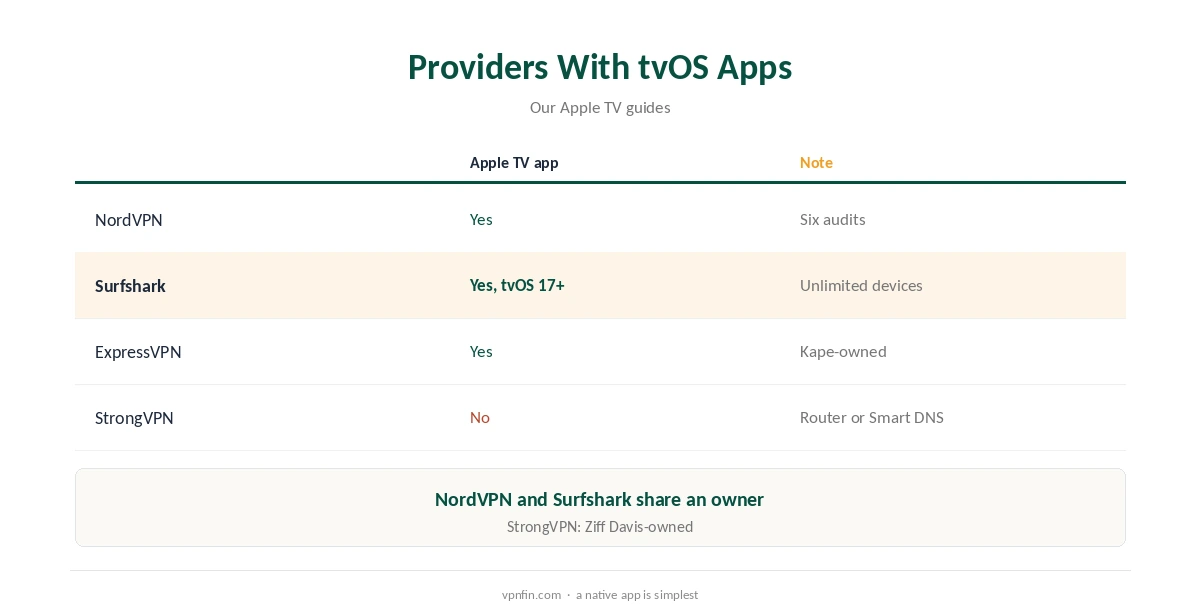
Apple TV has supported VPN apps since tvOS 17. Our NordVPN Apple TV guide and Surfshark Apple TV guide cover two providers with native apps; the pair share an owner, Nord Security.
Our ExpressVPN Apple TV guide covers a third.
StrongVPN’s Record
StrongVPN belongs to Ziff Davis, which also owns IPVanish, and our audit table records no independent audit. It allows 12 devices, and its 30-day guarantee covers yearly plans only, as our StrongVPN refund guide explains.
What StrongVPN Costs
Security.org lists $11.99 a month, or $47.69 for the first year and then $89.99 a year. Monthly plans carry no refund, so test on a yearly plan if you want the guarantee.
Related Guides
Our Apple TV VPN guide compares providers, and our StrongVPN vs VyprVPN page compares a close rival.
How We Research
This page draws on Top10VPN’s, Cloudwards’ and Security.org’s StrongVPN reviews, VPNCentral’s 2026 WireGuard router roundup and our StrongVPN tables. We cross-checked these sources against each other, and where they conflict or something can’t be verified, we say so in the text rather than guessing. We checked time-sensitive figures, including prices in US dollars, on 7 October 2026. Security.org lists $11.99 a month or $47.69 for the first year. The main source we relied on is Top10VPN’s StrongVPN review. Our full approach lives on the About Us page.
StrongVPN Apple TV FAQ
No. Top10VPN lists it among providers without Apple TV or Android TV apps.
Run StrongVPN on your router and connect the Apple TV to it.
Top10VPN mentions Smart DNS for consoles; check Apple TV support.
Cloudwards found it did not unblock Hulu in its tests.
NordVPN, Surfshark and ExpressVPN, among others.
The Verdict
StrongVPN Apple TV use runs through a router, where StrongVPN’s wide support helps. For a simpler setup, a provider with a native tvOS app saves effort.