
Disclosure: VPNFin is reader-supported. If you buy a VPN through links on this page, we may earn a commission at no extra cost to you. This never affects our ratings — here’s our full disclosure.
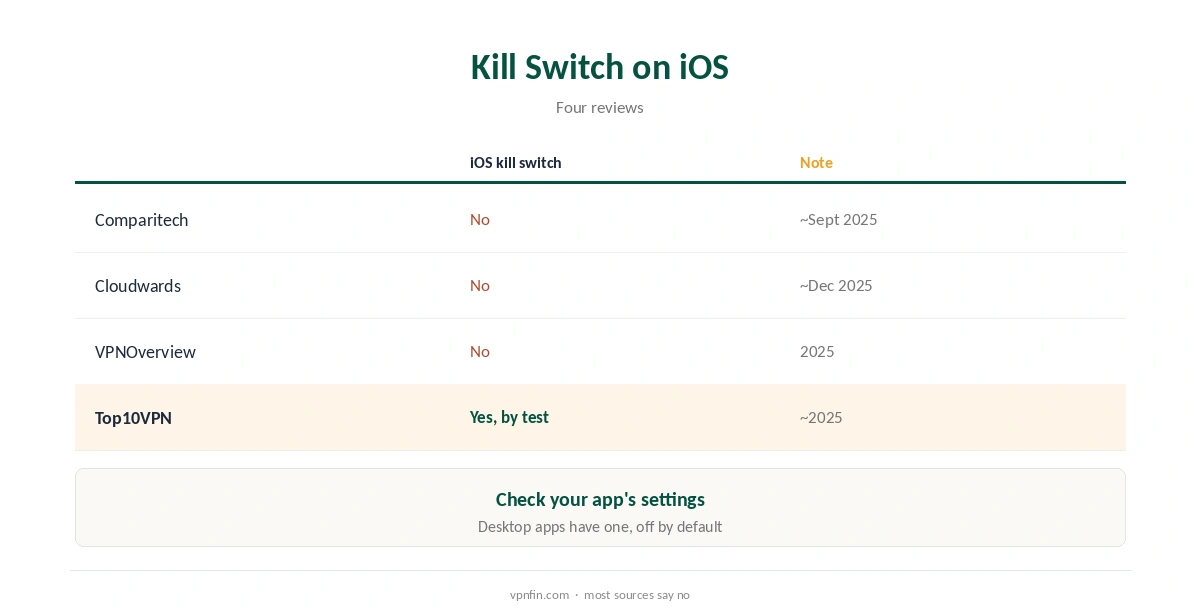
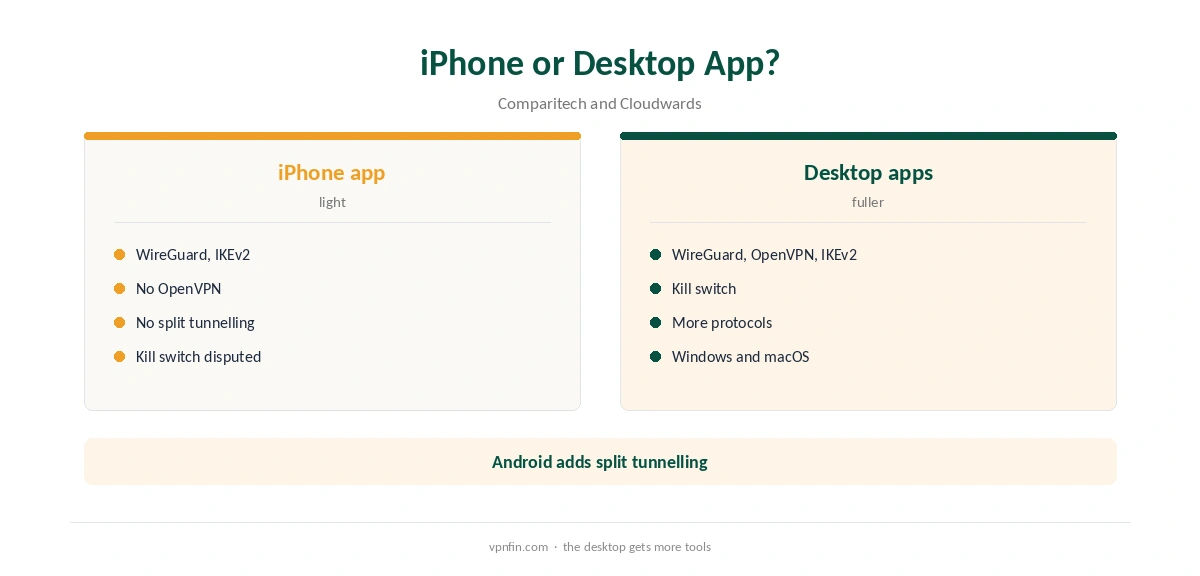
StrongVPN iOS support comes through the StrongVPN app from Strong Technology, LLC in the App Store. Comparitech lists WireGuard and IKEv2 on iOS, but not OpenVPN, and Cloudwards found no split tunnelling. Sources split on the kill switch: Comparitech, Cloudwards and VPNOverview found none on iOS, while Top10VPN’s test detected one. Security.org records a 4.3 rating in the App Store.
This guide covers the setup, the protocols, the kill switch question and a lookalike app to avoid.
StrongVPN iOS Setup
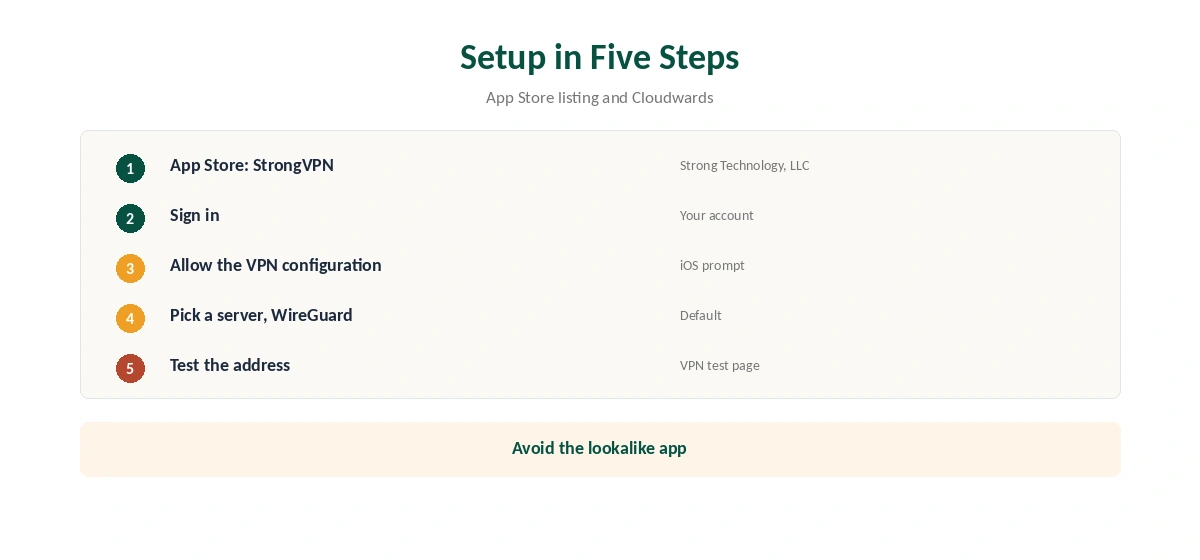
Open the App Store and install StrongVPN by Strong Technology, LLC. Sign in, allow the VPN configuration when iOS asks, pick a server and connect. Cloudwards notes WireGuard is selected by default.
Confirm the new address with our VPN test page.
Check the Developer Name
The App Store also lists an unrelated app called StrongVPN – A Secure VPN Proxy from a different developer. Install the one published by Strong Technology, LLC, which matches StrongVPN’s own support email.
Protocols on iPhone
Comparitech lists WireGuard and IKEv2 on iOS, with OpenVPN missing there. Cloudwards adds that PPTP and L2TP are absent from the mobile apps. WireGuard suits all-day use; IKEv2 reconnects quickly when the phone switches networks. Our IKEv2 vs WireGuard guide compares them.
The Kill Switch Question
Comparitech, Cloudwards and VPNOverview all say the iOS app has no kill switch. Top10VPN’s kill switch test reported one on Android and iOS. Check the app’s settings on your phone; if there is no option, keep the app open after connecting on risky networks. Our kill switch guide explains the risk.
No Split Tunnelling
Cloudwards found split tunnelling only on StrongVPN’s Android app. On iPhone, every app goes through the VPN when it is on. Our split tunnelling guide explains what you miss.
StrongVPN iOS on Public Wi-Fi
Phones join more public networks than any other device. Connect StrongVPN before you sign in to anything on café or hotel Wi-Fi. Because the kill switch is disputed on iOS, keep the app open briefly after connecting and check the VPN icon before using sensitive apps. Our public Wi-Fi guide explains the risks.
Battery and Reconnection
WireGuard is the lighter protocol on phones, and IKEv2 reconnects quickly when you move between Wi-Fi and mobile data. If StrongVPN drops when the screen locks, switch protocol and test again.
Troubleshooting
If StrongVPN iOS will not connect, delete and reinstall the VPN profile, then sign in again. Turn off iCloud Private Relay if it clashes. Our iPhone troubleshooting guide covers more fixes.
Several Devices
StrongVPN allows 12 devices, so one plan covers an iPhone, iPad, computers and a router. Our StrongVPN router guide covers the router side.
Is StrongVPN iOS Worth It?
For simple iPhone privacy with WireGuard and 12 devices on one plan, StrongVPN iOS use is reasonable. Users who want a confirmed kill switch, split tunnelling or audits on their phone should compare rivals first.
A Quick Rule
Everyday browsing? WireGuard is fine. Switching networks often? Try IKEv2. Risky public Wi-Fi? Confirm whether your StrongVPN iOS app shows a kill switch, and if not, wait for the VPN icon before opening sensitive apps.
Keeping It Updated
Allow App Store updates for StrongVPN, then check after each one that your protocol choice stayed the same. If an update causes connection problems, delete the VPN profile in iOS settings and let the app create it again. Our StrongVPN WireGuard guide explains the default protocol.
Quick Check
After connecting, the VPN icon should appear in the status bar. Open our test page to confirm the new address, then switch from Wi-Fi to mobile data and check the connection returns. If it does not reconnect on its own, try IKEv2, which handles network changes well, and test again on both connections.
iPad
The same app runs on iPad with the same settings. Sign in with your StrongVPN account; each iPad counts toward the 12-device limit.
Support in the App
The App Store listing mentions in-app chat support and lets you disable and erase device diagnostics. StrongVPN also lists support@strongvpn.com, available around the clock.
StrongVPN’s Record
StrongVPN belongs to Ziff Davis, which also owns IPVanish, and our audit table records no independent audit. It allows 12 devices, and its 30-day guarantee covers yearly plans only, as our StrongVPN refund guide explains.
What StrongVPN Costs
Security.org lists $11.99 a month, or $47.69 for the first year and then $89.99 a year. Monthly plans carry no refund, so test on a yearly plan if you want the guarantee.
Related Guides
Our iPhone VPN guide compares providers, and our guide to turning off a VPN on iPhone covers removing profiles.
For rivals, our NordVPN iPhone guide covers an app with a kill switch; NordVPN shares an owner, Nord Security, with Surfshark.
How We Research
This page draws on StrongVPN’s App Store listing, Comparitech’s, Cloudwards’, VPNOverview’s, Top10VPN’s and Security.org’s StrongVPN reviews and our StrongVPN tables. We cross-checked these sources against each other, and where they conflict or something can’t be verified, we say so in the text rather than guessing. We checked time-sensitive figures, including prices in US dollars, on 7 October 2026. Security.org lists $11.99 a month or $47.69 for the first year. The main source we relied on is StrongVPN’s App Store listing. Our full approach lives on the About Us page.
StrongVPN iOS FAQ
It does, published by Strong Technology, LLC.
WireGuard and IKEv2; OpenVPN is missing on iOS, per Comparitech.
Sources disagree; three say no, Top10VPN’s test found one.
No. Cloudwards found it only on Android.
An unrelated app shares the name; check the developer.
The Verdict
StrongVPN iOS support is simple, with WireGuard by default, but likely no kill switch and no split tunnelling. Check the developer name, and weigh the missing audit.