
Disclosure: VPNFin is reader-supported. If you buy a VPN through links on this page, we may earn a commission at no extra cost to you. This never affects our ratings — here’s our full disclosure.
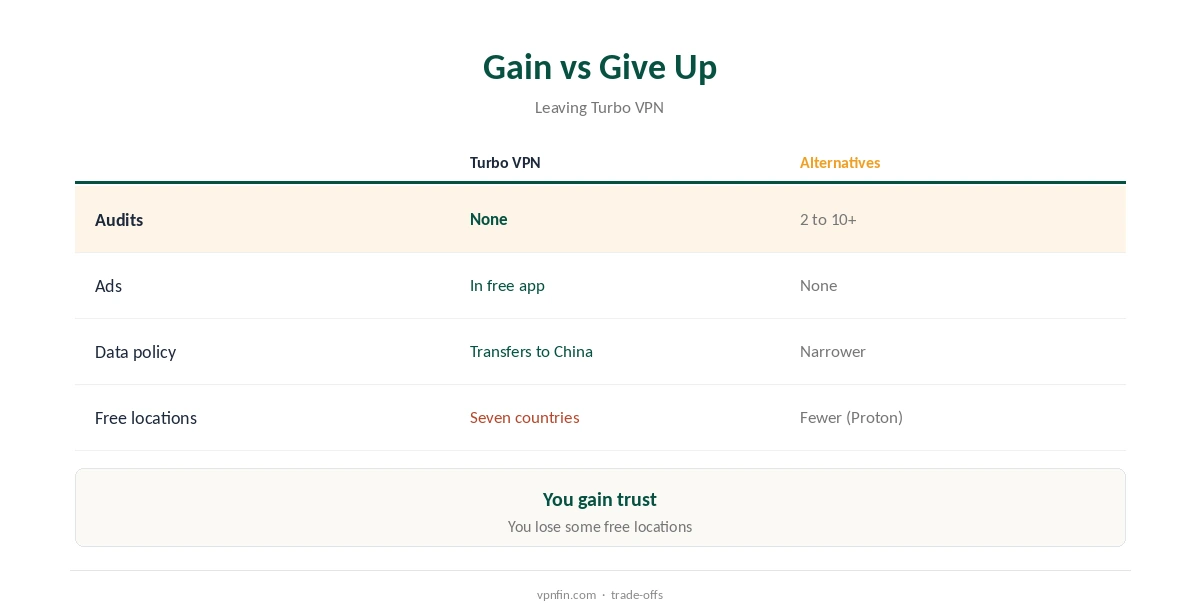
Turbo VPN alternatives are worth considering for almost anyone. Turbo VPN is popular and free, but its owner has links to mainland China, its policy allows data transfers there, and the free app carries ads.
The services below include an audited free plan, so you do not have to pay to switch. Our Turbo VPN review sets out the concerns in full.
Turbo VPN Alternatives for Streaming: NordVPN or Surfshark
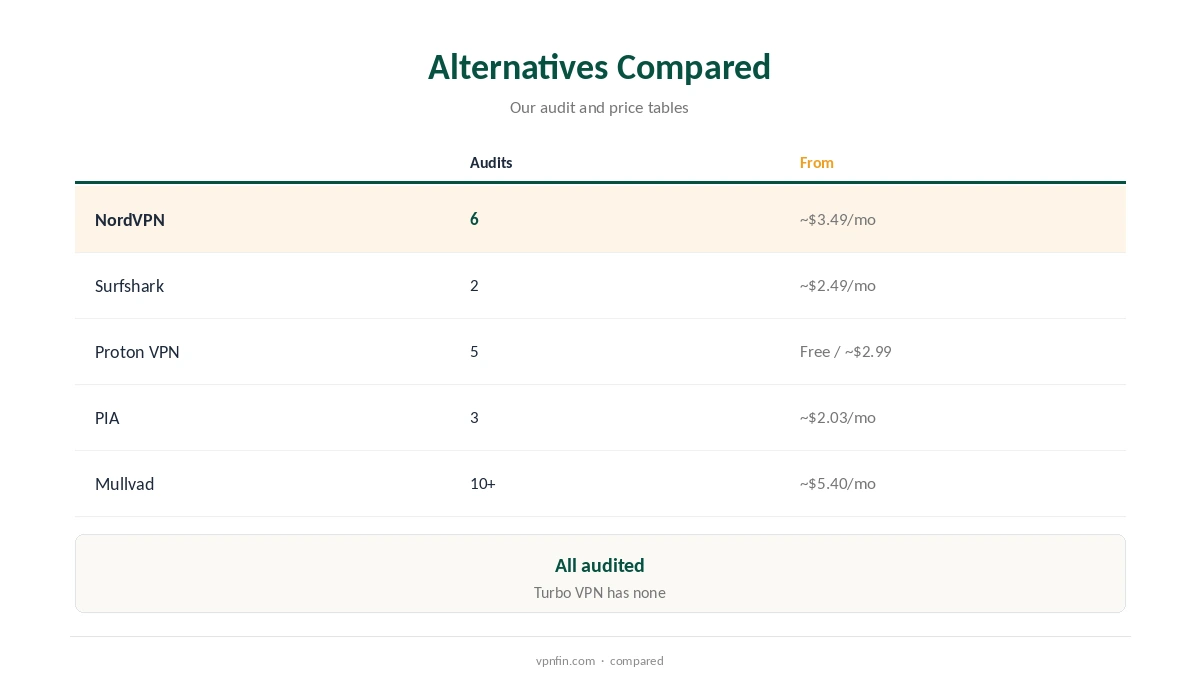
Reports on Turbo VPN’s streaming conflict, and its free servers are busy. Both come from Nord Security: NordVPN brings 6 audits and 10 devices, and Surfshark brings unlimited devices and 2 Deloitte audits.
For Audited Privacy and a Free Plan: Proton VPN
Turbo VPN has no audit, and ProPrivacy found its policy permits sending data to servers in China. Proton VPN pairs 5 audits in our table with a free plan that has no data cap. Paid plans cost about $2.99 a month on a two-year term.
That makes it the most direct swap for Turbo VPN’s free users: free, but audited and without ads.
For Torrenting: PIA
Top10VPN found Turbo VPN unsuitable for torrenting. Private Internet Access adds port forwarding for faster seeding, unlimited devices and 3 Deloitte audits in our table.
For Strict Privacy: Mullvad
If you want to get as far from Turbo VPN’s data practices as possible, Mullvad collects almost nothing at sign-up. Mullvad leads our table with 10+ audits and needs no email to sign up. It charges about $5.40 a month, with no discounts for long plans.
For Lower Prices: PureVPN or CyberGhost
vpnpro calls Turbo VPN’s VIP plan overpriced, so cheaper audited plans exist. On a budget, PureVPN costs about $2.15 a month with 4 KPMG audits, and CyberGhost about $2.19 with a 45-day refund window on longer plans.
For TVs and Routers
Turbo VPN focuses on phones and computers, with few TV options. For TVs, NordVPN and Surfshark have native apps, while a router such as ExpressVPN’s Aircove covers every device at once, as our guide to a VPN for smart TV explains.
Price Comparison
Turbo VPN is free with ads, and its VIP plan removes them; vpnpro calls it overpriced. The alternatives above run from free with Proton VPN to about $5.40 a month in our price table.
Free or Paid
Turbo VPN is free with ads, so the closest match is an audited free plan without them. Among free plans, Proton VPN sets no data cap and Windscribe allows up to 15 GB, our refund table records. Each has outside audits behind it.
A Quick Rule
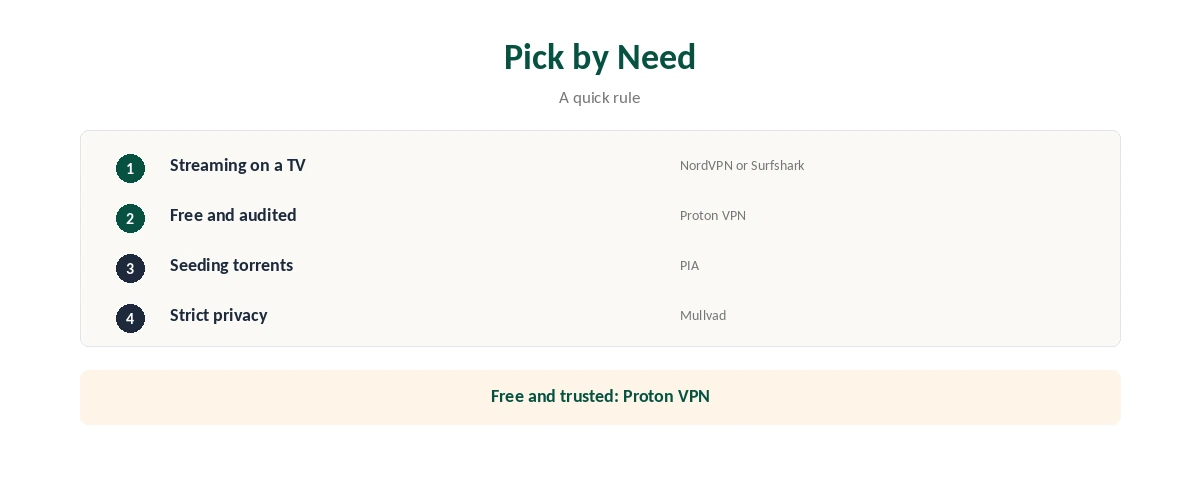
Want free without the concerns? Proton VPN. Streaming on a TV? NordVPN or Surfshark. Torrents? PIA. Maximum privacy? Mullvad.
Switching Without a Gap
Install the new VPN first, then uninstall Turbo VPN fully and cancel any VIP subscription in your app store. Deleting the app alone does not stop payments.
Several Devices
Turbo VPN’s free plan covers seven countries, vpnpro reports. NordVPN allows 10 devices, Surfshark and PIA set no limit, and Proton’s free plan covers one device.
Families
Ad-supported apps are a poor fit for children’s devices. An ad-free, audited VPN avoids exposing them to ad tracking.
Keeping Protection Running
Check your phone’s VPN settings after uninstalling Turbo VPN, and delete any leftover profile. Run both VPNs side by side only briefly; two active VPN apps can block each other. Remove the old one once the new one runs everywhere.
Testing an Alternative
After switching, run a leak test using our guide to checking if a VPN is working. Our guide to free VPN risks explains what to avoid next time.
Compare the apps’ permissions too. A trustworthy VPN asks only for what it needs to run the connection.
Ownership
Nord Security owns NordVPN and Surfshark, and Kape owns PIA, CyberGhost and ExpressVPN. Proton VPN and Mullvad are independent companies. Turbo VPN comes from Innovative Connecting Pte in Singapore, whose director heads China’s LinkSure, Top10VPN found.
Unlike Turbo VPN’s owner, each of these companies names itself on its own site, which makes accountability easier.
What You Give Up
You give up a free app with many locations and one-tap simplicity. Proton’s free plan offers fewer locations, but with an audit and no ads.
Leaving Turbo VPN
Cancel any VIP subscription in your App Store or Google Play account, then uninstall the app. Check that payments have stopped on your next statement.
Are Turbo VPN Alternatives Worth the Switch?
Yes, for almost everyone. Audited free and paid options cover every need Turbo VPN does, without its ownership and policy concerns.
For more on Turbo VPN, see Surfshark vs Turbo VPN, Turbo VPN’s free plan and what Turbo VPN costs.
We also cover similar services: OrionVPN alternatives and IceVPN alternatives.
How We Research
This page draws on our Turbo VPN research, including Top10VPN, ProPrivacy, Comparitech and vpnpro, read on 21 October 2026. The main source for this brand is Top10VPN’s Turbo VPN review. Partner figures come from our audit, price, device and refund tables. We do not run our own tests. Our full approach lives on the About Us page.
Turbo VPN Alternatives FAQ
Proton VPN, with an audited free plan and no data cap.
Its ownership links to China, its broad privacy policy and ads in the free app.
NordVPN or Surfshark.
No. Cancel in your app store account first.
The Verdict
The best Turbo VPN alternatives are audited and transparent: Proton VPN for free use, NordVPN or Surfshark for streaming, PIA for torrents and Mullvad for maximum privacy. Switching costs nothing on Proton’s free plan.