
Disclosure: VPNFin is reader-supported. If you buy a VPN through links on this page, we may earn a commission at no extra cost to you. This never affects our ratings — here’s our full disclosure.
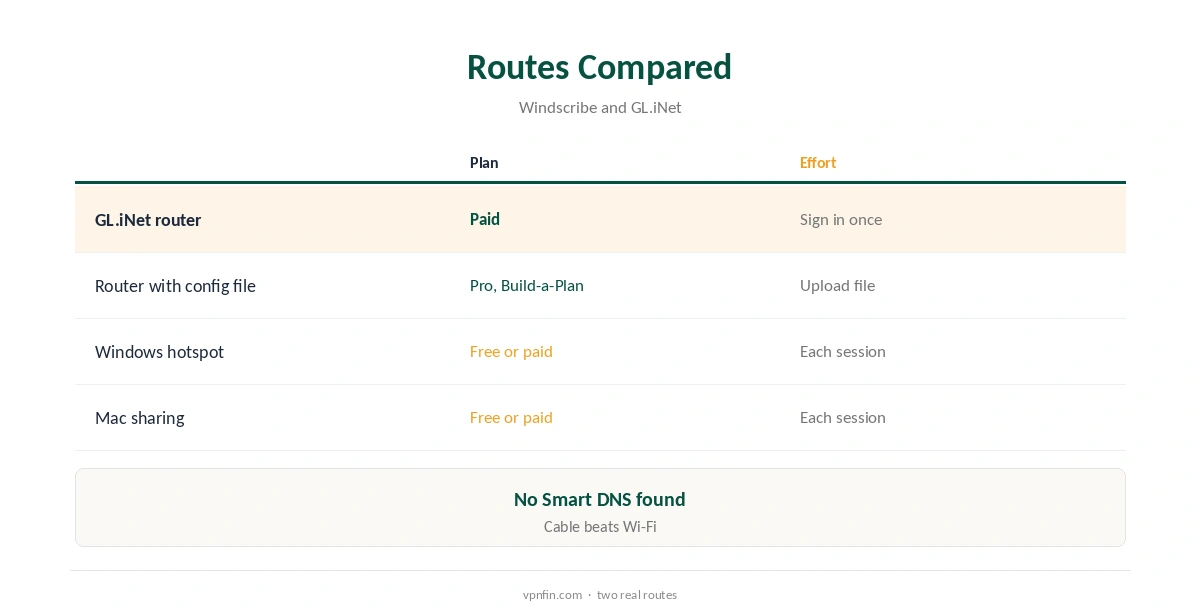
Windscribe Xbox use comes down to routing the console through something else, because Xbox Series and Xbox One consoles have no VPN apps and, unlike PlayStation, no proxy setting either. A Windows PC sharing its Windscribe connection over a cable is the quickest route and works on the free plan; a router running Windscribe is the permanent one.
Here we cover PC sharing step by step, routers, NAT and party chat, cloud gaming and Game Pass downloads.
Why Xbox Is Different
Many devices without VPN apps can at least point at a proxy; the Xbox cannot, so Windscribe’s Proxy Gateway is out. Its network menu offers DNS and IP settings, but no proxy field. Every route has to carry the console’s whole connection.
Our Xbox VPN guide explains why a VPN on Xbox often causes more trouble than it solves for online play.
Windscribe Xbox Setup Through a Windows PC
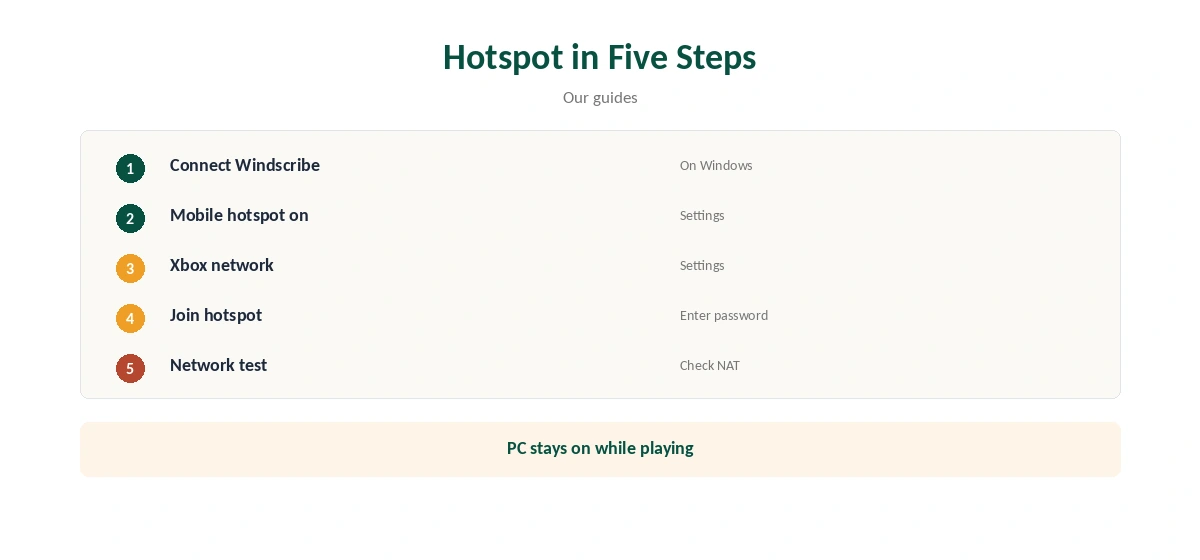
Connect Windscribe on the PC first and pick a nearby location. For Wi-Fi, turn on Mobile hotspot under Settings, Network and Internet. For a cable, open the network adapters, choose the VPN connection’s properties and, on the Sharing tab, allow other network users to connect through it via the Ethernet port the Xbox uses.
On the Xbox, open Settings, General, Network settings and join the shared network, or set it to wired. Turn sharing off on the PC afterwards.
A Router for Every Session
GL.iNet routers support Windscribe directly, and Pro or Build-a-Plan accounts can generate WireGuard or OpenVPN files for other firmware. Free accounts cannot create router files.
Plug the Xbox in by cable, and leave the router running so the console is covered every time it starts. Our Windscribe router guide walks through the setup.
NAT and Party Chat
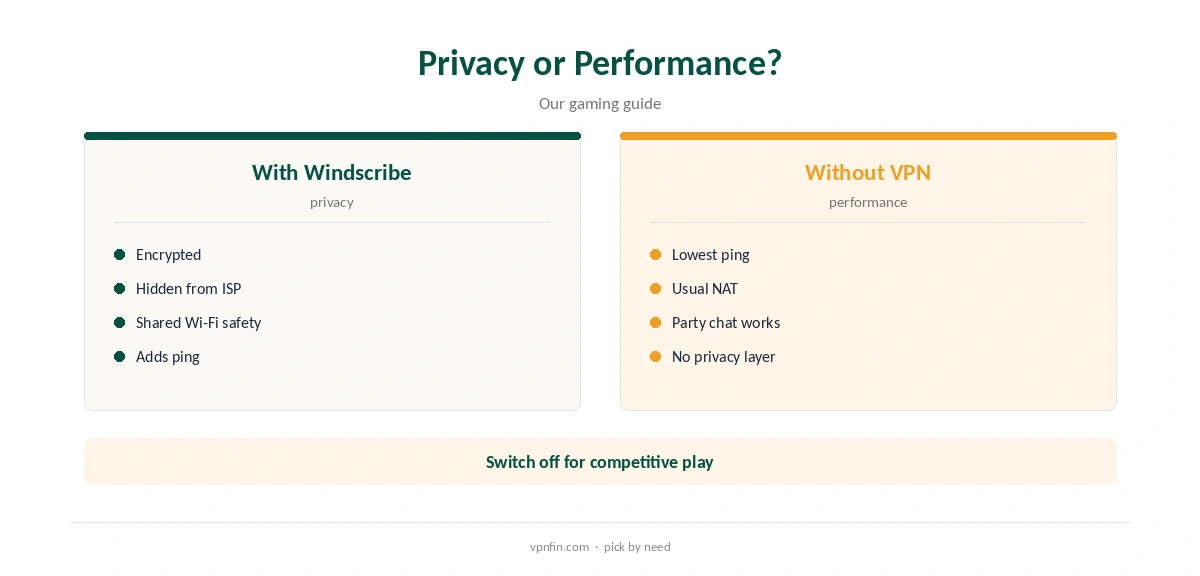
Xbox shows an Open, Moderate or Strict NAT type in its network test, and a VPN often pushes it towards Strict, which can break party chat and matchmaking. Run the test after each change.
If chat fails, compare with the console on your normal network before blaming Windscribe’s servers, and try a closer location. Our gaming VPN guide explains why ping and NAT change.
Port Forwarding
Windscribe Pro includes temporary port forwarding that lasts seven days at a time, and a paid static IP can hold a permanent port, Windscribe’s port forwarding page says. It is aimed at servers and torrent clients rather than consoles, which connect outward to Xbox services.
For a console, keeping it off the VPN for multiplayer is usually the simpler fix, while streaming apps stay protected.
Cloud Gaming and Game Pass Downloads
Xbox Cloud Gaming streams from Microsoft’s servers, so a VPN adds latency there; keep it off for cloud play if lag shows. Game Pass downloads pass through the tunnel when the console sits behind Windscribe.
On the free plan’s 10 GB, one large download can use the month’s allowance, so a router on a paid plan suits Game Pass users.
Travelling With an Xbox
Hotel and dorm networks often need a login page that consoles handle poorly. A travel router running Windscribe signs in once and gives the Xbox, your phone and laptop a private network behind the VPN.
It also lets you switch the Xbox between protected and direct play simply by changing networks.
Checking the Setup
Run the network test in Settings, General, Network settings after any change, and note the NAT type. Then check from a phone on the same network that the address belongs to Windscribe.
If something breaks, test without the VPN first; that tells you whether Windscribe or the network is the cause.
All Xbox Models
Series X, Series S and Xbox One share the same network menus and the same lack of VPN or proxy support, so these routes apply to every model.
A cable from the console to the router or PC beats Wi-Fi on any of them, especially through a VPN.
Using a Mac Instead
A Mac running Windscribe can share its connection through Internet Sharing in System Settings, over Ethernet or Wi-Fi. Wi-Fi sharing works only when the Mac itself reaches the internet another way, such as by cable.
Many Macs need a USB or Thunderbolt Ethernet adapter to share by cable with the Xbox.
Plans, Refund and Privacy
The free plan gives 10 GB a month with a confirmed email. Pro costs $9 a month or $69 a year with no renewal jump, or Build-a-Plan from $3. Windscribe’s terms allow a refund of the first payment within seven business days, under 10 GB used.
Windscribe’s no-logs claim held when an Athens court dismissed charges against its CEO in April 2025, because no user data existed. Sign-up needs no email, though confirming one raises free data to 10 GB. For what to expect and what to fix, see our page on Windscribe and Sky Go.
How We Research
This page draws on Windscribe’s plans page, terms, port forwarding page and Proxy Gateway guide, GL.iNet’s WireGuard client documentation and our Windscribe and Xbox tables. We cross-checked these sources against each other, and where they conflict or something can’t be verified, we say so in the text rather than guessing. We checked time-sensitive figures, including prices in US dollars, on 8 October 2026. The main source we relied on is GL.iNet’s WireGuard client guide. Our full approach lives on the About Us page.
Windscribe Xbox FAQ
No; Xbox consoles run no VPN apps.
No; Xbox has no proxy setting.
Sharing a Windows PC’s connection over a cable.
VPNs often tighten it; test without the VPN.
Through PC sharing, within 10 GB a month.
The Verdict
Windscribe Xbox use means PC sharing or a router, since there is no app or proxy option. Expect NAT changes, and keep the console direct for party chat if needed.