
Disclosure: VPNFin is reader-supported. If you buy a VPN through links on this page, we may earn a commission at no extra cost to you. This never affects our ratings — here’s our full disclosure.
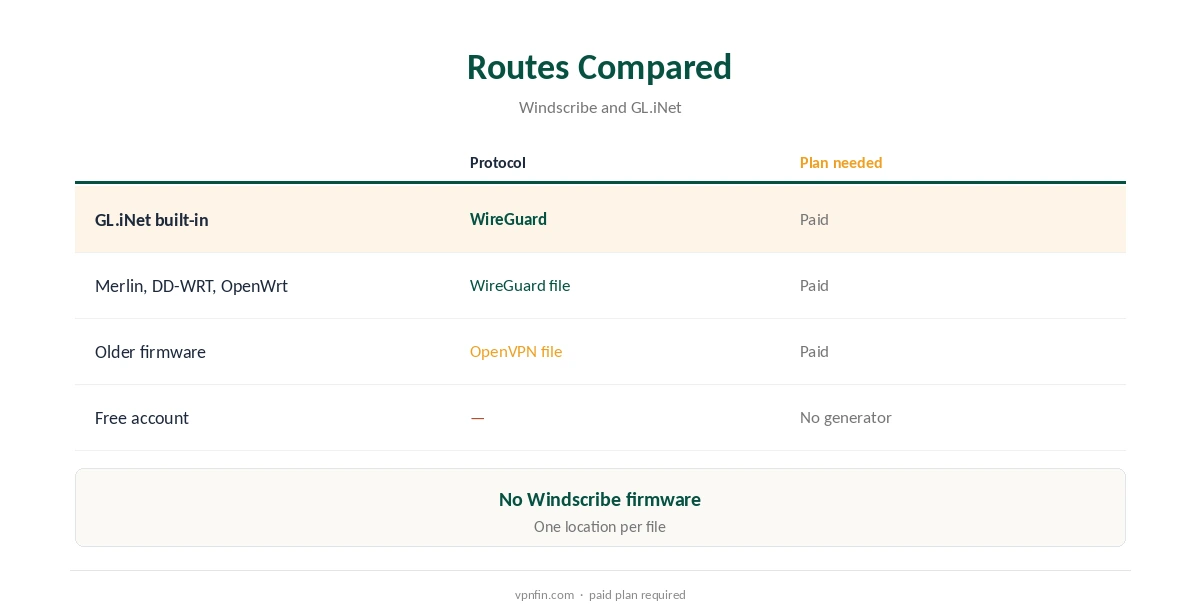
Windscribe for router use runs on configuration files rather than its own firmware. Pro subscribers can generate OpenVPN, IKEv2 and WireGuard files for any router that accepts them. Build-a-Plan users can do so for their chosen locations; free accounts cannot. GL.iNet’s router firmware has a built-in WireGuard client for several providers: you enter your credentials and it creates the server configurations itself, its documentation shows. Windscribe is on that list.
This guide covers the configuration generator, GL.iNet, other firmware, leak protection, speed and what a router loses compared with Windscribe’s apps.
Configuration Files
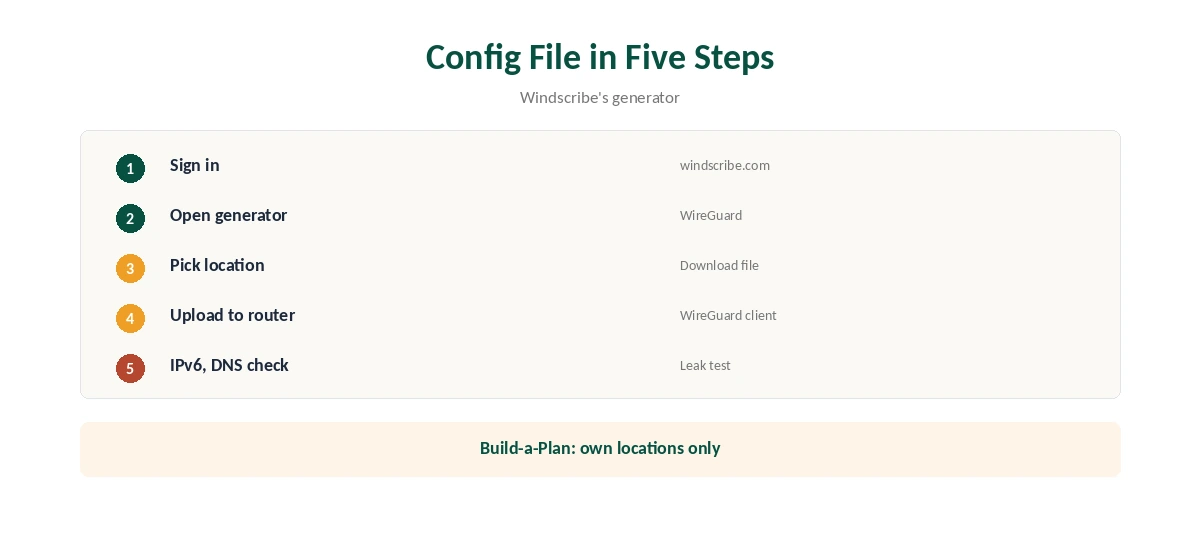
Sign in at windscribe.com, open the configuration generator, choose WireGuard or OpenVPN and a location, and download the file. Windscribe’s plans page and help pages describe the generator. Each file covers one location, so download several if you switch countries, and label them clearly on the router.
Build-a-Plan accounts can generate files only for the locations they pay for, Windscribe’s help article notes. Our Windscribe WireGuard guide covers the generator.
Windscribe for Router on GL.iNet
In the GL.iNet admin panel, open VPN, WireGuard Client and choose Windscribe, which is among the providers its firmware supports directly, GL.iNet’s documentation lists. GL.iNet’s guide walks through signing in, choosing servers and starting the connection.
A compact GL.iNet travel router running Windscribe covers a hotel room or a single TV, and switching it off takes seconds. Built-in support also saves downloading and uploading configuration files by hand.
Asus, DD-WRT, OpenWrt and Others
On other firmware, upload a generated WireGuard file to the WireGuard client, or an OpenVPN file to the OpenVPN client. Asuswrt-Merlin has supported WireGuard since version 388.1, DD-WRT offers it under Tunnels, and OpenWrt through its WireGuard packages, a 2026 router guide notes.
If your firmware lacks WireGuard, OpenVPN works almost everywhere but loads older routers more. IKEv2 files suit some built-in clients too. Our Windscribe OpenVPN guide covers the OpenVPN options.
Preventing Leaks
Disable IPv6 on the router unless the tunnel carries it, and point DNS through the VPN. The same router guide lists the IPv6 switch for each firmware. Then run a DNS leak test from a phone or laptop on the network.
Enable any block-on-failure option your firmware offers, since a router does not have Windscribe’s app firewall. Our DNS leak guide explains the test.
Sending Only Some Devices Through the VPN
To keep some devices direct, use your firmware’s routing rules. The 2026 router guide names VPN Director on Asuswrt-Merlin, policy-based routing on OpenWrt and a device-based mode on GL.iNet.
A TV or console can then use Windscribe while a work laptop stays on your normal home connection. Give routed devices fixed addresses so the rules keep matching.
What a Router Loses
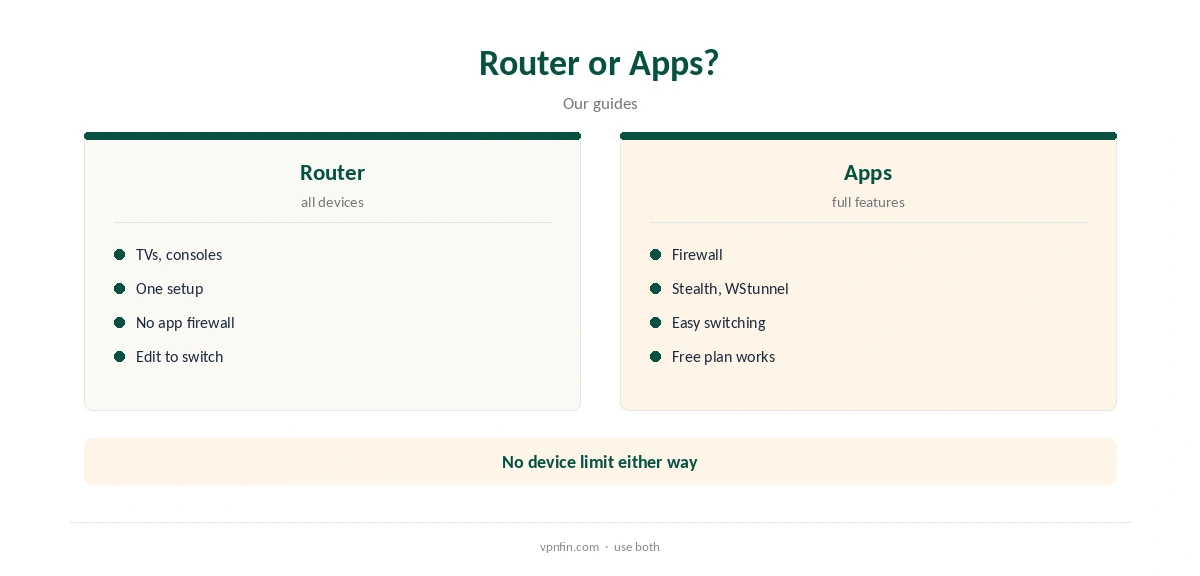
A router setup lacks the apps’ firewall, the Stealth and WStunnel modes for blocked networks, and easy location switching. It covers every device, but changing location means editing the router.
Windscribe sets no device limit anyway, so the router is a convenience for devices without apps rather than a way round a cap. Phones and laptops are better served by the apps, which also work on the free plan. Our router vs device guide weighs it up.
Speed on a Router
WireGuard is noticeably lighter on a router’s processor than OpenVPN, so it usually runs faster on the same hardware. Older routers may manage far less than your line speed with either, which is why many people keep the apps on fast devices.
If one device needs full speed, run Windscribe’s app on it and keep the router for TVs and consoles that cannot install anything.
On the Free Plan Instead
Free accounts cannot generate router files at all, by design, but they can run Windscribe’s apps on each device, with no device limit, 10 GB a month and Stealth included. For phones and laptops, that may be enough. Our guide to Windscribe on Xbox covers PC sharing or a router, with no proxy option.
Devices without apps, such as many TVs and consoles, still need a router and therefore a paid plan. Our Windscribe Free guide covers the free plan’s limits.
Troubleshooting
If the router will not connect, generate a fresh file, try another location, and confirm your firmware actually includes a WireGuard client; minimal DD-WRT builds may not, the 2026 router guide warns. If the internet stops when the VPN is on, check DNS settings. Our guide to Windscribe on PS4 covers router or hotspot, and a free way to test.
Our guide to turning off a VPN on a router covers disabling it cleanly.
Plans and Privacy
Pro costs $9 a month or $69 a year with no renewal jump; Build-a-Plan starts at $3 for chosen locations, enough if the router only ever needs one or two countries. Windscribe’s no-logs claim held when an Athens court dismissed charges against its CEO in April 2025, because no user data existed to hand over. Our guide to Windscribe on Roku covers why there is no app, two workarounds and a free way to test.
Our Windscribe price guide compares the plans.
How We Research
This page draws on Windscribe’s plans page and Build-a-Plan article, GL.iNet’s WireGuard client documentation, encapsulated.network’s 2026 router guide and our Windscribe tables. We cross-checked these sources against each other, and where they conflict or something can’t be verified, we say so in the text rather than guessing. We checked time-sensitive figures, including prices in US dollars, on 8 October 2026. The main source we relied on is GL.iNet’s WireGuard client guide. Our full approach lives on the About Us page.
Windscribe for Router FAQ
Yes, with generated configuration files on a paid plan, or built-in on GL.iNet.
No; the configuration generator needs a paid plan.
WireGuard where the firmware supports it.
No; it uses standard configuration files.
The apps’ firewall, Stealth, WStunnel and easy switching.
The Verdict
Windscribe for router use is simple with a WireGuard file on a paid plan, or built in on GL.iNet. Check DNS and IPv6 after setup.