
Disclosure: VPNFin is reader-supported. If you buy a VPN through links on this page, we may earn a commission at no extra cost to you. This never affects our ratings — here’s our full disclosure.
If your Messages stopped arriving after you installed a VPN, your provider probably offered you a setting called Allow Apple Services to bypass the VPN. Ticking it fixes the problem, and it does exactly what the label says.
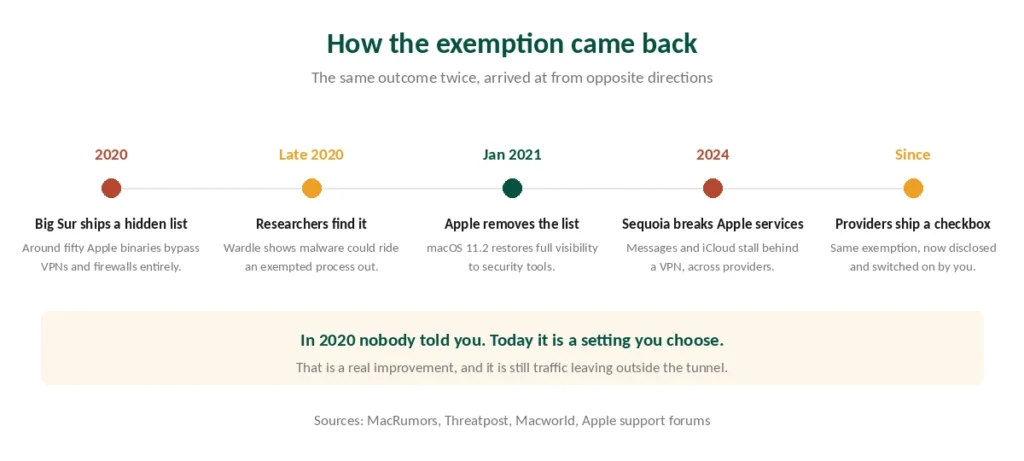
That checkbox has a history. In 2020, macOS Big Sur shipped with a list of around fifty Apple applications — iCloud, Maps, FaceTime, the App Store — that were exempt from third-party VPNs and firewalls entirely. Security researchers found it, wrote about it loudly, and Apple removed the list in January 2021. Our page on Astrill on Mac covers the website client, the Mac App Store version and App Guard.
Then macOS 15 Sequoia arrived in 2024 and broke Apple’s own services for VPN users, and the workaround the industry settled on was to exempt them again — this time with your consent. This guide covers what that means, what else goes wrong on a Mac, and which VPNs handle it best.
The Short Answer
If Messages, iCloud or Mail stop working with your VPN on, that is the known conflict rather than a fault on your end.
Three fixes exist, in descending order of how much privacy they keep: update the client, switch protocol, or tick the bypass checkbox. Our page on FastestVPN on Mac covers App Store setup, protocols and the kill switch.
Understand the checkbox before ticking it. Apple traffic then travels outside your tunnel, which is a real trade rather than a formality.
Best picks: NordVPN for speed and a dependable kill switch, Proton VPN for open-source apps and a free tier, Mullvad if you want the Mac client’s code published. Our guide to Mullvad on Mac covers DAITA, multihop and split tunnelling on macOS.
What Happened in 2020, and Why It Matters Now
Worth setting out, because it explains why Mac users are warier about this than Windows users.
macOS Big Sur contained a ContentFilterExclusionList. Around fifty Apple binaries — the App Store, iCloud, Maps, FaceTime, Siri and others — were routed around the Network Extension framework that VPN and firewall apps use. Those apps could not filter or inspect that traffic.
Researchers demonstrated the risk concretely. Patrick Wardle showed that malware could attach its own traffic to an exempted process and leave the machine despite firewalls set to block everything.
Apple’s explanation was that the list was temporary, a consequence of deprecating kernel extensions. It removed the list in macOS 11.2, and Wardle confirmed that socket-filter firewalls could once again see all system traffic.
⚠️ That episode is closed. We are describing it because the current situation looks similar and is not the same: in 2020 the exemption was undisclosed and automatic, and today it is a setting you choose.
The Sequoia Conflict
macOS 15 Sequoia broke Apple’s own services for VPN users. Messages would not send, iCloud stalled, mail servers timed out. The reports came from users of multiple providers, so it was the operating system rather than any one client.
Two workarounds emerged. Switching from WireGuard to IKEv2 restored the services, at the cost of the faster protocol and, in some clients, of advanced protection features. Our protocol guide covers what that trade costs you.
Then providers added the checkbox. ExpressVPN shipped Allow Apple Services to bypass the VPN in an update, and others followed. It works, and the mechanism is in the name.
⚠️ Decide deliberately rather than by default. Exempting Apple services means iCloud, Messages, FaceTime and App Store traffic leaves your machine outside the tunnel, so your network operator sees you using them and Apple sees your real address. For most people at home that is acceptable. On a network you do not control it is precisely what you were trying to avoid.
Fix It in This Order
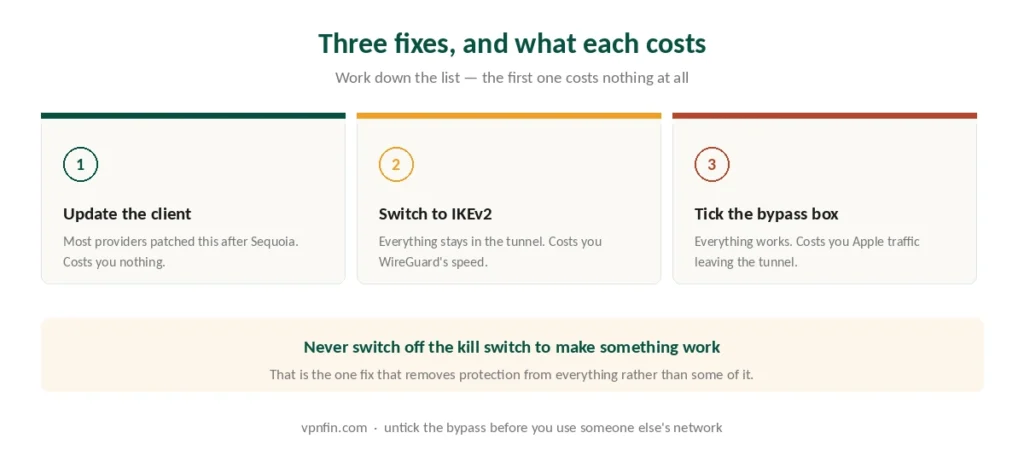
First: update the VPN client. Most of the Sequoia conflicts were addressed in client updates released after the operating system. This resolves it without any trade at all.
Second: switch protocol to IKEv2. Slower than WireGuard and, in some clients, incompatible with their stronger protection modes. Everything still goes through the tunnel.
Third: tick the bypass checkbox. Everything works, and Apple’s traffic is outside your VPN. Reasonable at home, worth reversing before you use a café network. Our guide to Windscribe for Mac covers the firewall, two kinds of split tunnelling and a known bug.
⚠️ Do not disable the kill switch to make something work. That is the one fix that removes protection from all your traffic rather than some of it.
The Kill Switch Bug Worth Knowing About
This one is fixed, and it illustrates why testing beats trusting.
A bug in macOS 14 caused firewall rules using the quick keyword to be silently ignored. Many VPN kill switches are built on exactly those rules. The client’s interface reported that traffic was blocked; packets were leaving the interface anyway. Our guide to Proton VPN on Mac covers setup, protocols, kill switch and split tunnelling.
Multiple VPN vendors confirmed it, and Apple fixed it in a release candidate build during the same cycle.
⚠️ The lesson generalises. A kill switch showing “protected” is reporting its own intention rather than a measurement. If it matters, verify with an external check rather than the app’s own indicator — the same reasoning that applies to DNS leaks on Windows.
The Picks
NordVPN — fastest in CNET’s testing at 2.9% average download loss, a kill switch that behaves predictably, and six published no-logs audits. Ten devices. Renewal reaches $139.08 a year, the highest we track — our renewal price table puts it in context. Our NordVPN review has the full picture.
Proton VPN — every app is open source, the Mac client included, which means the code handling these exemptions can be read rather than trusted. Five published annual audits, and a free tier with no data cap for a second machine. Our Proton VPN review covers it.
Mullvad — also open source, and the account is a sixteen-digit number rather than an email address. Five devices, no streaming, €5 a month with no renewal increase. Our Mullvad review explains the trade.
Surfshark — unlimited simultaneous connections, so the Mac, the phone and everything else run on one subscription at around $79 a year on renewal. Our Surfshark review sets it against the rest.
CyberGhost — 45 days to change your mind, fifteen more than NordVPN, at $56.94 a year on renewal. Our CyberGhost review has the detail.
The VPN Setting Already in macOS
System Settings has a VPN section, and it is a client rather than a service.
It connects to a server you already have — a work network, or one you run yourself. Apple supplies the software; the server is your problem. Our guide to IPVanish for Mac covers setup, the macOS permission and settings to check.
It supports IKEv2, L2TP and IPSec, but not WireGuard, so it is slower than any modern commercial client.
⚠️ And it has no kill switch. If the connection drops, macOS carries on without it silently.
What Else Goes Wrong on a Mac
System extension permission is required on first run. macOS blocks the VPN’s network extension until you approve it in System Settings → Privacy & Security. Installations that appear to fail usually stopped here. Our page on TorGuard on Mac covers the universal app, Gatekeeper and settings.
Login items multiply. Several VPN clients install background helpers that survive uninstallation. Check System Settings → General → Login Items if you have tried more than one provider — and remove things in the right order, because deleting the app first leaves the network extension with nothing to remove it.
Split tunnelling is less capable than on Windows. Apple’s framework constrains what clients can exclude, so some providers offer it on Mac in reduced form or not at all. That matters most when your bank refuses the connection, since excluding the banking app is the usual fix. For Apple tablets, see our NordVPN on iPad guide.
If nothing connects at all, our troubleshooting guide works through the usual causes in order.
Using one of the big three? Our provider guides walk through setup and the usual faults step by step: NordVPN on Mac, Surfshark on Mac and ExpressVPN on Mac.
Troubleshooting: our fix guides cover a VPN not working on Mac.
How We Research
This guide draws on contemporaneous reporting of the ContentFilterExclusionList by MacRumors, Threatpost, Macworld and Slashdot, security researcher Patrick Wardle’s published demonstrations and his confirmation of the list’s removal, user reports of the Sequoia conflict on Apple’s own support forums, ExpressVPN’s documentation of its bypass setting, and technical documentation of the macOS 14 firewall rule bug — cross-checked and verified at publication. We don’t run our own leak tests. Where a behaviour has since been fixed, as both the exclusion list and the firewall bug have been, we say so rather than presenting old problems as current ones. Our full approach lives on the About Us page. Our page on PrivadoVPN on Mac covers setup, features and the free plan.
Mac VPN FAQ
It is a known conflict introduced with macOS 15 Sequoia, reported by users across several providers rather than one. Update your VPN client first, since most addressed it in releases that followed. Switching the protocol to IKEv2 also restores the services, though it costs you WireGuard’s speed.
Only knowingly. The setting does what it says: iCloud, Messages, FaceTime and App Store traffic then travels outside your tunnel, so the network you are on can see you using them. At home that is usually acceptable. On public Wi-Fi it removes the protection you connected for.
Yes, in macOS 11 Big Sur. A ContentFilterExclusionList exempted around fifty Apple binaries from third-party VPNs and firewalls. Security researchers demonstrated that malware could exploit it, and Apple removed the list in macOS 11.2 in January 2021.
It is a client, not a service, so you still need a server to connect to. It supports IKEv2, L2TP and IPSec but not WireGuard, which makes it slower than commercial apps, and it has no kill switch — if the connection drops, macOS says nothing.
NordVPN for speed and a dependable kill switch, Proton VPN if you want the Mac client’s source code published and a free tier to test with, Mullvad for the same openness with anonymous sign-up, and Surfshark if you need to cover a household on one subscription.
The Verdict
Update the client before changing any setting. Most of the Apple-services conflict was resolved in updates released after Sequoia, and that fix costs you nothing. Our page on TunnelBear on Mac covers the setup, the features and what the Mac app lacks.
If you do tick the bypass checkbox, know what it does. iCloud, Messages, FaceTime and App Store traffic then travels outside your tunnel. At home that is usually fine. On someone else’s network it undoes the reason you connected. Our page on CyberGhost on Mac covers the Mac app, its protocols and common fixes.
And treat the kill switch indicator as a claim rather than a measurement. macOS 14 showed exactly how confidently an app can report protection it is not delivering. Our page on PureVPN on Mac covers the macOS app, WireGuard requirements and manual setups.