
Disclosure: VPNFin is reader-supported. If you buy a VPN through links on this page, we may earn a commission at no extra cost to you. This never affects our ratings — here’s our full disclosure.
When NordVPN keeps disconnecting, its support articles describe the same sign: the status flips back to Connecting, or a notification says the VPN dropped. NordVPN’s own support articles list the fixes, but they scatter them across platforms. This guide puts them in one order, from the quickest check to the slowest.
One distinction first. If the app never connects at all, that is a different fault, and our NordVPN not connecting guide covers it. This page is about a tunnel that works and then drops.
Step 1: Rule Out the Network
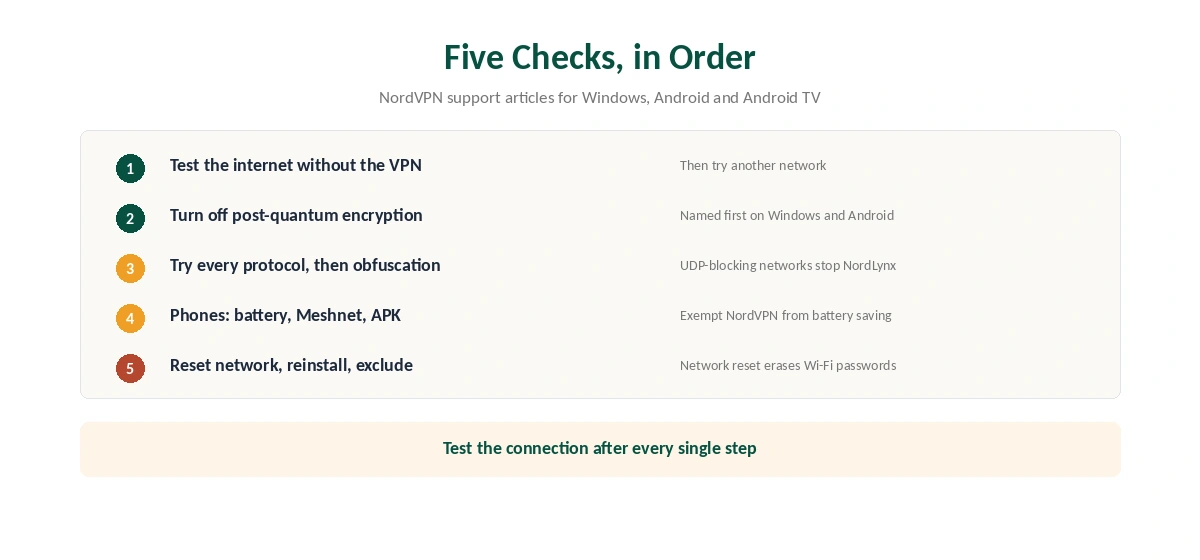
Disconnect the VPN and use the internet for a few minutes. NordVPN’s Windows article starts here for a reason: if the plain connection stutters, the tunnel inherits every gap. A weak Wi-Fi signal or a router that restarts will look exactly like a VPN fault.
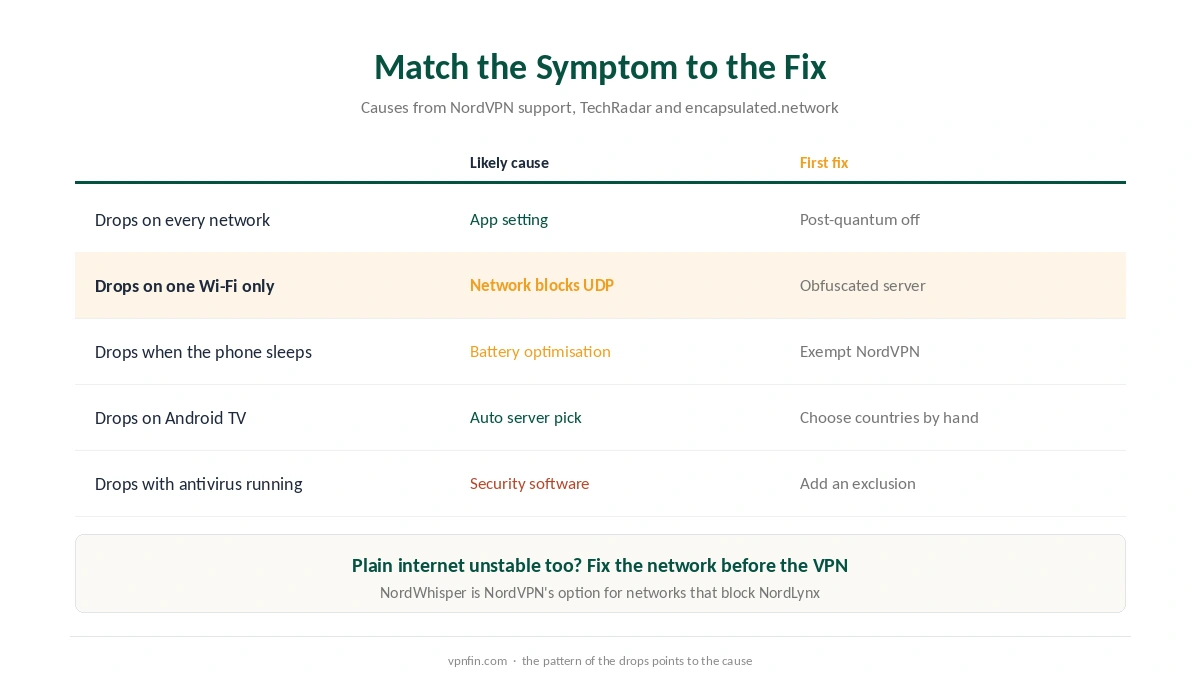
If the plain connection holds, switch networks as a test. Try mobile data instead of Wi-Fi, or the reverse. When the drops follow one network only, the cause sits on that network, and Step 3 matters most.
Step 2: Turn Off Post-Quantum Encryption
This is the newest setting, and NordVPN’s Windows and Android articles both list it. Post-quantum encryption adds a key exchange designed to resist future quantum computers. If NordVPN keeps disconnecting with it on, switch it off and test again.
On Android, tap the profile icon at the bottom right, then Settings, and turn the toggle off. On Windows, NordVPN places it in the app’s settings. Our post-quantum VPN explainer covers what you give up, which today is protection against a future threat, not a current one.
Step 3: Change the Protocol or the Server Type
NordVPN’s Android and Android TV articles both say to try every available protocol, one at a time. On Android, the list sits under the profile icon, Settings, VPN protocol. On Android TV, open the cogwheel, App settings, then Protocol.
Protocol choice matters most on networks that block traffic. NordLynx, NordVPN’s WireGuard-based protocol, runs over UDP, and the technical blog encapsulated.network notes that networks blocking UDP block NordLynx with it. For those networks, NordVPN points to NordWhisper or an obfuscated server. Our obfuscation guide and WireGuard vs OpenVPN explain the trade-offs.
On Android TV, one more change helps. NordVPN suggests picking specific countries by hand instead of the Secure my connection button. Our NordVPN Android TV guide covers that app.
Step 4: Why NordVPN Keeps Disconnecting on Phones
Phones add two causes of their own. First, battery saving can pause a VPN app in the background. TechRadar’s advice is to exempt the VPN app from battery optimisation. On many Android phones, that switch sits under Settings, Apps, Special access. The exact menu varies by maker.
Second, NordVPN’s Android article lists Meshnet as a factor, so turn it off while testing. The same article suggests replacing the Google Play app with the APK version from NordVPN’s website. Our Android VPN troubleshooting page covers the wider checks.
On iPhone, Low Power Mode and Wi-Fi switching cause similar drops. Our iPhone VPN troubleshooting page lists the iOS settings to check, and NordVPN on iPhone covers that app’s options.
Step 5: Reset, Reinstall, Exclude
If the drops continue, move to the slower fixes. NordVPN’s articles suggest resetting network settings, which also erases saved Wi-Fi passwords and old VPN and APN settings. Next, reinstall the app. Finally, if you run an antivirus, add NordVPN to its exclusions list, because security software can cut the tunnel.
On Windows, NordVPN’s own diagnostics tool includes the network reset, and our NordVPN Windows guide shows where to find it.
Keep the Kill Switch On While You Test
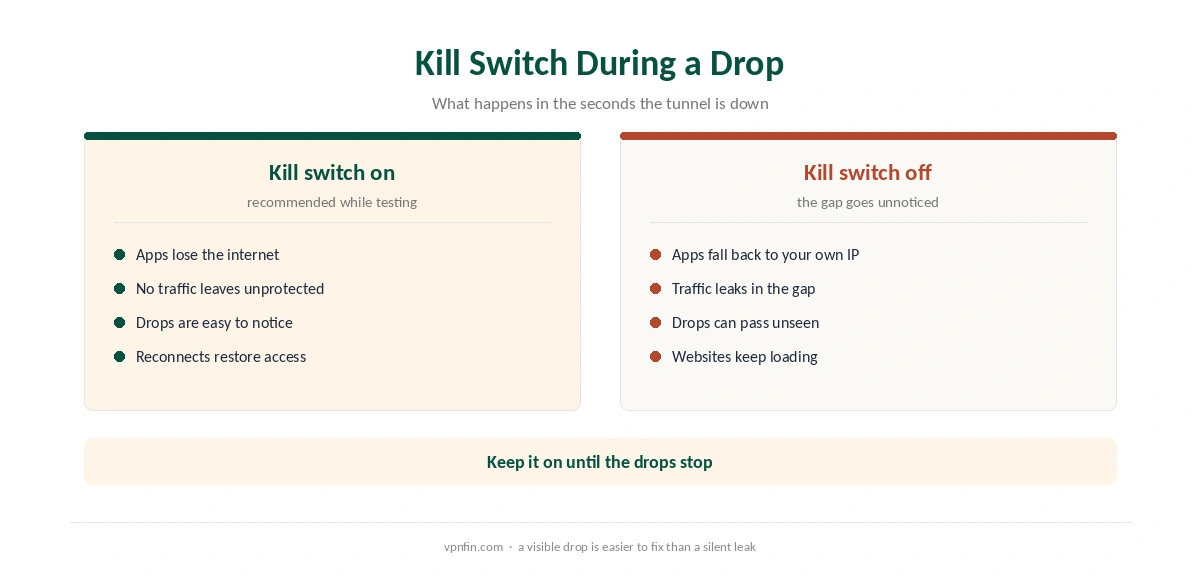
While NordVPN keeps disconnecting, a kill switch earns its place. With it on, apps lose the internet instead of falling back to your normal connection. That makes drops more visible, which helps diagnosis, and it stops traffic from leaking in the gaps. Our kill switch guide explains how it works.
After each fix, confirm the tunnel on our VPN test page. For problems common to every provider, see our general VPN drop guide.
NordVPN Keeps Disconnecting After Every Fix: Support or Refund
If NordVPN keeps disconnecting after every step above, contact its live chat with your app version, platform and the networks you tried. Specific details let support spot a known server problem faster. If the drops make the service unusable within 30 days of your first purchase, the money-back guarantee applies, as our NordVPN refund guide explains. Slow speeds are a separate problem, covered in our NordVPN speed guide.
How We Research
This page draws on NordVPN’s support articles on disconnections for Windows, Android and Android TV, and its articles on connection failures. We also read TechRadar’s guide and encapsulated.network’s NordLynx analysis. We cross-checked these sources against each other, and where they conflict or something can’t be verified, we say so in the text rather than guessing. We read every source on 5 October 2026. The main source we relied on is NordVPN’s Android disconnection article. Our full approach lives on the About Us page.
NordVPN Keeps Disconnecting FAQ
The common causes are an unstable network, post-quantum encryption, a protocol the network blocks, battery saving on phones and security software. NordVPN’s support articles cover each one.
Only while testing, or if it fixes the drops. NordVPN’s Windows and Android articles list switching it off as a fix. It guards against future quantum attacks rather than current ones.
Battery optimisation can pause the app in the background. Exempt NordVPN from battery optimisation, then test again with the screen off.
The app tries to, which is why the status shows Connecting. Keep the kill switch on so apps lose the internet during the gap instead of leaking traffic.
No. A drop happens after a working connection. If the app never connects, follow our NordVPN not connecting guide instead.
The Verdict
Most NordVPN drops trace back to the network, post-quantum encryption or the protocol, in that order. Phones add battery saving and Meshnet to the list. Work through the steps, test after each one, and keep the kill switch on while you do.