
Disclosure: VPNFin is reader-supported. If you buy a VPN through links on this page, we may earn a commission at no extra cost to you. This never affects our ratings — here’s our full disclosure.
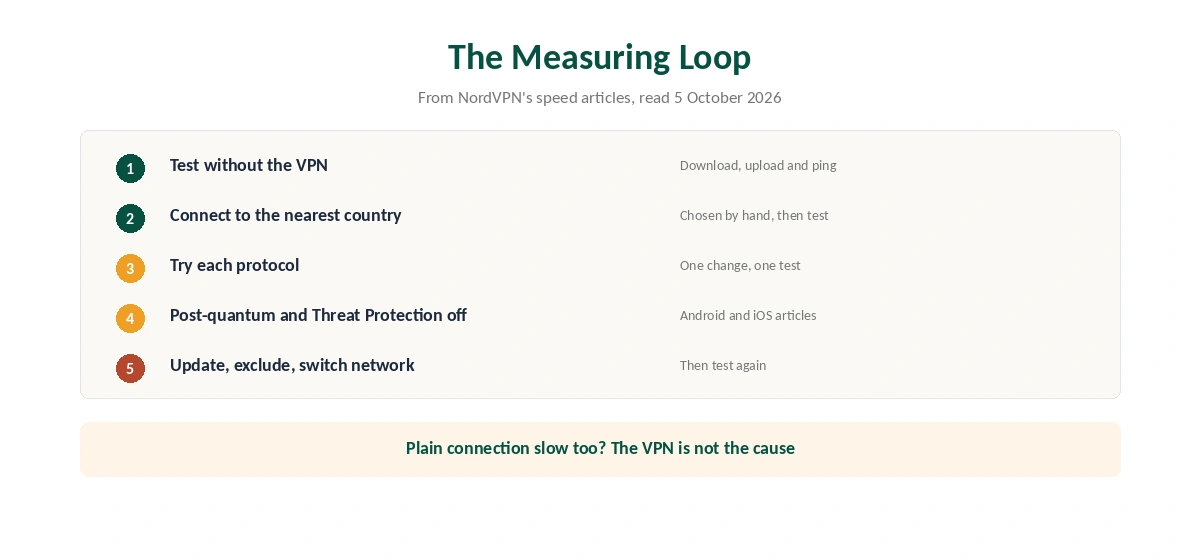
If NordVPN is slow, measure before you change anything. NordVPN’s own support articles tell you to run a speed test after every single step, starting with one without the VPN. Without that baseline, you cannot tell whether a fix helped or whether your home connection was slow all along.
This guide puts NordVPN’s fixes for Windows, Android, iOS, Linux and the browser extension in one order. It also explains which settings cost speed by design.
Step 1: Measure Your Baseline
Disconnect NordVPN and run a speed test, as the support articles suggest with speedtest.net. Write down download, upload and ping, so you know how slow NordVPN really is. Then connect and test again on the same device and network.
Some loss is normal, because every packet takes a longer route and passes through encryption. Our guide to VPN speed loss explains how much to expect. What you are looking for is a gap far larger than usual, or a sudden change.
Step 2: Why NordVPN Is Slow on Quick Connect
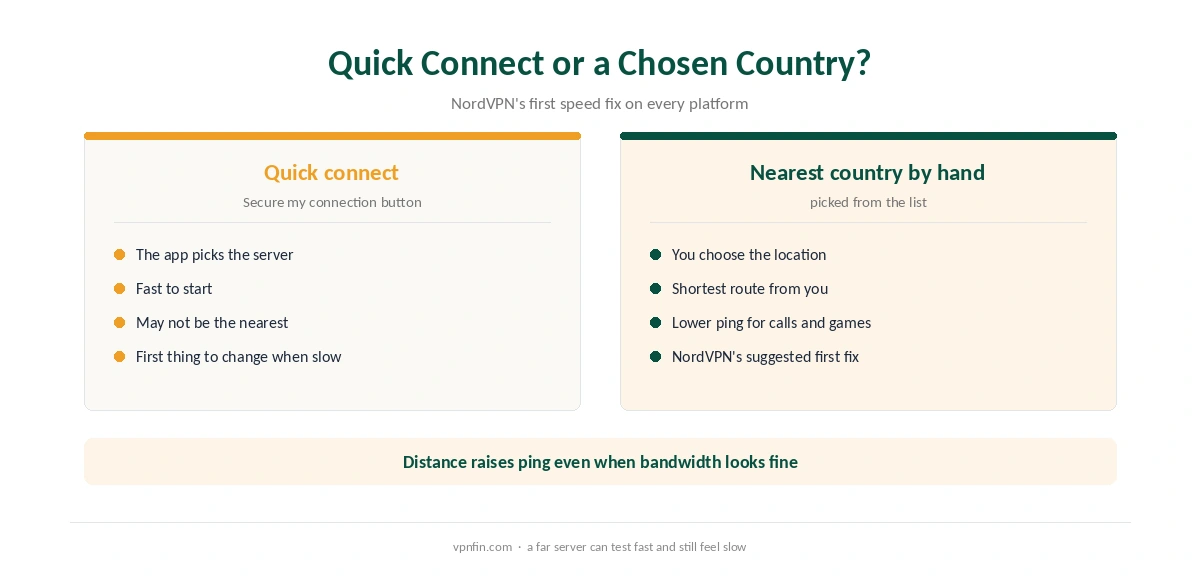
NordVPN’s articles start with server choice. If you used Secure my connection or Quick connect, the support pages suggest picking the countries closest to you by hand instead. They also note that ping rises with distance, so a server across an ocean will feel slower even when the bandwidth looks fine.
For gaming and calls, ping matters more than download speed. Our gaming VPN guide covers that side.
Step 3: Settings That Cost Speed
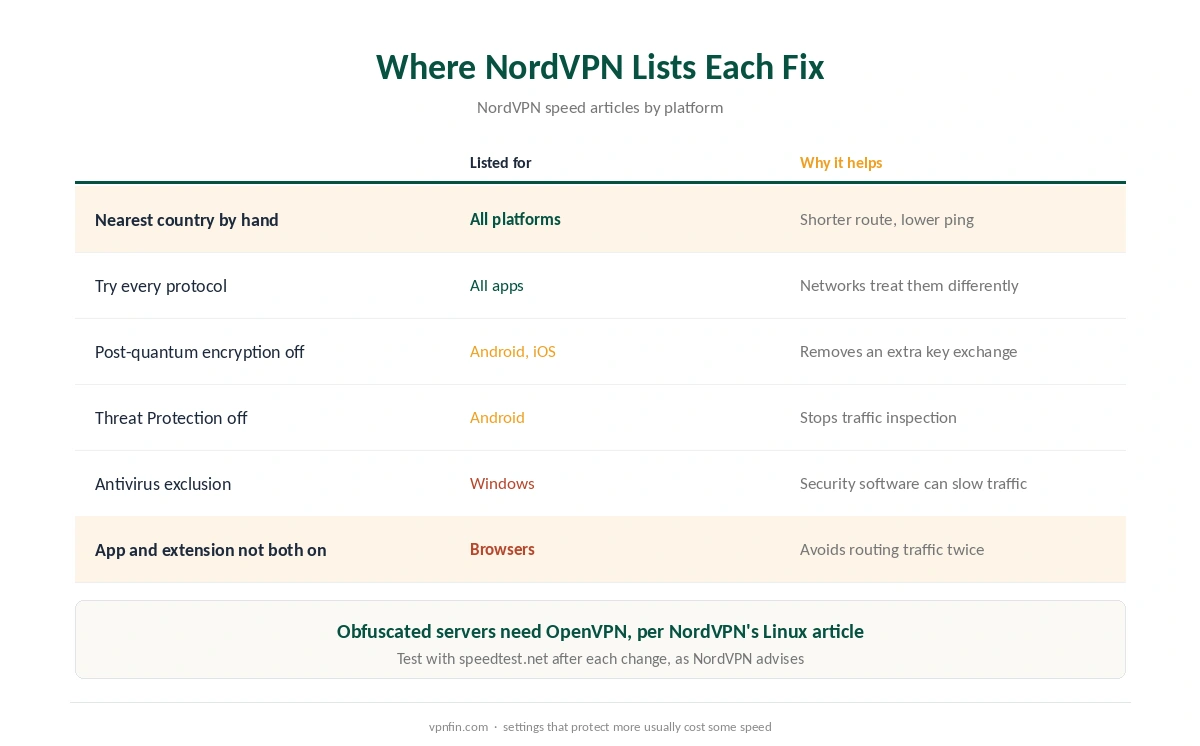
Several NordVPN settings trade speed for protection, and the support articles name them. On Android and iOS, NordVPN suggests turning off post-quantum encryption while you test. On Android, it also suggests turning off Threat Protection, which inspects traffic for threats.
Protocol comes next. NordVPN recommends trying every available protocol. NordLynx, its WireGuard-based default, runs on a much smaller codebase than OpenVPN and uses less processor time, according to NordVPN’s own blog. Obfuscated servers work only with OpenVPN, as the Linux article notes, so they suit restrictive networks rather than raw speed. Our WireGuard vs OpenVPN and post-quantum VPN pages explain each trade-off.
Step 4: Platform Causes of a Slow NordVPN
Each platform adds its own suspects. On Windows, NordVPN asks you to update the app from the banner in settings and to add NordVPN to your antivirus exclusions. Our NordVPN Windows guide shows the app’s layout.
On Android and iOS, the articles suggest switching connection type, for example Wi-Fi instead of mobile data. NordVPN also suggests replacing the Android Google Play app with the APK from its website. For the iPhone, the protocol list sits under the profile icon, Settings, VPN Connection; our NordVPN iPhone guide covers that app.
In the browser, one mistake slows everything. NordVPN warns against running the desktop app and the browser extension at the same time. Clear the browser cache, and reinstall the extension if speed stays low. Our NordVPN Chrome extension guide explains how the two differ.
When the Slowdown Is Not NordVPN
If NordVPN is slow only some days, run the baseline test again. A slow plain connection means the cause sits with the router, the Wi-Fi or the provider. Also, if the VPN keeps dropping as well as crawling, our NordVPN disconnection guide covers that fault, and our NordVPN not connecting guide covers connection failures.
Finally, confirm that the tunnel works at all on our VPN test page. Linux users can find the same steps in our Linux VPN guide.
If Speeds Stay Low
If NordVPN stays slow, contact its live chat with your baseline and VPN results, the server and the protocol. If speeds stay too low within 30 days of your first purchase, the money-back guarantee applies, as our NordVPN refund guide explains.
Speed varies by location and network, so independent tests rarely agree on exact figures. Our NordVPN review covers the provider’s wider strengths and weaknesses.
Saving a Fast Server
Once you find a fast server, save it as a favourite. Returning to a known good server is quicker than searching each time. Recheck it occasionally, since load changes through the day. Our Proton VPN running slow page goes into why it slows down and what to change.
How We Research
This page draws on NordVPN’s speed articles for Windows, Android, iOS, Linux and the browser extension, and its blog post on NordLynx. We cross-checked these sources against each other, and where they conflict or something can’t be verified, we say so in the text rather than guessing. We read every source on 5 October 2026. The main source we relied on is NordVPN’s Windows speed article. Our full approach lives on the About Us page.
Slow NordVPN FAQ
The usual causes are a distant server, a protocol that does not suit the network, post-quantum encryption or Threat Protection, and security software. Your own connection may also be slow.
NordVPN recommends testing every available protocol on your network. NordLynx, its WireGuard-based default, uses less processor time than OpenVPN, according to NordVPN’s blog.
NordVPN’s Android and iOS speed articles suggest turning it off while you test. If speed improves, you can decide whether to keep it off.
Yes, if you run it alongside the desktop app. NordVPN warns against using both at once and suggests clearing the browser cache.
Run a speed test without the VPN, then with it, on the same device. NordVPN’s articles ask you to test again after each change.
The Verdict
In NordVPN’s own articles, a slow NordVPN comes down to server distance, a protocol mismatch or a setting that costs speed. Measure your baseline, pick the nearest country by hand, then test the protocols and settings one at a time. Write the numbers down, because guessing wastes more time than any fix.