
Disclosure: VPNFin is reader-supported. If you buy a VPN through links on this page, we may earn a commission at no extra cost to you. This never affects our ratings — here’s our full disclosure.
Yes, every VPN costs you some speed. But “a VPN slows your internet” is too blunt to be useful, because the range across providers is enormous.
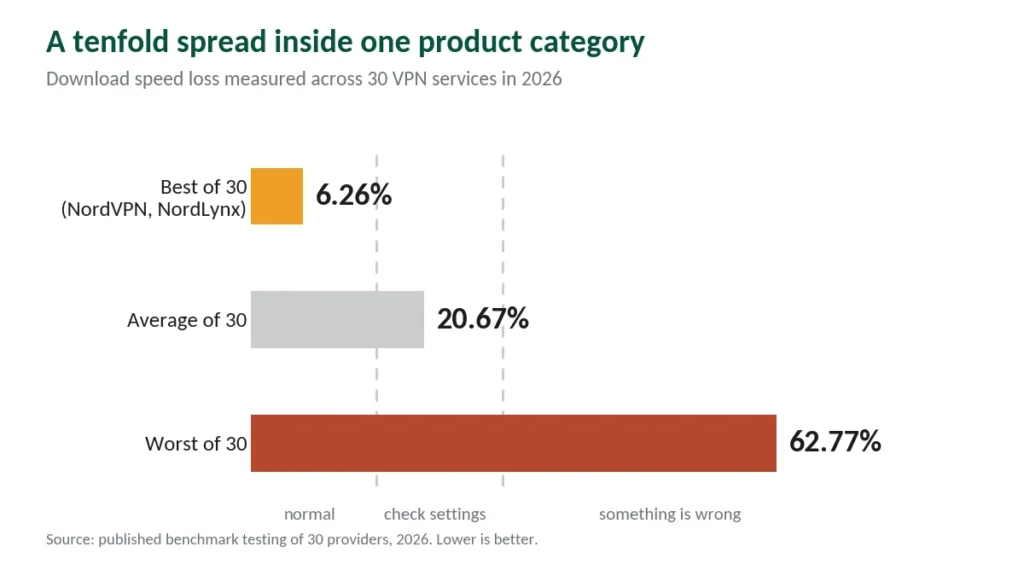
Testing across 30 services in 2026 found an average download loss of 20.67%. The best performer lost 6.26%. The worst lost 62.77%.
That is a tenfold spread between the top and bottom of the same product category. Which end you land on comes down to three things you can control, and this guide covers all of them.
The Short Answer
Normal is 3–15% on a good provider with a nearby server and a modern protocol. You will not notice it.
Above 30% means something is fixable — usually the protocol, the server, or both.
Above 50% usually means a free VPN, where the loss is structural rather than a settings problem.
Why Any VPN Costs You Speed
Three things happen when you connect, and each takes time.
Encryption. Your device encrypts every packet before sending and decrypts every packet arriving. Modern ciphers like AES-256 and ChaCha20-Poly1305 are efficient, and on current hardware this is the smallest of the three costs.
The detour. Without a VPN your traffic goes device → ISP → website. With one it goes device → ISP → VPN server → website. If that server sits 8,000 kilometres away, physics adds 50–200ms regardless of how good the provider is.
The server’s own load. VPN servers are shared. When too many people use one, everyone’s bandwidth divides. This is why speeds drop in the evening on popular servers and recover overnight.
Encryption is the part people blame and the part that matters least. The other two account for most of what you lose.
What the Percentage Actually Means for You
This is where generic advice fails, because the same percentage lands very differently.
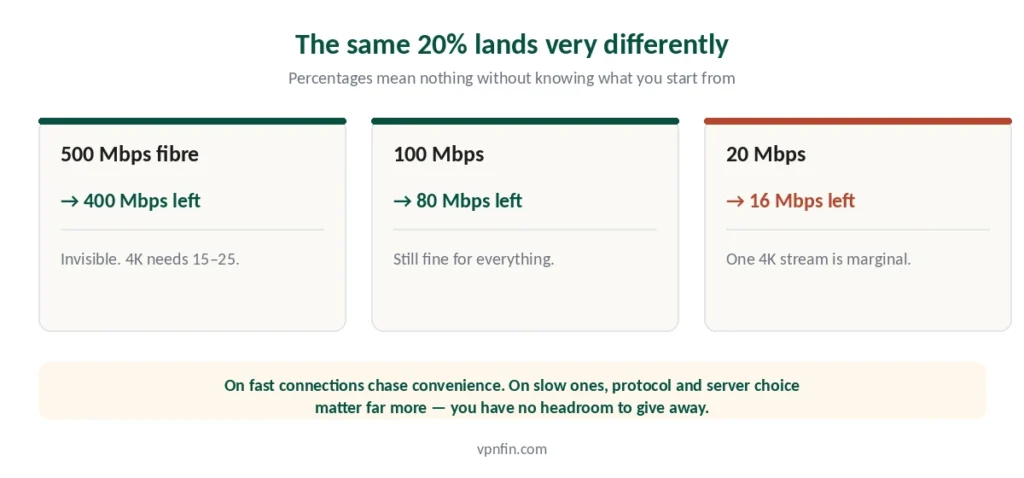
On 500 Mbps fibre: a 20% loss leaves you 400 Mbps. Netflix 4K needs 15–25. You will never notice. YouTube needs about 5 Mbps at 1080p and 20 at 4K — even less demanding.
On 100 Mbps: the same 20% leaves 80 Mbps. Still fine for everything.
On 20 Mbps: 20% leaves 16 Mbps. Now a single 4K stream is marginal, and two at once won’t work.
The practical rule: on a fast connection, chase convenience. On a slow one, chase efficiency — protocol and server choice matter far more when you have no headroom.
The Four Fixes
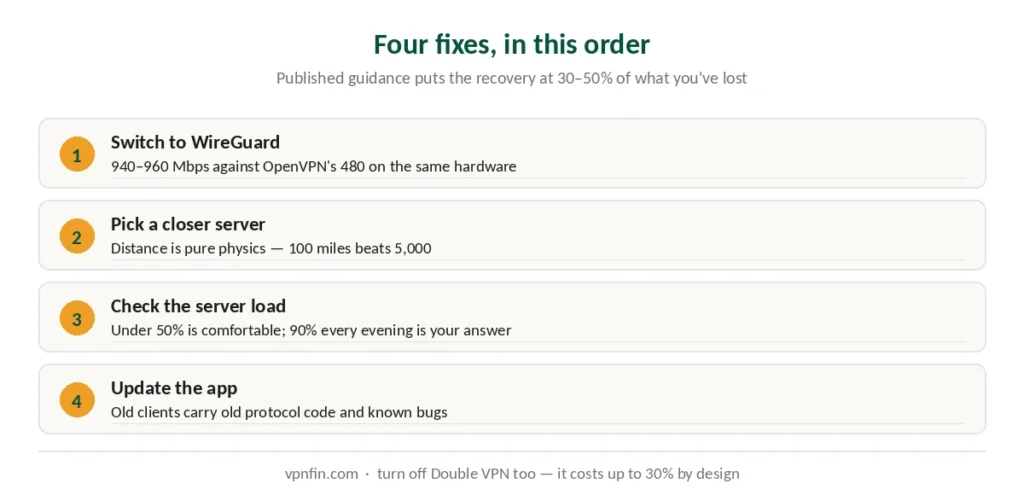
Published guidance suggests these recover 30–50% of lost speed for most people. Work through them in order.
1. Switch the protocol to WireGuard. This is the single biggest lever, and most people never touch it. In 2025–2026 testing, WireGuard reached 940–960 Mbps on a gigabit connection against roughly 480 Mbps for OpenVPN on the same hardware — near enough double. On modest hardware like Chromebooks the difference is even more noticeable.
Look in your app’s settings for WireGuard, or the provider’s own version: NordLynx on NordVPN, Lightway on ExpressVPN. If your app is set to “automatic”, it usually picks correctly — but not always. Our page on slow NordVPN speeds covers why NordVPN slows down and how to measure and fix it.
2. Pick a closer server. Distance is the second biggest factor and it’s pure physics. A server 100 miles away will always beat one 5,000 miles away. Unless you need a specific country for content, connect to the nearest one. One exception worth knowing: virtual server locations put the machine much further away than the country label suggests.
3. Check the server’s load. Most apps show it as a percentage. Anything under 50% is comfortable. If your usual server sits at 90% every evening, that’s your slowdown — switch to a different city in the same country for a similar IP with less congestion. Our guide to ExpressVPN Slow covers the three causes ExpressVPN names, tested in order.
4. Update the app. Outdated clients carry old protocol implementations and known performance bugs. This one takes thirty seconds and occasionally fixes everything. On Linux, check whether you’re on the native app or a manual config — the latter updates on your schedule, not the provider’s.
⚠️ And turn off features you’re not using. Double VPN routes you through two servers and costs up to 30% by design. If it’s on and you don’t need it, that alone explains your numbers.
When a VPN Makes You Faster
One scenario, and it’s real.
If your ISP throttles specific traffic — video streaming, torrenting, gaming — it has to identify that traffic first. A VPN encrypts everything, so the throttling has nothing to target. Mexico is a documented example, with three named providers reported to do it.
How to spot it: your speeds are fine on a speed test but collapse when you actually stream or download. Or performance craters every evening at the same hour, regardless of which site you’re on. Not every stall is throttling though — three common causes have nothing to do with your ISP.
How to confirm it: run a speed test without the VPN, then with it, during your problem hours. If the VPN result is higher, you were being throttled. Our IPVanish running slow page goes into why it slows down and what to change.
Outside of throttling, a VPN cannot exceed your base connection. Anyone claiming otherwise is selling something.
How to Measure Your Own
Five minutes, and it settles the question for your setup rather than in general.
Step 1. Disconnect the VPN, close everything else, run a speed test. Write the number down — this is your baseline.
Step 2. Connect to the nearest server on WireGuard. Run the same test.
Step 3. Calculate the drop as a percentage of baseline.
Step 4. Repeat at your usual usage time, especially evenings. Congestion is time-dependent and won’t show at 10am.
Reading the result: under 15% is normal and not worth chasing. 15–30% suggests server or protocol choice. Above 30% consistently, after trying the four fixes, points at the provider rather than your setup — and our troubleshooting guide covers when that conclusion is warranted.
⚠️ Slow and unstable are different faults. If the speed is acceptable but the tunnel keeps dropping, none of the four fixes above apply — that is usually your phone shutting the app down rather than anything to do with throughput.
Where the Providers Land
The spread between providers is wider than most comparison tables suggest.
NordVPN posted the best result in the 30-service test at 6.26% loss on NordLynx, and West Coast Labs recorded an 817 Mbps average across all routes on a gigabit baseline in 2025. The 2.9% figure in the table below comes from CNET’s separate round — different routes and different baselines produce different numbers, which is why we name the source beside each one rather than averaging them into a single claim. Our Surfshark Slow page goes into the 30% benchmark and the fixes beyond it.
The mid-field — Surfshark at 21% and ExpressVPN at 18% in CNET’s testing, published by a company that also owns two VPN brands — sits comfortably inside “you won’t notice on fibre.” Our ranking on speed alone puts the same providers in order and explains why other labs disagree with these figures.
CyberGhost at 31–38% is where the percentage starts to matter on slower connections.
| Provider | Speed loss | Source |
|---|---|---|
| NordVPN | 2.9% | CNET |
| Surfshark | 21% | CNET |
| ExpressVPN | 18% | CNET |
| CyberGhost | 31–38% | independent labs |
| PureVPN | 12–67% | four labs, varies by server |
| Proton VPN | 16% | CNET |
Free VPNs lose 30–70% by most measurements, and that gap is structural: congested servers and bandwidth caps rather than anything about encryption. Our free VPN guide covers what the reputable free tiers actually offer. We also have a separate guide to VyprVPN running slow.
How We Research
This guide draws on published benchmark testing from named sources including Truescho’s 30-service comparison, Security.org’s survey of 12 premium providers, CNET’s testing round and West Coast Labs’ 2025 report, alongside our own full reviews of the providers we rank — cross-checked and verified at publication. We do not run our own speed tests; every figure here comes from a named third party and is attributed. Our full approach lives on the About Us page.
VPN Speed FAQ
Testing across 30 services in 2026 found an average download loss of 20.67%, with the best performer at 6.26% and the worst at 62.77%. On a good provider with a nearby server and WireGuard, expect 3–15% — imperceptible on most connections. Losses above 30% usually indicate a fixable configuration problem.
Most commonly one of three things: you’re connected to a distant server, you’re using an older protocol like OpenVPN instead of WireGuard, or your server is congested. Server load explains slowdowns that appear in the evening and disappear overnight. Switching protocol and server fixes the majority of cases.
WireGuard, by a wide margin. In 2025–2026 testing it reached 940–960 Mbps on a gigabit connection against roughly 480 Mbps for OpenVPN on identical hardware. Provider implementations count too — NordLynx on NordVPN and Lightway on ExpressVPN are both WireGuard-based.
Only in one situation: if your ISP throttles specific traffic types. Encryption prevents the ISP from identifying what you’re doing, so the throttle never triggers. The tell is speeds that look fine on a test but collapse when you stream or download. Outside of throttling, a VPN cannot exceed your base connection.
Substantially. Free tiers lose 30–70% by most measurements, against under 10% for premium providers on nearby servers. The cause is structural — congested servers shared among many users and deliberate bandwidth limits — rather than anything about encryption strength.
It depends entirely on your baseline. On a 500 Mbps line it leaves 400 Mbps, which is invisible for anything you do. On a 20 Mbps connection it leaves 16 Mbps, where a single 4K stream becomes marginal. Percentage figures mean nothing without knowing what you start from.
The Short Version
Yes, but the number that matters is yours, not the average. Measure your baseline, connect to a nearby server on WireGuard, measure again.
Under 15%: working as intended, stop worrying about it.
Above 30%: switch protocol, switch server, check server load, update the app. Those four steps recover most of it.
Still above 30% afterwards: the provider is the constraint, and every one we rank offers at least 30 days to find that out. Our page on slow CyberGhost speeds covers baseline tests and protocol changes for better speed.