
Disclosure: VPNFin is reader-supported. If you buy a VPN through links on this page, we may earn a commission at no extra cost to you. This never affects our ratings — here’s our full disclosure.
NordVPN YouTube TV use runs into stricter checks than most streaming services. Google ties channels to a home area set by ZIP code, can verify location through your phone, and limits home-area changes to twice a year, only when you are physically in the new area, PCRisk reports. Security.org found NordVPN worked in its domestic US tests, but the rules matter more than the server.
What YouTube TV Checks Before NordVPN Matters
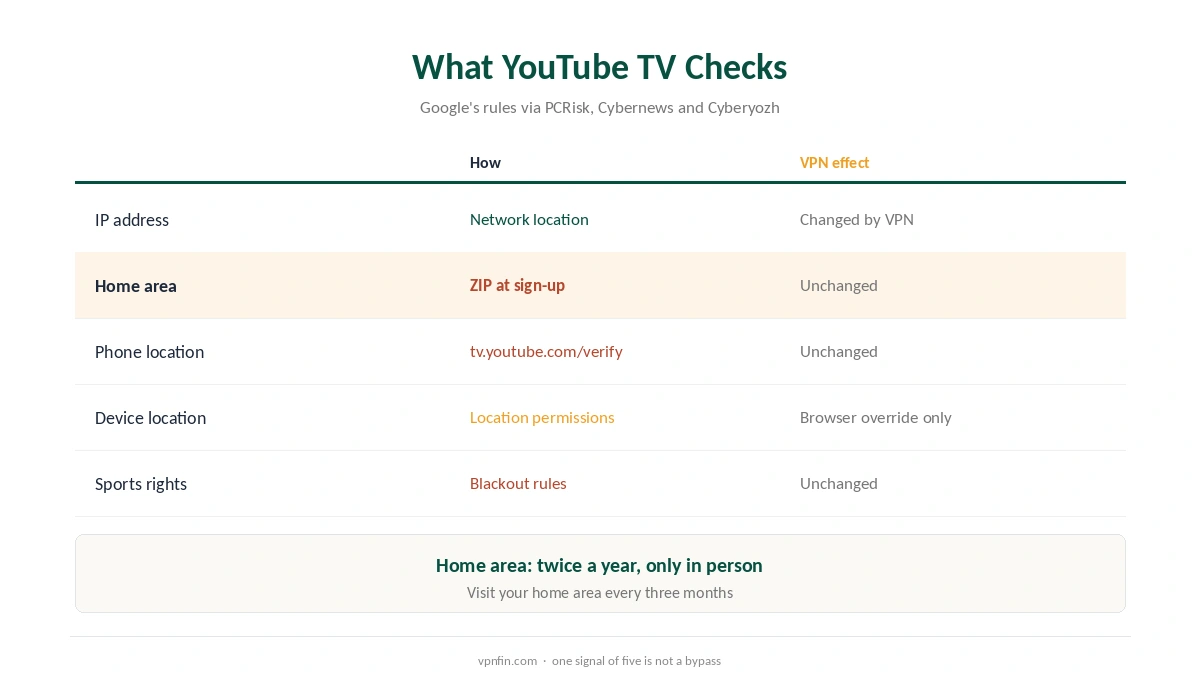
According to Google, as summarised by PCRisk, viewing options depend on your home area, sign-up requires a home ZIP code, and YouTube TV may ask for device location permissions or a phone check at tv.youtube.com/verify. Cybernews adds sports blackout rules and GPS checks.
Cyberyozh notes that Google’s own instruction for the proxy error is to switch the VPN off. That is the honest baseline: a VPN changes only one of several signals.
NordVPN YouTube TV for US Travellers
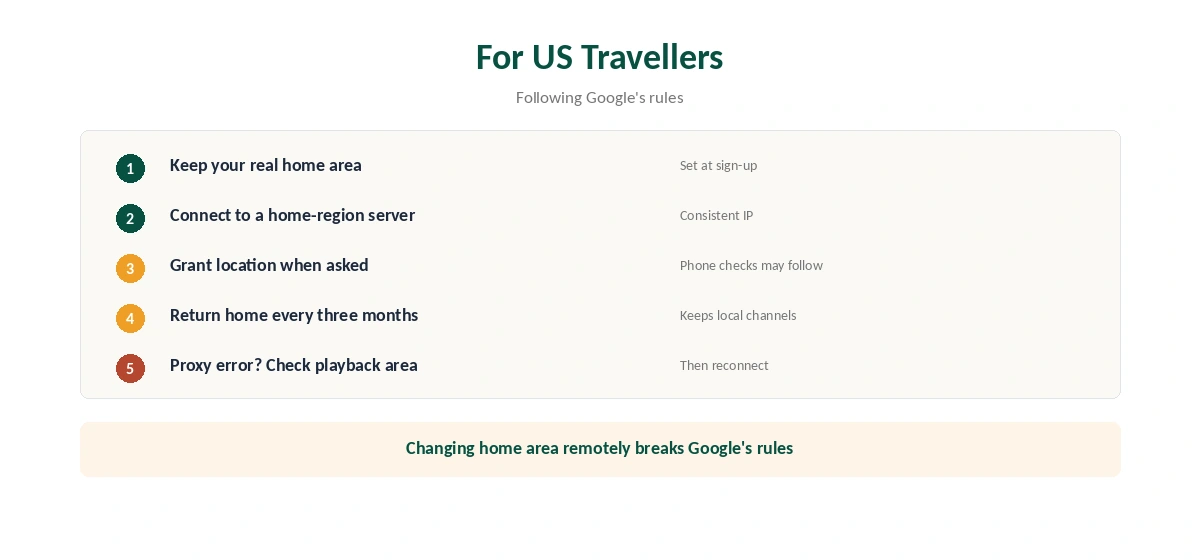
The case that fits Google’s rules is a US subscriber travelling within the US or abroad. Google advises frequent travellers to use YouTube TV in their home area at least once every three months to keep local networks, PCRisk notes. Connecting to a NordVPN server in your home region can keep the IP consistent with that home area.
Security.org also notes that NordVPN’s browser extensions can override the location websites read through the browser’s Geolocation API. Our NordVPN Chrome guide covers the extension.
What a VPN Cannot Change
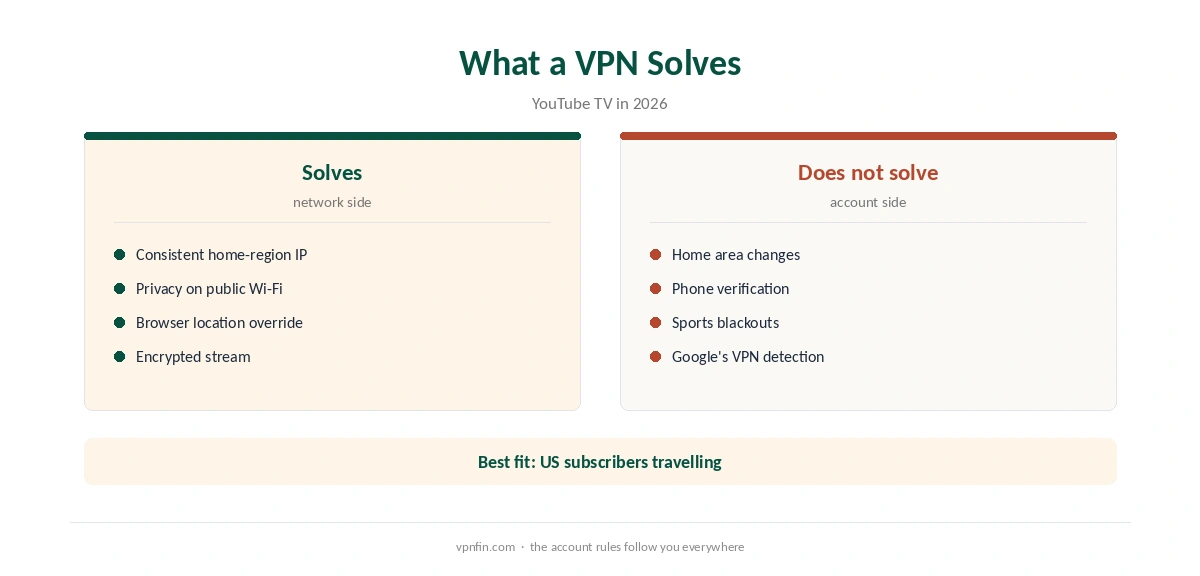
You cannot change your home area remotely; Google requires you to be in the new area, and only twice a year. Phone verification and sports blackouts still apply. Trying to fake a home area breaks Google’s rules and can cost you access.
Fixing the NordVPN YouTube TV Proxy Error
For a NordVPN YouTube TV proxy error, check Home Area and Current Playback Area in YouTube TV’s settings, as Cyberyozh suggests, and grant location permission when asked. Make sure your phone and computer report the same region. Test for leaks with our IPv6 leak guide.
Our YouTube TV VPN guide compares providers. Our NordVPN streaming hub covers other services. For sport, our sports streaming guide explains blackouts.
On TVs, our Firestick guide and router guide cover setup. Our refund guide explains the test window. NordVPN belongs to Nord Security, which also owns Surfshark.
NordVPN YouTube TV testing works best with a clean tunnel. Our DNS leak guide shows the check, and our NordVPN and Hulu guide covers a service with similar US rules. Our Firefox guide covers the other browser extension.
For realistic expectations, see our guide to what VPNs do. A VPN changes one signal of several. Google decides the rest.
Home Area Basics
YouTube TV ties local channels to a home area set by ZIP code at sign-up, PCRisk notes from Google’s help pages. The home area decides which local networks and sports you get. Google limits changes to twice a year, and only when you are physically in the new area.
That is why a VPN cannot move your home area. Google checks more than your IP address before allowing a change.
Phone Verification
YouTube TV may ask you to confirm your location through your phone at tv.youtube.com/verify. That check uses the phone’s own location, not the VPN on your TV. A VPN on the TV does not affect the phone’s answer.
If you are a US subscriber travelling inside the US, the phone check confirms you are in the country. Abroad, it reports the real location, which is one reason YouTube TV is stricter than most services.
The Three-Month Rule
Google advises frequent travellers to use YouTube TV in their home area at least once every three months, PCRisk notes. That keeps local networks attached to the account. Plan a stream at home before long trips.
Sports and Blackouts
Cybernews notes that YouTube TV applies sports blackout rules alongside its location checks. Blackouts follow the home area and the rights for each game. A VPN does not override them. Our sports streaming guide explains how blackouts work.
For a US subscriber away from home, the honest summary is simple. Keep a home-region IP for consistency, follow Google’s rules, and expect some local content to follow the home area rather than your location. Our guide to NordVPN and YouTube covers region-locked videos, and why cheap Premium is off the table.
Devices and Setup
On Fire TV and Android TV, run NordVPN on the same device as YouTube TV and connect to a server in your home region. Our NordVPN Firestick guide covers the app. Security.org also notes that NordVPN’s browser extensions can override the location websites read through the browser, which helps when watching on a laptop. Our PureVPN and YouTube TV page goes into home area rules and an honest look at access.
How We Research
This page draws on YouTube TV guides from PCRisk, Cybernews, Security.org and Cyberyozh, including their summaries of Google’s help pages. We cross-checked these sources against each other, and where they conflict or something can’t be verified, we say so in the text rather than guessing. We read every source on 5 October 2026. The main source we relied on is PCRisk’s YouTube TV guide. Our full approach lives on the About Us page.
NordVPN and YouTube TV FAQ
Security.org found it worked in domestic US tests. YouTube TV also checks home area, phone location and blackouts.
No. Google allows changes twice a year and only when you are physically in the new area.
A page where YouTube TV can confirm your location through your phone.
It detected the VPN or a location mismatch. Google’s own advice is to switch the VPN off.
At least once every three months, according to Google’s guidance as reported by PCRisk.
The Verdict
NordVPN YouTube TV use suits US subscribers keeping a consistent home-region IP while travelling. It cannot change your home area or beat phone verification, so follow Google’s rules.