
Disclosure: VPNFin is reader-supported. If you buy a VPN through links on this page, we may earn a commission at no extra cost to you. This never affects our ratings — here’s our full disclosure.
PureVPN YouTube TV access is harder to promise than most streaming services, and we found no recent independent test confirming it. YouTube TV ties local channels to a home area and periodically re-checks that you are physically near it, using location signals beyond your IP address. A topvpn guide argues no VPN can honestly guarantee reliable access for that reason.
This guide explains the rules, what PureVPN can realistically do for US subscribers, the setup and the fixes.
YouTube TV’s Rules
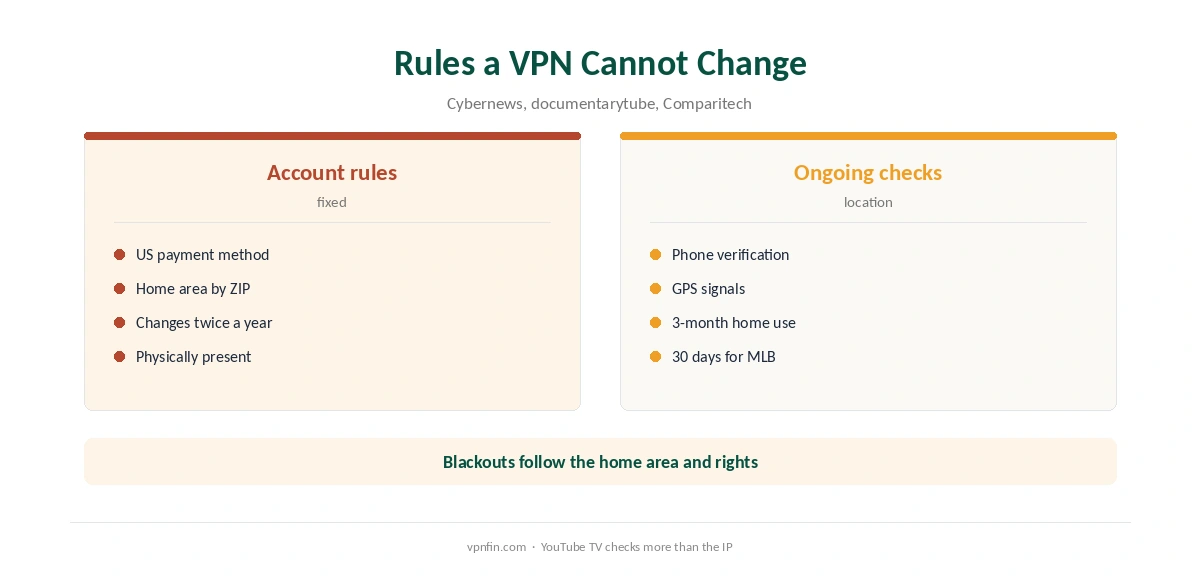
YouTube TV is a US-only service. Signing up needs a payment method tied to a US address, Comparitech notes. Your home area decides your local channels, and Cybernews notes you can change it only twice a year, while physically in the new area.
Documentarytube summarises YouTube TV’s travel guidance: frequent travellers should use the service in their home area at least once every three months, and MLB viewers at least once every 30 days, to avoid viewing restrictions.
Location Checks Beyond the IP
YouTube TV may ask you to verify your location through your phone, Cybernews and PCRisk report, and it uses GPS-based checks as well as IP addresses. A VPN on your TV does not change what your phone reports. That is why YouTube TV is stricter than most services.
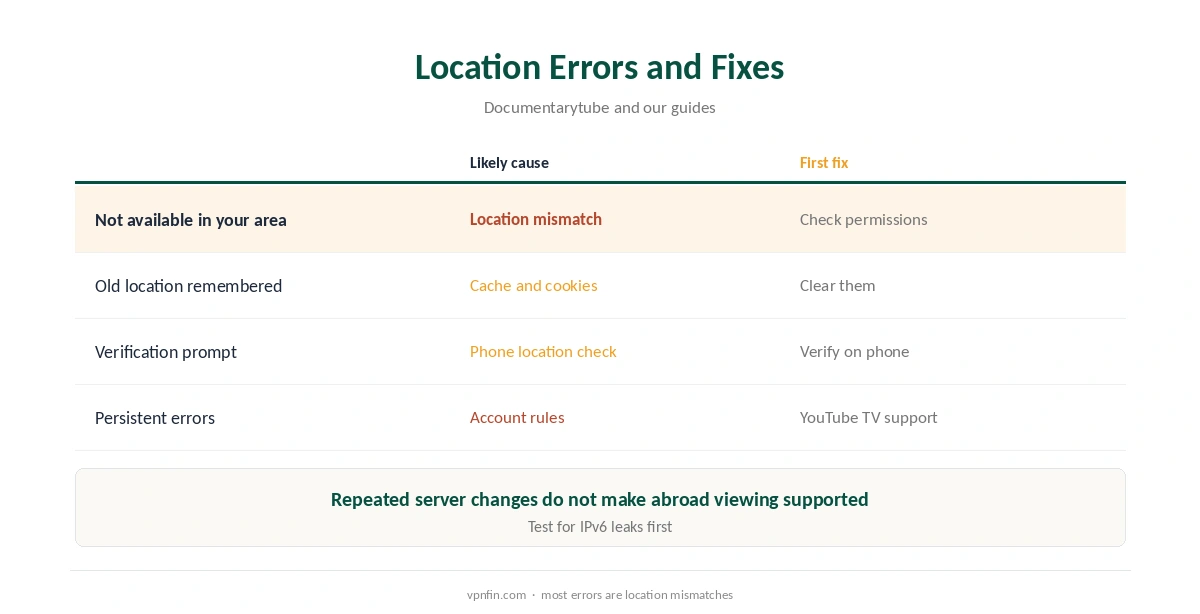
Documentarytube adds that repeatedly changing VPN servers or falsifying location does not turn international viewing into a supported use.
What PureVPN Can Do
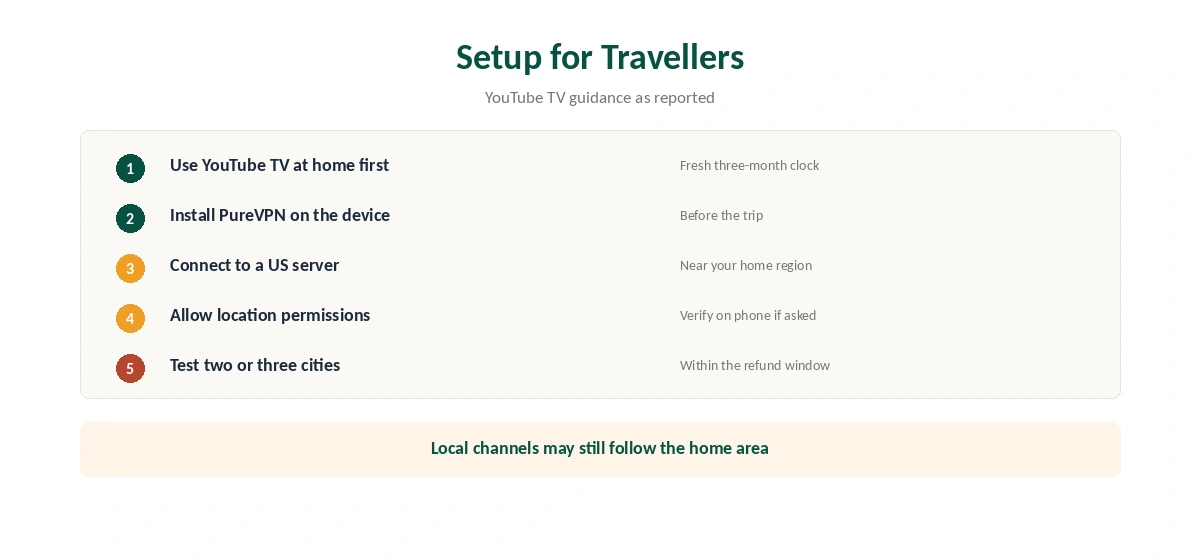
A US subscriber travelling inside the US gains privacy on hotel and airport Wi-Fi from PureVPN, without affecting home area rules. For a US subscriber abroad, a US server can restore access to some content, but local channels and sports may still follow the home area and blackout rules. Our page on Surfshark and YouTube TV covers home area rules and what a VPN can realistically do.
For anyone outside the US without a US subscription, YouTube TV is not the right service. A VPN does not supply a US payment method or a home area.
PureVPN YouTube TV Setup for Travellers
Before travelling, use YouTube TV in your home area, so the three-month clock is fresh. Install PureVPN on the device you will watch on, and connect to a US server, ideally in or near your home region.
Open YouTube TV and allow location permissions if asked. If it requests verification, complete it on your phone. Our PureVPN Firestick guide covers the TV app.
Fixing Location Errors
Documentarytube notes YouTube TV says clearing cache and cookies may fix location problems. Check location permissions in the browser and on your phone, since a mismatch triggers errors. Test for leaks with our IPv6 leak guide before switching servers.
If problems persist, contact YouTube TV support, which documentarytube describes as the recommended route for location errors.
Devices for YouTube TV
On Fire TV and Android TV, PureVPN runs on the same device as YouTube TV, as our PureVPN Android TV guide explains. Apple TV has a native PureVPN app. Phones remain the device YouTube TV uses for location verification, so keep the phone’s location settings accurate.
A leaking DNS request can contradict the US address, so run our DNS leak guide once after connecting.
A Simple Rule of Thumb
If you live in the US and travel, PureVPN can help on the road. If you live outside the US, choose a streaming service licensed where you live instead.
Sports and Blackouts
Sports availability depends on your location, home area, league rights and blackout rules, documentarytube notes. A VPN does not override those. Our sports streaming guide explains how blackouts work.
Testing Before You Rely on It
Because no recent test confirms PureVPN with YouTube TV, test it yourself within the 31-day refund window, or the 7-day paid trial in our PureVPN trial guide. Record the date and city of each attempt, so you can spot a pattern. Try two or three US cities on the device you watch on, and note which ones work.
Confirm a US address with our VPN test page first. Our PureVPN troubleshooting guide covers general streaming errors.
What PureVPN Costs
On 5 October 2026, PureVPN’s order page listed the Standard 2-year plan at $58.20 for the first 27 months, renewing at $47.95 a year. A separate deals page showed $58.05 for the same term with a $54.95 renewal. The page you buy from changes the renewal by seven dollars a year, so check the renewal line at checkout.
One plan covers 10 devices. PureVPN offers a 31-day money-back guarantee, as our PureVPN refund guide explains, which leaves time to test streaming on your own devices.
| Provider | Renewal price | Per month | Tier |
|---|---|---|---|
| NordVPN | $139.08/yr | ~$11.59 | Basic |
| Surfshark | ~$79/yr | ~$6.58 | Starter |
| ExpressVPN | $99.95/yr | ~$8.33 | Basic |
| CyberGhost | $56.94/yr | ~$4.75 | 2-year |
| PureVPN | $47.95/yr | ~$4.00 | Standard, 2-year (1-year renews $57.95) |
| IPVanish | $89.99/yr | ~$7.50 | Essential |
| Windscribe | ~$69/yr | ~$5.75 | Pro |
| Proton VPN | ~$83.88/yr | ~$6.99 | VPN Plus |
| Mullvad | ~$65/yr | ~$5.40 | flat, no tiers |
| Norton VPN | $79.99/yr | ~$6.67 | Standard |
| Hotspot Shield | ~$95.99/yr | ~$8.00 | Premium annual |
| Astrill | $300 every 2 yrs | ~$12.50 | 2-year, same at renewal |
Related Guides
Our YouTube TV VPN guide compares providers, and our NordVPN YouTube TV guide covers the same rules with a rival. For regular YouTube, see our PureVPN YouTube guide. PureVPN belongs to Gaditek, which absorbed Ivacy in 2024.
How We Research
This page draws on YouTube TV guides from topvpn, documentarytube, Cybernews, PCRisk and Comparitech, and PureVPN’s pricing pages. We cross-checked these sources against each other, and where they conflict or something can’t be verified, we say so in the text rather than guessing. We found no recent independent PureVPN YouTube TV test. We checked time-sensitive figures, including prices in US dollars, on 6 October 2026. PureVPN showed two price grids on different pages on 5 October 2026. The main source we relied on is Cybernews’ YouTube TV guide. Our full approach lives on the About Us page.
PureVPN YouTube TV FAQ
We found no recent independent test confirming it. YouTube TV’s location checks go beyond the IP address.
No. Home area changes need you physically in the new area, twice a year at most.
At least every three months, and every 30 days for MLB, per YouTube TV’s guidance as reported.
Sign-up needs a payment method tied to a US address, which a VPN does not provide.
Clear cache and cookies, check location permissions, test for leaks, then contact YouTube TV support.
The Verdict
PureVPN YouTube TV use is a narrow case: privacy for US subscribers on the move, with no guarantee abroad. Respect the home area rules, test within the refund window, and expect local content to follow your home area.