
Disclosure: VPNFin is reader-supported. If you buy a VPN through links on this page, we may earn a commission at no extra cost to you. This never affects our ratings — here’s our full disclosure.
NordVPN on Switch works the same way as on other consoles: the Nintendo Switch cannot install VPN apps, so the VPN has to sit upstream. A VPN router or a PC sharing its connection gives full protection. NordVPN’s Smart DNS is the quickest option, but it changes only the region and encrypts nothing.
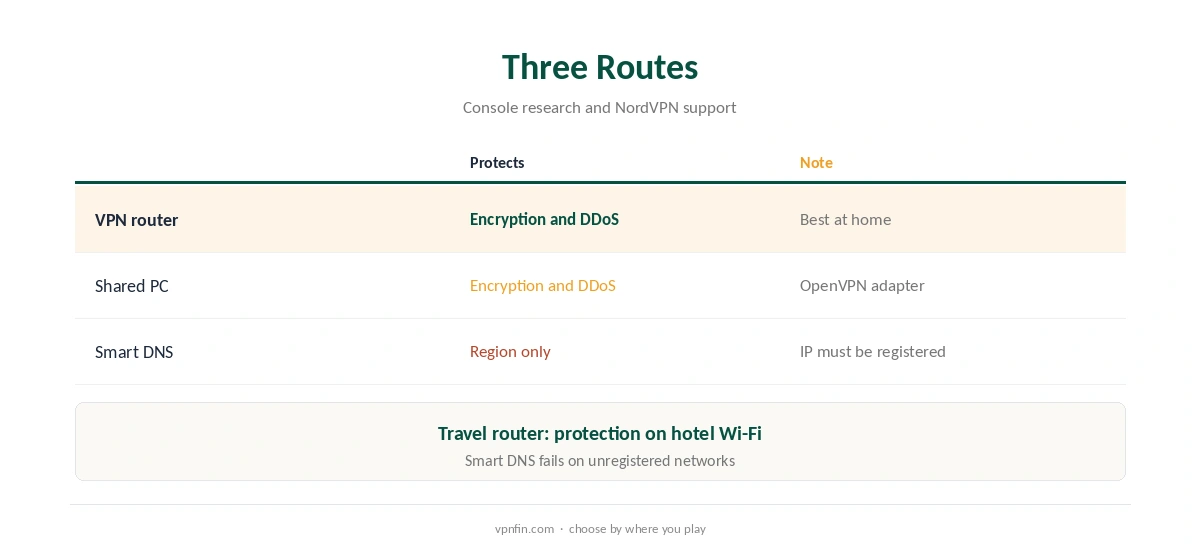
Three Routes for NordVPN on Switch
A VPN router covers the Switch and every other device at home, as our NordVPN router guide explains. A Windows PC can share its VPN connection through Mobile hotspot, using the OpenVPN adapter, as our NordVPN Xbox guide describes in detail.
Smart DNS needs nothing but a DNS change on the console. Earthsims notes it gives no encryption and no DDoS protection. Our Smart DNS vs VPN page explains the difference.
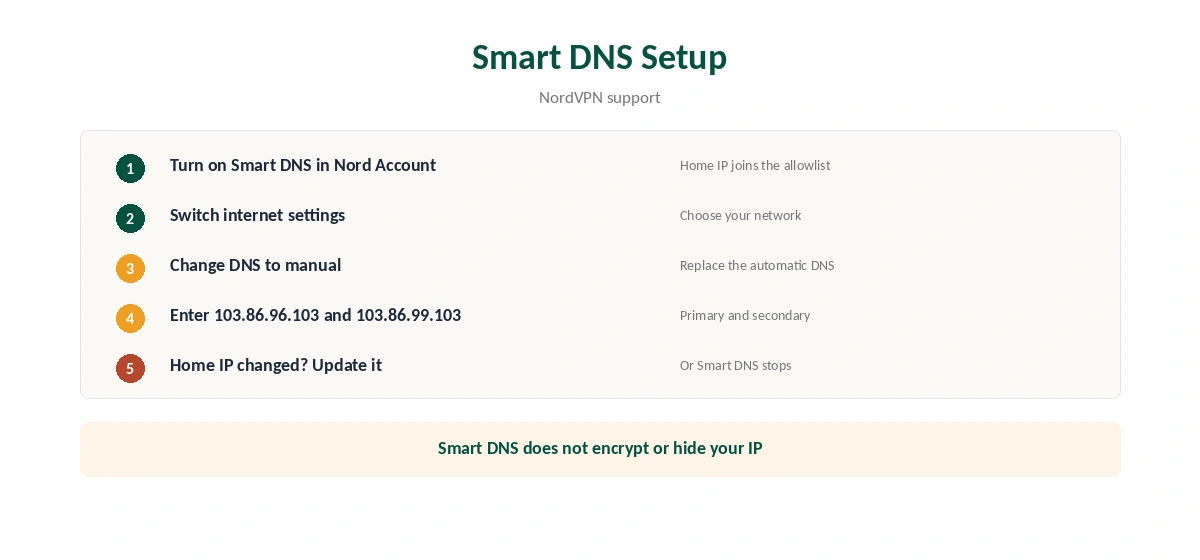
Setting Up NordVPN Smart DNS on Switch
First, turn on Smart DNS in your Nord Account; NordVPN’s support explains this adds your home IP to an allowlist. Then open the Switch’s internet settings, choose your network, change the DNS settings to manual and enter NordVPN’s addresses, 103.86.96.103 and 103.86.99.103.
If your home IP changes, update it in the Nord Account. Smart DNS also stops working on a different network, such as a hotel, unless you register that IP too.
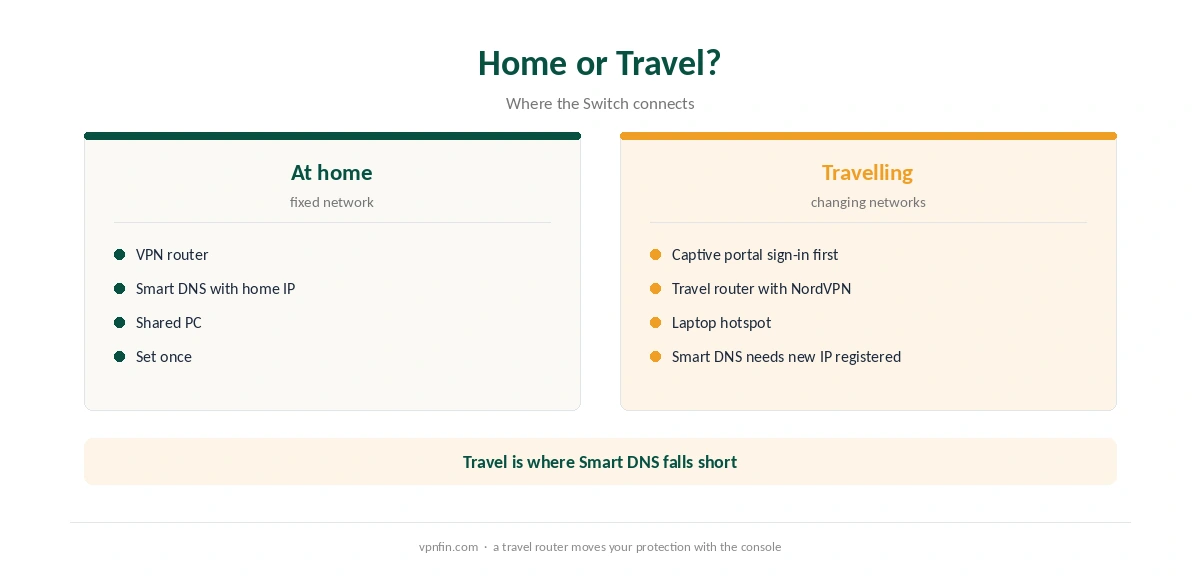
NordVPN on Switch While Travelling
The Switch is portable, which makes travel the tricky case. Hotel Wi-Fi with a captive portal needs the sign-in first. A travel router running NordVPN, or a laptop hotspot, protects the console on public networks; our public Wi-Fi guide explains why that matters.
Ping and Online Play
In the gaming tests we read, a VPN adds a few milliseconds of ping, so choose a nearby server. Our NordVPN gaming guide covers ping, and our PS5 guide covers the same routes on PlayStation. Our Switch VPN guide compares providers.
The kill switch protects only devices running the app, so a router setup is safer for the Switch; see our kill switch guide. NordVPN belongs to Nord Security, which also owns Surfshark.
Checking NordVPN on Switch
Once NordVPN on Switch is set up through a router, test a device on the same network with our VPN test page. Our DNS leak guide checks the resolver, and our refund guide explains the 30-day window. Run the checks again after router firmware updates.
For streaming apps on the Switch, our NordVPN streaming hub applies. A Smart DNS setup cannot be tested the same way, since it changes DNS only.
Using a Router With Built-In NordVPN Support
Some routers make the setup easier. NordVPN’s OpenVPN guide notes that GL.iNet routers have NordVPN quick setup built in, using service credentials. GL.iNet also makes travel routers, so the same device can protect a Switch at home and in a hotel.
Other routers need a manual OpenVPN profile, as our NordVPN OpenVPN guide explains. Check your router’s VPN menu before buying new hardware.
Online Play and Ping
Nintendo’s online games are sensitive to delay, especially fighting and racing games. A VPN adds a hop, so choose the nearest server and measure ping with and without it. If ping rises noticeably, connect the Switch outside the VPN for competitive play.
On a router, that means a second network or guest Wi-Fi without the VPN. Many routers support that split, and our router setup guide covers it.
Smart DNS on the Road
Smart DNS works only from IP addresses registered in the Nord Account. At home, that is easy. In a hotel, the network’s address changes, so Smart DNS stops working until you register the new IP.
Registering a hotel IP is possible, but the address may change again during your stay. A travel router running NordVPN avoids the problem entirely, since the VPN carries your location with it.
Keeping Children’s Settings
A VPN changes the network path, not the Switch’s parental controls. Nintendo’s controls stay in place whatever router or VPN the console uses. Parents who set up NordVPN on a router should still check those settings on the console itself.
Testing the Setup
After connecting the Switch through a VPN router or hotspot, run the console’s own connection test in its internet settings. It reports the connection type and confirms the network works. Then open a game’s online mode and note the ping. To confirm the VPN, check the public IP from a phone on the same network with our VPN test page. If it shows a NordVPN address, the Switch uses the tunnel too. Repeat the check after router firmware updates, since settings can reset. A two-minute test then saves an evening of confusion. If the Switch shows a NAT type warning after connecting, test without the VPN to see whether the router or the VPN causes it.
How We Research
This page draws on our console research with SpeedTestHQ, TechRadar and Earthsims, plus NordVPN’s Smart DNS support article. We cross-checked these sources against each other, and where they conflict or something can’t be verified, we say so in the text rather than guessing. We read every source on 5 October 2026. The main source we relied on is SpeedTestHQ’s gaming VPN guide. Our full approach lives on the About Us page.
NordVPN on Nintendo Switch FAQ
No. The Switch cannot run VPN apps. Use a router, a shared PC or Smart DNS.
No. It changes your region only, with no encryption or DDoS protection.
103.86.96.103 and 103.86.99.103, after you turn on Smart DNS in the Nord Account.
Only if you register that network’s IP in the Nord Account.
In most tests, no. Choose a nearby server to keep the added ping small.
The Verdict
NordVPN on Switch means a router or shared connection for protection, or Smart DNS for region changes only. For travel, a VPN travel router is the most practical option.