
Disclosure: VPNFin is reader-supported. If you buy a VPN through links on this page, we may earn a commission at no extra cost to you. This never affects our ratings — here’s our full disclosure.
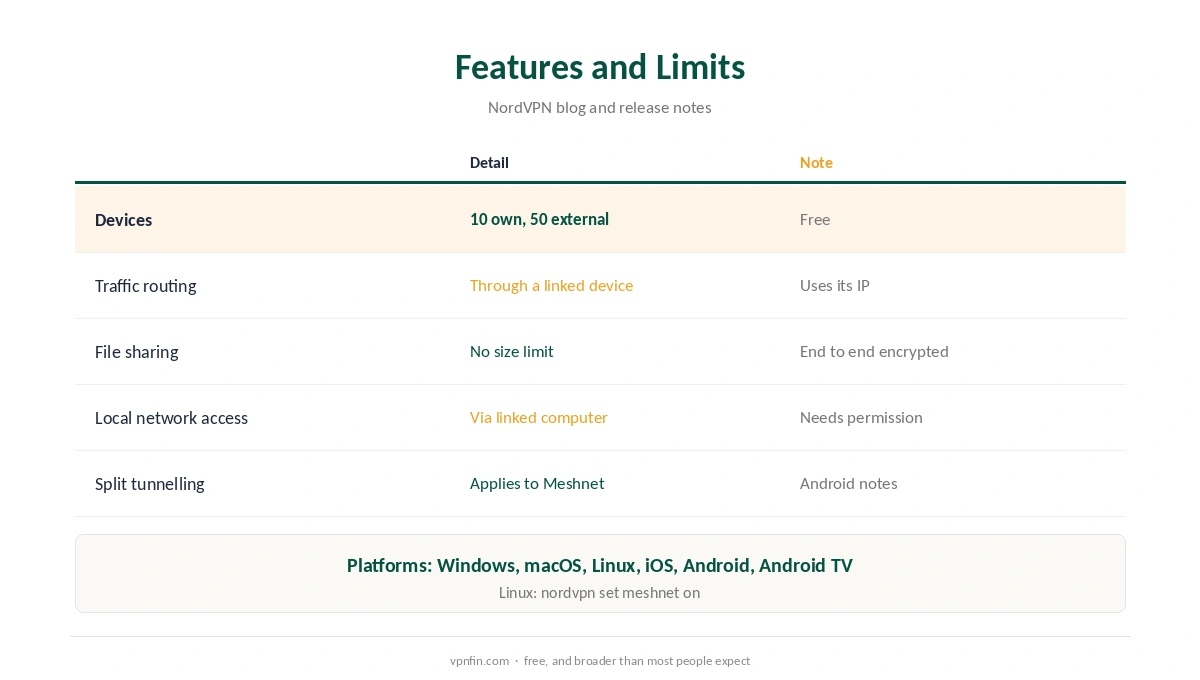
NordVPN Meshnet is a free private network between devices running the NordVPN app. NordVPN’s blog says it links up to 10 of your own devices and up to 50 external ones, works on Windows, macOS, Linux, iOS, Android and Android TV, and needs no paid plan. It handles traffic routing, file sharing, remote access and LAN-style gaming.
What NordVPN Meshnet Does
Routing lets one device send its traffic through another, so a laptop abroad can use your home IP. File sharing sends files of any size, end to end encrypted, according to NordVPN’s announcement. Remote access reaches your own devices, and games that support LAN see linked devices as local.
NordVPN also open-sourced Libtelio and Libdrop, the libraries behind Meshnet, along with its Linux app. Our NordVPN gaming guide covers the gaming use.
Reaching a Synology NAS Through Meshnet
A Synology NAS cannot run the NordVPN app, as our NordVPN Synology guide explains. Meshnet still helps: NordVPN’s Android release notes say that when you route traffic through a linked computer, you can reach that computer’s local network devices if it grants permission. Leave a home PC in Meshnet, and the NAS on the same network becomes reachable.
That avoids opening ports on the router, which our port forwarding guide discusses.
Setting Up NordVPN Meshnet
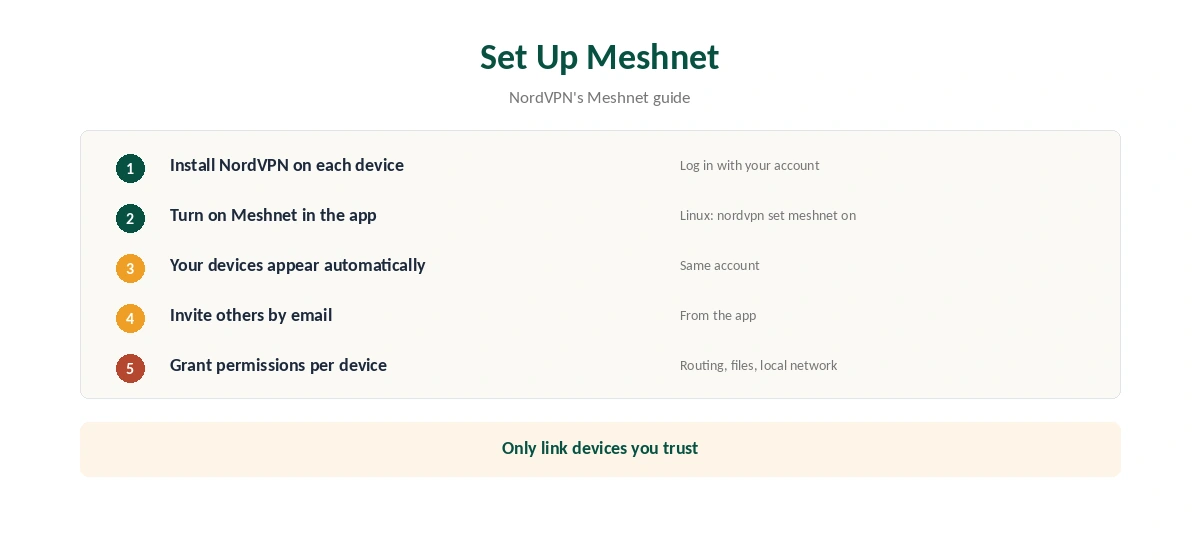
Install NordVPN on each device, log in and turn on Meshnet in the app, NordVPN’s blog explains. Your own devices appear automatically. To link someone else’s device, send an invitation to their email from the app.
On Linux, nordvpn set meshnet on switches it on, as our NordVPN Linux guide shows. On TVs, Meshnet works in the Android TV app, our Android TV guide notes.
Meshnet Is Staying
NordVPN had announced Meshnet would leave on 1 December 2025, then reversed the decision, its Linux release notes say. The feature remains free. Split tunnelling settings now apply to Meshnet connections too, according to the Android release notes; our split tunnelling guide explains them.
Privacy Notes
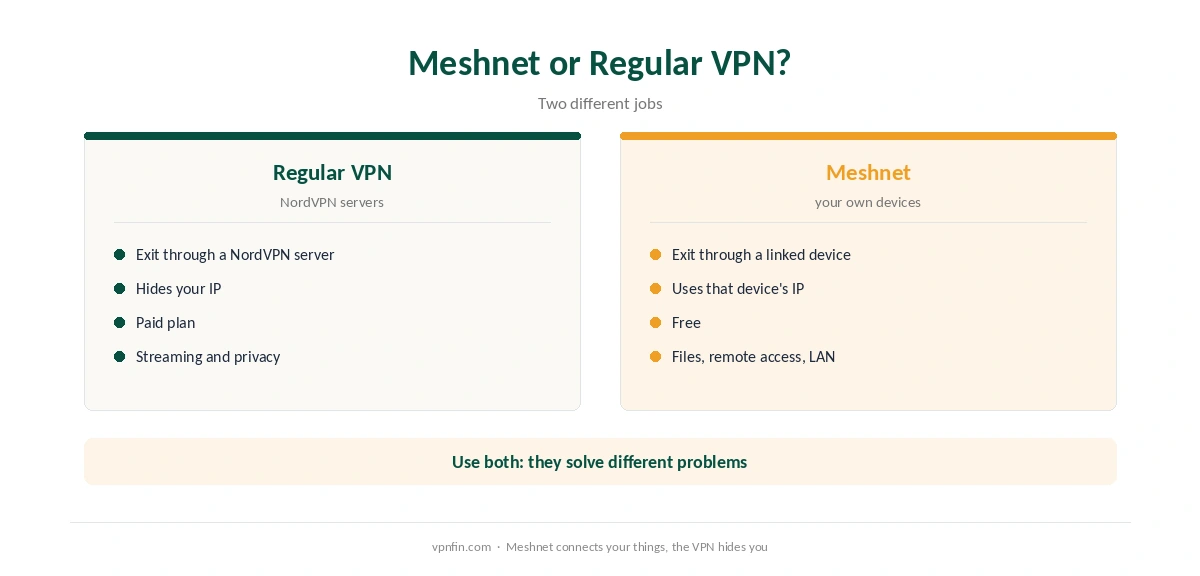
Routing through a friend’s device uses their IP, so their network sees your traffic leave. Only link devices you trust. Our kill switch guide and safety guide cover the rest of the security picture. NordVPN belongs to Nord Security, which also owns Surfshark.
Gamers can pair Meshnet with our Xbox guide for console setups. Our Windows guide shows where the Meshnet tab sits.
Other ways to reach a NAS appear in our Synology VPN guide. For the paid VPN, the refund guide explains the 30-day window. Meshnet itself costs nothing.
Sharing Files Step by Step
File sharing in Meshnet works between linked devices. Choose a device in the Meshnet list, pick a file, and send it. Depending on the permissions you set, the other side may need to accept it. NordVPN describes transfers as end to end encrypted, with no size limit.
File sharing permissions are set per device. You can let your own devices send files freely while external devices need approval. Check those permissions after linking anyone outside your household.
LAN Games With Friends
Games that support local network play can run over Meshnet, since linked devices appear to share a network. That lets friends in different cities play LAN-style without opening ports on their routers.
Each player needs the NordVPN app with Meshnet on. Meshnet is free, so friends do not need a paid plan. Our NordVPN gaming guide covers ping and DDoS protection for online play.
Routing Traffic Through Home
Routing sends a travelling device’s traffic through a computer at home, so services see your home IP. That helps with banking apps that flag foreign logins, or home streaming subscriptions while abroad.
The home computer must stay on and connected. Its upload speed limits what the travelling device gets, so a slow home line means slow browsing abroad.
Meshnet on Linux and Servers
On Linux, nordvpn set meshnet on switches the feature on from the command line. That suits home servers and Raspberry Pi boards, as our NordVPN Raspberry Pi guide explains. Add SSH to the allowlist first if you manage the machine remotely.
Who to Link
Every linked device can see the others in your Meshnet list, and routing permissions let one device use another’s connection. Link your own devices freely. Link friends’ devices only for a clear purpose, such as a game night or a file transfer, and remove them afterwards. Our NordVPN safety guide covers the wider privacy record.
Meshnet stays free, and NordVPN reversed its plan to retire the feature, according to its Linux release notes. Linked devices keep working with the paid VPN switched off, so you can use Meshnet on its own when you only need to reach your devices.
How We Research
This page draws on NordVPN’s Meshnet blog and announcements, its Android and Linux release notes, and coverage from TechRadar and My TechDecisions. We cross-checked these sources against each other, and where they conflict or something can’t be verified, we say so in the text rather than guessing. We read every source on 5 October 2026. The main source we relied on is NordVPN’s Meshnet guide. Our full approach lives on the About Us page.
NordVPN Meshnet FAQ
Yes. NordVPN says anyone can use Meshnet without a paid plan.
Up to 10 of your own and up to 50 external devices, according to NordVPN.
Through a linked computer on the same network, if that computer grants local network access.
No. It planned to on 1 December 2025, then reversed the decision.
Yes. NordVPN describes file sharing as end to end encrypted, with no size limit.
The Verdict
NordVPN Meshnet is a free, capable private network for routing, file sharing and remote access, including a NAS behind a home PC. Link only devices you trust.