
Disclosure: VPNFin is reader-supported. If you buy a VPN through links on this page, we may earn a commission at no extra cost to you. This never affects our ratings — here’s our full disclosure.
Kodi is legal. It’s open-source media centre software maintained by a non-profit foundation, available in official app stores, and it has been around since 2003. Nothing about installing or running it is legally questionable. Our page on CyberGhost on Kodi covers running the app on the device and the router route for other boxes.
What people install into it is a separate question, and almost every guide on this topic blurs the two.
A useful comparison from one published source: think of Kodi like YouTube. The platform is legal; what individual users access through it may not be. Our page on TunnelBear on Kodi covers device-level setup on each platform and its limits.
This guide covers what a VPN genuinely does here — and, more usefully, what it doesn’t.
The Short Answer
The official repository ships legal add-ons — YouTube, Pluto TV, BBC iPlayer, Plex, Crackle. Using those needs no defending.
Third-party add-ons are the grey area. Some pull from licensed feeds, some from whatever responds to a request. That’s where the legal questions start.
A VPN hides your traffic from your ISP. It does not change the legal status of anything you stream, and no honest guide should imply otherwise.
Where the Grey Area Actually Starts
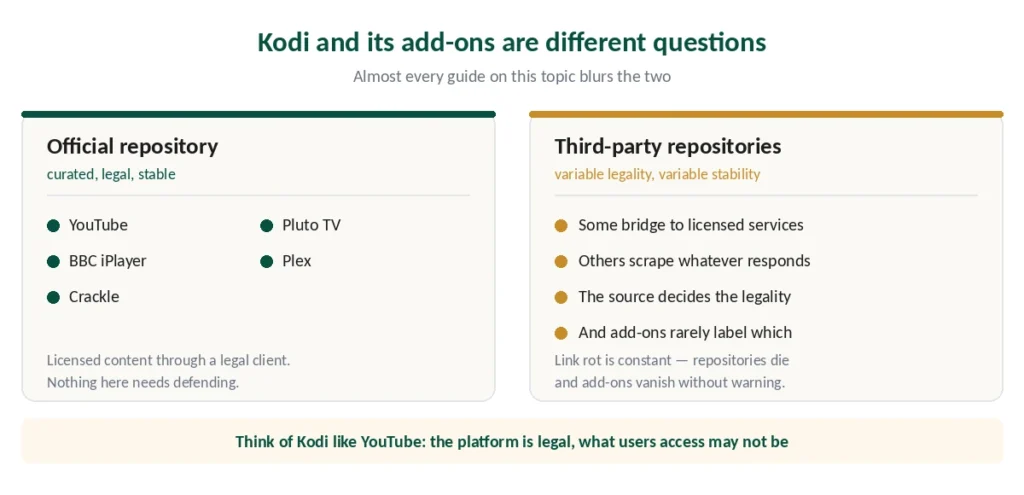
The official Kodi repository is curated and ships nothing controversial. YouTube, Pluto TV, BBC iPlayer and similar services are licensed content delivered through a legal client.
Third-party repositories are where the ecosystem gets complicated. Some add-ons bridge to legitimate services. Others act as scrapers pulling streams from external sources, and the source determines whether what you’re watching is licensed.
The practical problem is that you often can’t tell. An add-on that aggregates streams doesn’t label which ones are properly licensed, and published community reports describe constant link rot — add-ons disappearing as repositories die, requiring URL swaps and replacements.
⚠️ Even the official side has been unstable. Community reports flagged a major Kodi repository outage in early 2026 that affected access to official modules, not just third-party ones.
What a VPN Does Here
Three things, and they’re worth being precise about.
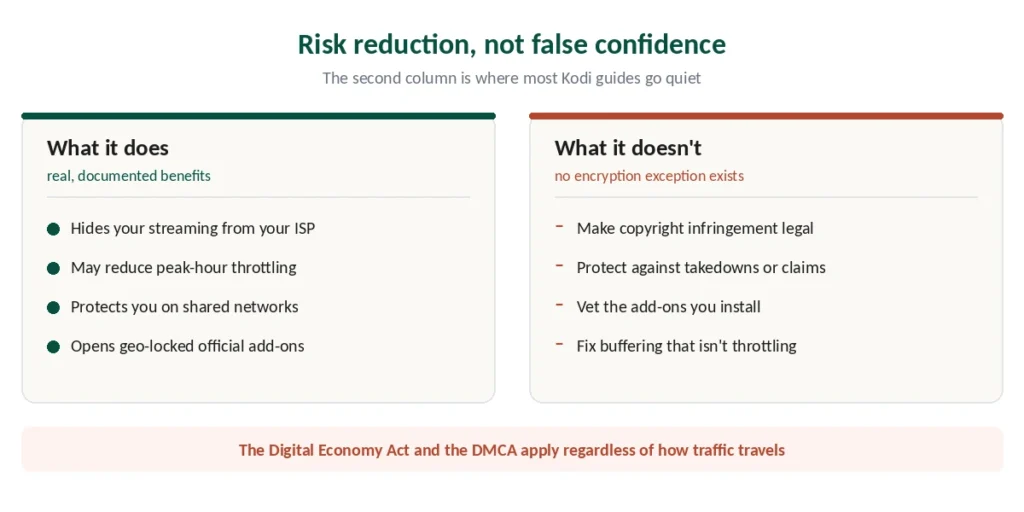
It hides your streaming from your ISP. Without one, your provider can see the connections your device makes, log what you streamed and when, and in some countries retain that record. With one, they see encrypted traffic to a VPN endpoint. Our page on Surfshark on Kodi covers running the app on the device and routing only Kodi with Bypasser.
It may reduce throttling. Some ISPs slow high-bandwidth streaming during peak hours. Encrypted traffic can’t be identified as streaming, so the throttling has nothing to target.
It protects you on shared networks — hotel Wi-Fi, dorm internet, a household network where others have visibility. This applies whether your add-ons are official or not.
What It Doesn’t Do
This is where most Kodi guides go quiet, and it matters more than everything above.
It doesn’t make copyright infringement legal. Encryption changes what your ISP can observe. It changes nothing about the legal status of the content. In the UK the Digital Economy Act applies; in the US, the DMCA. Neither has an exception for encrypted traffic.
It doesn’t protect against account action or takedowns tied to what you stream. One published analysis puts it plainly: a VPN is risk reduction, not false confidence.
It doesn’t vet add-ons for you. Sketchy repositories carry malware and tracking regardless of how your traffic is routed, and a VPN doesn’t inspect what you install.
And it doesn’t fix every buffering problem — covered below, because this is where money gets wasted.
Not Every Buffering Problem Is Throttling
Worth its own section, because “buy a VPN to stop buffering” is the most common advice and it’s often wrong.
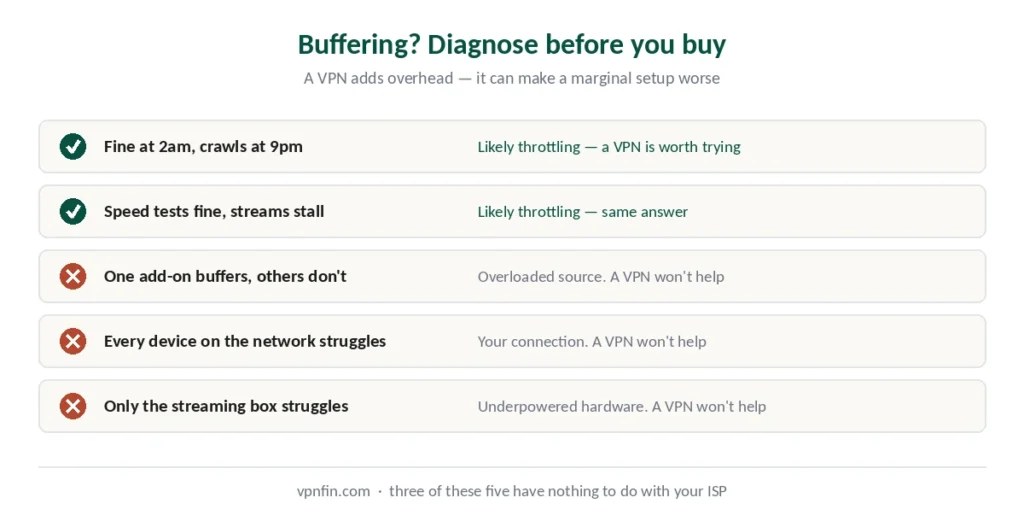
It might be throttling if Kodi works fine at 2am and crawls at 9pm, or if speed tests look normal while streams stall. Encrypting the traffic is a reasonable first thing to try.
It’s probably not throttling if the problem is one add-on rather than all of them — that’s usually an overloaded source. If it’s every device on the network, that’s your connection. If it’s only the streaming box, that’s often underpowered hardware struggling with the stream.
⚠️ Diagnose before buying. Our speed guide covers how to test your own connection properly, and a VPN adds overhead of its own — it can make a marginal setup worse rather than better.
Which Provider to Choose
Four things matter for Kodi specifically.
Native apps for your device. Kodi runs on Firestick, Android TV boxes, Windows, macOS and Linux, and you want the VPN on the same device. Our Firestick guide covers a wrinkle worth knowing about there.
Speed with headroom, since HD and 4K streams need bandwidth and a slow VPN causes the buffering you were trying to fix. NordVPN posted the best result in independent benchmark testing.
| Provider | Speed loss | Source |
|---|---|---|
| NordVPN | 2.9% | CNET |
| Surfshark | 21% | CNET |
| ExpressVPN | 18% | CNET |
| CyberGhost | 31–38% | independent labs |
| PureVPN | 12–67% | four labs, varies by server |
| Proton VPN | 16% | CNET |
An audited no-logs policy, because the visibility moves from your ISP to your provider — what a VPN actually hides covers why that distinction matters.
Broad server coverage, if you’re using geo-restricted official add-ons like BBC iPlayer. ExpressVPN covers 113 countries, the widest of the five.
The Sensible Setup
Install the VPN on the same device as Kodi, not on a different one. On devices without an app store, most providers offer a downloadable APK from their own site. Our guide to IPVanish on Kodi covers running it on the device and routing only Kodi.
⚠️ Only from the provider’s own site. Third-party APK repositories are a common malware vector, and a compromised VPN app is worse than none.
Or configure it on your router, which covers the streaming box regardless of what it supports — our router guide covers the three approaches.
Stick to the official repository unless you have a specific reason not to. It’s stable, legal, and the add-ons don’t vanish every few months. Our guide to Windscribe on Kodi covers running it on the device, testing free and streaming on Pro.
On an Nvidia Shield, our Shield guide explains how to keep Kodi in the tunnel and Plex out of it.
How We Research
This guide draws on published analysis from named sources including Security.org, TheBestVPN, SimplyTechToday and community reporting on the Kodi ecosystem — cross-checked and verified at publication. Several sources carry commercial interests in VPN services; we used them for technical detail confirmed elsewhere rather than for recommendations. We describe the legal position in general terms rather than as legal advice, and it varies by country. Our full approach lives on the About Us page.
Kodi VPN FAQ
Yes. Kodi is open-source media centre software maintained by a non-profit foundation, available in official app stores since 2003. The comparison one published source uses is apt: it’s like YouTube — the platform is legal, but what individual users access through it may not be. The legal questions concern third-party add-ons, not Kodi itself.
Not legally, and not at all if you use official repository add-ons on your home network. It becomes worthwhile if your ISP throttles streaming, if you’re on shared or public Wi-Fi, or if you want your provider’s view of your viewing removed. Published guidance describes it as strongly recommended for third-party add-ons specifically.
No. A VPN encrypts your traffic so your ISP can’t see what you stream. It changes nothing about copyright law — the Digital Economy Act in the UK and the DMCA in the US apply regardless of encryption. Any guide implying otherwise is selling confidence rather than protection.
Only if the cause is ISP throttling. The tell is Kodi working fine late at night and crawling at peak hours, or speed tests looking normal while streams stall. If only one add-on buffers, that’s an overloaded source. If every device on the network struggles, that’s your connection. A VPN adds overhead, so it can make a marginal setup worse.
Those in the official Kodi repository — YouTube, Pluto TV, BBC iPlayer, Plex, Crackle and similar. They’re curated, legal and stable. Third-party repositories vary enormously: some bridge to legitimate services, others scrape whatever responds, and community reports describe constant link rot as repositories disappear.
On the same device that runs Kodi. On devices without an app store, download the provider’s APK from its own website — never from a third-party repository, since those are a common malware vector. Alternatively, configure the VPN on your router, which covers the streaming box regardless of what it supports.
The Short Version
Kodi is legal software and has been for over twenty years. The official repository ships legal add-ons that need no justification.
A VPN hides your streaming from your ISP and may reduce throttling. Both are real benefits, particularly on shared or public networks.
It changes nothing about copyright law. Encryption affects what your provider can see, not what’s lawful to watch — and any guide suggesting otherwise is selling you confidence rather than protection. Our page on NordVPN on Kodi covers running the VPN on the device beneath Kodi.
And before buying one to fix buffering, check whether the problem is actually throttling. Often it isn’t. Our page on PureVPN on Kodi covers running PureVPN beneath Kodi, device by device.