Disclosure: VPNFin is reader-supported. If you buy a VPN through links on this page, we may earn a commission at no extra cost to you. This never affects our ratings — here’s our full disclosure.
Can you use a VPN on the Nvidia Shield TV? Yes. The Shield runs Android TV 11, so Android TV VPN apps install straight from Google Play, and Nvidia is still supporting the box: Shield Experience 9.2.4, released in February 2026, brought the January 2026 security patch to every Shield and Shield Pro, 9to5Google reports. That long support is why many people still use the Shield for Plex, Kodi and cloud gaming, and those uses shape how you should set up a VPN. Our page on PureVPN on Android TV covers code sign-in, split tunnelling modes and fixes.
This page covers installation, the apps, and how to keep Plex and GeForce NOW working with a VPN on.
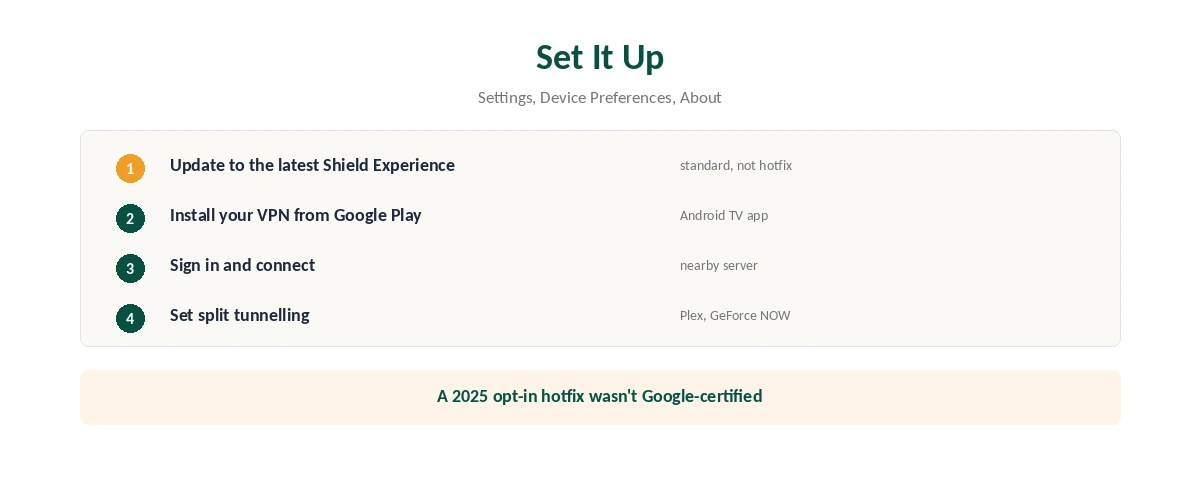
VPN for Nvidia Shield: How to Set It Up
| Step | What to do |
|---|---|
| 1 | Update the Shield: Settings, Device Preferences, About, System upgrade |
| 2 | Open Google Play and search for your VPN |
| 3 | Install the Android TV app and sign in |
| 4 | Choose a server and connect |
| 5 | Set split tunnelling for apps that need your home connection |
Stay on the standard update. In 2025, an opt-in Shield hotfix that wasn’t Google-certified could stop some apps from installing or updating through Google Play, Android Police reported; the February 2026 release went to all users.
Plex, Kodi and GeForce NOW
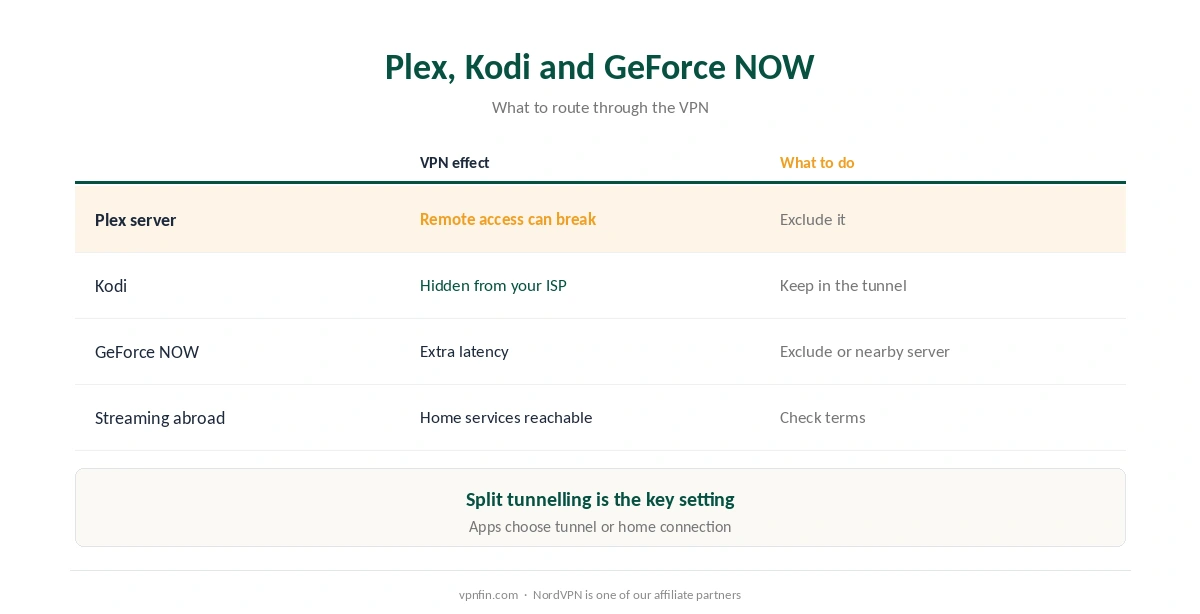
| Use | VPN effect | What to do |
|---|---|---|
| Plex server on the Shield | Remote access can break | Exclude Plex with split tunnelling |
| Kodi add-ons | VPN hides your traffic from your ISP | Keep Kodi in the tunnel |
| GeForce NOW cloud gaming | Extra latency | Exclude it, or use a nearby server |
| Streaming apps abroad | Home services reachable | Server at home; check terms |
Split tunnelling is the key setting on a Shield. It lets Plex’s remote access and cloud gaming use your normal connection while everything else goes through the VPN, as our split tunnelling guide explains. Our Kodi guide covers Kodi, and our port forwarding guide covers remote access through a VPN.
Cloud gaming and VPNs don’t mix well. Every extra hop adds latency, as our gaming guide explains.
Which VPN Apps Work
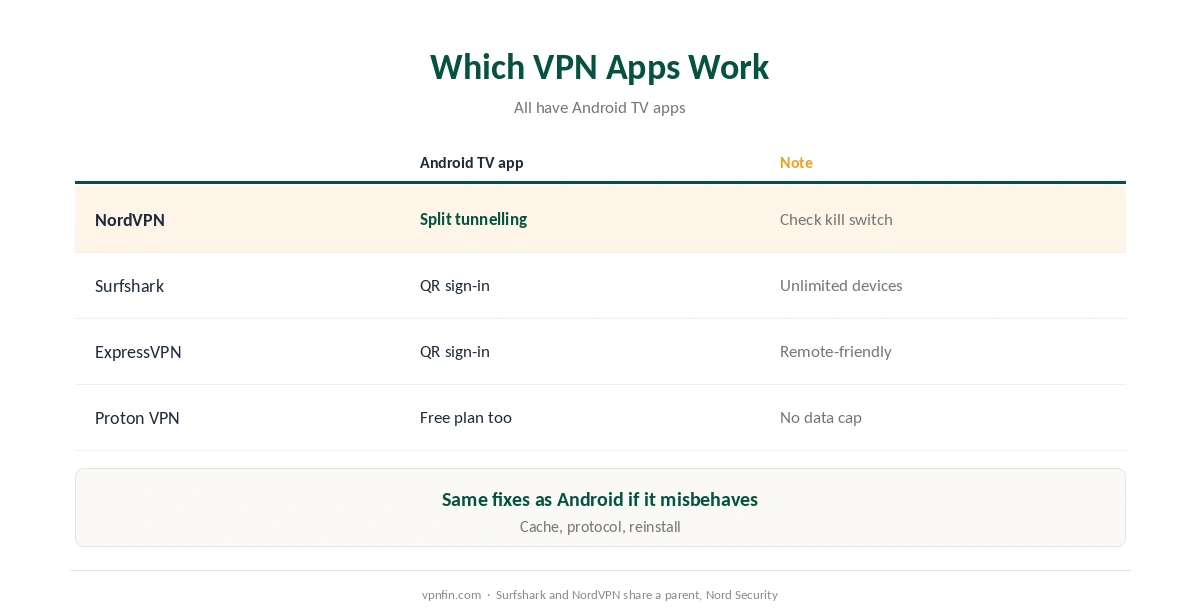
| Provider | Android TV app | Note |
|---|---|---|
| NordVPN | Yes, with split tunnelling | Check for a kill switch |
| Surfshark | Yes, QR sign-in | Unlimited devices |
| ExpressVPN | Yes, QR sign-in | Remote-friendly |
| Proton VPN | Yes, free plan too | No data cap on free |
The Shield runs these apps easily, with Gigabit Ethernet for steady 4K. Brand guides: NordVPN on Android TV and Surfshark on Android TV; the two share a parent, Nord Security.
Comparing boxes? Our Google TV Streamer guide covers Google’s newer box.
If the VPN Misbehaves on the Shield
Android TV behaves like Android. Battery-style app restrictions, Private DNS and always-on settings can all interfere, and the fixes for a VPN for Nvidia Shield match those in our Android fix guide: clear the app’s cache, switch protocol, then reinstall. Our page on Hotspot Shield on Android TV covers setup, the free tier and the kill switch.
Streaming app shows the wrong region? Clear that app’s cache after connecting, since apps store your last location. Our VPN location guide explains why sites remember old locations.
Need the VPN off quickly? Disconnect in the app, as our TV VPN off guide shows for Android TV boxes.
Choosing a VPN App for the Shield
The Shield runs Android TV, so most major VPNs install from the Play Store. Check for WireGuard support, split tunnelling for apps like Plex, and a kill switch. Our page on FastestVPN on Android TV covers the app, sideloading and setup.
NordVPN allows 10 devices, Surfshark and PIA set no limit, and Proton VPN allows 10, according to our device table. Our Proton VPN Android TV guide covers one more option. Our page on PIA on Android TV covers Nvidia Shield setup, split tunnelling and settings.
Shield Pro and Performance
The Shield has more processing power than most streaming sticks, so it handles VPN encryption alongside 4K streaming better. Wired Ethernet still beats Wi-Fi for steady speeds.
If streams stutter, choose a closer server or switch protocol before blaming the box.
Local Network Access
A VPN can block access to local devices such as a NAS or Plex server on your home network. Turn on the app’s local network option, or exclude Plex with split tunnelling. Our Synology VPN guide explains the NAS side.
Streaming Apps on the Shield
After connecting, open the streaming app fresh. If it shows your home library, close it fully, clear its cache in the Shield’s app settings, and reopen it. Check that the Shield’s time zone matches the server country if an app keeps refusing. Our Netflix VPN guide covers the rules streaming services set.
A Quick Rule
Streaming only? Any VPN with an Android TV app and WireGuard works. Running Plex or a NAS? Allow local network access or split tunnel. Seeing the wrong library? Clear the app’s cache and check the time zone. Our guide to VPN for Android TV covers apps, sign-in codes and what to check.
How We Research
Update history and support come from Nvidia’s release notes, 9to5Google and Android Police; app features from Gizmodo’s Android TV testing. Nvidia’s own release notes are at nvidia.com/shield/software-update. We read all sources on 28 September 2026. NordVPN is one of our affiliate partners. Our full approach lives on the About Us page.
VPN for Nvidia Shield FAQ
Yes. It runs Android TV 11, so Android TV VPN apps install from Google Play.
Yes. Shield Experience 9.2.4 arrived in February 2026 with the January 2026 security patch.
It can break remote access. Exclude Plex with split tunnelling.
It adds latency. Exclude GeForce NOW from the VPN or use a nearby server.
NordVPN, Surfshark, ExpressVPN and Proton VPN all have Android TV apps; pick one with split tunnelling.
The Verdict
A VPN for Nvidia Shield installs like any Android TV app, and the box is still getting updates in 2026. Our page on CyberGhost on Android TV covers setup, the TV app’s settings and its limits.
Use split tunnelling so Plex and cloud gaming keep your home connection while everything else goes through the VPN.