
Disclosure: VPNFin is reader-supported. If you buy a VPN through links on this page, we may earn a commission at no extra cost to you. This never affects our ratings — here’s our full disclosure.
TorGuard for Mac comes as a Universal app that runs natively on Apple Silicon and Intel Macs, TorGuard’s macOS guide says. You install it from a DMG rather than the App Store, so macOS may block the first launch until you allow it. The guide lists support from macOS 10.15 Catalina to 14 Sonoma, and the app can start with macOS and keep your login in Keychain.
This guide covers the setup, Gatekeeper, the settings and manual options.
TorGuard for Mac Setup
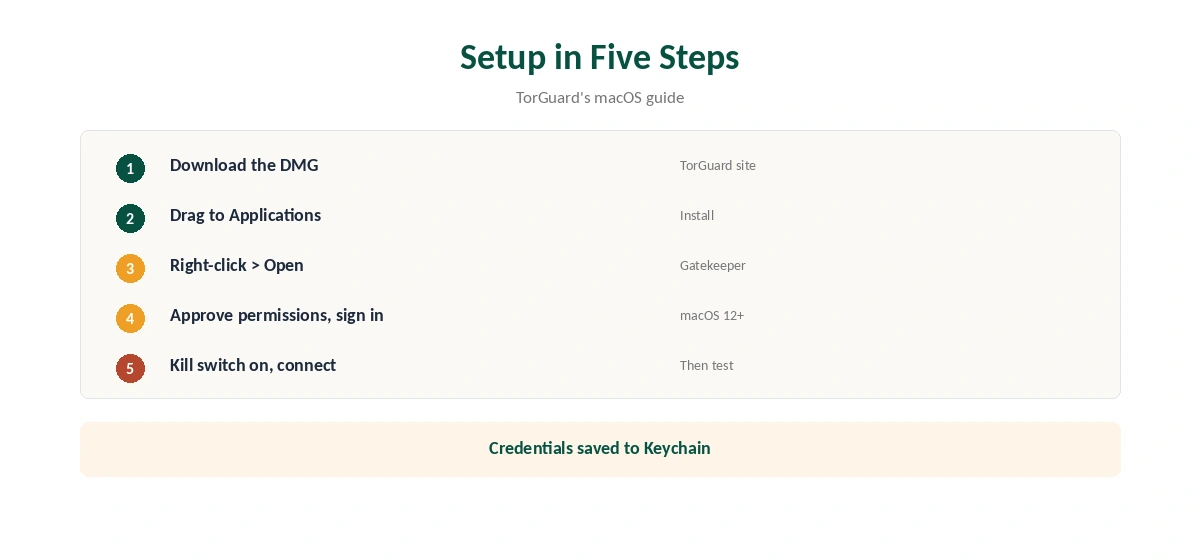
Download the macOS app from TorGuard, open the DMG and drag TorGuard to Applications, as its guide describes. On first launch, if macOS says it cannot open an app not downloaded from the App Store, right-click the app and choose Open. Approve the network permissions macOS asks for, sign in and connect.
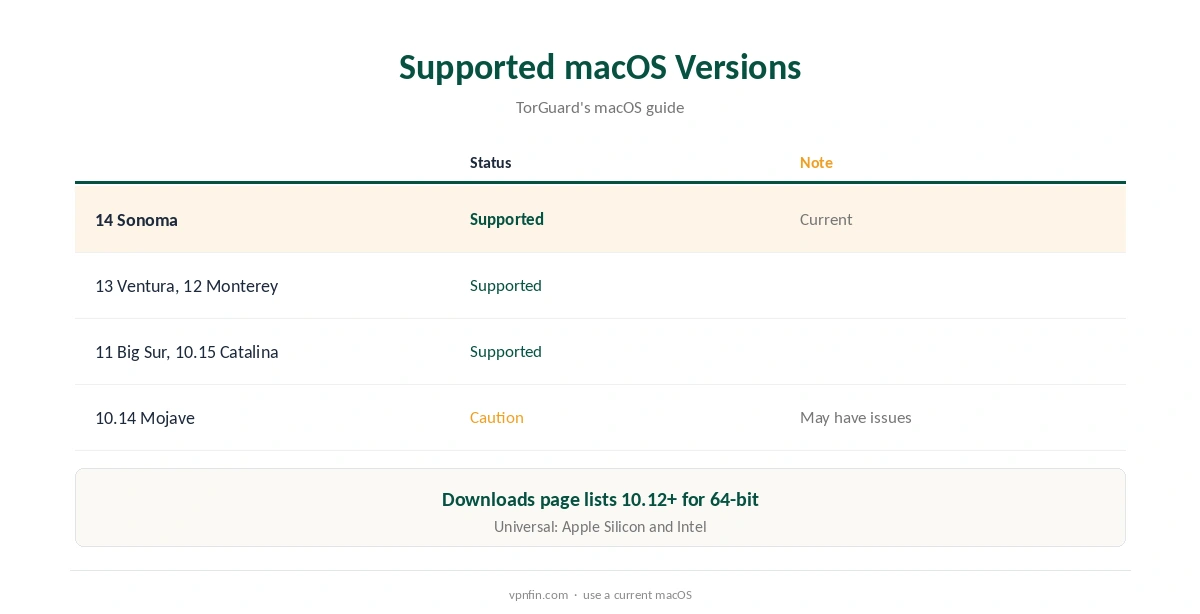
Supported macOS Versions
TorGuard’s guide marks macOS 14, 13, 12, 11 and 10.15 as supported, and 10.14 with a caution. Its downloads page lists an older minimum of macOS 10.12 for the 64-bit app. Use a current macOS for the best results.
Settings Worth Turning On
Turn the kill switch on, since TorGuard’s desktop apps ship with it off. Choose WireGuard for speed, and Stealth modes on networks that block VPNs. Enable start with macOS on laptops. Our kill switch guide and obfuscation guide explain why.
Manual Options
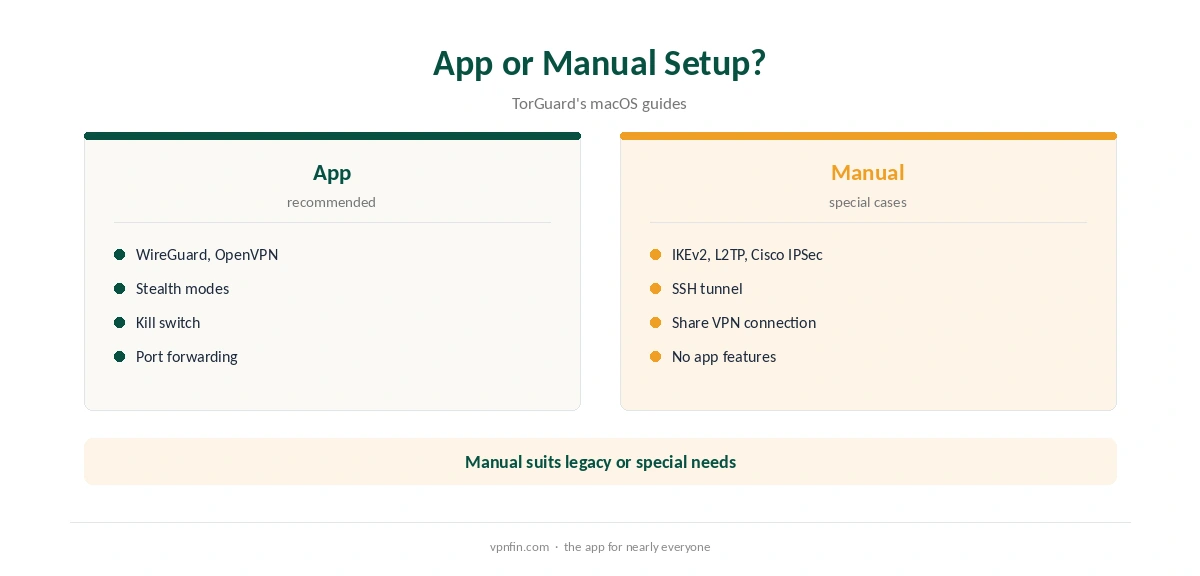
TorGuard’s macOS guides also cover IKEv2, L2TP/IPsec and Cisco IPSec through system settings, an SSH tunnel from the terminal, and sharing the VPN connection with other devices. These suit special cases, while the app handles everyday use with fewer steps.
Port Forwarding and Torrents
TorGuard includes port forwarding, which helps torrent seeding. Request a port in the client area, keep the kill switch on and bind your client to the VPN. Our port forwarding guide explains the setup.
TorGuard for Mac on Public Wi-Fi
On laptops, enable start with macOS and the kill switch, so the tunnel is up before apps reach the network. Our public Wi-Fi guide explains why that order matters on café and hotel networks.
Sharing the Connection
TorGuard’s macOS guides include sharing the VPN connection with other devices, which can help a console or TV without its own app. A router is the steadier long-term route, as our TorGuard router guide explains.
Several Macs
Standard allows up to eight devices, Fahimai notes, and Pro up to 12. Install TorGuard for Mac on each machine and sign in with the same account; Keychain stores the login on each Mac separately.
A Quick Rule
Apple Silicon or Intel? The same Universal app works. First launch blocked? Right-click and choose Open. Before anything else? Turn the kill switch on.
Why TorGuard for Mac Is Not in the App Store
TorGuard distributes its Mac app as a DMG from its own site, its guide shows, which is why Gatekeeper asks for permission on first launch. That is normal for apps outside the App Store. Download only from TorGuard’s site and check the checksum TorGuard lists on its downloads page.
Streaming on a Mac
Security.org found TorGuard’s Standard plan lacked streaming options and moved to Pro. If you plan to stream with TorGuard for Mac, check which plan you need first. Our Netflix VPN guide covers how services detect VPNs.
Checking for Leaks
After connecting, confirm the address with our VPN test page and run our DNS leak guide. Repeat after macOS updates.
Keeping It Updated
TorGuard’s downloads page lists the current desktop version. Check it now and then, since apps outside the App Store do not always update themselves. After updating, confirm the kill switch and protocol settings stayed the same.
Quick Check
After connecting, switch Wi-Fi off and on. With the kill switch on, apps should stop loading until the tunnel returns. Then check the address on our test page.
Apple Silicon Notes
Because the app is a Universal Binary, TorGuard’s guide says macOS automatically picks the right version for your Mac, so it runs natively on M-series chips. If you migrated from an Intel Mac, reinstall the app rather than copying it across, then sign in again and turn the kill switch back on.
Troubleshooting
If the app will not connect after a macOS update, re-approve its network extension in System Settings. Switch protocol if a network blocks one. Our Mac VPN troubleshooting guide covers more fixes.
TorGuard’s Record
Our audit table records no independent audit for TorGuard. It is run by VPNetworks LLC in Florida and settled a copyright lawsuit in 2022 by blocking BitTorrent on its US servers. Standard allows up to eight devices, and refunds are limited to seven days, as our TorGuard cost guide explains.
Related Guides
Our Mac VPN guide compares providers, and our guide to turning off a VPN on a Mac covers removing profiles.
How We Research
This page draws on TorGuard’s macOS getting-started guide, its downloads page and macOS guide index, and our TorGuard tables. We cross-checked these sources against each other, and where they conflict or something can’t be verified, we say so in the text rather than guessing. We checked time-sensitive figures, including prices in US dollars, on 7 October 2026. The main source we relied on is TorGuard’s macOS guide. Our full approach lives on the About Us page.
TorGuard for Mac FAQ
It does; the app is a Universal Binary for Apple Silicon and Intel.
It is not from the App Store; right-click the app and choose Open.
TorGuard’s guide lists 10.15 to 14, with 10.14 marked with a caution.
No; turn it on in the app’s settings.
Yes, with IKEv2, L2TP/IPsec or Cisco IPSec, per TorGuard’s guides.
The Verdict
TorGuard for Mac installs quickly from a DMG and runs natively on Apple Silicon. Allow it past Gatekeeper, turn the kill switch on and weigh the missing audit.