
Disclosure: VPNFin is reader-supported. If you buy a VPN through links on this page, we may earn a commission at no extra cost to you. This never affects our ratings — here’s our full disclosure.
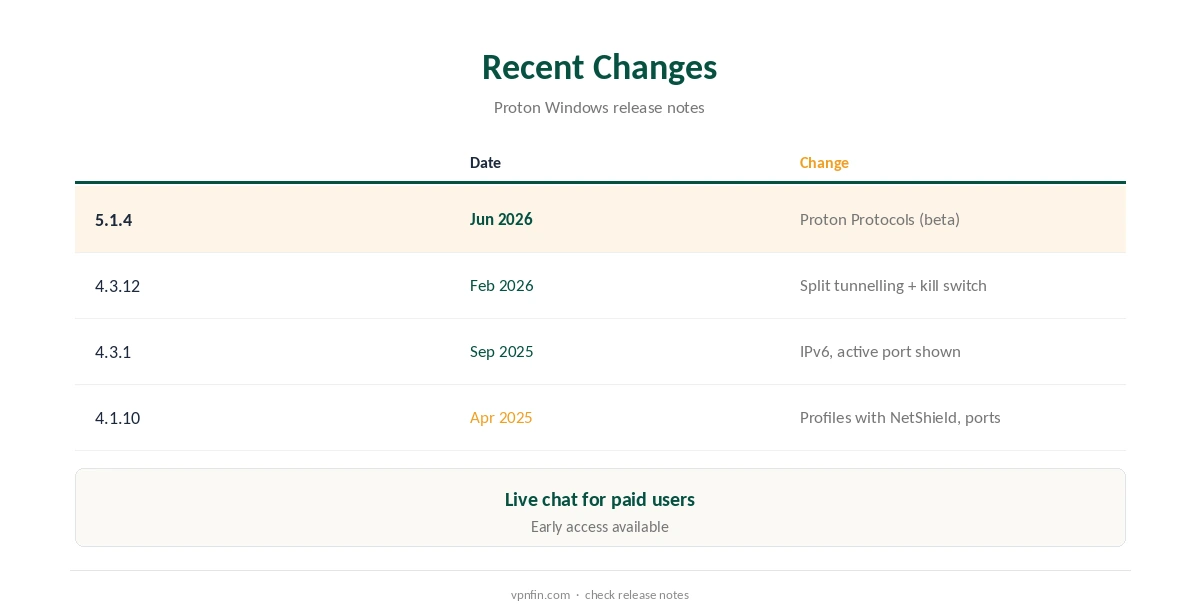
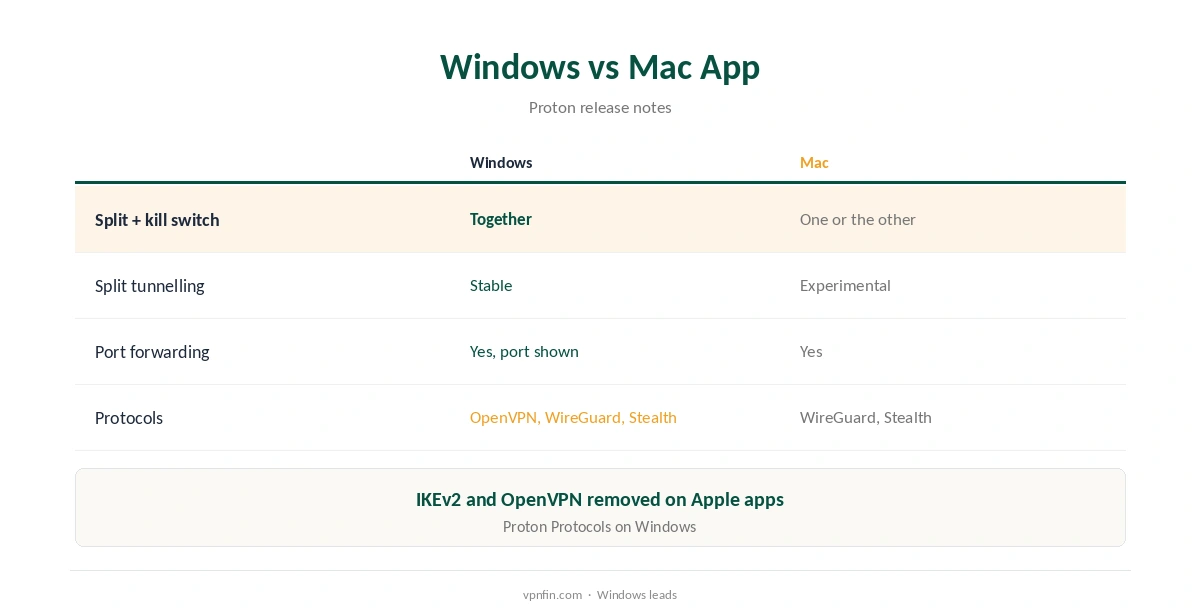
Proton VPN Windows users have the most complete Proton app. Since February 2026, split tunnelling, the kill switch and NetShield work together on Windows, Proton’s release notes and TechRadar report. On Mac, the kill switch and split tunnelling still cannot run at once. The Windows app also shows the active port for port forwarding and supports IPv6. In mid-2026 it gained Proton Protocols, a new architecture aimed at stability and censorship resistance. Proton VPN, run by the Proton Foundation in Switzerland, has five Securitum audits in our table, a free plan with no data cap and 10 devices on VPN Plus.
This guide covers setup, the settings worth changing and recent changes.
Proton VPN Windows Setup
Download the app from Proton’s site, run the installer and sign in with your Proton account. Choose Quick Connect or a country; paid plans can pick specific servers and Secure Core. Save a profile if you connect the same way often: profiles can open chosen apps or websites automatically, the release notes say.
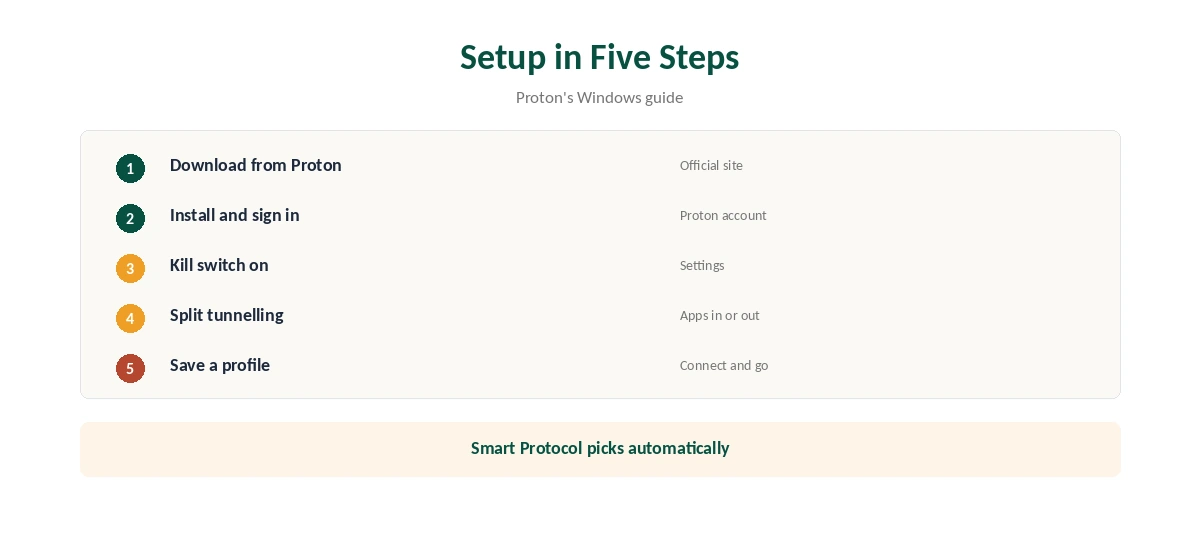
Kill Switch and Split Tunnelling Together
Version 4.3.12, released on 12 February 2026, made split tunnelling work with the kill switch. Selected apps now stay protected if the tunnel drops. Tom’s Guide notes NetShield can now run alongside both. Our split tunnelling guide explains include and exclude modes.
Protocols
Smart Protocol on Windows tries OpenVPN over UDP and TCP, WireGuard over UDP and TCP, and Stealth, Proton’s support pages say. Proton Protocols arrived in a June 2026 beta and later stable releases. On blocked networks, Stealth or alternative routing helps; our Proton VPN connection guide covers the fixes.
Port Forwarding
Paid plans can forward a port for P2P. Since September 2025 the app shows the active port number, which makes setting up a torrent client easier. Our torrenting VPN guide compares providers.
NetShield
NetShield blocks malware, trackers and adverts on paid plans, and since February 2026 it runs alongside split tunnelling and the kill switch on Windows, Tom’s Guide notes. Turn it on in a profile for everyday browsing.
Profiles
Profiles save a server, protocol and features such as NetShield and port forwarding, and can open chosen apps or websites on connect. A torrent profile and a streaming profile save time if you switch often.
Proton VPN Windows Troubleshooting
If the app will not connect, let Smart Protocol choose or switch to Stealth, then try alternative routing. Our Windows VPN troubleshooting guide covers wider fixes, from firewall rules to network resets.
Several Devices
VPN Plus covers 10 devices, so a Windows PC, a laptop and phones share one plan. Our Windows VPN guide compares other providers.
Early Access
Proton lets Windows users test new versions through its beta channel, as the release notes show. Leave it off if you want only stable releases.
Is Proton VPN Windows Free?
The app is free to install, and the free plan runs on Windows without a data cap. Paid plans add streaming support, port forwarding, NetShield and Secure Core, and cover 10 devices.
Censored Networks
On Windows, Stealth and alternative routing help where networks block VPNs, Proton’s support pages say. Proton Protocols, added in 2026, target the same problem. Check local law before using a VPN abroad.
Proton VPN Windows for Gaming
Split tunnelling lets a game launcher use your normal connection while a browser or torrent client stays in the tunnel, and since February 2026 the kill switch still protects the tunnelled apps. Test ping with and without the VPN before ranked play.
Quick Check
After connecting, open our VPN test page and confirm the address changed. Then switch Wi-Fi off and on to test the kill switch.
Proton VPN Windows vs Other Providers
NordVPN’s Windows app adds Threat Protection and Meshnet; Proton’s adds Secure Core, port forwarding and a free plan. Our Windows VPN guide compares the field.
Keeping It Updated
Proton notifies you of updates. After updating, check that profiles, the kill switch and split tunnelling settings stayed the same.
Who It Suits
Windows users who torrent, game or work across many apps gain most, since split tunnelling, port forwarding and the kill switch now work together. Casual users can stay on the free plan.
Quick Rule
Need some apps outside the tunnel and a kill switch? Windows handles both.
IPv6
Version 4.3.1 added IPv6 support, so the tunnel now carries IPv6 websites instead of blocking or leaking them. Run our DNS leak guide after connecting to confirm.
Free Plan on Windows
The free plan installs on Windows with no data cap, one device and servers in 10 countries assigned automatically, Toolradar notes. Our Proton VPN free guide covers its limits.
Support
Paid users can reach Proton by live chat, its release notes say; everyone else through the support team.
How We Research
This page draws on Proton’s Windows release notes and support pages, TechRadar’s and Tom’s Guide’s coverage of the February 2026 update, Toolradar and our Proton tables. We cross-checked these sources against each other, and where they conflict or something can’t be verified, we say so in the text rather than guessing. We checked time-sensitive figures, including prices in US dollars, on 8 October 2026. The main source we relied on is Proton VPN’s Windows release notes. Our full approach lives on the About Us page.
Proton VPN Windows FAQ
Yes, since version 4.3.12 in February 2026.
Yes, on paid plans, and it shows the active port.
A new architecture for stability and censorship resistance, added in 2026.
Yes, with no data cap and one device.
Yes, since version 4.3.1 in September 2025.
The Verdict
Proton VPN Windows is Proton’s most capable app: split tunnelling with the kill switch, port forwarding and Proton Protocols. Start on the free plan, then upgrade for streaming and ports.