
Disclosure: VPNFin is reader-supported. If you buy a VPN through links on this page, we may earn a commission at no extra cost to you. This never affects our ratings — here’s our full disclosure.
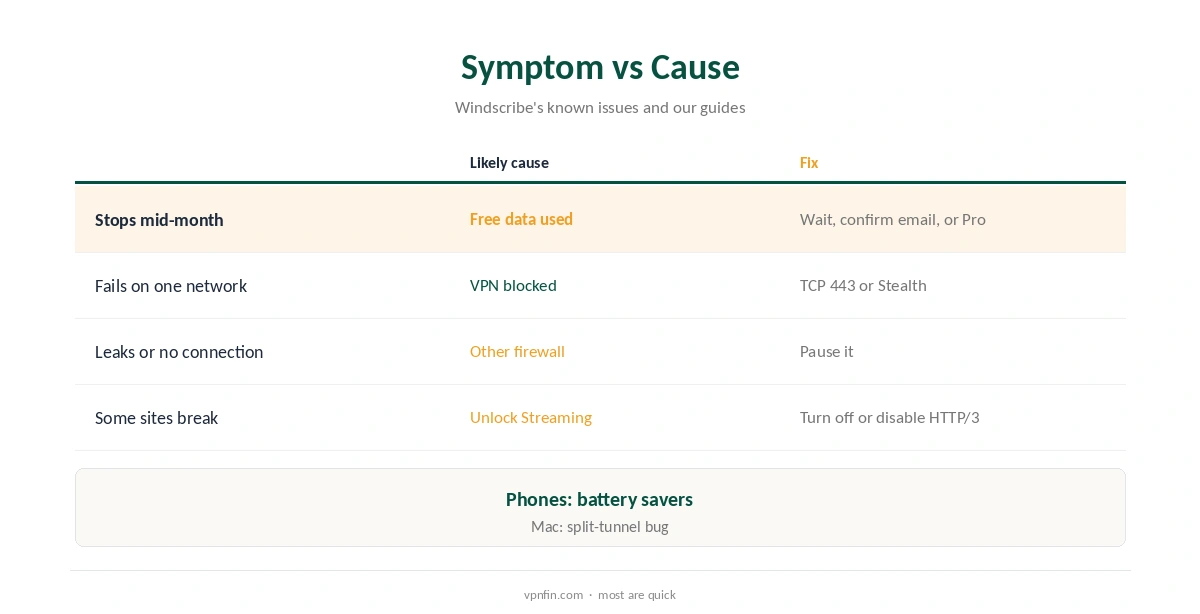
Is Windscribe down, or is the problem on your side? Most failures trace to a handful of causes. On the free plan, the connection stops when the monthly allowance runs out. Networks that block VPNs need a different protocol or port, and Stealth or WStunnel. Other security programs with administrator rights can override Windscribe’s firewall, its own known-issues page warns, and a few platform bugs are documented there too.
This guide works through the causes in order, from the quickest checks to platform-specific bugs, with the fix for each.
Check the Data Allowance First
Free accounts get 10 GB a month after confirming an email, 2 GB without, and the connection stops when it runs out, our Windscribe Free guide records. The app shows the remaining data; if it reads zero, that is the whole problem.
Wait for the monthly reset, confirm an email to raise the allowance, or upgrade to Pro, at $9 a month or $69 a year. Pro accounts have no cap, so this check matters for free users only. Our Windscribe Free guide covers the limits.
Is Windscribe Down, or Is It the Network?
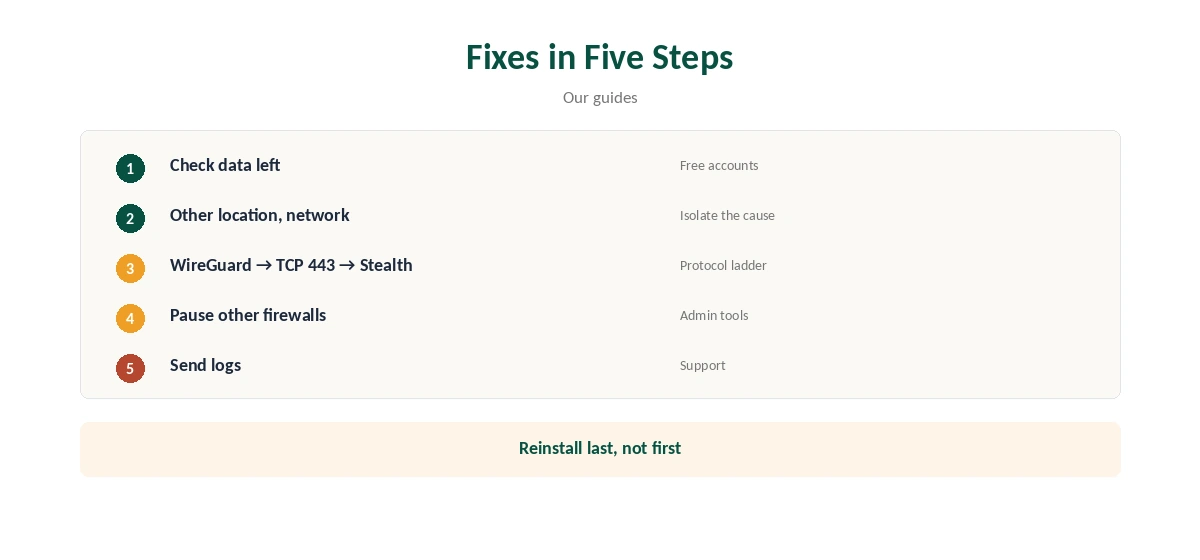
Try another location first, ideally a nearby one. If several fail, try another network, such as a phone hotspot. If Windscribe connects there, your usual network is blocking VPN traffic, which is common on school, office and hotel Wi-Fi.
Our hotel Wi-Fi guide and school Wi-Fi guide explain why those networks block VPNs and what still works.
Switch Protocol and Port
Windscribe offers WireGuard, OpenVPN over UDP and TCP, IKEv2, Stealth and WStunnel, and lets you choose the port, TechRadar notes. Start with WireGuard; if it fails, try OpenVPN TCP on port 443, which looks like ordinary web traffic.
On networks that actively block VPNs, Stealth and WStunnel wrap traffic further. They work on the free plan too, including on Linux through windscribe-cli. On Linux, the command windscribe-cli connect best udp:443 tests a port directly.
Firewall Conflicts
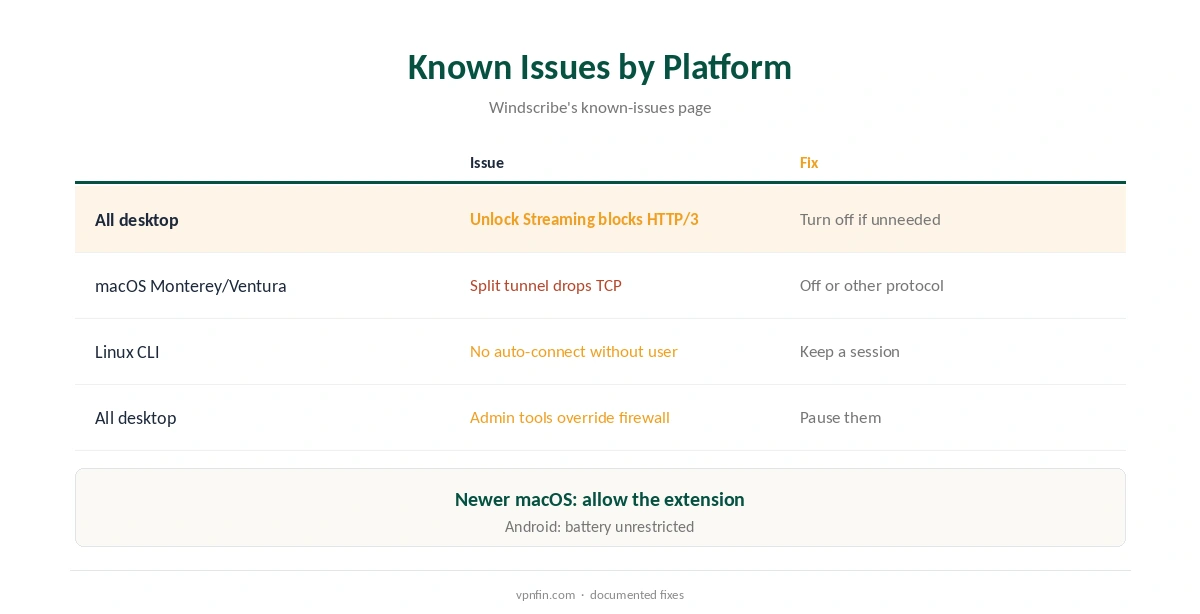
Windscribe’s firewall uses the operating system’s own tools, WFP on Windows, PF on macOS and nftables on Linux. Other programs with administrator rights can override its rules and cause leaks, and some reassert their rules repeatedly, its known-issues page says.
If connections fail or leak, pause other firewalls, antivirus web shields or VPN apps, then reconnect. Our Windows VPN troubleshooting guide covers Windows-specific conflicts.
Streaming Breaks Other Sites
If you enabled Unlock Streaming in your Windscribe account, it prevents HTTP/3 from working while connected, the known-issues page notes. Some sites and apps that rely on HTTP/3 may misbehave.
Turn the feature off in your account if you do not need it, or disable HTTP/3 in the affected browser. Streaming results vary anyway: Security.org reported Netflix problems on Windscribe.
Mac and Linux Bugs
On macOS Monterey and Ventura, starting split tunnelling can interrupt existing TCP connections because of a system bug; turn split tunnelling off or change protocol, Windscribe advises. Newer macOS versions instead need the network extension allowed in System Settings.
On Linux, the CLI runs as a user service and will not auto-connect without a logged-in user. Our Windscribe for Mac guide and Windscribe for Linux guide cover each platform.
Fire TV and Browser Extensions
On Fire TV, Cloudwards found Windscribe’s app has some issues, so update it from the Appstore and restart the stick before deeper fixes. Vega OS sticks have no Windscribe app in our records, so a router is the alternative there.
If you use the browser extension, apps outside the browser will not be protected or routed; that is expected, not a fault, as Windscribe’s own guide explains. Our Windscribe Chrome guide covers the difference.
Test After Fixing
Once connected again, run our DNS leak guide to confirm traffic stays in the tunnel, especially after pausing other security tools.
Then turn those tools back on one at a time, so you know which one conflicts with Windscribe’s firewall. Keep the one that conflicts off while connected, or look for a setting that excludes Windscribe.
Phones Dropping the Connection
On Android, battery savers can close VPN apps in the background. Set Windscribe’s battery use to unrestricted and turn on Always-on VPN in Android’s settings. Our Windscribe Android guide walks through it.
If the app still drops, reinstall it and sign in again. Repeated drops on one network usually point to that network, not the app. Test the same phone on mobile data to compare.
When to Contact Support
If nothing works across networks and protocols, contact Windscribe’s support with your platform and the steps you tried. On Linux, windscribe-cli logs send uploads logs for them.
Keep in mind Pro’s refund window is only seven days, and void after 10 GB of use, its help article says, so raise problems quickly after buying. Free users can test for as long as they like before paying.
How We Research
This page draws on Windscribe’s desktop known-issues page, its Linux CLI guide, TechRadar’s 2026 Windscribe review, Security.org and our Windscribe tables. We cross-checked these sources against each other, and where they conflict or something can’t be verified, we say so in the text rather than guessing. We checked time-sensitive figures, including prices in US dollars, on 8 October 2026. The main source we relied on is Windscribe’s known-issues page. Our full approach lives on the About Us page.
Windscribe Down FAQ
Often the free data ran out, the network blocks VPNs, or another firewall conflicts.
WireGuard first, then OpenVPN TCP on port 443, then Stealth.
Unlock Streaming blocks HTTP/3, Windscribe’s known issues say.
A split-tunnelling bug on Monterey and Ventura.
On Linux, windscribe-cli logs send; elsewhere, contact support.
The Verdict
When Windscribe seems down, check the data allowance, switch network and protocol, and rule out firewall conflicts before reinstalling. Platform bugs have documented fixes.