
Disclosure: VPNFin is reader-supported. If you buy a VPN through links on this page, we may earn a commission at no extra cost to you. This never affects our ratings — here’s our full disclosure.
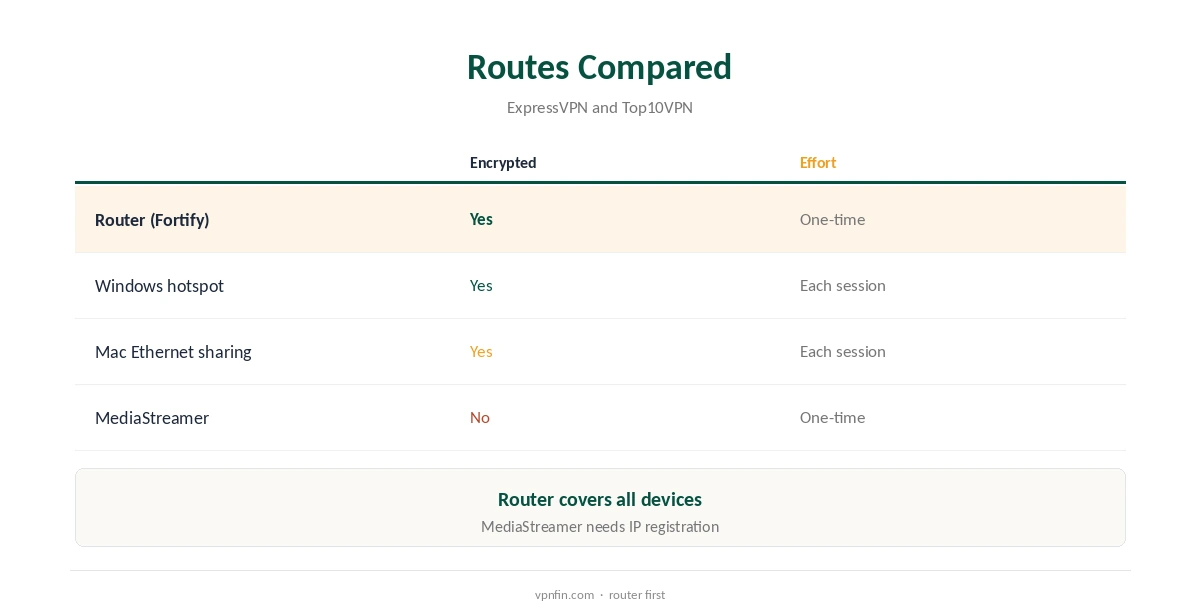
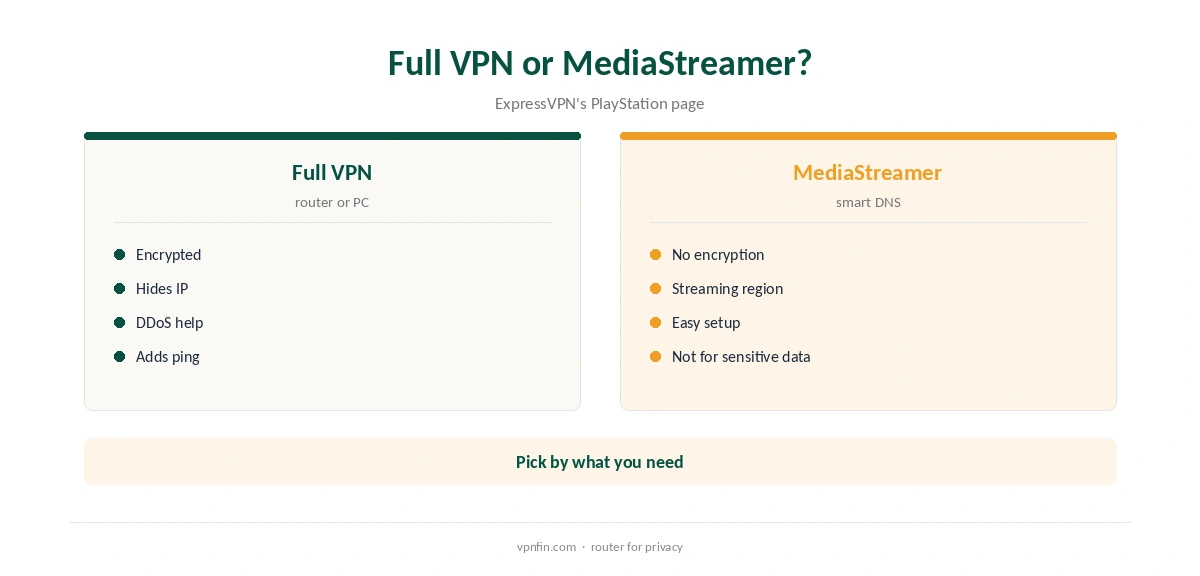
ExpressVPN on PlayStation has no app to install, because PS5 and PS4 do not run VPN apps. ExpressVPN’s own PlayStation page gives three routes: its Fortify router with ExpressVPN built in, sharing a VPN connection from a Windows PC, or MediaStreamer, its smart DNS service. Only the first two encrypt the console’s traffic; ExpressVPN says MediaStreamer adds no encryption and should not carry sensitive information. Our guide to ExpressVPN on PS4 covers router, PC sharing or MediaStreamer, with the PS4’s menus.
This guide compares the routes, walks through each, and explains what a VPN does for gaming on a console.
The Three Routes
A router running ExpressVPN covers the PS5 and every other device on the network, with full encryption. Sharing from a PC sends the console’s traffic through the computer’s VPN, and needs the PC on whenever you play. MediaStreamer changes how the console resolves addresses for streaming, without a tunnel, so it hides nothing from your provider.
ExpressVPN calls the Fortify router the easiest full setup. Top10VPN found ExpressVPN works with more PlayStation methods than rivals, including Ethernet sharing from Windows or Mac.
Using a Router
Fortify ships with ExpressVPN built in, ExpressVPN says, and protects every device connected to it. Compatible routers can also run ExpressVPN’s router app, which Top10VPN describes as a firmware upload followed by sign-in on ExpressVPN’s site.
Once the router connects, join the PS5 to its network in Settings, Network, Set Up Internet Connection. Our ExpressVPN router guide covers Fortify and the older Aircove models.
ExpressVPN on PlayStation via a PC
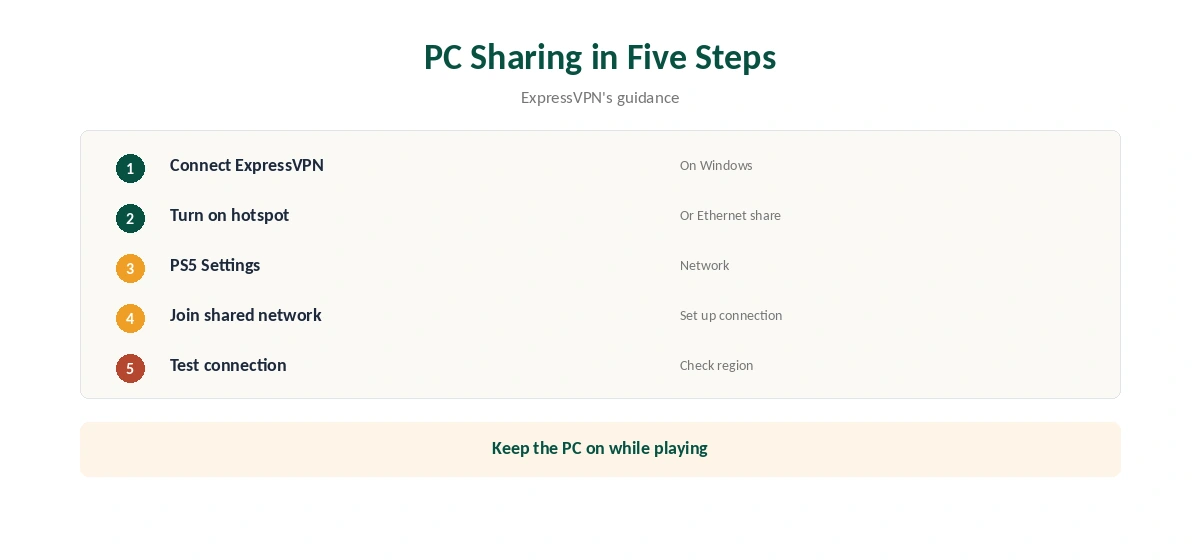
On Windows, connect ExpressVPN, then share the connection through a mobile hotspot or Ethernet, ExpressVPN and Top10VPN describe. On a Mac, Internet Sharing over Ethernet does the same with an adapter if needed.
Then point the console at the shared network in its network settings, choosing Wi-Fi or LAN cable to match how it connects. The PC must stay on and connected, so this suits occasional use more than daily play, such as a weekend trip.
Sharing From a Mac
On a Mac, connect ExpressVPN, then open System Settings, Sharing, Internet Sharing, and share the connection to the PS5 over Ethernet or Wi-Fi, the guides we read describe. Many Macs need a USB or Thunderbolt Ethernet adapter for a cable.
As with Windows, the Mac must stay on while you play. A router avoids that, which is why ExpressVPN points most people to it.
MediaStreamer
MediaStreamer is ExpressVPN’s smart DNS service: register your home IP address in your account, note the MediaStreamer DNS address, and enter it in the PS5’s network settings under a custom setup. It works on devices that cannot run any VPN, and you must update the registered IP if your home address changes.
It changes your apparent region for some streaming apps but does not encrypt traffic or hide your address, ExpressVPN says. Our Smart DNS vs VPN guide explains the difference.
Will It Help Your Games?
A VPN adds a hop, so ping usually rises rather than falls, our gaming VPN guide explains. ExpressVPN says a full connection helps against DDoS attempts and protects you on shared networks.
Pick a nearby location for play, and switch the console off the VPN for competitive matches if latency matters more than privacy. With a router, a device group or a second network can keep the console direct.
Streaming, and PS4 or Older Consoles
PlayStation streaming apps use the console’s connection, so a router or shared PC changes their location like any device. MediaStreamer targets that use case without encryption.
Streaming services may still block VPN addresses, and some check payment country as well. Our PS5 VPN guide compares providers for consoles.
ExpressVPN’s PlayStation page covers PS5, PS4 and older models with the same routes, since none of them runs VPN apps. A router or shared PC protects any of them.
The same applies to Xbox and Nintendo Switch. Our Xbox VPN guide covers that console’s quirks.
Price and Devices
ExpressVPN’s Basic plan covers 10 devices and renews at $99.95 a year, our tables record; a router counts as one device. ExpressVPN offers a 30-day refund for new users, long enough to test each route with the console.
Fortify is a separate purchase. Check the current price on ExpressVPN’s site before buying, and compare it with installing ExpressVPN’s router app on a compatible router you already own.
Checking It Works
A PS5 has no browser for leak tests, so check on another device on the same network or shared connection. ExpressVPN suggests its IP address checker and a DNS leak test for router setups, run from a phone or laptop on the same network.
On the console, a streaming app showing the expected region is a practical sign. ExpressVPN’s router app also lets you group devices and send each group to a different location, its MediaStreamer guide shows, so the PS5 can sit in its own group.
How We Research
This page draws on ExpressVPN’s PlayStation and MediaStreamer pages, Top10VPN’s PlayStation VPN guide and our ExpressVPN tables. We cross-checked these sources against each other, and where they conflict or something can’t be verified, we say so in the text rather than guessing. We checked time-sensitive figures, including prices in US dollars, on 8 October 2026. The main source we relied on is ExpressVPN’s PlayStation page. Our full approach lives on the About Us page.
ExpressVPN on PlayStation FAQ
No; use a router, a shared PC connection or MediaStreamer.
No; ExpressVPN says it adds no encryption.
A router with ExpressVPN, such as Fortify.
Usually not; a VPN adds a hop.
Yes, one slot covering everything behind it.
The Verdict
ExpressVPN on PlayStation means a router, a shared PC or MediaStreamer. Use a router for full protection, and MediaStreamer only for streaming.