
Disclosure: VPNFin is reader-supported. If you buy a VPN through links on this page, we may earn a commission at no extra cost to you. This never affects our ratings — here’s our full disclosure.
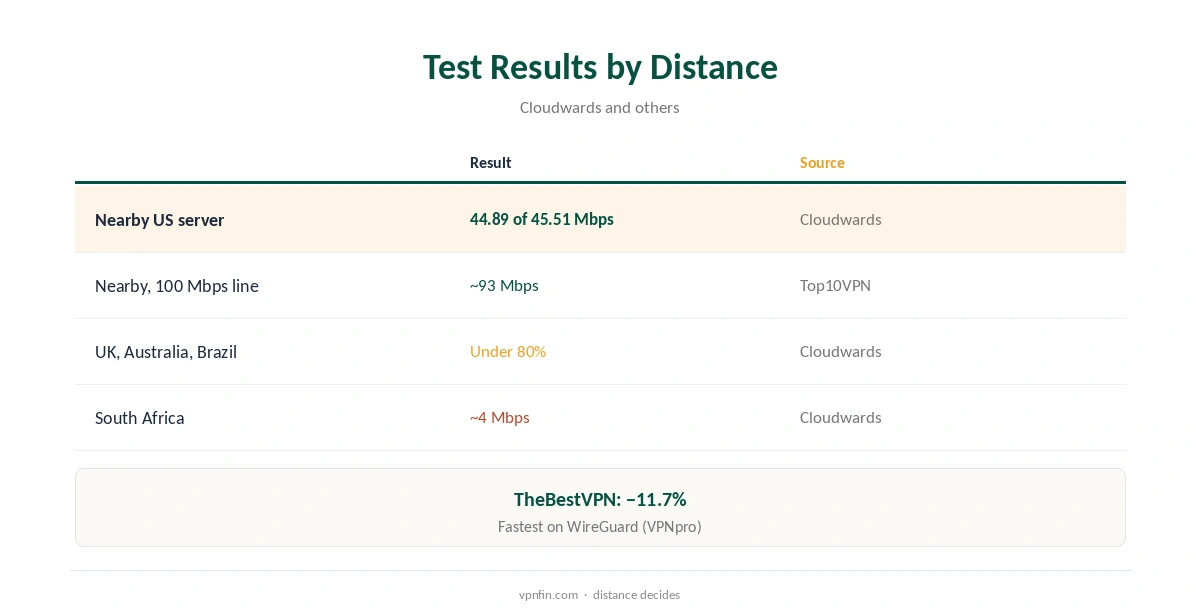
When IPVanish is slow, distance is the usual cause. Cloudwards found nearby US servers barely dented its speed, 44.89 Mbps against 45.51 Mbps unprotected. Three distant locations fell below 80%, and South Africa dropped to about 4 Mbps. VPNpro found it fastest on WireGuard. Protocol, obfuscation, Wi-Fi and the time of day explain most of the rest. Our guide to IPVanish and WireGuard covers whether it is supported and how to set it up.
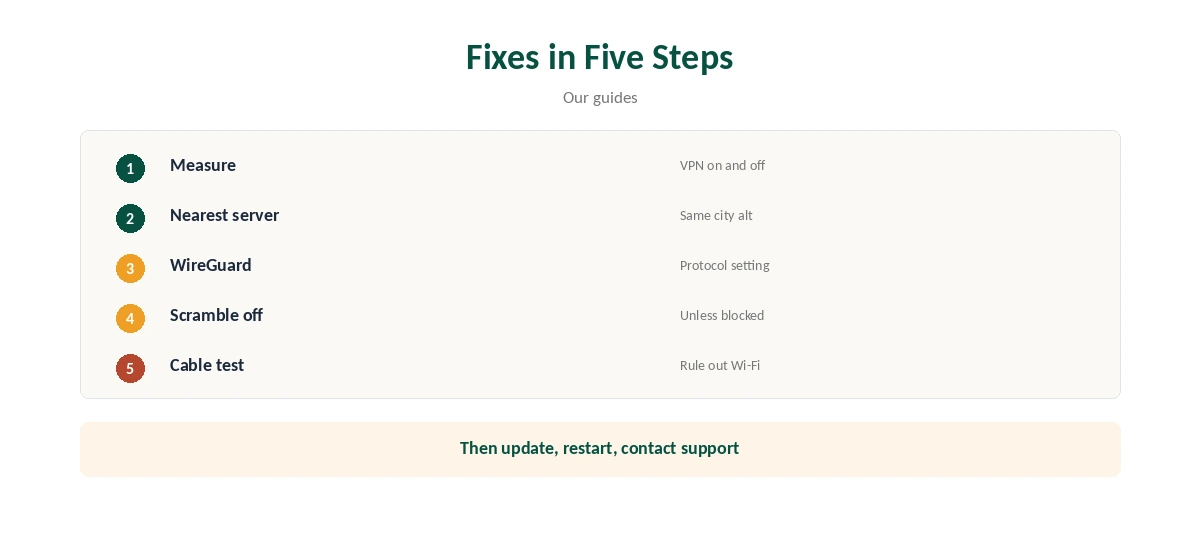
This guide covers how to measure the slowdown, then the fixes in order: server, protocol, Scramble, network, device and support.
Measure First
Run a speed test with IPVanish off, then on, connected to the same nearby location, and note download, upload and ping. A modest drop is normal; TheBestVPN measured IPVanish about 11.7% below baseline, mid-table among the providers it tested.
Cybernews’ Chrome test kept 46% of download speed on a faster line, which shows results vary with the connection. Our VPN speed guide explains the three numbers worth tracking.
IPVanish Is Slow on Distant Servers
Every extra thousand kilometres adds latency, and Cloudwards’ distant locations showed it: the UK, Australia and Brazil all fell below 80% from the US. Top10VPN measured about 93 Mbps on a 100 Mbps line on nearby servers.
Pick the nearest location unless you genuinely need another country, and try a second server in the same city if one is busy. Server load changes through the day.
Switch to WireGuard
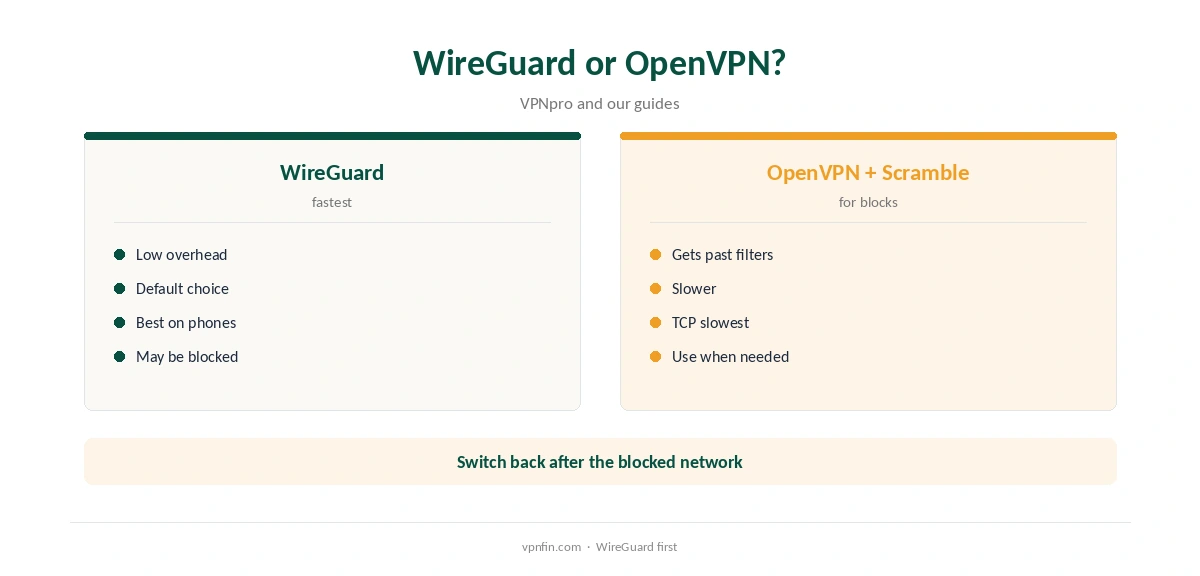
VPNpro found IPVanish fastest with WireGuard, which uses less overhead than older protocols. If the app is set to OpenVPN or IKEv2, switch the protocol in settings and reconnect, then test again.
OpenVPN over TCP is the slowest option and suits only networks that block everything else. Our WireGuard vs OpenVPN guide explains why.
Turn Off Scramble When You Do Not Need It
Scramble disguises OpenVPN traffic to get past networks that block VPNs, and the extra work costs speed. Use it only on networks that need it, such as some hotels or offices, and only with OpenVPN, where it applies.
If Scramble is on at home, turn it off and test again; most home connections never need it.
Check Your Own Network
Wi-Fi is often the bottleneck: test with a cable or sitting closer to the router, ideally on the 5 GHz band. Evening congestion on your provider’s network slows every connection, VPN or not, so compare tests at the same time of day.
If speeds drop only on one network, that network may be throttling or filtering VPN traffic; switching protocol, or Scramble on OpenVPN, can help there.
Device and App
Update the app to the latest version, close other VPN apps, and restart the device, since leftover adapters from other VPNs can slow traffic. On Android and Fire TV, split tunnelling can keep streaming or downloads you do not need protected outside the tunnel, our tables record.
Older or low-powered devices, such as early Fire TV sticks, may encrypt more slowly than newer hardware. Our IPVanish Firestick guide covers TV hardware.
Streaming and Downloads
For streaming, a nearby location in the right country matters more than raw speed, since most services need far less than IPVanish delivers nearby. For large downloads, the distance penalty is felt most, so pick the closest location that suits the task.
If a streaming app buffers only on one server, switch to another in the same city before blaming speed. Our IPVanish for Kodi guide covers streaming boxes.
How IPVanish Compares
In Cloudwards’ tests, NordVPN never fell below 85% of the unprotected speed anywhere, while IPVanish dropped below 80% in three distant locations. Nearby, the two were close.
If you mostly connect far away, that gap matters; for local use, IPVanish’s speed is rarely the bottleneck. Our NordVPN vs IPVanish page compares them in full.
On a Router
A router running IPVanish through OpenVPN is limited by its processor. Routers without hardware encryption support can slow down, as ExpressVPN warns about its own manual setups. Newer routers with WireGuard support do better.
If only one device needs speed, run the app on that device instead of the router, where WireGuard is available.
Kill Switch and Reconnects
IPVanish’s kill switch is strict and not customisable, Tom’s Guide notes, so a dropped tunnel stops all traffic until it reconnects. Short, repeated drops can easily feel like slowness; the app’s connection status shows whether the tunnel actually dropped.
If drops repeat, switch protocol or server rather than turning the kill switch off, which would leave your traffic exposed during drops.
When to Contact Support
If speeds stay low across locations and protocols, contact IPVanish’s live chat, which runs around the clock, with your test results. Capterra reviewers note slow speeds in some countries, which support can confirm or route around by suggesting other servers.
Our IPVanish troubleshooting guide covers connection failures as opposed to slow speeds.
How We Research
This page draws on Cloudwards’, VPNpro’s, Cybernews’ and TheBestVPN’s IPVanish speed tests, Top10VPN, Capterra reviews and our IPVanish tables. We cross-checked these sources against each other, and where they conflict or something can’t be verified, we say so in the text rather than guessing. We checked time-sensitive figures, including prices in US dollars, on 8 October 2026. The main source we relied on is Cloudwards’ IPVanish review. Our full approach lives on the About Us page.
IPVanish Is Slow FAQ
Usually distance; also protocol, Scramble, Wi-Fi or busy hours.
WireGuard, VPNpro found.
Little; Cloudwards saw 44.89 against 45.51 Mbps.
Yes; use it only when a network blocks VPNs.
Contact live chat with your test results.
The Verdict
When IPVanish is slow, pick a nearby server, switch to WireGuard, turn off Scramble and test on a cable. Distant locations will always be slower.