
Disclosure: VPNFin is reader-supported. If you buy a VPN through links on this page, we may earn a commission at no extra cost to you. This never affects our ratings — here’s our full disclosure.
ExpressVPN on Synology runs as an OpenVPN profile in DiskStation Manager, since there is no ExpressVPN app for the NAS. You download an OpenVPN file and manual credentials from ExpressVPN’s setup page, then create a VPN profile in DSM’s network settings. Wizcase found ExpressVPN publishes step-by-step Synology guides. ExpressVPN warns that manual setups lack some of its apps’ protections, and not every location is available for them. WizCase belongs to Kape, which also owns ExpressVPN, so we weigh its findings alongside independent sources.
This guide covers the files, the DSM setup, the advanced options, the 2026 certificate change, leaks and when a NAS VPN makes sense.
Getting the Configuration Files
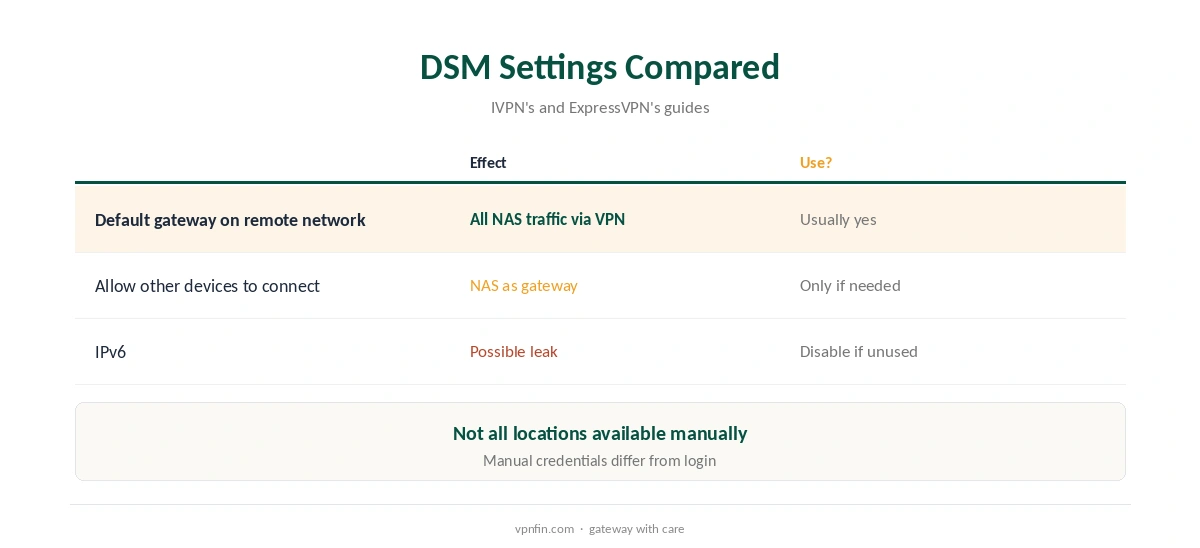
Sign in on ExpressVPN’s setup page, choose manual configuration and OpenVPN, and note the separate username and password shown there; they differ from your account login. Then download the .ovpn file for each location you want.
ExpressVPN retired older security certificates on 31 March 2026, Tom’s Guide reported, so files downloaded before then may need replacing. Our ExpressVPN OpenVPN guide covers the files in more detail.
ExpressVPN on Synology Setup in DSM
In DSM, open Control Panel, then Network and Network Interface, choose Create and Create VPN Profile, and pick OpenVPN via importing a .ovpn file. Give the profile a name, enter the manual username and password, and import the file.
Save the profile, select it in Network Interface and connect; DSM shows the connection status there. The same steps appear in guides from several providers, such as IVPN’s Synology guide.
The Advanced Options
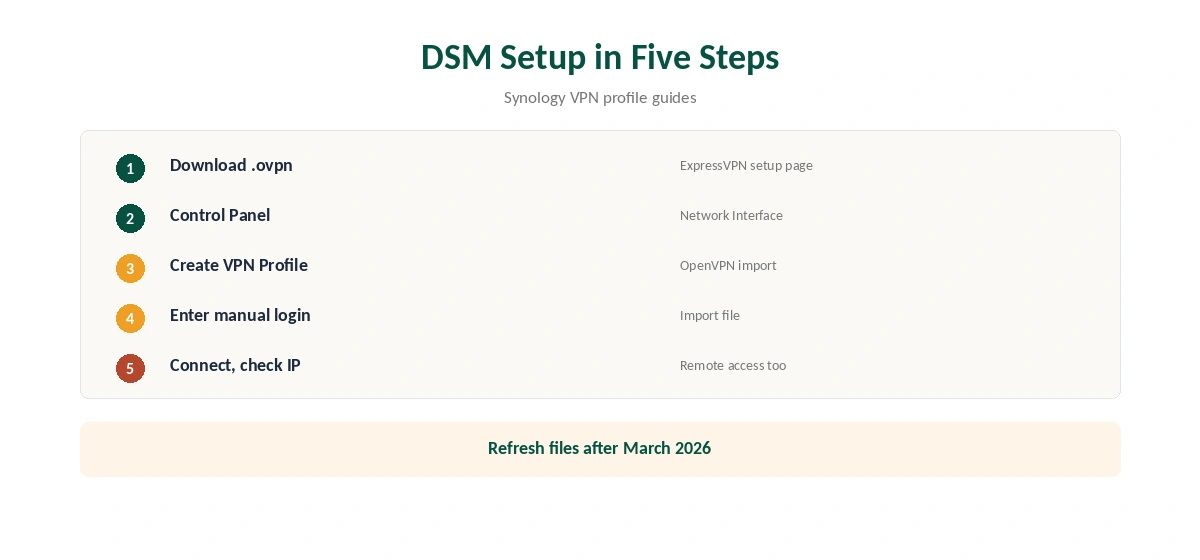
Use default gateway on remote network sends all of the NAS’s traffic through ExpressVPN. Allow other network devices to connect through this Synology server’s Internet connection lets the NAS share the tunnel with other devices, IVPN’s guide explains.
Most people only need the first, which keeps the NAS’s own traffic private. Sharing the tunnel turns the NAS into a gateway, which needs care with your router settings. Our Synology VPN guide explains the gateway trade-off.
Staying Connected
DSM’s VPN profile offers an option to reconnect when the VPN connection is lost; turn it on so the NAS returns to the tunnel after network blips or restarts. Check the profile’s status after a reboot the first few times.
Pick a nearby ExpressVPN location for the best speed, since NAS tasks such as backups and cloud sync move large amounts of data, often overnight.
Remote Access Trade-Off
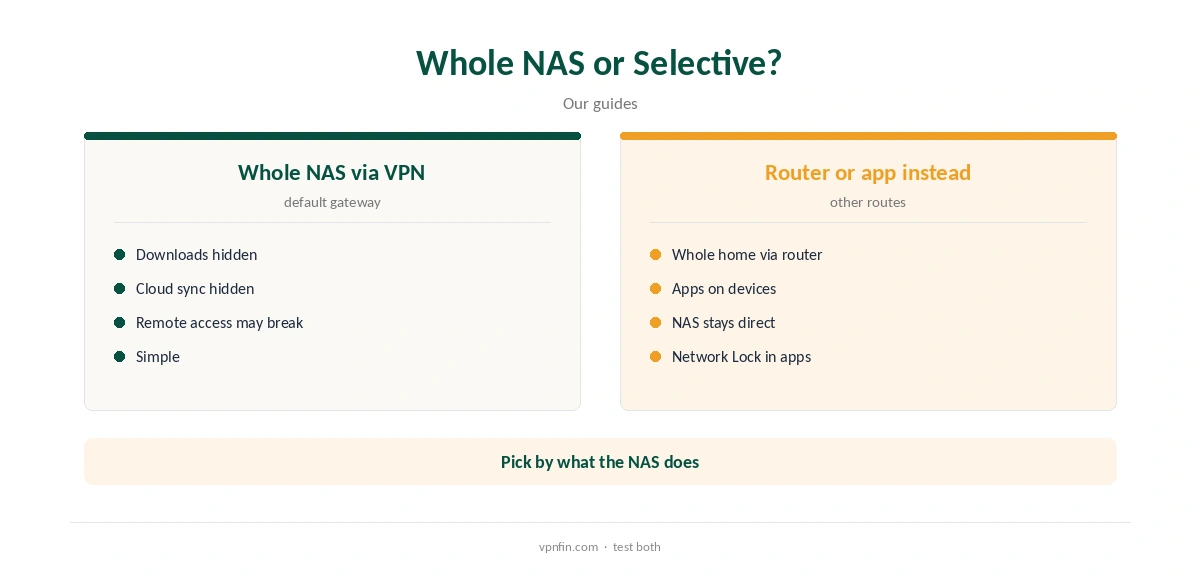
When all NAS traffic goes through the VPN, reaching the NAS from outside your home through its normal address may stop working, because replies leave through ExpressVPN. Check remote access after connecting, from a phone on mobile data rather than your home Wi-Fi.
If you rely on remote access, test it before leaving the VPN on permanently, and keep a way to reach the NAS locally. Our NordVPN Synology guide covers the same issue for another provider.
Leaks and IPv6
DSM’s VPN profile does not include ExpressVPN’s Network Lock, so traffic can continue outside the tunnel if it drops. Disable IPv6 on the NAS unless you need it, and set DNS servers in the network settings so lookups do not go to your provider.
Check the NAS’s public address from a task that uses the internet, such as Download Station, after connecting. Our DNS leak guide explains the risks.
When a NAS VPN Makes Sense, and Price
A VPN on the NAS hides its downloads and cloud sync traffic from your internet provider. It does not protect the rest of the house, and a router running ExpressVPN may suit whole-home cover better.
ExpressVPN advises its apps rather than manual setups in countries with heavy censorship. Our ExpressVPN router guide covers whole-home routes.
Download Station and Torrents
Download Station uses the NAS’s connection, so with the default gateway option on, its downloads go through ExpressVPN. ExpressVPN offers no port forwarding in its apps, only in its router app, so seeding through the NAS is limited.
If the tunnel drops, Download Station keeps downloading on your normal connection, since DSM has no Network Lock. Pause tasks when the VPN is off. Our PureVPN Synology guide covers a provider with paid port forwarding.
ExpressVPN’s Basic plan covers 10 devices and renews at $99.95 a year, our tables record, and the NAS counts as one. New users get a 30-day refund, and ExpressVPN lists 27 independent audits by May 2026.
Kape owns ExpressVPN, along with CyberGhost and PIA.
How Other Providers Compare on Synology
NordVPN and Surfshark also run on Synology through OpenVPN profiles with separate service credentials, and PureVPN and CyberGhost do the same, our NAS guides record. The DSM steps barely differ between them. NordVPN and Surfshark share an owner, Nord Security, and ExpressVPN belongs to Kape.
The real differences are price, device limits and features such as port forwarding. Our Surfshark Synology guide and CyberGhost Synology guide cover two alternatives.
How We Research
This page draws on ExpressVPN’s manual configuration pages, Wizcase’s and Comparitech’s Synology VPN guides, IVPN’s Synology guide, Tom’s Guide on the certificate change and our ExpressVPN and Synology tables. We cross-checked these sources against each other, and where they conflict or something can’t be verified, we say so in the text rather than guessing. We checked time-sensitive figures, including prices in US dollars, on 8 October 2026. The main source we relied on is ExpressVPN’s app vs manual setup guide. Our full approach lives on the About Us page.
ExpressVPN on Synology FAQ
No; use an OpenVPN profile in DSM.
The manual username and password from ExpressVPN’s setup page.
Old certificates were retired on 31 March 2026; download new files.
It can, if all traffic uses the VPN; test it.
Not ExpressVPN’s Network Lock; check for leaks yourself.
The Verdict
ExpressVPN on Synology works as a DSM OpenVPN profile with manual credentials. Refresh old files, check remote access, and test for leaks.