
Disclosure: VPNFin is reader-supported. If you buy a VPN through links on this page, we may earn a commission at no extra cost to you. This never affects our ratings — here’s our full disclosure.
A CyberGhost Synology setup runs through the OpenVPN client built into DSM, Synology’s operating system. Netzwelt lists Synology NAS via OpenVPN among CyberGhost’s supported systems, and ProPrivacy calls CyberGhost easy to set up on Synology. The detail that trips people up is the credentials: CyberGhost generates separate ones for manual setups, and your account login will not work.
This guide covers the credentials, the DSM steps, the gateway and IPv6 settings, and the common problems.
Getting Your Manual Credentials
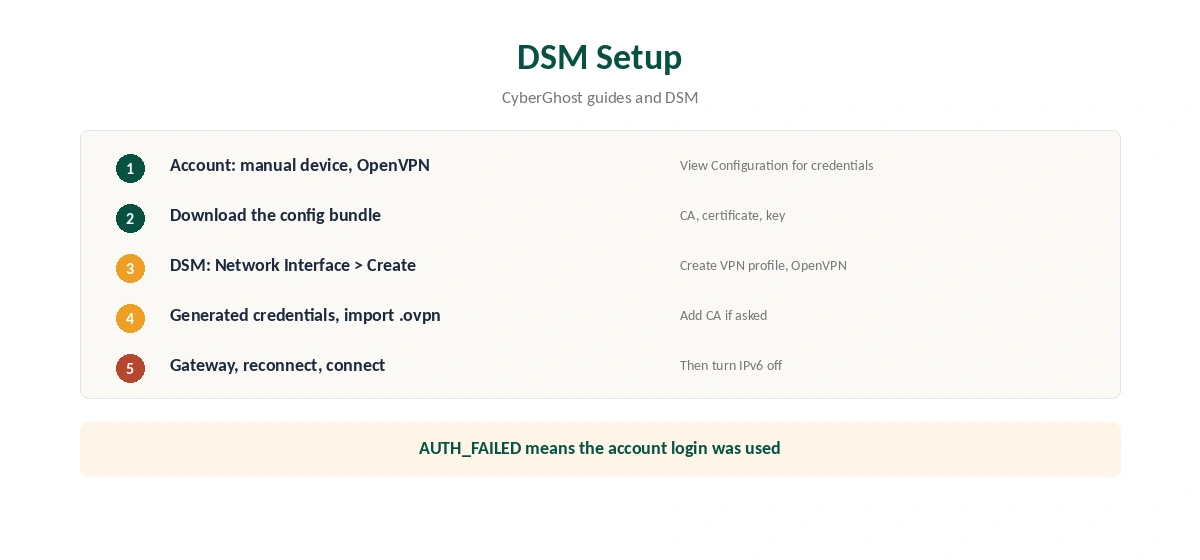
In your CyberGhost account, create a manual device and choose OpenVPN, as our CyberGhost OpenVPN guide explains. CyberGhost’s router guide says the View Configuration button reveals generated credentials that work only for manual setups. Note them.
Download the configuration bundle for the location you want. NAT Checker says it contains the CA, client certificate and private key alongside the .ovpn file. Keep the files together.
CyberGhost Synology Setup in DSM
In DSM, open Control Panel, then Network, then Network Interface. Choose Create, then Create VPN profile, and select OpenVPN via importing a .ovpn file. Give the profile a name, enter the generated username and password, and import the .ovpn file. If DSM asks for the CA certificate separately, import it from the same bundle.
Finish the wizard, select the profile and connect. The status should change to connected within a few seconds.
The Default Gateway Choice
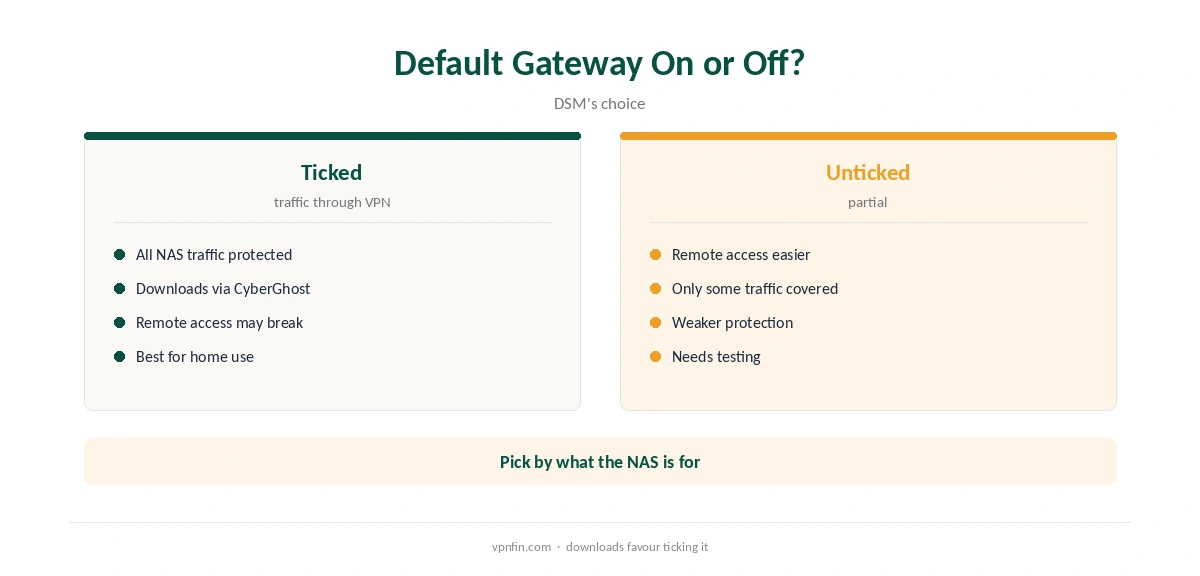
The last screen of DSM’s wizard offers to use the default gateway on the remote network. With it ticked, all the NAS’s internet traffic, including downloads, goes through CyberGhost. PureVPN’s Synology guide warns that this can make remote access to the NAS harder, and the same applies with any provider.
Decide what the NAS is for. For downloads, tick it. For remote access, test it carefully. Also tick the option to reconnect when the VPN connection is lost, so an unattended NAS recovers by itself.
Turn Off IPv6
DSM cannot route IPv6 over a VPN, PureVPN’s Synology guide notes. IPv6 traffic can then leave outside the tunnel. CyberGhost’s own Windows support also notes CyberGhost does not support IPv6. Turn IPv6 off in DSM’s network settings; our IPv6 leak guide explains why.
When the Connection Fails
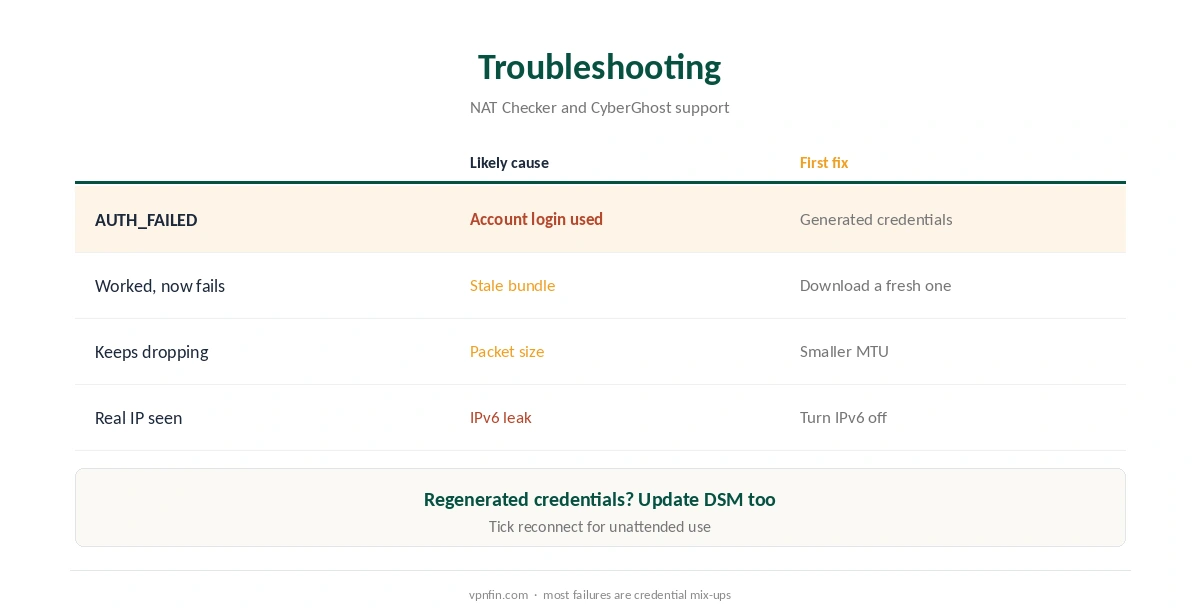
NAT Checker links authentication failures to using the account login instead of the generated credentials. After regenerating credentials in the account, update the DSM profile too. When a server stops responding, download a fresh bundle for the same location.
If the connection drops, CyberGhost’s support lists a smaller MTU as a fix on networks that fragment large packets. Our CyberGhost disconnection guide covers more.
Choosing a Location
Each configuration bundle points to one location. For downloads, pick a nearby P2P-friendly country; for a fixed address, a CyberGhost dedicated IP works over OpenVPN, as our CyberGhost dedicated IP guide explains. Download two or three bundles so you can switch if one server is busy.
After connecting, confirm the NAS’s address from a computer on the same network with our VPN test page.
Updating DSM and the Profile
DSM updates can reset network settings. After each update, check that the VPN profile still connects and that IPv6 is still off. Keep the configuration bundle and generated credentials somewhere safe, so a rebuild takes minutes rather than a support ticket. A note of the location each bundle points to also saves time when you switch servers later. Label the files clearly by country, and keep the reconnect option ticked after every DSM update.
No App Kill Switch
DSM’s VPN profile has no kill switch like CyberGhost’s apps. A drop can expose NAS traffic until it reconnects, so the reconnect option matters. Our kill switch guide explains the gap.
Remote Access to the NAS
If you reach the NAS from outside through QuickConnect or your router, test that access after enabling the VPN. Routing changes can affect it on some setups, which is part of the default gateway choice above.
Downloads and Port Forwarding
A NAS behind CyberGhost can download through Download Station or a torrent client, as our CyberGhost torrenting guide explains. CyberGhost has no port forwarding, so seeding stays limited and remote access through the VPN address will not work.
What CyberGhost Costs
CyberGhost renews at $56.94 a year on its 2-year plan, according to our renewal table. It covers seven devices, and a NAS takes one of them. The 45-day money-back guarantee applies to website purchases, as our CyberGhost refund guide explains.
| Provider | Renewal price | Per month | Tier |
|---|---|---|---|
| NordVPN | $139.08/yr | ~$11.59 | Basic |
| Surfshark | ~$79/yr | ~$6.58 | Starter |
| ExpressVPN | $99.95/yr | ~$8.33 | Basic |
| CyberGhost | $56.94/yr | ~$4.75 | 2-year |
| PureVPN | $47.95/yr | ~$4.00 | Standard, 2-year (1-year renews $57.95) |
| IPVanish | $89.99/yr | ~$7.50 | Essential |
| Windscribe | ~$69/yr | ~$5.75 | Pro |
| Proton VPN | ~$83.88/yr | ~$6.99 | VPN Plus |
| Mullvad | ~$65/yr | ~$5.40 | flat, no tiers |
| Norton VPN | $79.99/yr | ~$6.67 | Standard |
| Hotspot Shield | ~$95.99/yr | ~$8.00 | Premium annual |
| Astrill | $300 every 2 yrs | ~$12.50 | 2-year, same at renewal |
Testing and Related Guides
Check the NAS’s public IP from a browser or package on the NAS, and run a DNS test with our DNS leak guide. Our Synology VPN guide compares providers.
For rivals, our Surfshark Synology guide and NordVPN Synology guide cover two Nord Security brands. CyberGhost belongs to Kape Technologies, which also owns ExpressVPN and Private Internet Access.
How We Research
This page draws on Netzwelt’s CyberGhost review, ProPrivacy’s Synology roundup, CyberGhost’s router and Windows support articles as quoted, NAT Checker’s OpenVPN guide, PureVPN’s Synology guide on DSM and our renewal table. We cross-checked these sources against each other, and where they conflict or something can’t be verified, we say so in the text rather than guessing. We checked time-sensitive figures, including prices in US dollars, on 6 October 2026. Renewal from our renewal table. The main source we relied on is NAT Checker’s CyberGhost OpenVPN guide. Our full approach lives on the About Us page.
CyberGhost Synology FAQ
Yes, through DSM’s OpenVPN client with CyberGhost’s configuration files.
The generated manual credentials from View Configuration, not your account login.
Tick it to route NAS traffic through the VPN; test remote access afterwards.
DSM cannot route IPv6 over a VPN, so IPv6 traffic could leak.
Downloading works, but CyberGhost has no port forwarding, so seeding stays limited.
The Verdict
A CyberGhost Synology setup works through DSM’s OpenVPN client with generated credentials. Keep the bundle’s files together, turn IPv6 off, enable reconnection and decide on the gateway by what the NAS is for.