
Disclosure: VPNFin is reader-supported. If you buy a VPN through links on this page, we may earn a commission at no extra cost to you. This never affects our ratings — here’s our full disclosure.
Surfshark on Synology runs through the OpenVPN client built into DSM, Synology’s operating system. Surfshark’s support articles cover both current DSM and DSM 6.2, and its blog recommends OpenVPN over L2TP/IPSec for Synology. The key detail is the credentials: Surfshark generates separate service credentials for manual setups, and your email and password will not work.
This guide covers the credentials, the DSM steps, static and dedicated IPs, and the common problems.
Getting Your Service Credentials
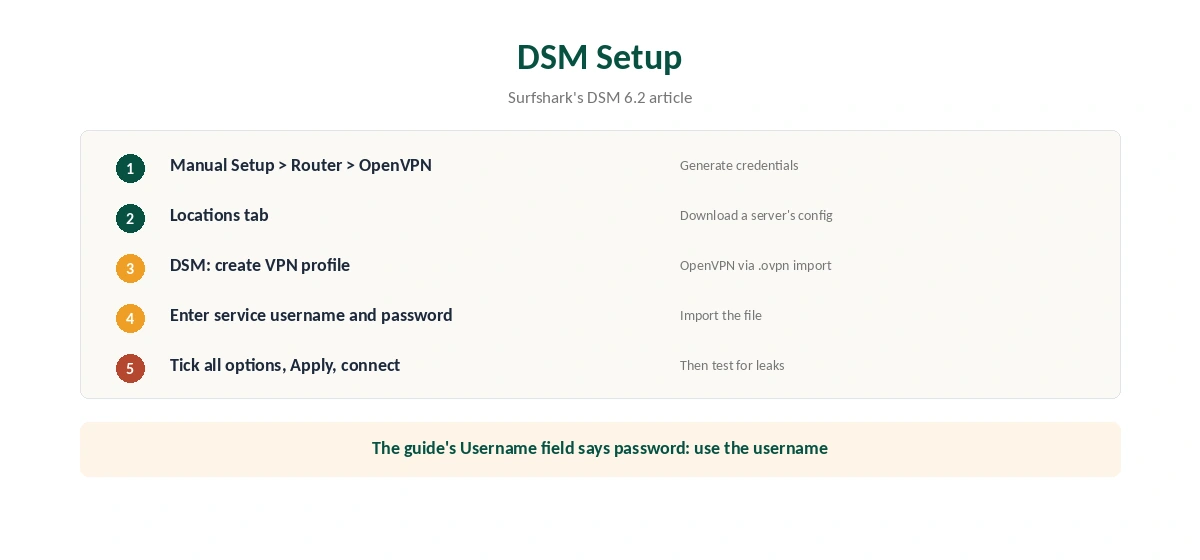
Log in on Surfshark’s website and open VPN, Manual Setup, Router, then OpenVPN, as Surfshark’s support describes. On the Credentials tab, choose Generate credentials. Keep that tab open, since you will need the service username and password in DSM.
Then open the same page in a second tab, switch to Locations and download the configuration file for the server you want. Our Surfshark OpenVPN guide explains the difference between service credentials and your account login.
Surfshark on Synology Setup in DSM
In DSM, open Control Panel and the network settings, and create a VPN profile. Surfshark’s DSM 6.2 article says to choose OpenVPN (via importing a .ovpn file) and press Next. Give the profile a name, enter the service username and password, and import the configuration file.
One small trap: Surfshark’s DSM 6.2 article labels the username field as the service password. Enter the service username there. On the last screen, Surfshark advises checking all available options and choosing Apply, then connecting.
Why OpenVPN
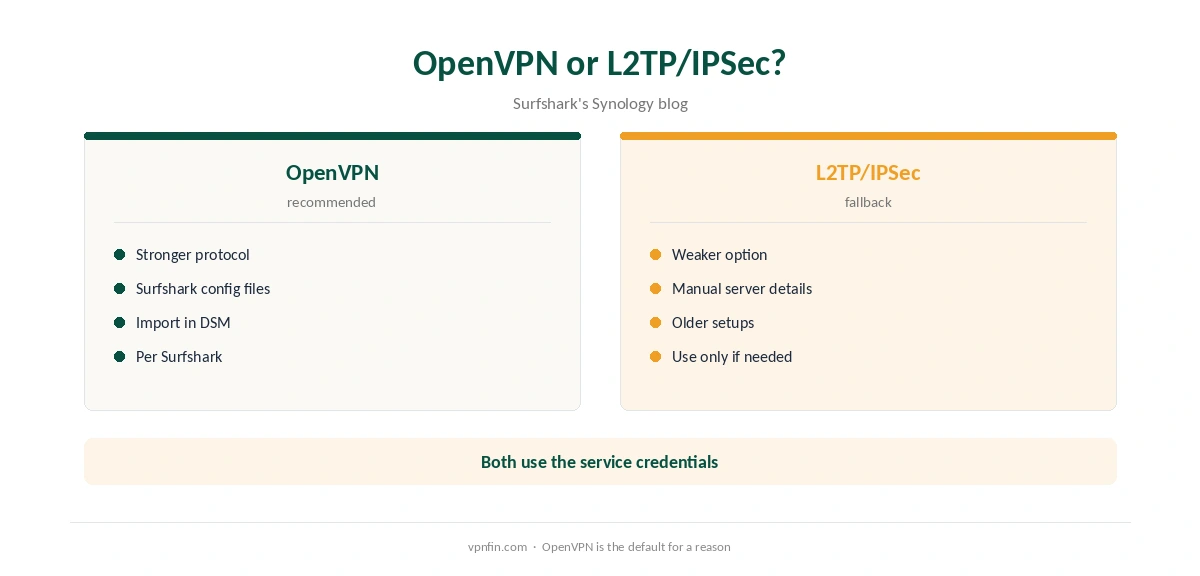
Surfshark’s Synology blog recommends OpenVPN over L2TP/IPSec. OpenVPN is the stronger of the two protocols DSM’s client commonly offers, and Surfshark’s configuration files are built for it. Our Synology VPN guide covers the protocol choice across providers.
Static and Dedicated IPs
Surfshark’s blog says you can use its static IP servers, or a dedicated IP if you added one to your plan, with Synology. A fixed address helps if a service or remote tool expects the same IP each time. Download the configuration file for that static or dedicated location instead of a regular server.
Surfshark still has no port forwarding, so a fixed address does not open inbound ports, as our Surfshark port forwarding guide explains.
If the Connection Keeps Dropping
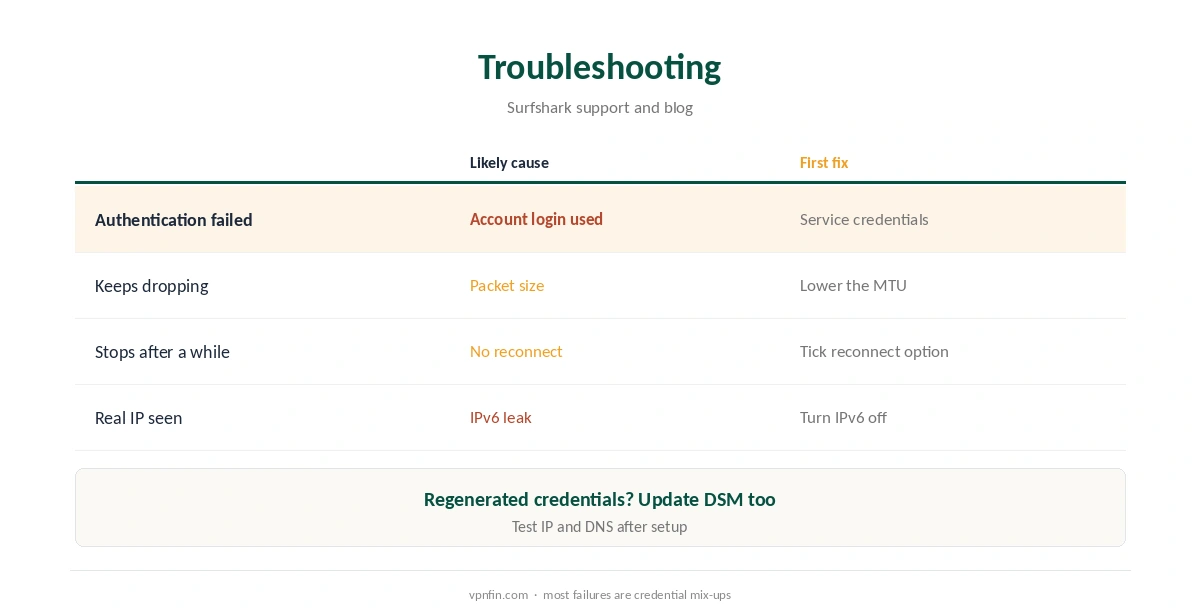
Surfshark’s German blog suggests lowering the MTU value if the Synology connection keeps dropping. Smaller packets get through networks that fragment large ones. Also tick the option to reconnect when the VPN is lost, so an unattended NAS recovers by itself.
If authentication fails, check that you used the service credentials. If you regenerated them in the account, update the DSM profile too. Our Surfshark disconnection guide covers more fixes.
Downloads Through the VPN
A NAS often runs Download Station or a torrent client unattended. With the VPN profile set as the default route, those downloads leave through Surfshark rather than your home address. Surfshark allows P2P on every server, as our Surfshark torrenting guide explains, so any nearby location works.
Pick a server close to you for speed, since the NAS’s processor handles the encryption and distance adds delay on top.
Reaching the NAS From Outside
With Surfshark on Synology, remote access through the VPN address does not work, since Surfshark has no port forwarding. If you reach the NAS from outside through QuickConnect or your router, test that access after enabling the VPN, as routing changes can break it on some setups. Our port forwarding guide explains why inbound connections need open ports.
Testing for Leaks
Surfshark recommends an IP leak test and a DNS leak test after setup. From a computer on the same network, check that the NAS’s traffic shows a Surfshark address, then run a DNS test. Our DNS leak guide shows how. DSM cannot route IPv6 over a VPN, as PureVPN’s own Synology guide notes, so turn IPv6 off on the NAS; our IPv6 leak guide explains why.
No App Kill Switch
DSM’s VPN profile has no kill switch like Surfshark’s apps. A drop can expose NAS traffic until it reconnects, so the reconnect option matters. Our kill switch guide explains the gap.
What Surfshark Costs
On 25 September 2026, the Starter 2-year plan cost $67.23 for the first 27 months. Renewal sits at about $79 a year, according to Security.org and VPNOverview. Surfshark sets no device limit, so the NAS adds nothing to the count. Our Surfshark price breakdown covers the plans.
| Provider | Renewal price | Per month | Tier |
|---|---|---|---|
| NordVPN | $139.08/yr | ~$11.59 | Basic |
| Surfshark | ~$79/yr | ~$6.58 | Starter |
| ExpressVPN | $99.95/yr | ~$8.33 | Basic |
| CyberGhost | $56.94/yr | ~$4.75 | 2-year |
| PureVPN | $47.95/yr | ~$4.00 | Standard, 2-year (1-year renews $57.95) |
| IPVanish | $89.99/yr | ~$7.50 | Essential |
| Windscribe | ~$69/yr | ~$5.75 | Pro |
| Proton VPN | ~$83.88/yr | ~$6.99 | VPN Plus |
| Mullvad | ~$65/yr | ~$5.40 | flat, no tiers |
| Norton VPN | $79.99/yr | ~$6.67 | Standard |
| Hotspot Shield | ~$95.99/yr | ~$8.00 | Premium annual |
| Astrill | $300 every 2 yrs | ~$12.50 | 2-year, same at renewal |
Related Guides
Our NordVPN Synology guide covers the sister brand, and our PureVPN Synology guide another provider. To confirm the NAS uses the tunnel, check the IP from a computer on the same network with our VPN test page. Surfshark belongs to Nord Security, which also owns NordVPN.
How We Research
This page draws on Surfshark’s Synology support articles for current DSM and DSM 6.2, its Synology blog in several languages, PureVPN’s Synology guide on IPv6 and pricing from Surfshark, Security.org and VPNOverview. We cross-checked these sources against each other, and where they conflict or something can’t be verified, we say so in the text rather than guessing. We checked time-sensitive figures, including prices in US dollars, on 6 October 2026. Surfshark’s renewal table did not load, so renewal figures come from Security.org and VPNOverview. The main source we relied on is Surfshark’s Synology guide. Our full approach lives on the About Us page.
Surfshark on Synology FAQ
Yes, through DSM’s OpenVPN client with Surfshark’s configuration files.
Service credentials generated under VPN, Manual Setup, Router, OpenVPN. Not your email and password.
OpenVPN, according to Surfshark’s Synology blog.
Yes, Surfshark’s blog says both work. Download that location’s configuration file.
Lower the MTU, as Surfshark’s German blog suggests, and tick the reconnect option.
The Verdict
Surfshark on Synology works well through DSM’s OpenVPN client. Generate service credentials, import the configuration file, turn IPv6 off, and enable reconnection for an unattended NAS.