
Disclosure: VPNFin is reader-supported. If you buy a VPN through links on this page, we may earn a commission at no extra cost to you. This never affects our ratings — here’s our full disclosure.
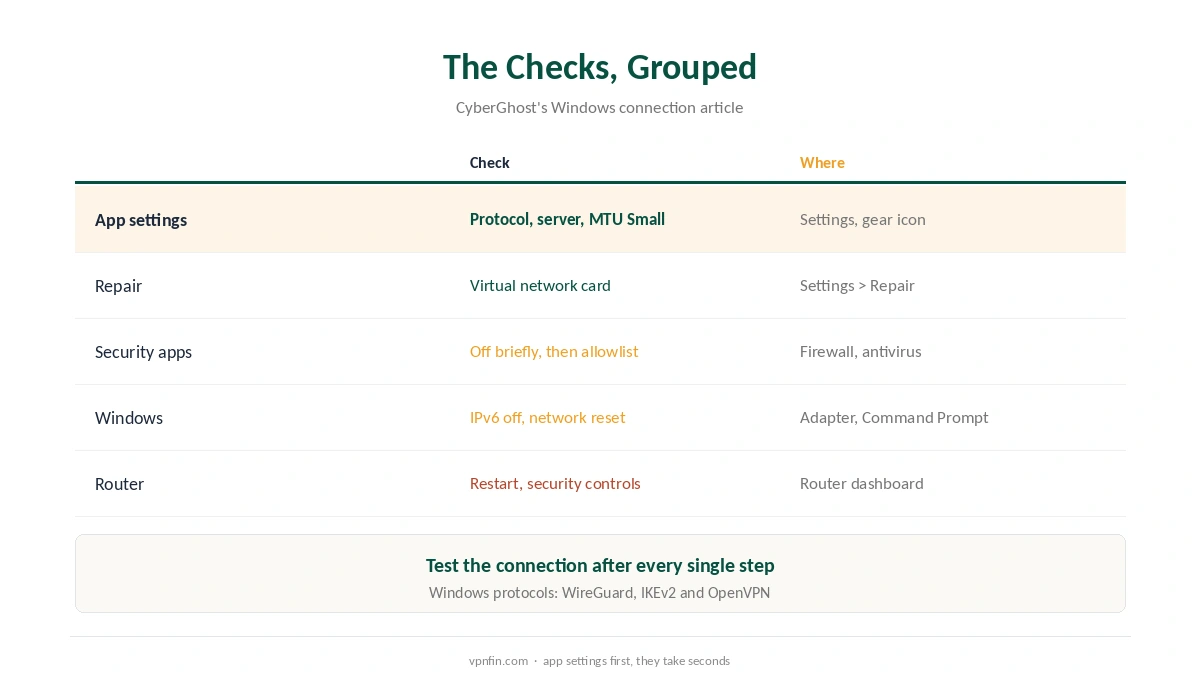
When CyberGhost is not connecting, its Windows support article lists eleven checks, and two of them did not appear in the other providers’ guides we read: a Small MTU setting and a button that repairs CyberGhost’s virtual network card. This guide puts all eleven in a sensible order, with the quick app settings first.
One warning from CyberGhost itself comes before anything else. If you are in a country with heavy internet censorship, contact support straight away, because ordinary fixes rarely help there.
Step 1: CyberGhost Not Connecting? Change the Protocol
CyberGhost picks a protocol automatically. Open Settings with the gear icon, click Automatic selection and choose another one. On Windows, CyberGhost supports WireGuard, IKEv2 and OpenVPN. That settles a point where reviews disagreed, as our CyberGhost Windows guide noted.
If CyberGhost is not connecting with one protocol, try the other two before moving on. Our WireGuard vs OpenVPN page explains why networks treat them differently.
Step 2: Another Server, Then a Small MTU
Next, click the server location widget, choose More servers and connect to a different location. Some locations hold a more stable connection than others, CyberGhost notes.
Then change the MTU. Under Settings, find MTU size, open the Default menu and choose Small. CyberGhost recommends Small for connection problems and says it may improve connection performance.
Step 3: Repair the Virtual Network Card
Other software can disable or damage the virtual network card that CyberGhost uses. In Settings, click Repair virtual network card. A green tick and the word Done mean it worked, so try it whenever CyberGhost is not connecting after you install new security software. CyberGhost’s support section also has a separate article on TAP driver errors if the repair fails.
Step 4: Why CyberGhost Is Not Connecting Because of Other Software
Firewalls and antivirus programs can take control of the network. CyberGhost suggests switching them off briefly; if that fixes the connection, add CyberGhost to their allowlist and switch them back on. Our Windows VPN troubleshooting page covers the Windows Firewall side.
CyberGhost also does not support IPv6, so disable it on your network adapter. A user on the Elektroda forum reported that unticking IPv6 on the physical network card restored the internet after connecting. Our IPv6 leak guide explains why IPv6 matters for a VPN.
Step 5: Restart, Reinstall, Reset
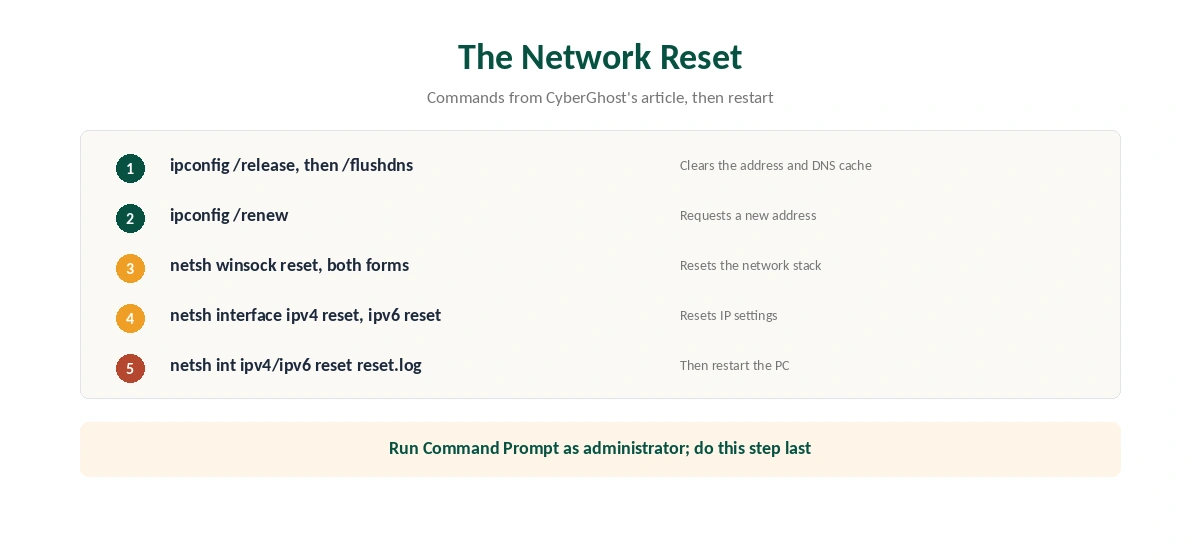
If the app still fails, restart the PC, then reinstall CyberGhost through Add or remove programs. Unplug the router for 30 seconds as well. After that, CyberGhost lists a full network reset in Command Prompt, shown in the image below, followed by a restart. Leave it for last, because it resets every network setting.
Finally, some internet providers ship routers with security or parental controls that block VPNs. Log in to the router and look for a security tab. Our router guide explains the dashboard. If CyberGhost is still not connecting after all that, our general VPN connection guide covers causes shared by every provider.
Netflix Blocked With CyberGhost Connected
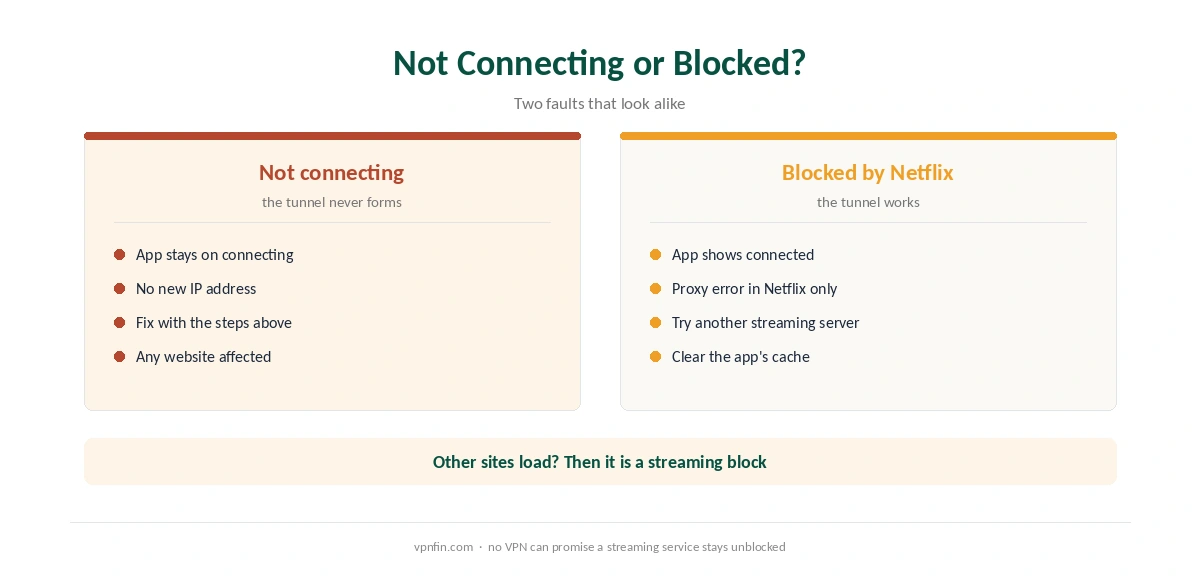
A different problem looks similar: CyberGhost connects, but Netflix shows a proxy error. That is a block by the streaming service, not a connection fault. CyberGhost’s support centre has a separate Netflix guide, and its TV apps label servers by service, as our CyberGhost Firestick guide describes. Try another streaming server and clear the Netflix app’s cache.
Services change their blocks often, so no VPN can promise access. Our Netflix VPN guide explains what Netflix checks.
Other Devices and When to Ask for Help
CyberGhost has separate support articles for Mac, Android and Linux. Our guides for Mac and iPhone cover those apps. If the drops start only after a working connection, see our CyberGhost disconnection guide.
CyberGhost’s support answers by email at support@cyberghost.ro, by online request and through 24/7 live chat. If the service never works within the refund window, our CyberGhost refund guide explains the request. CyberGhost belongs to Kape Technologies, a London-based company that also owns ExpressVPN and Private Internet Access.
Heavily Censored Countries
CyberGhost’s Windows support gives one exception to its step-by-step list. Users in countries with heavy censorship should contact support straight away. Those networks need specific advice. Our obfuscation guide explains why ordinary connections fail there.
Elsewhere, update the app before anything else. An outdated version can fail after server or certificate changes. Then work through the steps above in order, testing after each one.
How We Research
This page draws on CyberGhost’s Windows connection article and the list of its troubleshooting articles, plus an Elektroda forum thread on IPv6. We cross-checked these sources against each other, and where they conflict or something can’t be verified, we say so in the text rather than guessing. We read every source on 5 October 2026. The main source we relied on is CyberGhost’s Windows connection article. Our full approach lives on the About Us page.
CyberGhost Not Working FAQ
CyberGhost’s Windows article lists the protocol, the server, the MTU size, a damaged virtual network card, interfering security software, IPv6 and router controls. Test them in that order.
WireGuard, IKEv2 and OpenVPN, according to CyberGhost’s support article. Switch away from Automatic selection to test each one.
It makes packets smaller, which can help them pass through some networks. CyberGhost recommends Small for connection problems.
No. CyberGhost says it does not currently support IPv6 traffic, so disable IPv6 on your network adapter.
Netflix blocked that server. Try another streaming server and clear the Netflix app’s cache.
The Verdict
CyberGhost’s own list solves most connection failures in order: protocol, server, Small MTU and the repair button. Security software, IPv6 and router controls come next, and the network reset comes last.