
Disclosure: VPNFin is reader-supported. If you buy a VPN through links on this page, we may earn a commission at no extra cost to you. This never affects our ratings — here’s our full disclosure.
When CyberGhost keeps disconnecting, its own Privacy Hub points to three causes: the network, the protocol and power saving. Its Windows support article adds the settings that steady a shaky tunnel: a Small MTU and a repair for the virtual network card.
This page covers drops after a working connection. If CyberGhost never connects at all, our CyberGhost not connecting guide covers that fault.
Step 1: Test the Line Without the VPN
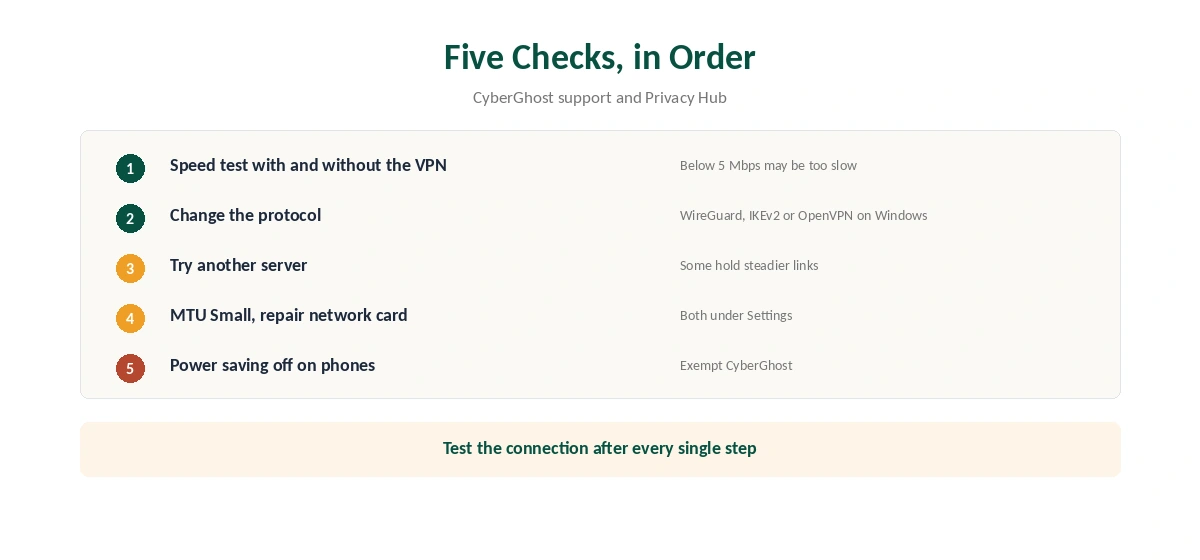
If CyberGhost keeps disconnecting, disconnect it yourself and run a speed test. CyberGhost’s Privacy Hub suggests the Ookla test with and without the VPN, and it notes that speeds below about 5 Mbps can be too slow for a stable VPN. If the plain line drops too, fix the Wi-Fi or router first.
Step 2: If CyberGhost Keeps Disconnecting, Change Protocol and Server
Change the protocol in Settings, away from Automatic selection. On Windows, the choices are WireGuard, IKEv2 and OpenVPN. Then try another location, since some hold steadier connections than others. Our CyberGhost Mac guide shows the same settings on a Mac.
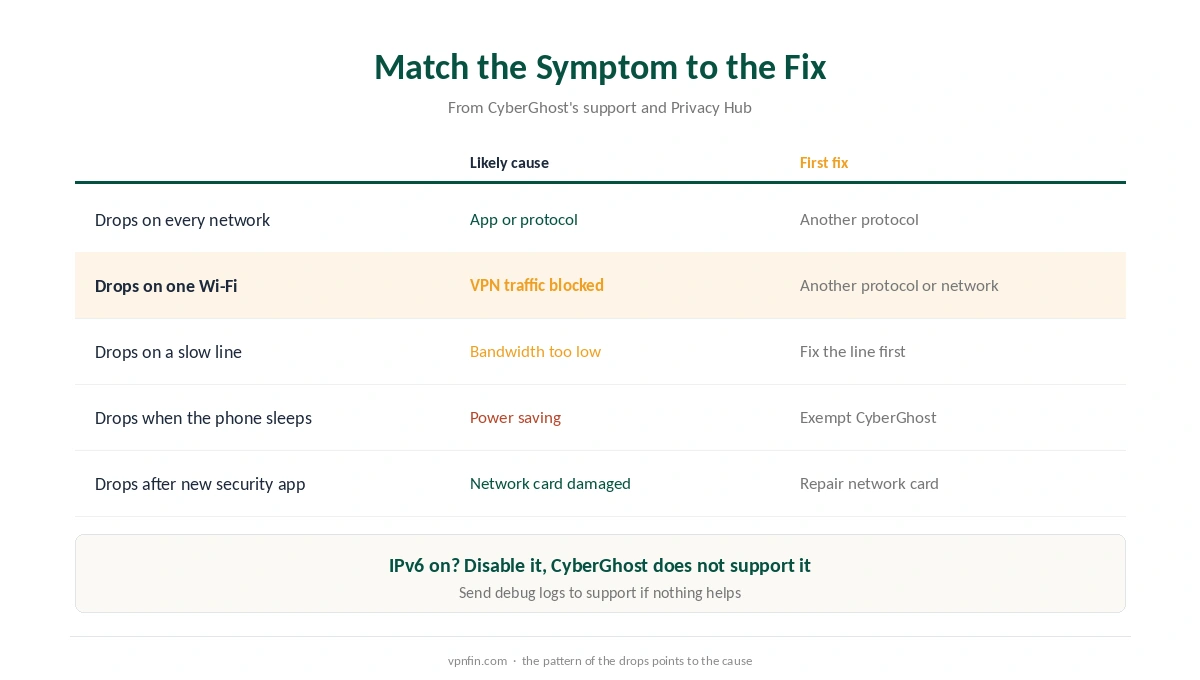
If CyberGhost keeps disconnecting on one network only, that network may block VPN traffic. Hotel and campus Wi-Fi are typical cases, covered in our hotel Wi-Fi guide.
Step 3: Small MTU and the Repair Button
CyberGhost recommends setting MTU size to Small for connection problems. Next, use Repair virtual network card in Settings, especially after installing other VPN or security software.
Also, disable IPv6 on your adapter, because CyberGhost does not support it; our IPv6 leak guide explains why. Our CyberGhost Windows guide shows the app’s settings.
Step 4: Why CyberGhost Keeps Disconnecting on Phones
Power saving pauses background apps, and a VPN runs in the background. CyberGhost’s Privacy Hub names power-saving mode as a cause of drops, so exempt CyberGhost from battery optimisation. Our Android VPN troubleshooting page shows where.
On iPhone, Low Power Mode and switching between Wi-Fi and mobile data cause similar drops. Our iPhone VPN troubleshooting page lists the settings, and our CyberGhost iPhone guide covers the app. If CyberGhost keeps disconnecting on a TV box, our CyberGhost Android TV guide covers the Ethernet bug on Android TV.
Keep the Kill Switch On
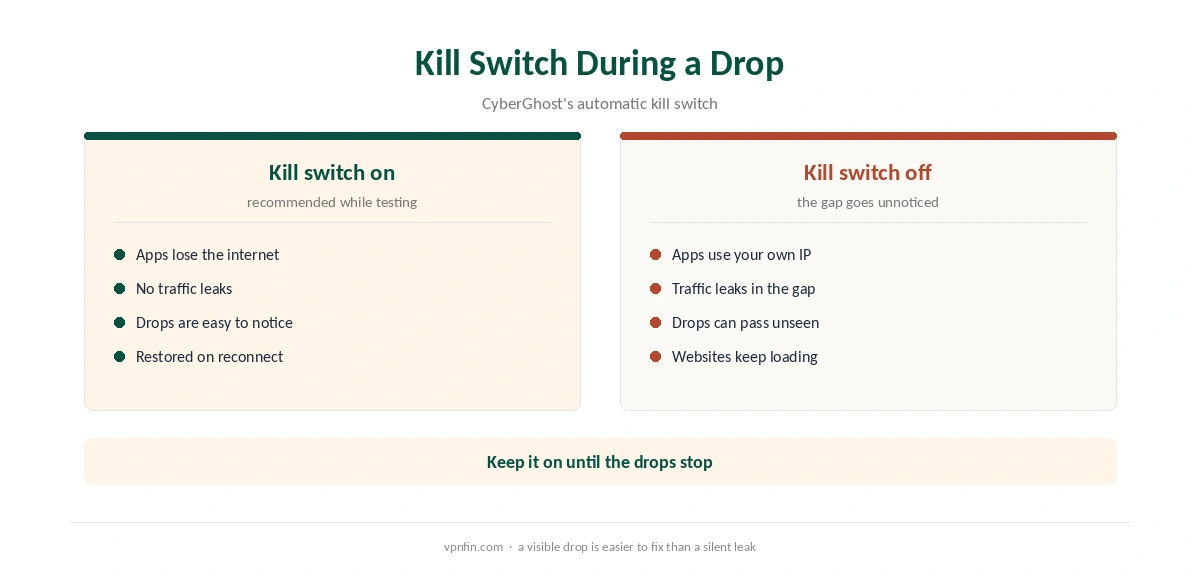
CyberGhost’s apps include an automatic kill switch. While CyberGhost keeps disconnecting, it stops apps from falling back to your normal connection in each gap. Our kill switch guide explains how it works, and our general VPN drop guide covers causes shared by every provider.
When to Contact Support
CyberGhost’s Windows section includes a guide to sending debug logs, which helps support see the failure. Contact them by live chat or at support@cyberghost.ro. For slow speeds rather than drops, see our CyberGhost speed guide. If the service stays unusable, our CyberGhost refund guide explains the 45-day window. CyberGhost belongs to Kape Technologies, a London-based company that also owns ExpressVPN and Private Internet Access.
IPv6 and Disconnections
CyberGhost’s Windows support notes that CyberGhost does not support IPv6 and suggests disabling it. A network that switches between IPv4 and IPv6 can break the tunnel. Disable IPv6 in the network adapter settings and test again. Our IPv6 leak guide explains why IPv6 also matters for privacy.
Router Restarts
CyberGhost’s support also suggests turning the router off for 30 seconds. Routers that run for months can develop problems that show up as dropped VPN connections. A restart clears them.
Other VPNs and Security Tools
Two VPN apps on one computer can fight over the network adapter. Uninstall or fully quit other VPNs before testing CyberGhost. Pause security software briefly as well, then add CyberGhost to its allowlist if that helps.
Full Network Reset
As a last step, CyberGhost’s Windows support lists commands that release and renew the IP address, flush DNS and reset Winsock. They return Windows networking to a clean state. Restart afterwards, then reconnect CyberGhost. Our CyberGhost not connecting guide lists the commands in order.
Phones and Battery Saving
On phones, battery saving can pause VPN apps in the background. That shows up as disconnections when the screen is off. Exempt CyberGhost from battery optimisation in the phone’s settings. Our Android VPN troubleshooting page shows where the setting sits.
Smaller packet size can also help on mobile data. CyberGhost’s support lists the Small MTU option for networks that drop large packets. If drops continue on every network, send CyberGhost’s support the times they happened and the protocol in use.
How We Research
This page draws on CyberGhost’s Windows connection article, its Privacy Hub guide to disconnections and the list of its troubleshooting articles. We cross-checked these sources against each other, and where they conflict or something can’t be verified, we say so in the text rather than guessing. We read every source on 5 October 2026. The main source we relied on is CyberGhost’s guide to VPN disconnections. Our full approach lives on the About Us page.
CyberGhost Keeps Disconnecting FAQ
An unstable line, the protocol, power saving and blocked VPN traffic are the main causes CyberGhost names. A Small MTU and the virtual network card repair can also help.
It can. CyberGhost’s Privacy Hub says speeds below about 5 Mbps may be too slow for a VPN.
CyberGhost recommends Small for connection problems. Find it under Settings, MTU size.
Power saving can pause the app in the background. Exempt CyberGhost from battery optimisation and test again.
No. A drop follows a working connection. If the app never connects, follow our CyberGhost not connecting guide.
The Verdict
Test the line first, then change the protocol and server, set MTU to Small and repair the virtual network card. On phones, check power saving. Keep the kill switch on throughout.