
Disclosure: VPNFin is reader-supported. If you buy a VPN through links on this page, we may earn a commission at no extra cost to you. This never affects our ratings — here’s our full disclosure.
ExpressVPN on Roku always runs through another device, because Roku cannot install VPN apps or change its own DNS. What has changed is which device. Several Roku guides updated in August and September 2026 still recommend ExpressVPN’s Aircove router, but ExpressVPN retired Aircove from sale on 16 September and replaced it with Fortify, built with GL.iNet. Cybernews also reports that ExpressVPN’s app for non-Aircove routers stopped being supported on 31 March 2026.
This guide sets out the routes that work now: a router, a Windows hotspot, and MediaStreamer on your router.
ExpressVPN on Roku: The Short Answer
For a permanent setup, use a router running ExpressVPN. New buyers get Fortify; existing Aircove owners keep full support to 2027, as our ExpressVPN on a router guide explains.
For occasional use, share ExpressVPN from a Windows PC as a hotspot, one of the options ExpressVPN’s Roku guide lists.
Know the channel store limit. Roku ties its channel store to your account’s country, so a VPN changes libraries inside installed apps, not which channels you can add. ExpressVPN’s guide advises a Roku account in the same location as the VPN, but Gizmodo notes Roku’s terms forbid accessing other regions’ content. Our ExpressVPN review covers the service.
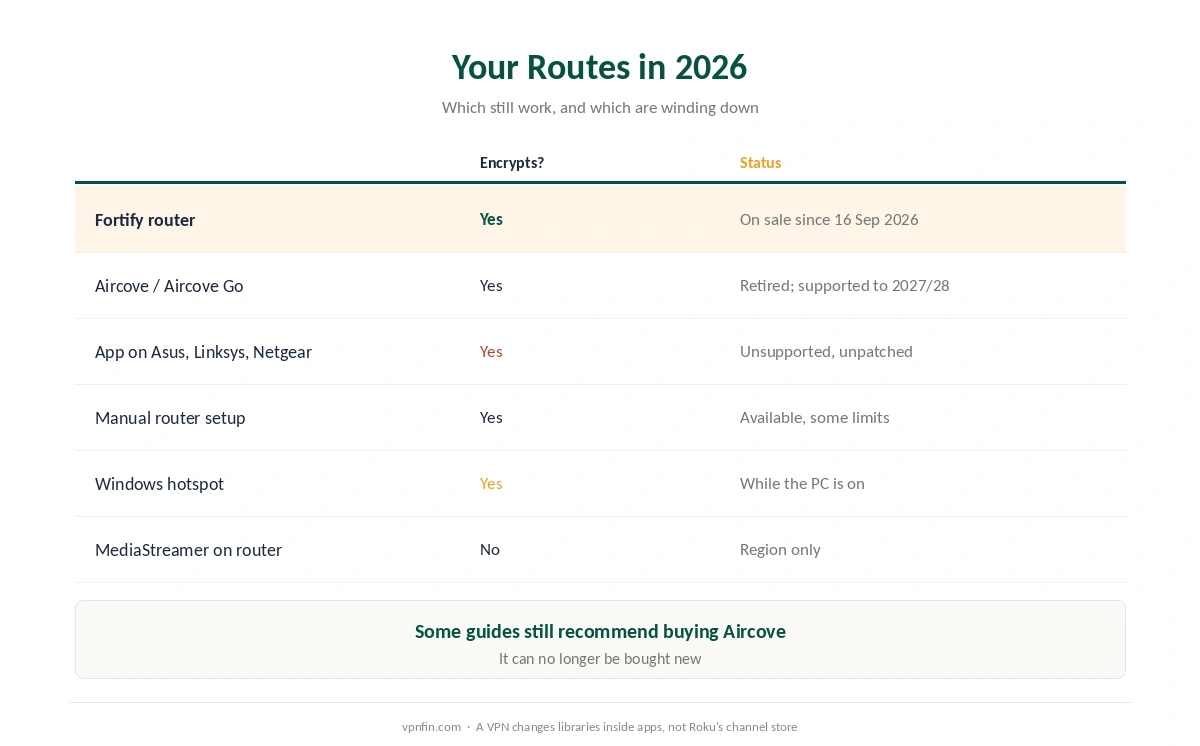
Your Routes in 2026
| Route | Encrypts? | Status |
|---|---|---|
| Fortify router | Yes | On sale since 16 September 2026 |
| Aircove or Aircove Go | Yes | Retired from sale; supported to 2027 and 2028 |
| ExpressVPN app on Asus, Linksys, Netgear | Yes | No longer supported or updated |
| Manual router configuration | Yes | Available; some limits |
| Windows hotspot | Yes | Works while the PC is on |
| MediaStreamer on the router | No | Region only, no location choice |
Be wary of older advice. TheBestVPN’s August guide and Security.org’s September guide both still point Roku owners to Aircove, which can no longer be bought new. Our router setup guide covers the general process.
Route 1: A Router Running ExpressVPN
Fortify is the new default. It connects over WireGuard and OpenVPN DCO at launch, includes 12 months of ExpressVPN’s Advanced plan, and covers the Roku along with every other device at home.
Manual configuration works on other routers with an OpenVPN client, though ExpressVPN notes not every location is available and some protections are missing compared with its app. Afterwards, confirm the address from any device with our guide to checking a VPN.
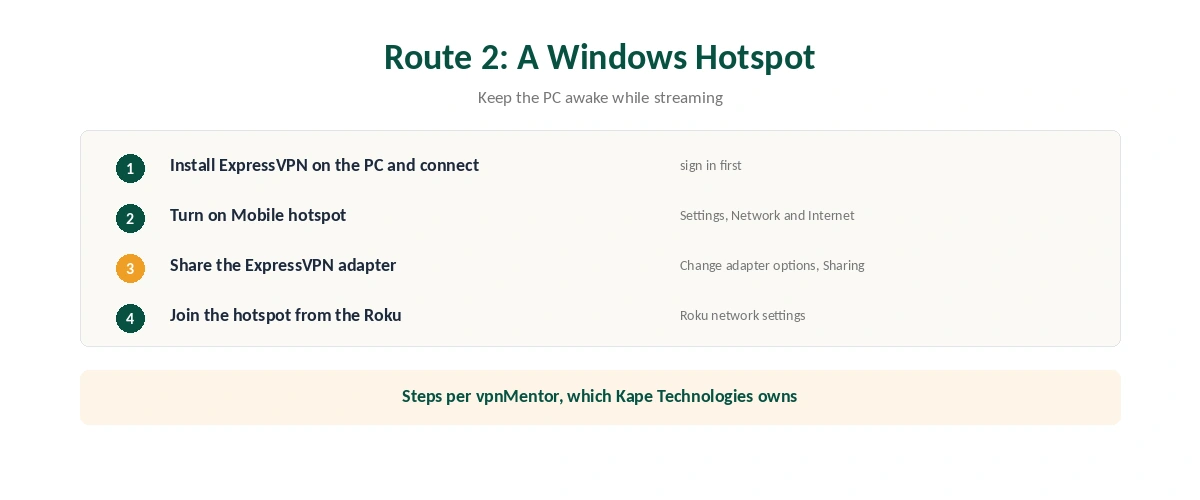
Route 2: A Windows Hotspot
| Step | What to do | Note |
|---|---|---|
| 1 | Install ExpressVPN on a Windows PC | Sign in and connect |
| 2 | Turn on Mobile hotspot | Settings, Network and Internet |
| 3 | Open Change adapter options | Under related settings |
| 4 | Share the ExpressVPN adapter with the hotspot | Sharing tab |
| 5 | Join the hotspot from the Roku | Roku network settings |
| 6 | Stream, keeping the PC awake | The link drops if it sleeps |
It needs the PC to stay on, vpnMentor notes, so it suits occasional viewing. vpnMentor is owned by Kape Technologies, which also owns ExpressVPN.
Route 3: MediaStreamer on Your Router
Roku will not accept DNS changes itself, so MediaStreamer, ExpressVPN’s Smart DNS, goes on the router, Top10VPN explains. You register your home IP in your ExpressVPN account, then enter the MediaStreamer addresses in the router’s DNS settings.
It changes the region but encrypts nothing, and you cannot choose its location. Our Smart DNS comparison explains the trade-off.
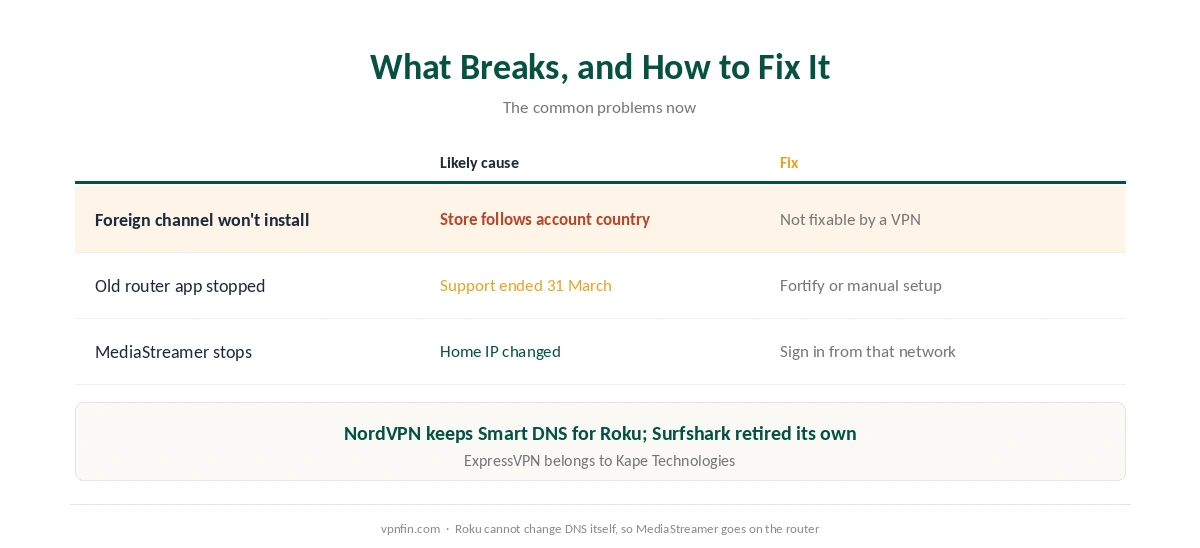
What Breaks, and How to Fix It
A foreign channel will not install. Roku’s channel store follows your account’s country. A VPN changes libraries inside installed apps, not the store, as our Netflix guide explains for one major app.
Your old router app stopped working. Cybernews reports support ended on 31 March 2026 for ExpressVPN’s app on non-Aircove routers. Move to Fortify or a manual setup.
MediaStreamer stops working. Your home IP has probably changed; sign in to ExpressVPN from that network. Our speed guide covers buffering on a VPN route.
Comparing Roku Options
NordVPN still offers Smart DNS for Roku, while Surfshark retired its own, as our NordVPN on Roku guide and our Surfshark on Roku guide explain. NordVPN and Surfshark share a parent, Nord Security. Our Roku VPN guide compares every provider.
A streaming stick avoids the problem entirely. ExpressVPN runs natively on Fire TV, as our ExpressVPN Firestick guide explains, and our ExpressVPN on Smart TV guide covers televisions.
How We Research
The routes come from ExpressVPN’s Roku support page and Roku download page, the router app’s end of support from Cybernews, the Fortify details from ExpressVPN’s September announcement, and the MediaStreamer router method from Top10VPN. The hotspot steps come from vpnMentor, which Kape Technologies owns. We name each source where used; all were read on 26 September 2026. We did not test on a Roku ourselves. Our full approach lives on the About Us page.
ExpressVPN on Roku FAQ
No. Roku does not support VPN apps. Use a router running ExpressVPN, a Windows hotspot, or MediaStreamer on your router.
No. ExpressVPN retired Aircove from sale on 16 September 2026. Its replacement is Fortify, built with GL.iNet.
Cybernews reports its support for non-Aircove routers ended on 31 March 2026, and ExpressVPN says security updates for that firmware have ended.
Only through your router, since Roku cannot change DNS itself. MediaStreamer does not encrypt traffic.
Roku ties its channel store to your account’s country, and a VPN cannot change that. Roku’s terms also forbid accessing other regions’ content, Gizmodo notes.
The Verdict
ExpressVPN on Roku runs through a router, a Windows hotspot or MediaStreamer, and the router route now means Fortify for new buyers.
Treat any guide that still recommends buying Aircove, or ExpressVPN’s older router app, as out of date.