
Disclosure: VPNFin is reader-supported. If you buy a VPN through links on this page, we may earn a commission at no extra cost to you. This never affects our ratings — here’s our full disclosure.
ExpressVPN on Chrome used to need the desktop app. Its extension was essentially a remote control, and many guides still say so. In March 2026 ExpressVPN replaced it with what it calls a hybrid extension, which runs in one of two modes: a standalone Proxy Mode that protects Chrome alone, or a Remote Control Mode that operates the desktop app for full-device protection.
The mode you pick decides what you get. ExpressVPN’s own description of Proxy Mode, Gizmodo notes, is limited privacy protection for this browser only. This guide explains both modes, setup and what breaks.
ExpressVPN on Chrome: The Short Answer
Install the extension from the Chrome Web Store and sign in. It works without the desktop app in Proxy Mode, which suits quick sessions on public Wi-Fi, as our public Wi-Fi guide explains.
For the whole computer, install the desktop app too and switch the extension to Remote Control Mode under Menu, Settings, Browser extension mode, as iTechGuides describes.
Either way, keep WebRTC blocking and location spoofing on. They stop Chrome revealing your real IP or location. Our ExpressVPN review covers the service.
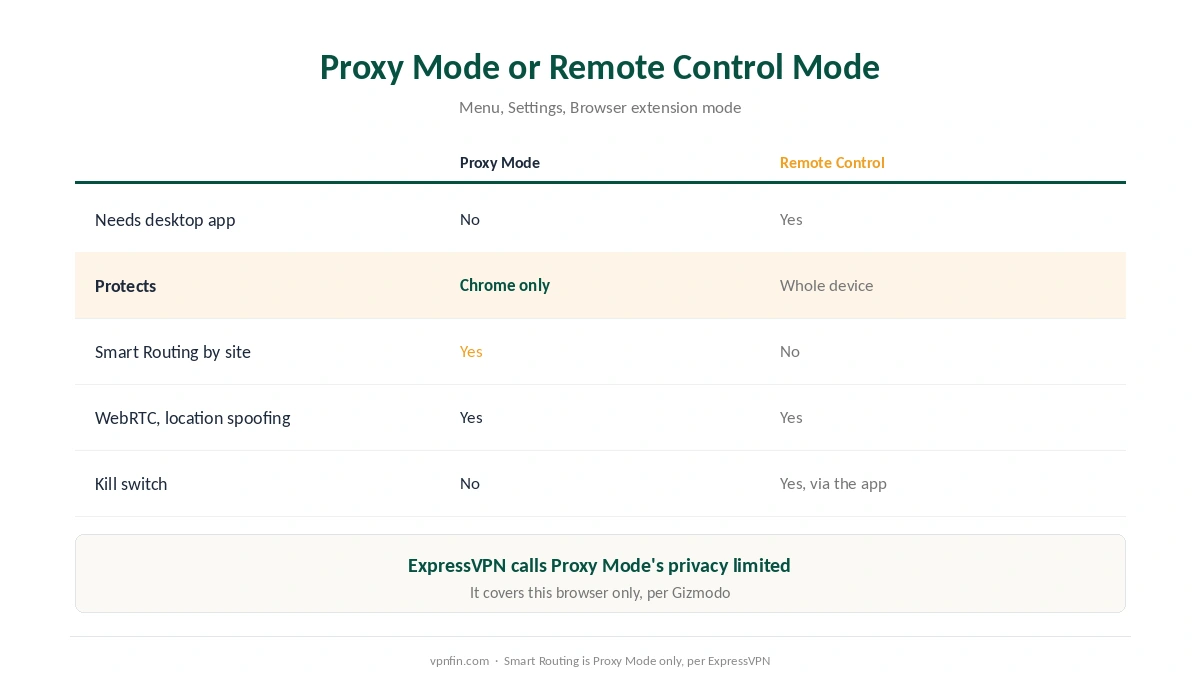
Proxy Mode or Remote Control Mode
| Proxy Mode | Remote Control Mode | |
|---|---|---|
| Needs the desktop app | No | Yes |
| What it protects | Chrome only | The whole device |
| Smart Routing by website | Yes | No |
| WebRTC blocking, location spoofing | Yes | Yes |
| Protocol | Proxy | The app’s, including Lightway |
Smart Routing in ExpressVPN on Chrome works only in Proxy Mode, ExpressVPN’s support page says. It lets you set rules so some sites use the VPN, some a different location and some bypass it altogether. Our split tunnelling guide explains the idea.
Remote Control Mode makes the extension a shortcut. The app does the protecting, including a kill switch, as our kill switch guide explains; the extension adds browser-level WebRTC and location protection the app cannot reach. Our VPN and proxy comparison explains the difference.
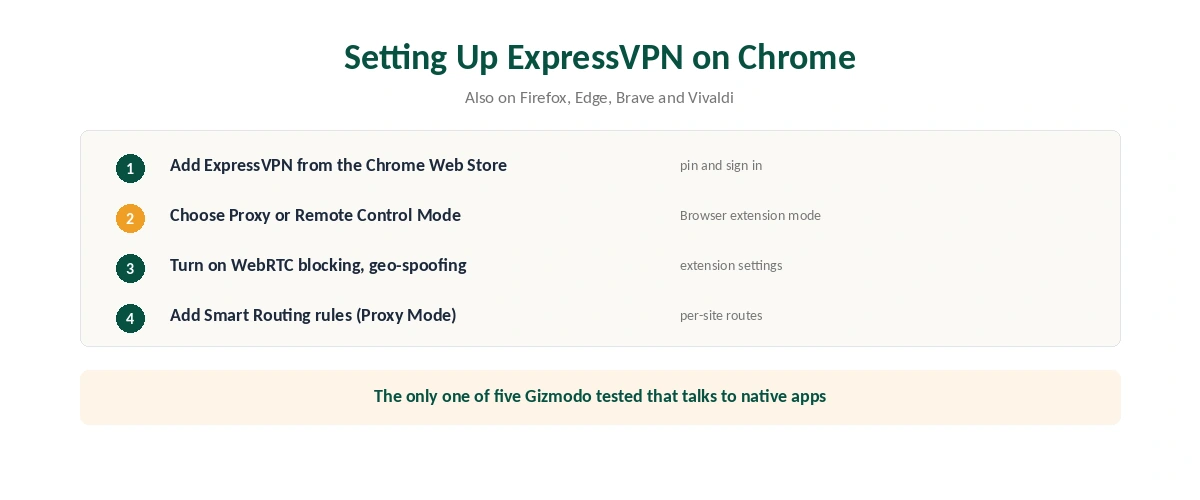
Setting Up ExpressVPN on Chrome
| Step | What to do | Note |
|---|---|---|
| 1 | Add ExpressVPN from the Chrome Web Store | Check the verified publisher |
| 2 | Pin the icon and sign in | Subscription required |
| 3 | Choose a mode | Menu, Settings, Browser extension mode |
| 4 | Turn on WebRTC blocking and location spoofing | In the extension settings |
| 5 | Set Connect on browser launch | Optional |
| 6 | In Proxy Mode, add Smart Routing rules | Per-site routes |
The extension also runs in Firefox, Edge, Brave and Vivaldi, per ExpressVPN’s support page. Gizmodo found it asked for a permission none of the other four extensions it tested did: talking to native apps, which is how it controls the desktop app.
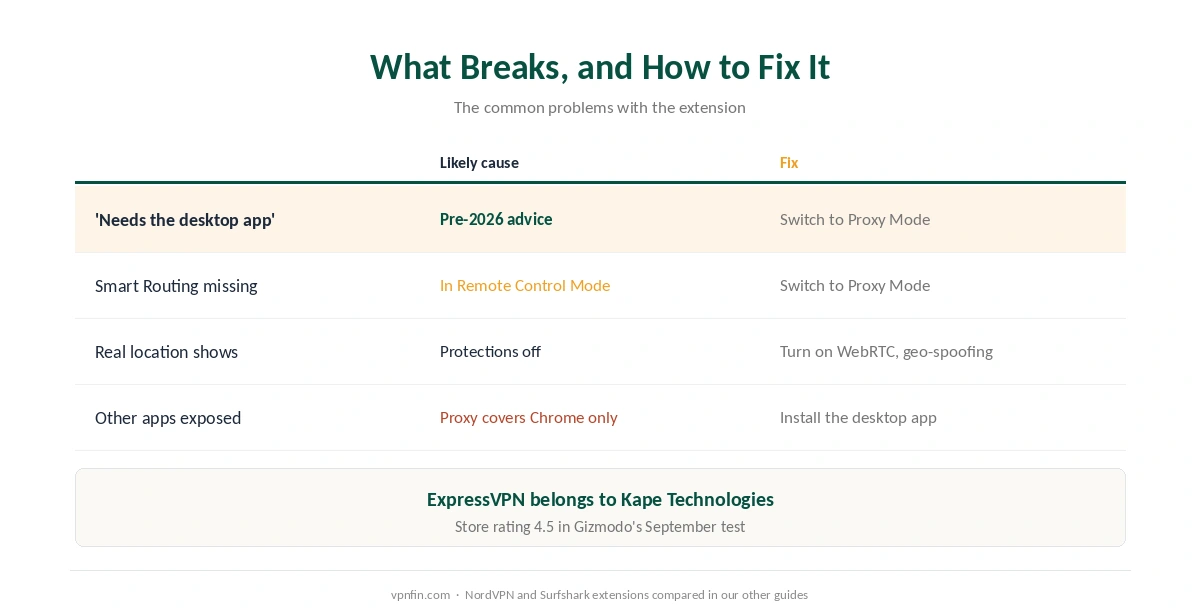
What Breaks, and How to Fix It
A guide says ExpressVPN on Chrome needs the app. That was true before March 2026. Switch to Proxy Mode to use it alone, then confirm the address with our guide to checking a VPN.
Smart Routing is missing. It works only in Proxy Mode. Gizmodo’s test reported no site exclusion, which fits a test in Remote Control Mode.
Your real location still shows. Turn on location spoofing and WebRTC blocking; Gizmodo found WebRTC blocked even in Proxy Mode. Our DNS leak guide covers the related check.
Other apps are exposed. Proxy Mode covers Chrome only. Install the desktop app, as our ExpressVPN on Windows guide and our ExpressVPN on Mac guide explain.
Comparing Chrome Extensions
Gizmodo’s September test found ExpressVPN’s extension had the highest store rating of the five it tested, 4.5 stars, and about a million users. NordVPN’s extension came first overall for standalone use, and Surfshark’s second for features, as our NordVPN on Chrome guide and our Surfshark on Chrome guide explain. NordVPN and Surfshark share a parent, Nord Security; ExpressVPN belongs to Kape Technologies.
To turn it off, disconnect from the icon or remove it, as our guide to turning off a VPN in Chrome explains.
How We Research
The two modes come from ExpressVPN’s March 2026 announcement, its support page and its Chrome Web Store listing. The mode-switching path comes from iTechGuides, and the Proxy Mode wording, permissions and rating from Gizmodo’s September 2026 Chrome test. We name each source where used; all were read on 26 September 2026. We did not test the extension ourselves. Our full approach lives on the About Us page.
ExpressVPN on Chrome FAQ
Not since March 2026. Its Proxy Mode works on its own and protects Chrome. Remote Control Mode uses the desktop app for full-device protection.
Per-site rules in Proxy Mode: some sites use the VPN, some a chosen location, and some bypass it. It is not available in Remote Control Mode.
Open the extension, then Menu, Settings, Browser extension mode, according to iTechGuides.
Yes. The extension blocks WebRTC and spoofs HTML5 geolocation, and Gizmodo found WebRTC blocked even in Proxy Mode.
Chrome, Firefox, Edge, Brave and Vivaldi, according to ExpressVPN’s support page.
The Verdict
ExpressVPN on Chrome is now two tools in one: a standalone proxy with per-site Smart Routing, or a remote control for the full desktop app.
Use Proxy Mode for quick browser privacy, Remote Control Mode when everything must be covered, and keep WebRTC blocking on in both.