
Disclosure: VPNFin is reader-supported. If you buy a VPN through links on this page, we may earn a commission at no extra cost to you. This never affects our ratings — here’s our full disclosure.
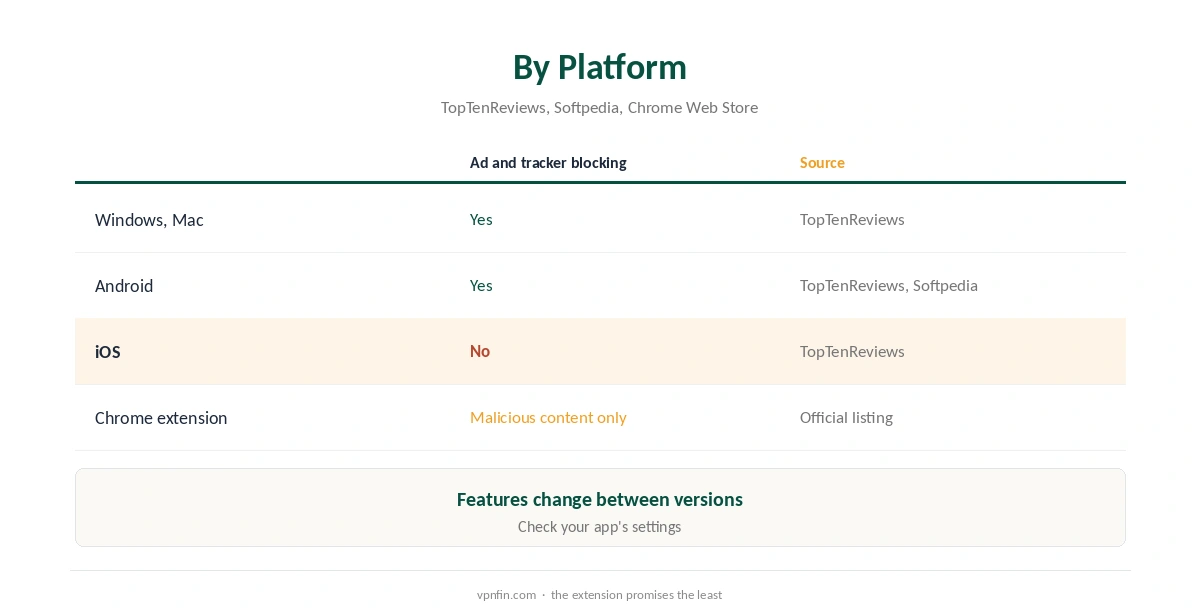
The CyberGhost ad blocker story is less clear than its marketing suggests. TopTenReviews describes blockers for ads, trackers and malicious websites in CyberGhost’s apps, except on iOS. Softpedia’s listing of the Android app describes the same three blockers. But the official Chrome Web Store listing for CyberGhost’s free extension promises only blocking of malicious content, not ads, and warns it does not protect against WebRTC leaks.
This guide sets out what each source confirms, how to check your own app, and when a separate ad blocker makes more sense.
What the Apps Block
TopTenReviews lists blockers for ads, trackers and malicious websites in CyberGhost’s apps, with the iOS client the exception. It also mentions automatic HTTPS redirection and a malicious URL filter that is always on. Softpedia’s listing of older Android versions describes ad, tracker and malicious-site blocking, plus a count of blocked ads after each session.
Features change between versions and platforms, so open your app’s settings and look for content blocking options before relying on them. Our CyberGhost Windows guide shows where the settings sit on desktop.
The Free Chrome Extension
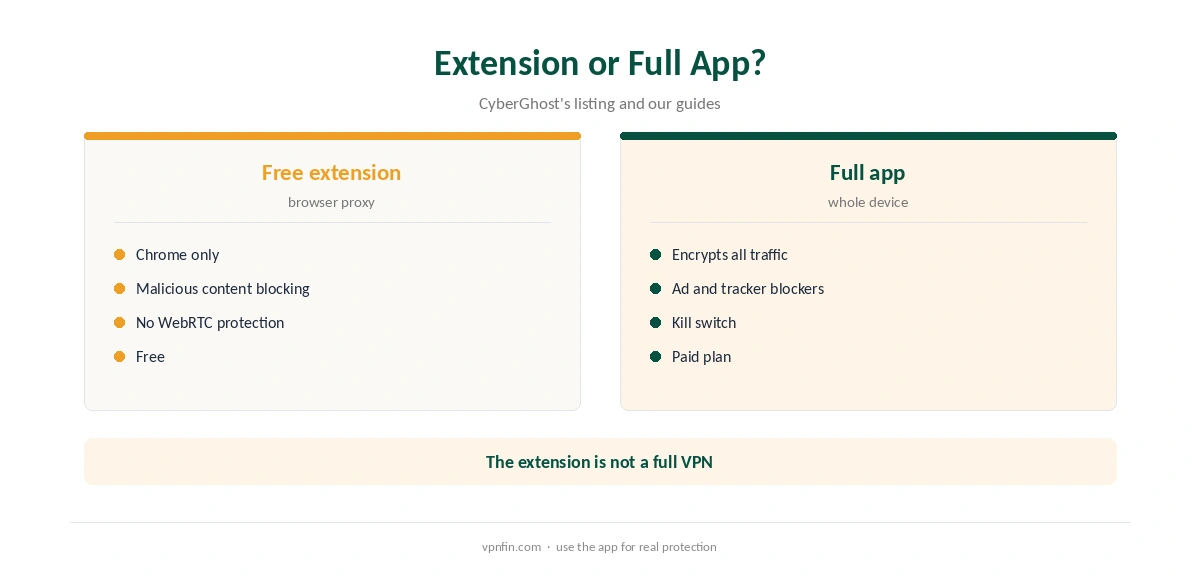
CyberGhost’s free Chrome extension, listed as Stay secure with CyberGhost VPN Free Proxy, is a browser proxy. Its official listing promises a hidden IP, access to geo-restricted sites and blocked malicious content, but not ad blocking. It also warns the plugin does not protect against WebRTC leaks.
Some third-party sites describe a built-in ad blocker in the extension; the official listing does not, so we do not rely on that claim. Our CyberGhost Chromebook guide compares the extension with the Android app, and our WebRTC leak guide explains the leak warning.
iPhone and iPad
TopTenReviews says the iOS client lacks the ad and tracker blockers. On iPhone, a Safari content blocker from the App Store covers that gap without affecting the VPN. Our CyberGhost iPhone guide covers the iOS app’s other features.
CyberGhost Ad Blocker or a Browser Extension?
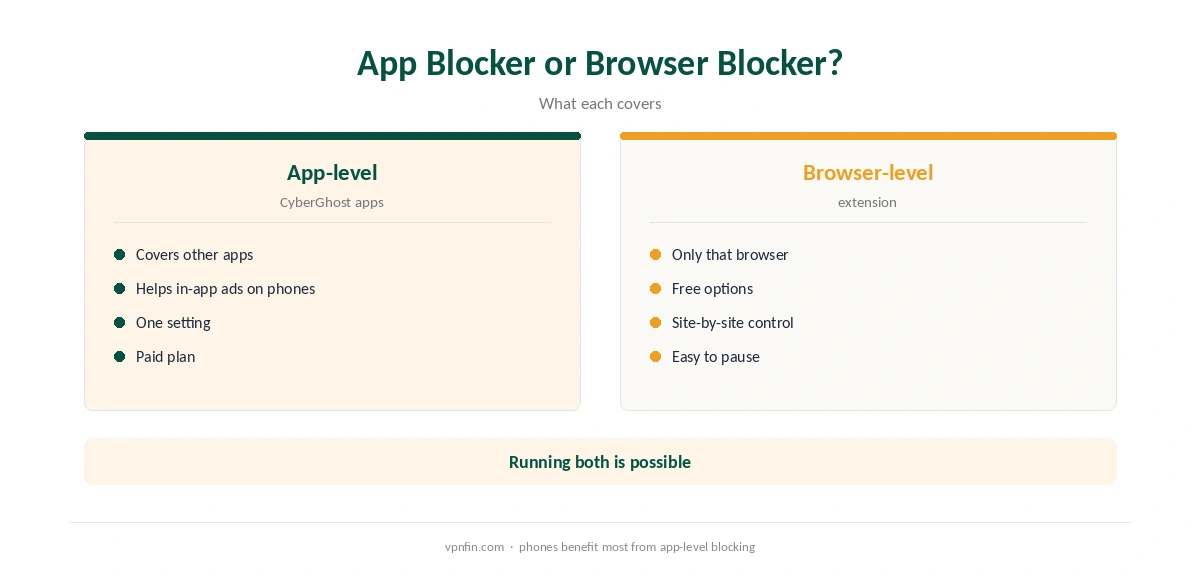
A browser ad blocker works only in that browser, but it is often free and can be paused site by site. An app-level blocker covers other apps too, which helps on phones where ads appear inside apps. Running both is possible; if a site breaks, pause one blocker for that site first.
When Sites or Streams Break
Ad blockers can break sites that rely on ad scripts, and some streaming players refuse to play when ad servers are blocked. If a page or stream fails right after you enable blocking, pause it and reload. Our CyberGhost Netflix guide covers other streaming errors.
Testing the CyberGhost Ad Blocker
Open a news site you know carries many ads, with the CyberGhost ad blocker off and then on, and compare. If nothing changes, check that the option is enabled in your app version, or use a browser blocker instead. Confirm the VPN side separately with our VPN test page and a DNS check with our DNS leak guide.
Android TV and Other Devices
TV apps focus on connecting and streaming, and the sources we read do not describe ad blocking on CyberGhost’s Android TV app. Our CyberGhost Android TV guide covers what the TV app does offer.
Who Needs the CyberGhost Ad Blocker
If you mainly browse on a desktop, a free browser blocker may be enough. The CyberGhost ad blocker matters more on Android, where ads appear inside apps, and for households that want one setting across devices. On iPhone, rely on a Safari content blocker instead, which works alongside the VPN without conflict and costs little or nothing to add on an iPhone or iPad.
Malicious Site Blocking
TopTenReviews notes CyberGhost’s malicious URL filter is always on, which matters for downloads and links in email.
How It Compares
NordVPN’s Threat Protection covers ads and malicious sites, and PureVPN’s Tracker and Ad Blocker sits in its apps, as our NordVPN ad blocker guide and PureVPN ad blocker guide explain. If ad blocking is your main reason to pick a VPN, compare what each app actually offers on your platform. Our CyberGhost safety guide covers the provider’s wider record.
Ad Blocking Is Not Antivirus
Blocking malicious sites reduces exposure, but it does not scan files or stop malware you install yourself. Our VPN vs antivirus guide explains why both still matter.
What CyberGhost Costs
CyberGhost renews at $56.94 a year on its 2-year plan, according to our renewal table. It covers seven devices, and the 45-day money-back guarantee applies to website purchases, as our CyberGhost refund guide explains, which leaves time to check the blockers on your own devices.
| Provider | Renewal price | Per month | Tier |
|---|---|---|---|
| NordVPN | $139.08/yr | ~$11.59 | Basic |
| Surfshark | ~$79/yr | ~$6.58 | Starter |
| ExpressVPN | $99.95/yr | ~$8.33 | Basic |
| CyberGhost | $56.94/yr | ~$4.75 | 2-year |
| PureVPN | $47.95/yr | ~$4.00 | Standard, 2-year (1-year renews $57.95) |
| IPVanish | $89.99/yr | ~$7.50 | Essential |
| Windscribe | ~$69/yr | ~$5.75 | Pro |
| Proton VPN | ~$83.88/yr | ~$6.99 | VPN Plus |
| Mullvad | ~$65/yr | ~$5.40 | flat, no tiers |
| Norton VPN | $79.99/yr | ~$6.67 | Standard |
| Hotspot Shield | ~$95.99/yr | ~$8.00 | Premium annual |
| Astrill | $300 every 2 yrs | ~$12.50 | 2-year, same at renewal |
How We Research
This page draws on CyberGhost’s official Chrome Web Store listing, TopTenReviews’ CyberGhost review, Softpedia’s Android listing and our renewal table. We cross-checked these sources against each other, and where they conflict or something can’t be verified, we say so in the text rather than guessing. We set aside third-party claims about the extension that the official listing does not support. We checked time-sensitive figures, including prices in US dollars, on 6 October 2026. Renewal from our renewal table. The main source we relied on is CyberGhost’s Chrome extension listing. Our full approach lives on the About Us page.
CyberGhost Ad Blocker FAQ
TopTenReviews describes ad, tracker and malicious-site blockers in its apps, except iOS. Check your app’s settings.
Its official listing promises blocked malicious content, not ad blocking.
TopTenReviews says the iOS client lacks the blockers. A Safari content blocker fills the gap.
No. The official listing says it does not.
Pause the blocker for that site and reload.
The Verdict
The CyberGhost ad blocker exists in its apps according to reviewers, though not on iOS, while the free Chrome extension promises only malicious-content blocking. Check your own app, and pair it with a browser blocker if you want site-by-site control. CyberGhost belongs to Kape Technologies, which also owns ExpressVPN and Private Internet Access.