
Disclosure: VPNFin is reader-supported. If you buy a VPN through links on this page, we may earn a commission at no extra cost to you. This never affects our ratings — here’s our full disclosure.
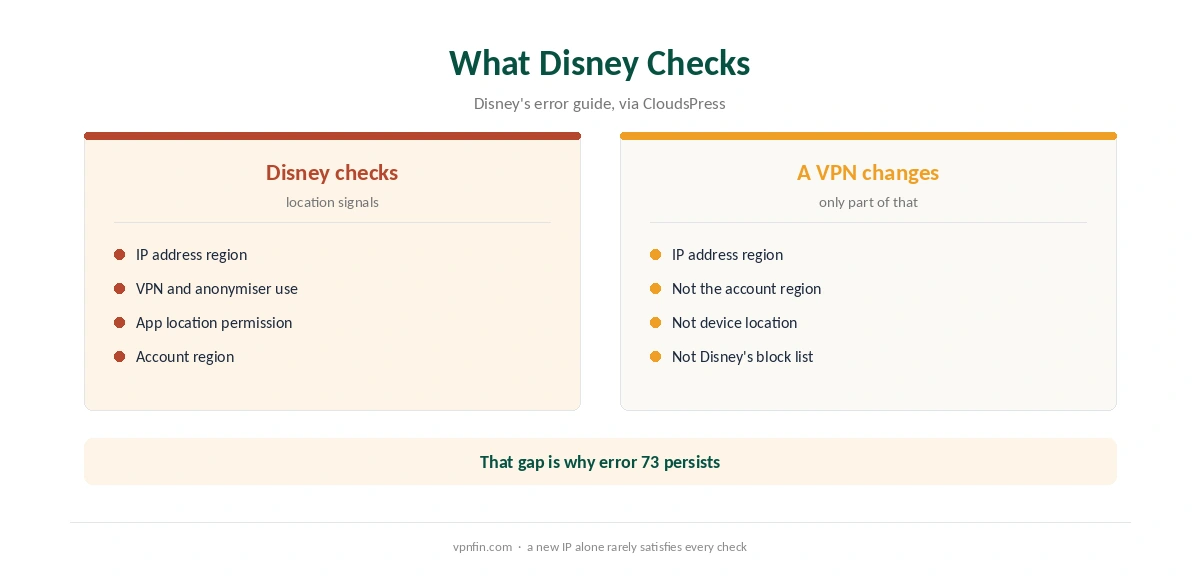
Using NordVPN for Disney Plus often ends in error code 73. Disney’s own error guide lists it as a location error caused by an unsupported region or a VPN or IP anonymiser, and Disney’s advice is to switch the VPN off. We found no recent independent test confirming NordVPN with Disney Plus, so this guide focuses on diagnosis, not promises. Our page on PureVPN and Disney Plus covers its optimised servers and the fixes for error 73.
What Error Code 73 Means
Disney groups code 73 with its location errors, CloudsPress notes. It appears when Disney Plus decides you are in a region where the service or title is not available, or when it detects a VPN. Online Tech Tips adds that Disney Plus actively blocks VPN addresses.
Server reputation changes over time, so a server that worked last month may fail today. No VPN can guarantee access, CloudsPress stresses.
Diagnosing NordVPN for Disney Plus Errors
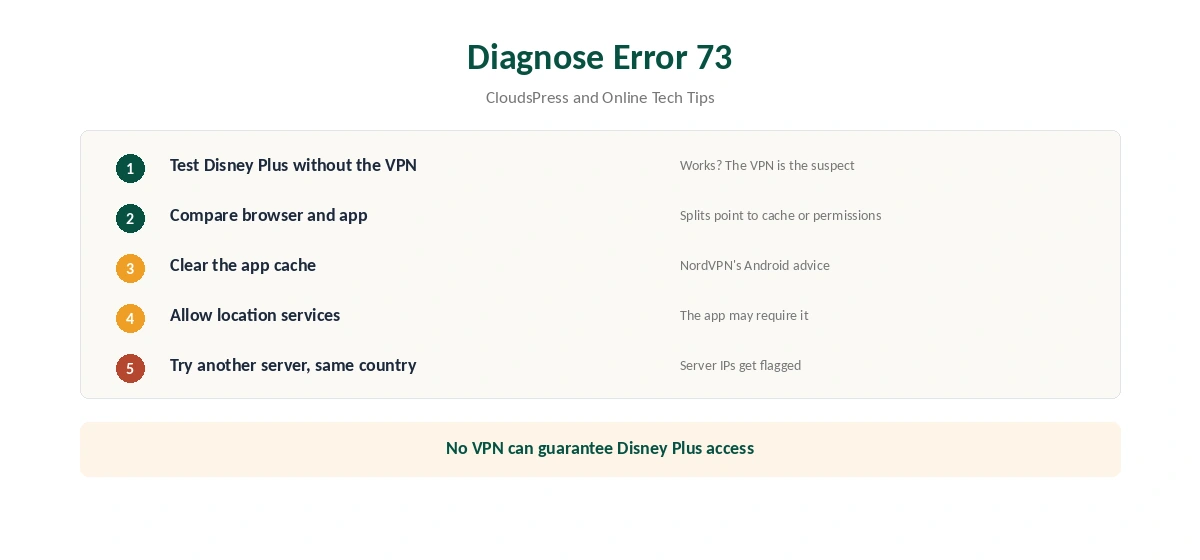
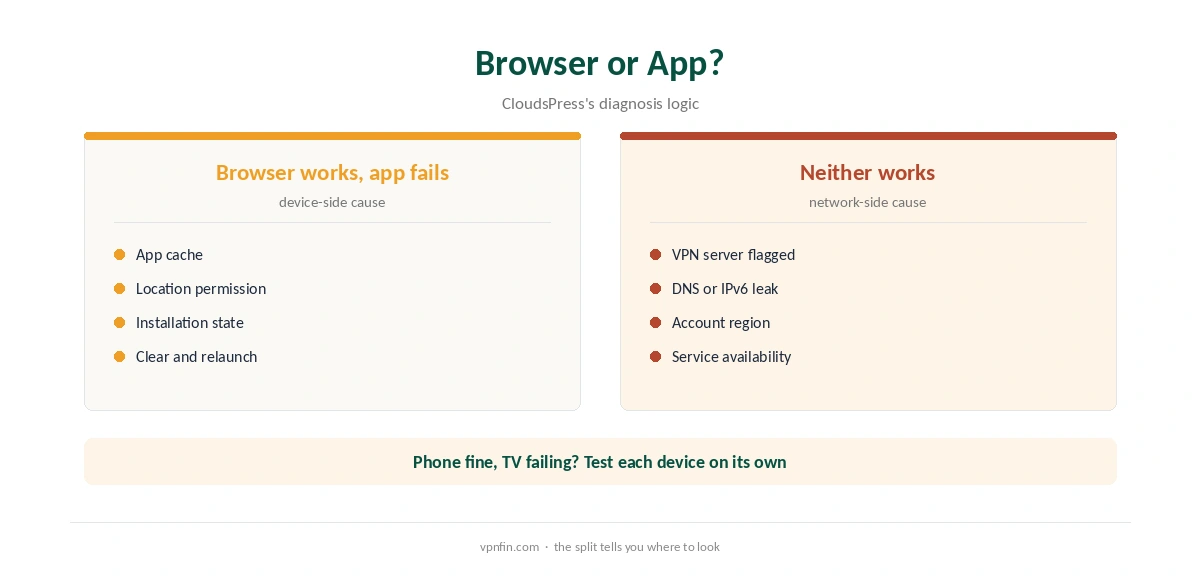
First, test Disney Plus with the VPN off. If it works, the VPN path is the suspect. Next, compare the browser with the app: if the browser works and the app fails, the cause is often the app’s cache or a location permission.
On Android, NordVPN suggests clearing the Disney Plus app’s cache, according to CloudsPress. Online Tech Tips notes that the app may need location services enabled. Then try another server in the same country.
TVs and Different Devices
A Sky forum user in August 2026 saw error 73 on a TV while Disney Plus worked on an iPad and phone. Devices can disagree, so test each one. On TVs, our NordVPN Firestick guide and smart TV guide cover setup.
Other Fixes Worth Trying
Test for IPv6 leaks, which can reveal your real location; our IPv6 leak guide shows how. A dedicated IP avoids shared addresses that services flag, as our dedicated IP guide explains.
For services that work more reliably with NordVPN, see our Netflix guide and Hulu guide; PCRisk notes Hulu and Disney Plus are moving closer together in 2026.
Should You Rely on NordVPN for Disney Plus?
Not as your main reason to subscribe. Use the 30-day refund window to test your own region, as our NordVPN refund guide explains. Our Disney Plus VPN guide compares providers, and our streaming hub covers the rest. NordVPN belongs to Nord Security, which also owns Surfshark.
If streams buffer rather than fail, our NordVPN speed guide helps. Our VPN test page confirms which country your IP shows. For TV boxes, our Android TV guide covers the TV app’s split tunnelling.
Disney Plus on TVs and Sticks
A Sky forum user in August 2026 saw error 73 on a TV while Disney Plus worked on an iPad and phone. TV apps cache location and device data more stubbornly than phones. Clear the Disney Plus app’s cache in the TV’s settings, or reinstall it, after connecting.
On Fire TV and Android TV, run NordVPN on the same device, as our NordVPN Firestick guide explains. On smart TVs without apps, a router running NordVPN is the route.
Location Permissions
Online Tech Tips notes that the Disney Plus app may need location services. On phones and tablets, the app can read device location as well as the IP address. A mismatch between the two can trigger error 73.
If the app asks for location, grant it only while using the app, and check that the device’s location settings match where the VPN says you are. Our page on TunnelBear with Disney+ covers split test results and how to check on your network.
Testing Honestly
We found no recent independent test confirming NordVPN with Disney Plus. Disney’s own guidance points to VPNs as a cause of error 73. Treat any success as temporary and test within the 30-day refund window, as our NordVPN refund guide explains.
Note which servers work and when. If several fail in a row, the block is likely broad rather than server-specific.
When to Stop Trying
If Disney Plus fails on every server, the honest answer is that NordVPN is not the right tool for it right now. NordVPN’s strengths lie elsewhere, as our NordVPN streaming hub shows. Our Disney Plus VPN guide compares how other providers fare.
Cached Sessions in the Browser
In a browser, Disney Plus can hold on to an old session. Sign out, clear cookies for the site, then connect NordVPN and sign in again. A private window is a quick way to test without touching your main browser.
If the private window works and the normal one does not, the old session was the problem, not the server. If it does not, the server is the problem, so switch city.
How We Research
This page draws on Disney Plus error guides from CloudsPress and Online Tech Tips, a Sky forum thread and PCRisk. We cross-checked these sources against each other, and where they conflict or something can’t be verified, we say so in the text rather than guessing. We read every source on 5 October 2026. The main source we relied on is Disney’s error 73 page. Our full approach lives on the About Us page.
NordVPN and Disney Plus FAQ
We found no recent independent test confirming it. Disney Plus blocks VPNs and shows error code 73.
A location error: Disney says it comes from an unsupported region or a VPN or IP anonymiser.
Test without the VPN, clear the app’s cache, allow location services, then try another server.
Devices can differ in cache, location settings and network path. Test and fix each one.
It avoids shared addresses that services flag, but nothing guarantees access.
The Verdict
NordVPN for Disney Plus is unreliable, and Disney’s own guidance points to VPNs as a cause of error 73. Diagnose carefully, test within the refund window, and choose NordVPN for its other strengths.