
Disclosure: VPNFin is reader-supported. If you buy a VPN through links on this page, we may earn a commission at no extra cost to you. This never affects our ratings — here’s our full disclosure.
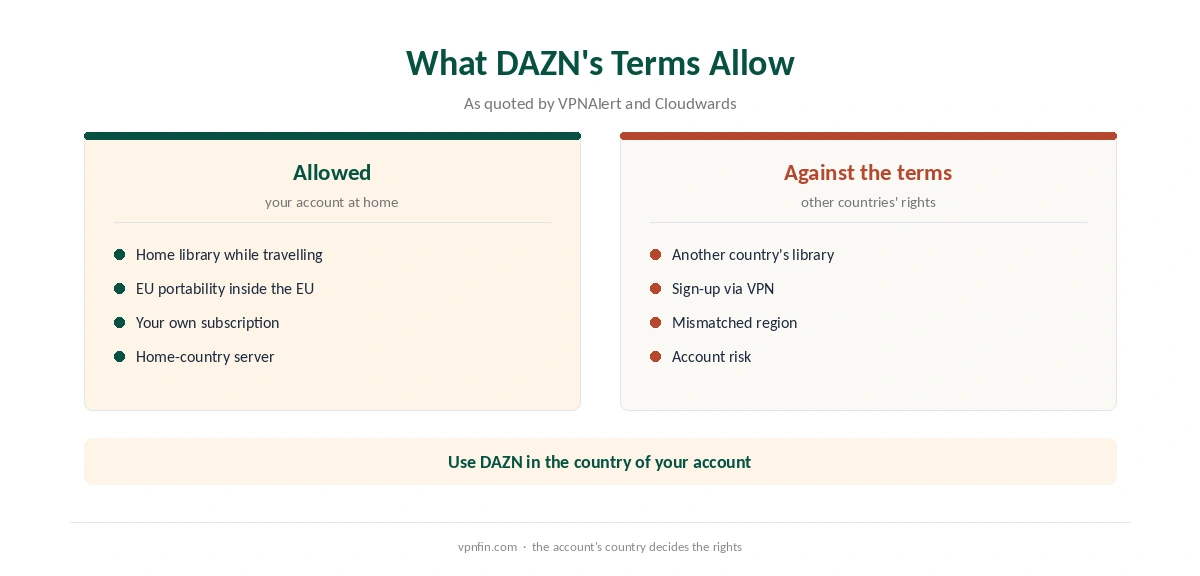
A DAZN NordVPN setup works best for one thing: watching your own DAZN account while you travel. DAZN’s terms, as quoted by VPNAlert, say you may use the service only in the country where you set up the account. EU subscribers can already watch their home library elsewhere in the EU, Cloudwards notes, but not in the US.
What DAZN Allows
DAZN’s catalogue and rights differ sharply by country, so the same sport can sit on DAZN in one market and elsewhere in another. Connecting to a server in your home country restores your home library while abroad.
Using a server elsewhere to reach another country’s rights goes against the terms VPNAlert quotes. Comparitech also notes that the list of VPNs working with DAZN shrank considerably in 2026.
DAZN NordVPN Error Codes
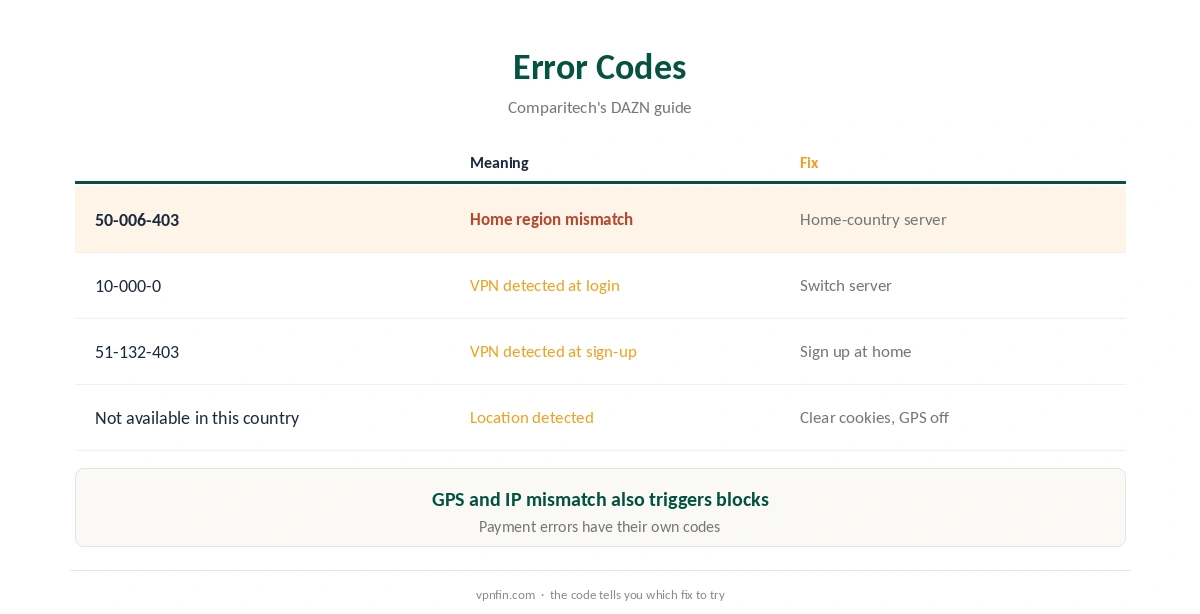
Comparitech decodes the main ones. Error 50-006-403 means your account’s home region does not match where you appear to be. Error 10-000-0 means DAZN detected a VPN at login, and 51-132-403 means it detected one at registration. The plain message reads: DAZN not available in this country.
Fixing DAZN NordVPN Errors
Switch to another server in your home country, then clear cookies and reopen DAZN. Comparitech adds that a mismatch between GPS location and IP address triggers blocks, so switch off location sharing on the device and in the browser. Finally, ask NordVPN’s support which servers currently work.
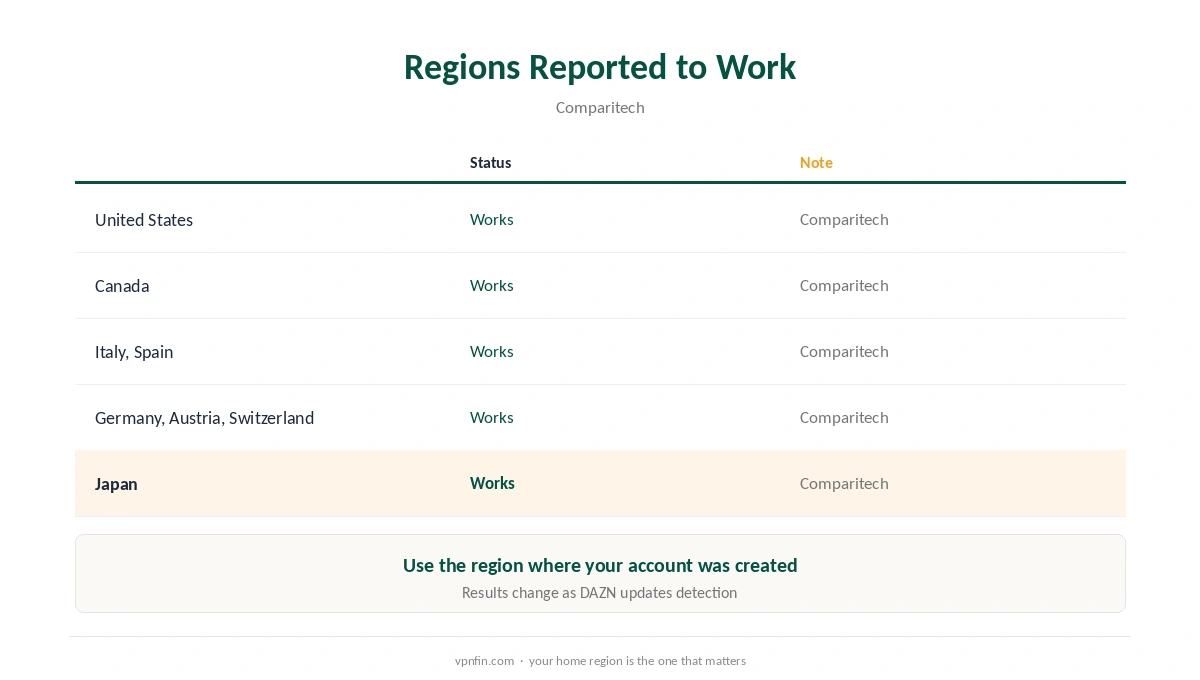
Comparitech reports NordVPN working in at least eight DAZN regions: the US, Canada, Italy, Spain, Japan, Switzerland, Germany and Austria.
Sport on Other Services
Our sports streaming guide covers blackouts and rights, and our streaming hub covers other services. For Japanese DAZN, our NordVPN Japan guide applies. Each guide starts from the same rule: your own account, your own country.
US sport has its own rules, as our Peacock guide explains. NordVPN belongs to Nord Security, which also owns Surfshark. Rights decide what each service shows.
Checks Before You Stream
Confirm your visible country with our VPN test page. Our IPv6 leak guide and DNS leak guide cover two leaks that can reveal a real location. Repeat the checks on each new network.
Keep the kill switch on, as our kill switch guide explains. On TVs, our Firestick guide covers the app. Both matter more during live events.
If live sport buffers, our NordVPN speed guide explains server choice. Our NordVPN Netflix guide and refund guide help you decide. Run the checks before kick-off, not during it.
EU Subscribers Travelling Inside Europe
Cloudwards notes that DAZN subscribers in an EU country can watch their home library in other EU countries without a VPN. That follows EU portability rules for online content. Outside the EU, including the US, the home library is not available.
So a German subscriber in Spain may not need NordVPN at all. The same subscriber in the US would connect to a German server to keep the home library.
DAZN on TVs and Streaming Sticks
On Fire TV and Android TV, install NordVPN on the same device, connect to your home country, then open DAZN. Our NordVPN Firestick guide covers the app. Close DAZN fully if it was already open.
On smart TVs without a VPN app, a router running NordVPN covers the set, as our NordVPN router guide explains.
Location Services and DAZN
Comparitech notes that a mismatch between GPS location and IP address can trigger DAZN’s location error. Phones and tablets share GPS with apps. Turn off location access for DAZN, or for the browser, before watching through a VPN.
If the error persists, clear the app’s data or the browser’s cookies and sign in again.
Live Events and Timing
DAZN streams many live events, where a dropped connection costs more than on-demand viewing. Test the setup before kick-off, not during it. Keep the kill switch on, and pick a server close to you within your home country. If a server fails during an event, switch to another city rather than disconnecting.
Choosing a Server in Your Home Country
Comparitech reports NordVPN working in at least eight DAZN regions. Within your home country, pick the city closest to where you are travelling. A subscriber from Italy in Asia, for example, should try several Italian cities and keep the fastest. If DAZN shows a VPN error, switch city rather than country, since your account only works with its own country’s library. Our NordVPN speed guide helps if streams buffer. Keep two working cities saved before a big event. If DAZN still refuses every city, compare a browser with the app on the same device. A browser that works while the app fails points to the app’s cache rather than the server. Our guide to VPN for DAZN covers account rules, EU travel and the error codes.
How We Research
This page draws on DAZN VPN guides from Comparitech, VPNAlert and Cloudwards, including DAZN’s terms as VPNAlert quotes them. We cross-checked these sources against each other, and where they conflict or something can’t be verified, we say so in the text rather than guessing. We read every source on 5 October 2026. The main source we relied on is Comparitech’s DAZN guide. Our full approach lives on the About Us page.
NordVPN and DAZN FAQ
Comparitech reports it working in at least eight DAZN regions, including the US, Canada, Italy and Japan.
Your account’s home region does not match where you appear to be, according to Comparitech.
Your own account, from your home country’s servers, yes. DAZN’s terms limit use to the account’s country.
Not within the EU; Cloudwards notes the home library works across EU countries, but not in the US.
It detected your location or the VPN. Switch servers, clear cookies and turn off location sharing.
The Verdict
A DAZN NordVPN setup suits subscribers watching their own account abroad. Use home-country servers, switch off location sharing, and respect DAZN’s country rules.