
Disclosure: VPNFin is reader-supported. If you buy a VPN through links on this page, we may earn a commission at no extra cost to you. This never affects our ratings — here’s our full disclosure.
NordVPN Peacock access matters because Peacock streams only in the US and a handful of US territories. Comparitech found NordVPN working with Peacock in August 2026, and ProPrivacy counts about 3,000 NordVPN servers across 22 US cities. New sign-ups from abroad still need a US payment method, so the clearest case is a US subscriber travelling.
Where NordVPN Peacock Access Works
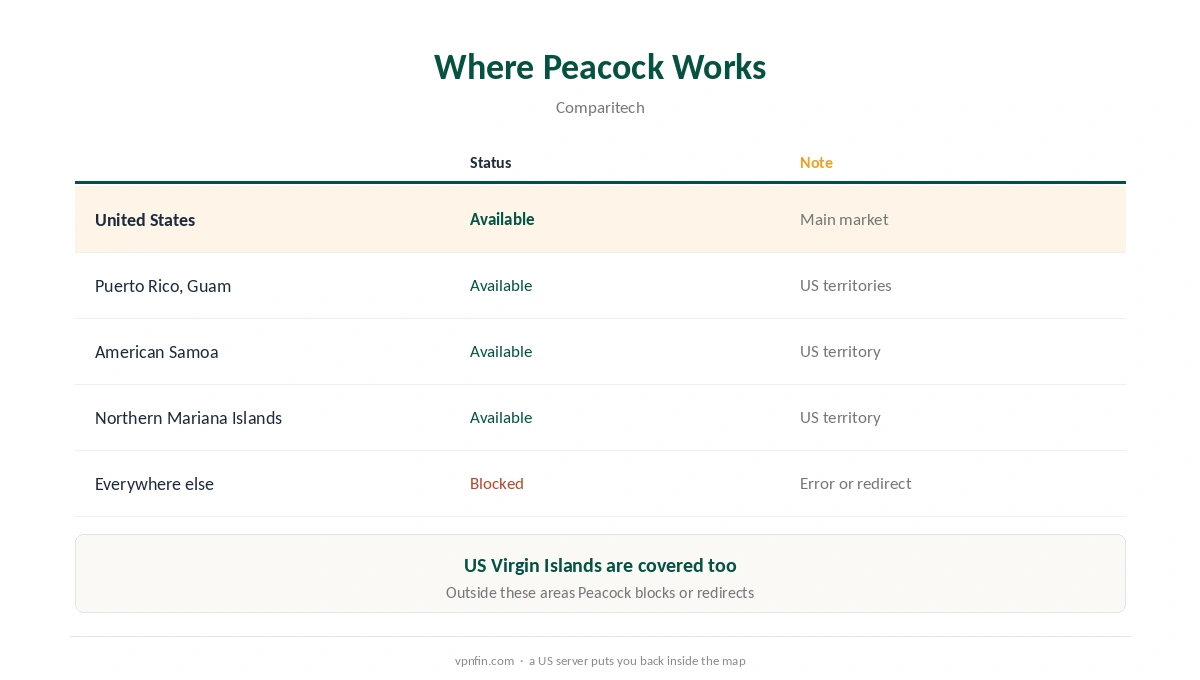
Comparitech lists the US plus Puerto Rico, Guam, American Samoa, the Northern Mariana Islands and the US Virgin Islands. Anywhere else, Peacock shows an error or redirects to NBCUniversal’s site.
NordVPN Peacock Error Messages
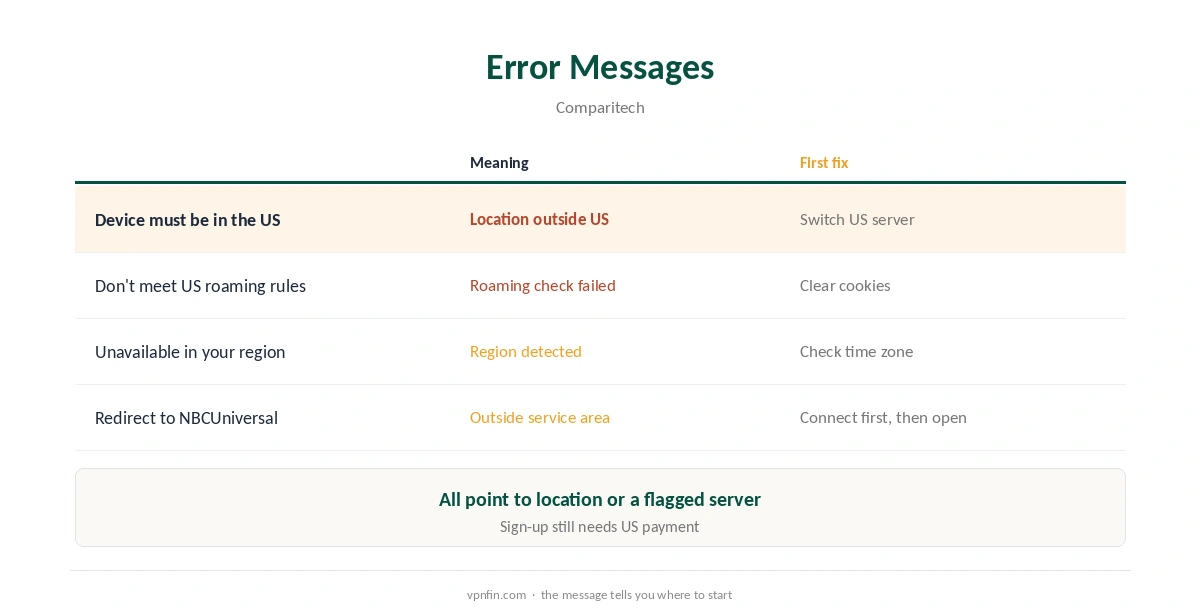
Comparitech records three: Your device must physically be located in the US to stream; It looks like you don’t meet US roaming rules; and This service is unavailable in your region. Each means Peacock saw a location outside the US or a blocked VPN address.
Fixing NordVPN Peacock Errors
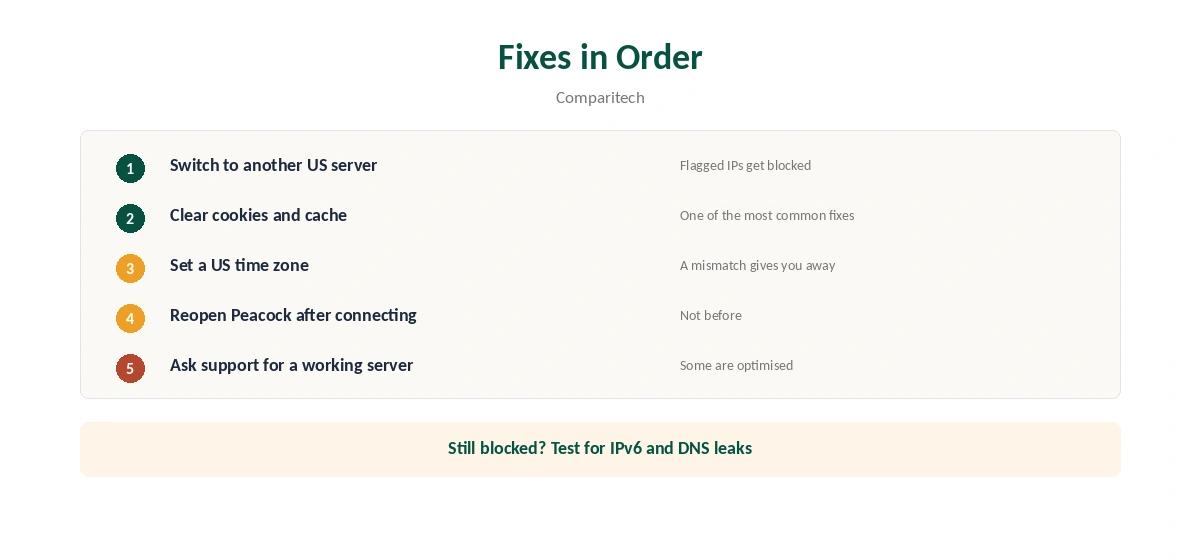
First, switch to another US server. Second, clear cookies and cache, which Comparitech recommends as an early fix. Third, check the device’s time zone: Comparitech notes that a non-US time zone can give you away.
Fourth, ask NordVPN’s support which servers work, since some providers optimise specific servers for streaming. Our Peacock VPN guide compares providers.
Peacock and Other US Services
NordVPN Peacock tips carry over to other US services, since Peacock shares the US-only model with Hulu and YouTube TV. Our NordVPN Hulu guide and YouTube TV guide cover their rules, and our sports guide covers live events. NordVPN belongs to Nord Security, which also owns Surfshark.
Checks Before You Stream
Confirm your visible country with our VPN test page. Our IPv6 leak guide and DNS leak guide cover two leaks that can reveal a real location. Repeat the checks on each new network.
Keep the kill switch on, as our kill switch guide explains. On TVs, our Firestick guide covers the app. Both matter more during live events.
If live sport buffers, our NordVPN speed guide explains server choice. Our streaming hub and refund guide help you decide. Run the checks before kick-off, not during it.
Choosing a US Server for Peacock
ProPrivacy counts about 3,000 NordVPN servers across 22 US cities, so there is plenty of room to switch. For speed, pick the US city closest to where you are: an East Coast server from Europe, a West Coast one from Asia. Distance adds delay, and live streams feel it first.
If one city stops working with Peacock, try another city before changing anything else. Peacock blocks individual addresses it has flagged, not whole cities, so a second server often clears the error.
Peacock on TVs and Streaming Sticks
On a Fire TV Stick, install NordVPN from the Amazon Appstore, connect to a US server, then open Peacock. Our NordVPN Firestick guide covers the app. On smart TVs without a VPN app, a router or Smart DNS is the route, as our NordVPN smart TV guide explains.
TV apps hold on to location data stubbornly. Force-close Peacock after connecting and open it again. Check that the device’s time zone matches a US region, which Comparitech flags as a giveaway.
Signing Up From Abroad
A VPN gives you a US address, but Peacock’s sign-up still needs a US payment method, Comparitech notes. Travellers who already pay for Peacock at home are the clean case: the VPN keeps their existing subscription working while they are away.
Gift cards and third-party billing change over time. Check Peacock’s own help pages for current payment options rather than relying on workarounds.
Live Events and Sport
Peacock carries live sport, and live rights can differ from on-demand rights. A US connection gives you the US service, but individual events can still carry their own restrictions. Our sports streaming guide explains how blackouts work, and our NordVPN speed guide helps if live streams buffer.
Testing Before a Big Event
If you plan to watch a specific live event, test the setup a day or two before. Connect to the US city you intend to use, open Peacock on the actual device. Play something for a few minutes. That leaves time to switch servers, clear the cache or move to a router if needed.
One NordVPN plan covers 10 devices. The phone, laptop and TV you use for Peacock can all be set up in advance. If the setup does not work for you, NordVPN’s 30-day refund window applies, as our NordVPN refund guide explains. Our Peacock VPN guide compares other providers’ results.
If Peacock still fails after two or three US cities, contact NordVPN’s live chat with the device and the error message. Support can point to servers that currently work. Give them the city you tried, so they do not suggest the same one. Note the time too. Our page on Surfshark and Peacock covers its US servers, Peacock’s rules and the error fixes.
How We Research
This page draws on Peacock VPN guides from Comparitech and ProPrivacy. We cross-checked these sources against each other, and where they conflict or something can’t be verified, we say so in the text rather than guessing. We read every source on 5 October 2026. The main source we relied on is Comparitech’s Peacock guide. Our full approach lives on the About Us page.
NordVPN and Peacock FAQ
Yes, in Comparitech’s August 2026 test, using US servers.
The US and its territories: Puerto Rico, Guam, American Samoa, the Northern Mariana Islands and the US Virgin Islands.
Peacock saw a location outside the US or a blocked server. Switch US servers and clear cookies.
Yes. Comparitech notes a non-US time zone can reveal your location.
You need a US payment method, which a VPN does not provide.
The Verdict
NordVPN Peacock access works for US subscribers travelling, with many US servers to switch between. Clear cookies and fix the time zone when errors appear.