
Disclosure: VPNFin is reader-supported. If you buy a VPN through links on this page, we may earn a commission at no extra cost to you. This never affects our ratings — here’s our full disclosure.
NordVPN Smart DNS changes the region that streaming services see on devices that cannot run a VPN app, such as many smart TVs and consoles. It is not a VPN: NordVPN’s own blog says it adds no encryption and covers only selected locations, and Comparitech notes your provider can still see your streaming. Surfshark dropped its Smart DNS in 2026, so NordVPN’s is one of the few left among major providers.
How NordVPN Smart DNS Works
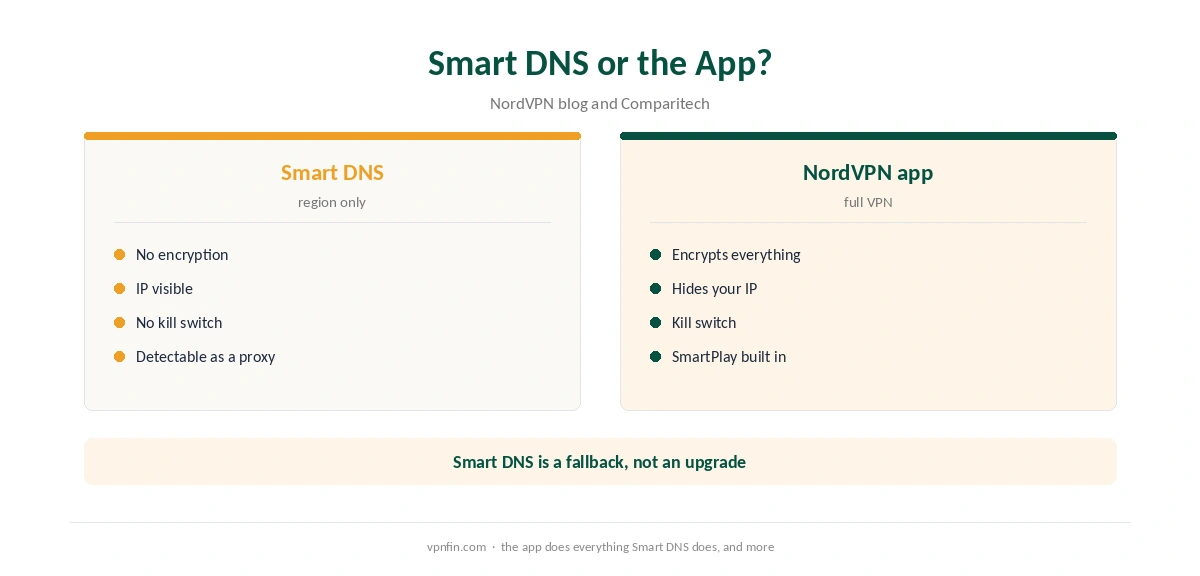
Smart DNS replaces your device’s DNS servers with NordVPN’s. Those servers answer streaming lookups in a way that makes the service think you are in a supported region. Everything else, including your IP address and traffic, stays as it was.
That makes it light and fast, but limited. Our Smart DNS vs VPN page explains the trade-off in depth.
Setting Up NordVPN Smart DNS
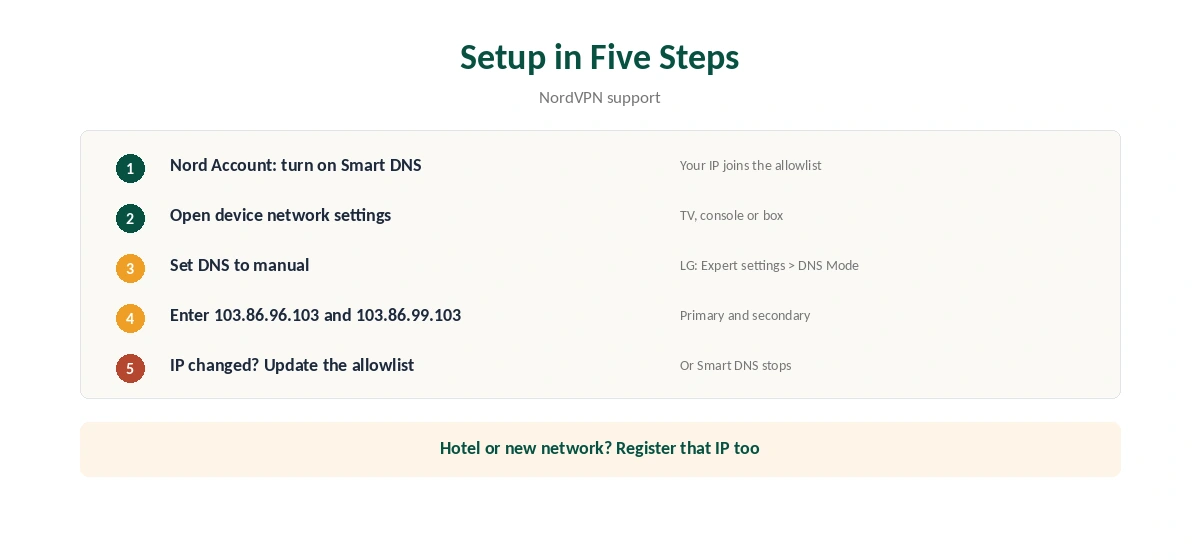
First, turn on Smart DNS in the Nord Account. NordVPN’s support says this adds your current IP to an allowlist. Then open the device’s network settings, set DNS to manual and enter 103.86.96.103 and 103.86.99.103.
On LG TVs, NordVPN’s support gives the path: Settings, Network, Network Connection, Expert settings, DNS Mode Manual. If your home IP changes, update it in the Nord Account.
NordVPN Smart DNS vs the App
The app encrypts all traffic, hides your IP and includes a kill switch. Smart DNS does none of that. Use the app wherever one exists, as on Fire TV, Android TV and Apple TV; our Firestick guide and Apple TV guide cover them.
Streaming services can also spot Smart DNS. Comparitech notes that Amazon’s HTTP proxy error appears when a VPN or Smart DNS is detected, as our NordVPN Prime Video guide explains.
NordVPN Smart DNS by Device
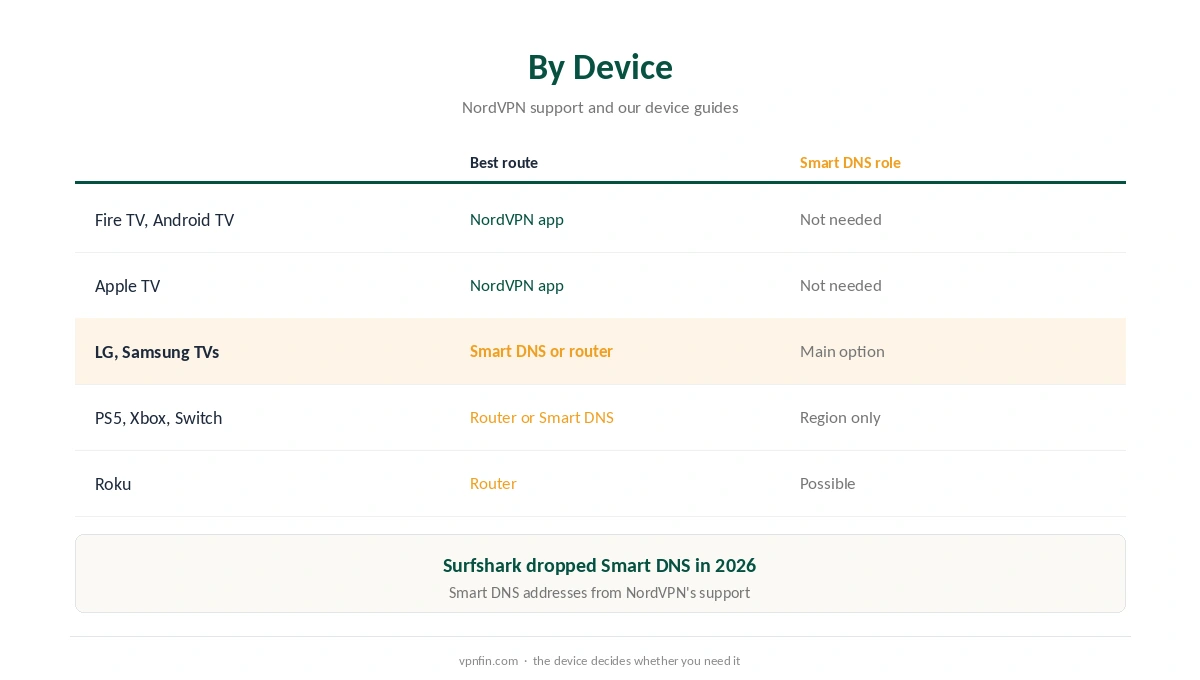
Smart TVs without apps are the main use, as our NordVPN smart TV guide explains. Router setups cover the whole home instead. Consoles follow the same steps; see our PS5 guide and Switch guide.
Smart DNS fails on networks whose IP you have not registered, such as hotels. For netflix specifically, our NordVPN Netflix guide explains SmartPlay, which mixes Smart DNS into the apps. NordVPN belongs to Nord Security, which also owns Surfshark.
For the whole home, our NordVPN router guide covers the encrypted alternative. On open networks Smart DNS is no help, as our public Wi-Fi guide explains. Consoles appear in our Xbox guide too.
To test the full app instead, our refund guide explains the 30-day window. Compare the two on the same TV before deciding. In our view, the app wins wherever it installs.
Roku and Hard-Coded DNS
Cybernews notes that some Roku models use Google’s DNS servers regardless of the router’s settings. On those devices, Smart DNS set on the router does nothing until Google’s DNS is blocked with firewall rules.
That is advanced router work. For Roku, a router running the full NordVPN connection is simpler, as our NordVPN Roku guide explains.
When Your Home IP Changes
Smart DNS works only from IP addresses registered in the Nord Account. Many home connections get a new IP address from time to time, especially after a router restart. When that happens, Smart DNS stops working.
If streams suddenly show your real region, check the registered IP first. Update it in the Nord Account, wait a few minutes, and restart the TV. That fixes most sudden Smart DNS failures.
Smart DNS or SmartPlay?
SmartPlay is built into NordVPN’s apps and combines the VPN with Smart DNS automatically, Top10VPN notes. You do not set it up. Smart DNS is the manual version for devices without apps.
If a device can run the NordVPN app, use the app and let SmartPlay work in the background. Our NordVPN Netflix guide explains how SmartPlay handles Netflix.
What Services See
Smart DNS changes how streaming domains resolve. The service still sees your real IP for the video stream itself. Comparitech notes that Amazon detects Smart DNS and shows the HTTP proxy error, as our NordVPN Prime Video guide explains. Other services vary, so test each one you use.
Turning Smart DNS Off
To stop using Smart DNS, set the device’s DNS back to automatic in its network settings. Then turn Smart DNS off in the Nord Account, so your home IP leaves the allowlist. Forgetting the second step leaves a registered address you no longer use. Our smart TV VPN off guide covers the TV menus in more detail.
Smart DNS remains one of the few such services from a major provider, since Surfshark closed its own in 2026. If you rely on it, keep the NordVPN app ready as a fallback on devices that can run it, and recheck the registered IP after any router change.
How We Research
This page draws on NordVPN’s Smart DNS support and blog, Comparitech’s guides and Gizmodo’s smart TV notes. We cross-checked these sources against each other, and where they conflict or something can’t be verified, we say so in the text rather than guessing. We read every source on 5 October 2026. The main source we relied on is NordVPN’s smart TV blog. Our full approach lives on the About Us page.
NordVPN Smart DNS FAQ
A DNS service that changes the region streaming services see, without encryption, for devices that cannot run the app.
103.86.96.103 and 103.86.99.103, after you turn Smart DNS on in the Nord Account.
No. Your IP and traffic stay visible; only DNS changes.
It can help on devices without apps. NordVPN’s apps use SmartPlay, which combines VPN and Smart DNS.
Your IP probably changed. Update it in the Nord Account.
The Verdict
NordVPN Smart DNS is a useful fallback for TVs and consoles without apps. It changes region, not privacy, so use the app wherever one exists.