
Disclosure: VPNFin is reader-supported. If you buy a VPN through links on this page, we may earn a commission at no extra cost to you. This never affects our ratings — here’s our full disclosure.
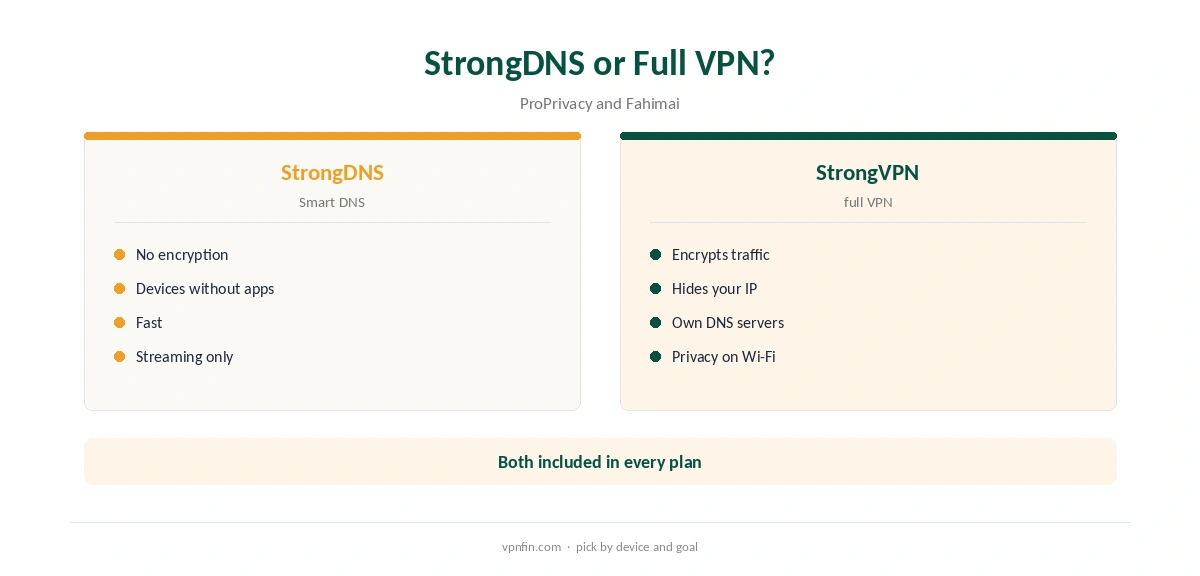
StrongVPN DNS covers two things: the DNS servers its VPN uses, and StrongDNS, its Smart DNS service. Fahimai’s 2026 review found all DNS requests went through StrongVPN’s own servers with no IP, DNS or WebRTC leaks. StrongDNS comes free with every plan, ProPrivacy notes, and works on smart TVs, consoles and other devices without VPN apps, Fahimai adds. ProPrivacy used it to watch BBC iPlayer and Channel 4 from abroad.
This guide covers both sides, how to set up StrongDNS and its limits.
DNS on the VPN
When the VPN is on, StrongVPN handles DNS lookups on its own servers, ProPrivacy and Fahimai both found, which prevents your provider seeing the sites you visit. Fahimai’s leak tests found no DNS leaks. Run our DNS leak guide after connecting to confirm on your network.
StrongDNS: Smart DNS
Smart DNS changes how streaming services see your location by routing only the DNS lookups and location checks, not encrypting your traffic. That makes it useful on devices that cannot run VPN apps. Fahimai lists smart TVs, consoles and similar devices, and Top10VPN mentions consoles. Our Smart DNS vs VPN guide explains the difference.
StrongVPN DNS Setup on a TV or Console
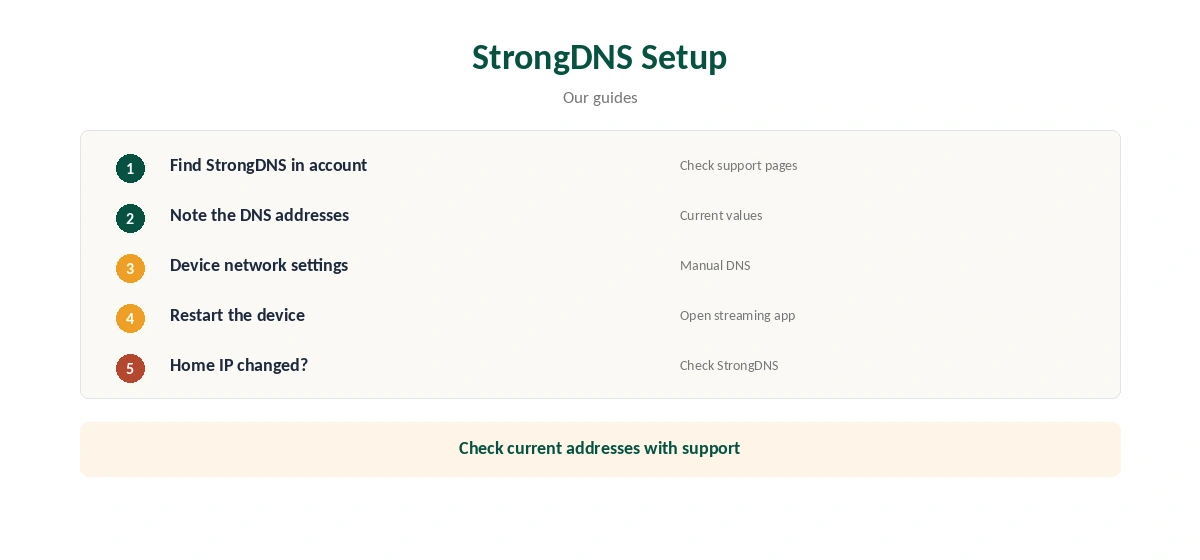
Smart DNS services typically work by recognising your home IP address and giving you DNS addresses to enter on the device. Look up StrongDNS in your StrongVPN account and its support pages for the current steps, then enter the DNS addresses in the device’s network settings in place of automatic DNS. Restart the device and open a streaming app. If your home IP changes, check whether StrongDNS needs updating.
An older firewall.cx review describes StrongDNS as set up through a separate client or manually; check StrongVPN’s current support pages for exact addresses.
What StrongDNS Does Not Do
Smart DNS does not encrypt traffic or hide your IP from the sites you visit, so it offers no privacy on public Wi-Fi. Use the full VPN for that. Some services detect Smart DNS too, so check yours.
StrongVPN DNS and Streaming Services
ProPrivacy reached BBC iPlayer and Channel 4 through StrongDNS, while Cloudwards later found the VPN did not unblock Hulu or iPlayer. Results shift as services update their detection, so treat any list as a snapshot and test the services you use.
Checking for DNS Leaks
With the VPN on, run a DNS leak test and our WebRTC leak guide. Fahimai found neither leak; a test on your own network confirms it after updates.
Using StrongDNS and the VPN Together
Use one or the other on a device, not both. With the VPN on, its own DNS servers take over; StrongDNS is for devices where the VPN cannot run. Mixing them can confuse location checks.
A Quick Rule
Laptop or phone? Run the VPN and let StrongVPN DNS handle lookups. TV or console without an app? Set up StrongDNS. Need privacy on that TV? A router running StrongVPN, as our StrongVPN router guide explains.
Several Devices
StrongVPN allows 12 devices for the VPN. Whether StrongDNS counts towards that limit is not stated in the sources we read, so check with support if you plan to use it on several TVs and consoles.
Travelling
Smart DNS usually depends on the network you are on. On a hotel or friend’s network, StrongDNS may need re-registering or may not work at all; the VPN apps travel better. Our StrongVPN iPhone guide covers the phone app.
Is StrongVPN DNS a Reason to Choose It?
For households with TVs and consoles that cannot run VPN apps, StrongDNS is a genuine extra, since some rivals have dropped Smart DNS. For laptop and phone users, the VPN’s own DNS servers matter more, and they tested clean.
Quick Check
After setting StrongDNS on a TV, open a streaming app that showed your home library before. If the library changes, StrongDNS is working; if not, recheck the DNS fields and restart the device.
Keeping It Working
If streaming stops working after weeks, check whether your home IP changed and whether StrongVPN’s DNS addresses are still current on its support pages.
Smart DNS Elsewhere
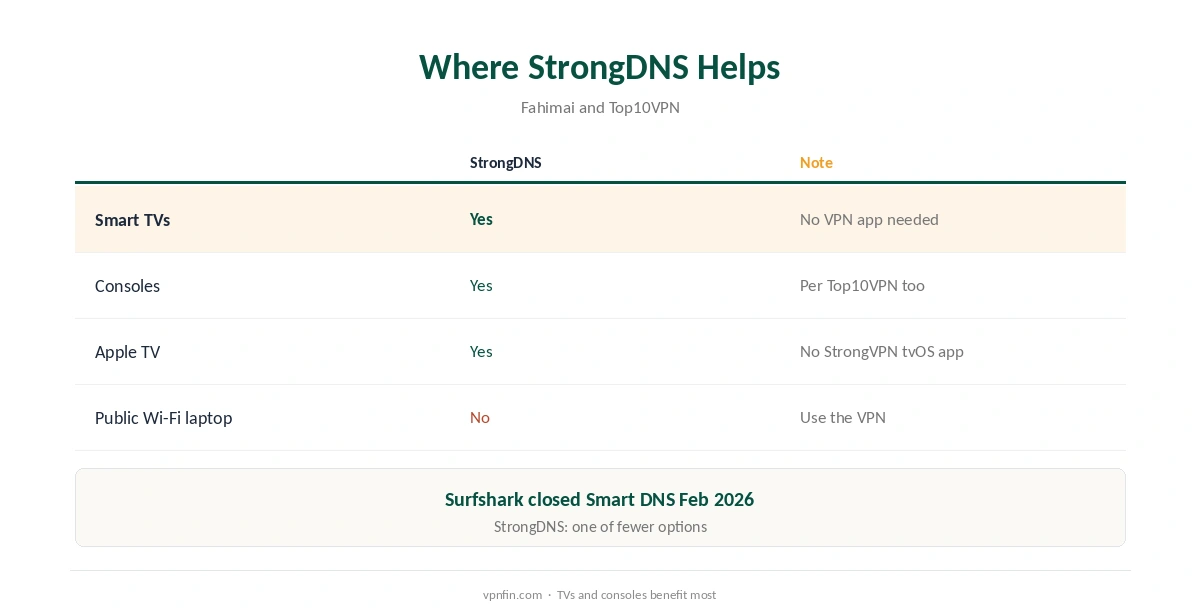
Surfshark closed its Smart DNS on 2 February 2026, our tables record, which makes StrongDNS one of fewer remaining options. NordVPN shares an owner, Nord Security, with Surfshark. Our smart TV VPN guide compares routes for TVs.
Devices That Benefit
Apple TV owners without a StrongVPN tvOS app, Roku users and console players are the main audience. Our StrongVPN Apple TV guide covers the Apple TV side.
StrongVPN’s Record
StrongVPN belongs to Ziff Davis, which also owns IPVanish, and our audit table records no independent audit. It allows 12 devices; Security.org lists $11.99 a month or $47.69 for the first year. Our StrongVPN price guide covers the plans.
How We Research
This page draws on ProPrivacy’s, Fahimai’s, Top10VPN’s and firewall.cx’s StrongVPN coverage and our StrongVPN and Smart DNS tables. We cross-checked these sources against each other, and where they conflict or something can’t be verified, we say so in the text rather than guessing. We checked time-sensitive figures, including prices in US dollars, on 7 October 2026. The main source we relied on is ProPrivacy’s StrongVPN review. Our full approach lives on the About Us page.
StrongVPN DNS FAQ
Yes; ProPrivacy and Fahimai found DNS requests went through StrongVPN’s servers.
StrongVPN’s Smart DNS service, included free with every plan, per ProPrivacy.
Smart TVs, consoles and devices without VPN apps, per Fahimai.
No; Smart DNS changes location checks without encryption.
ProPrivacy reached iPlayer and Channel 4 with it.
The Verdict
StrongVPN DNS is a strength: leak-free lookups on the VPN and StrongDNS for devices without apps. Use the VPN for privacy and StrongDNS for streaming on TVs and consoles.