
Disclosure: VPNFin is reader-supported. If you buy a VPN through links on this page, we may earn a commission at no extra cost to you. This never affects our ratings — here’s our full disclosure.
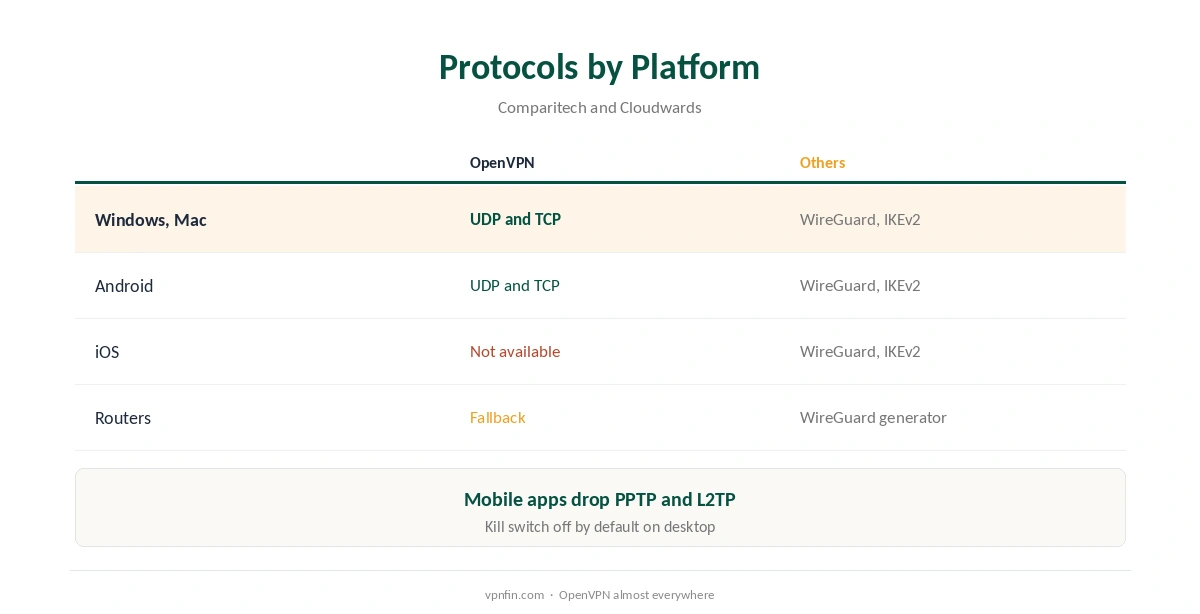
StrongVPN OpenVPN support covers every platform except iOS, Comparitech found, over UDP and TCP. WireGuard is the default in StrongVPN’s apps, Cloudwards notes, and IKEv2 is available everywhere. AllAboutCookies lists IPsec, SSTP and L2TP as well, though the mobile apps drop PPTP and L2TP. OpenVPN earns its place on networks that block WireGuard’s UDP traffic.
This guide covers where OpenVPN is available, when to choose it and the trade-offs.
Where It Is Available
Comparitech lists OpenVPN over UDP and TCP on Windows, macOS, Android and other platforms, but not iOS, where WireGuard and IKEv2 are the options. ProPrivacy describes the Windows client’s OpenVPN with IPv4 DNS leak protection and a kill switch. Our StrongVPN iPhone guide covers the iOS protocols.
When to Choose StrongVPN OpenVPN
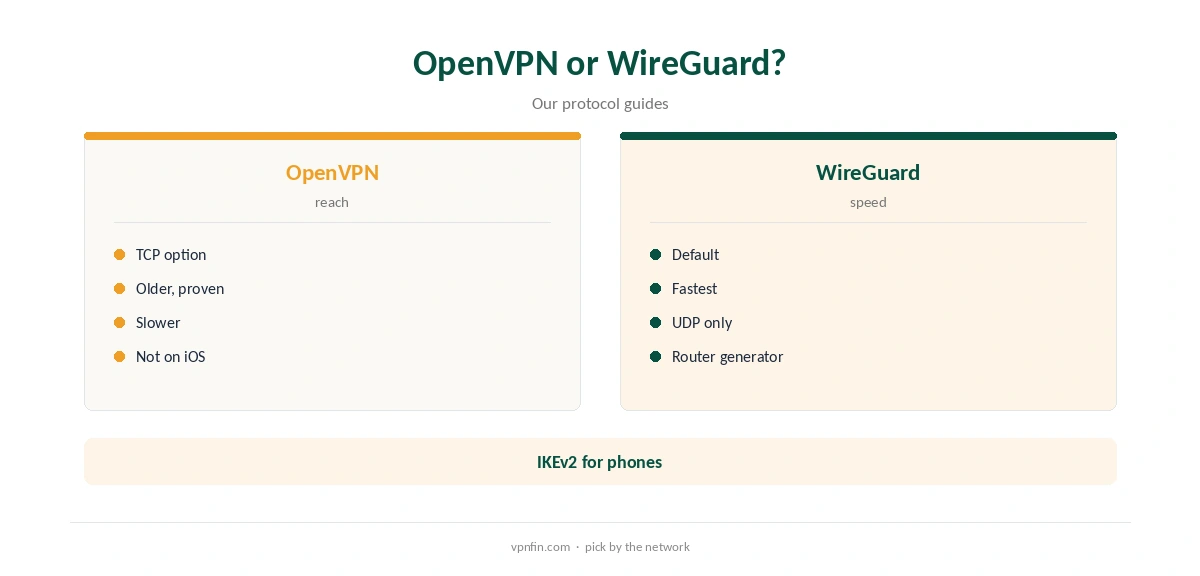
WireGuard is usually faster, as our protocol guides explain. Choose OpenVPN over TCP when a hotel, school or office network blocks UDP, and choose it for long downloads where stability matters more than speed. Our WireGuard vs OpenVPN guide explains the differences.
Switching Protocol
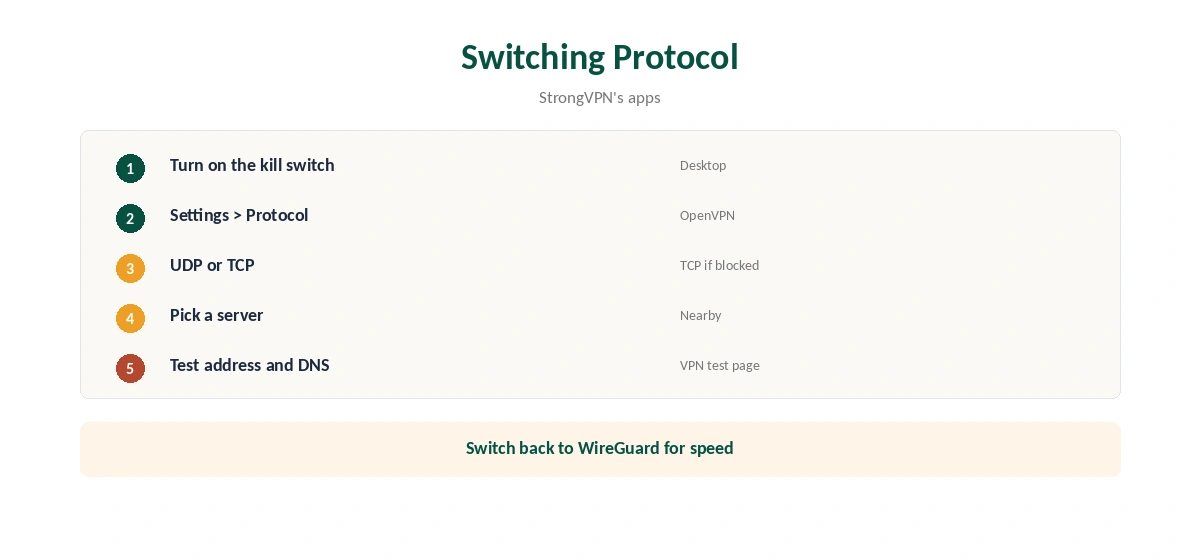
Open StrongVPN’s settings, choose OpenVPN, pick UDP or TCP, select a server and connect. Turn on the kill switch first on Windows or Mac; Top10VPN notes it is off by default.
UDP or TCP
UDP is faster and suits most connections. TCP adds overhead but passes through networks that block UDP. Start with UDP, and switch to TCP on restrictive Wi-Fi.
StrongVPN OpenVPN for Torrents
Fahimai found StrongVPN allows P2P on all servers. OpenVPN’s steadier connection suits long downloads; keep the kill switch on so a drop does not expose your address. Our torrenting VPN guide compares providers.
IKEv2 on Phones
On iPhone, StrongVPN offers WireGuard and IKEv2 instead. IKEv2 reconnects quickly when a phone switches networks, so it is a sensible pick on the move. Our IKEv2 vs WireGuard guide compares them.
Testing Speed
Run a speed test on WireGuard and on StrongVPN OpenVPN at the same server and time of day. Fahimai measured 5 to 7% loss on nearby servers with StrongVPN; OpenVPN usually loses more. Keep the faster protocol for everyday use.
Is StrongVPN OpenVPN Still Worth Using?
For most people, WireGuard handles daily use better. OpenVPN stays valuable on networks that block UDP, on older router firmware and for long, steady downloads. Keep it in mind as the fallback rather than the default.
Checking the Connection
After switching, confirm the address with our VPN test page and run our DNS leak guide. ProPrivacy found the Windows client’s OpenVPN included IPv4 DNS leak protection.
Several Devices
StrongVPN allows 12 devices. Each can use its own protocol, so a laptop on OpenVPN TCP at the office and a phone on IKEv2 share one plan.
A Quick Rule
Fast home network? WireGuard. UDP blocked? StrongVPN OpenVPN over TCP. iPhone? WireGuard or IKEv2. Old router firmware? OpenVPN as the fallback.
Other Protocols
AllAboutCookies lists IPsec, SSTP and L2TP among StrongVPN’s protocols. SSTP can pass some firewalls on Windows, but OpenVPN TCP and WireGuard cover nearly every need, and the mobile apps drop PPTP and L2TP, Cloudwards notes.
Keeping It Updated
App updates can reset protocol choices. After updating, confirm the protocol and kill switch settings stayed the same, then reconnect and run a quick test.
Public Wi-Fi
On café and hotel networks that block VPNs, OpenVPN over TCP is the first thing to try. Connect before signing in to anything. Our public Wi-Fi guide explains the risks.
Quick Check
Disconnect the network briefly after connecting. With the kill switch on, apps should stop loading until the tunnel returns. Then check the address again.
Linux and Servers
On servers, OpenVPN over TCP on a common port can pass strict firewalls where WireGuard cannot. Pair it with firewall rules, since manual setups have no kill switch, and start the tunnel at boot.
Router Firmware
Some older routers support OpenVPN but not WireGuard. On those, OpenVPN is the only StrongVPN route at home, so check your firmware’s VPN client options before buying a new router.
Routers
StrongVPN’s router route centres on WireGuard configs from its generator, VPNCentral and Pantacor show. Firmware without WireGuard can fall back to OpenVPN. Our StrongVPN router guide covers the setup.
Linux
Sources disagree on a dedicated Linux app; the WireGuard generator works either way. OpenVPN on Linux needs a config from StrongVPN’s support pages. Our StrongVPN Ubuntu guide covers the WireGuard route.
Kill Switch and Leaks
Desktop apps include a kill switch, off by default. Manual setups lack one, so add firewall rules. Our kill switch guide explains why it matters.
StrongVPN’s Record
StrongVPN belongs to Ziff Davis, which also owns IPVanish, and our audit table records no independent audit. It allows 12 devices; Security.org lists $11.99 a month or $47.69 for the first year. Our StrongVPN price guide covers the plans.
How We Research
This page draws on Comparitech’s, Cloudwards’, AllAboutCookies’, ProPrivacy’s and Top10VPN’s StrongVPN reviews, VPNCentral’s 2026 router roundup and our StrongVPN tables. We cross-checked these sources against each other, and where they conflict or something can’t be verified, we say so in the text rather than guessing. We checked time-sensitive figures, including prices in US dollars, on 7 October 2026. The main source we relied on is Comparitech’s StrongVPN review. Our full approach lives on the About Us page.
StrongVPN OpenVPN FAQ
Yes, over UDP and TCP, on every platform except iOS, per Comparitech.
No; WireGuard is the default, Cloudwards notes.
When a network blocks UDP, or for steady long downloads.
Not in StrongVPN’s iOS app; use WireGuard or IKEv2.
On Windows and Mac, once you turn it on.
The Verdict
StrongVPN OpenVPN is the fallback for restrictive networks on every platform except iOS. Keep WireGuard for speed, and turn the kill switch on.