
Disclosure: VPNFin is reader-supported. If you buy a VPN through links on this page, we may earn a commission at no extra cost to you. This never affects our ratings — here’s our full disclosure.
TunnelBear Mac support comes through a native app with WireGuard, OpenVPN and IKEv2, according to Tom’s Guide. The Mac app has fewer features than the Windows version: split tunnelling covers websites only, and GhostBear, TunnelBear’s obfuscation, is unavailable in the latest Mac version. TunnelBear sets no device limit, has a free plan with 2 GB a month, and Cure53 has audited it every year since 2017. Our page on TunnelBear on Windows covers its fullest app, with split tunnelling and GhostBear.
This guide covers the setup, the features, what is missing on Mac and how it compares.
TunnelBear Mac Setup
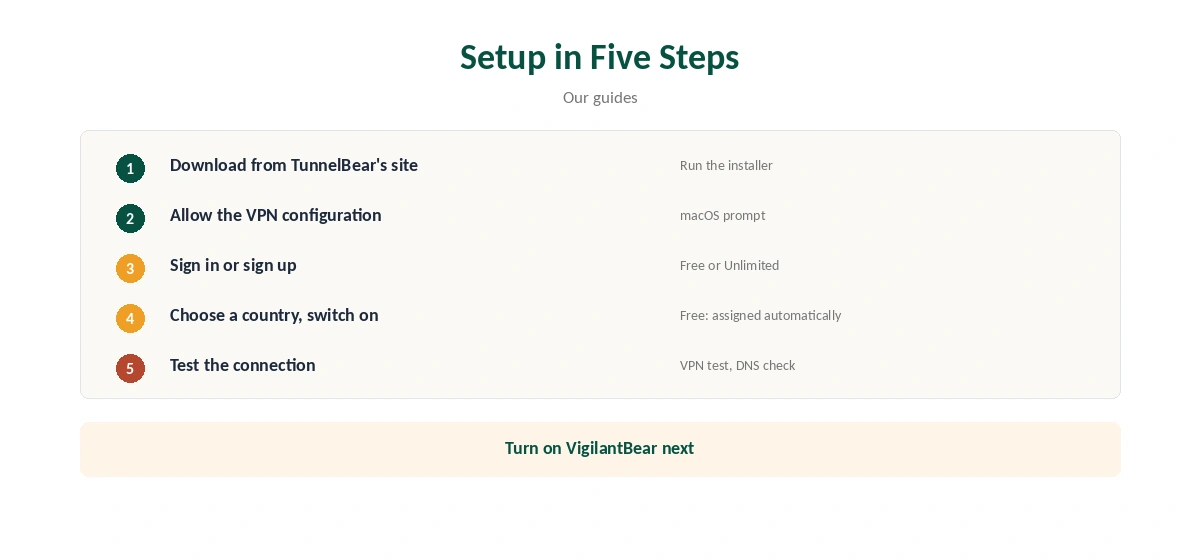
Download the app from TunnelBear’s website, open the installer and follow the prompts. Allow the VPN configuration when macOS asks. Sign in or create an account, then choose a country and switch it on.
Confirm the new address with our VPN test page and run a DNS check with our DNS leak guide.
Features on Mac
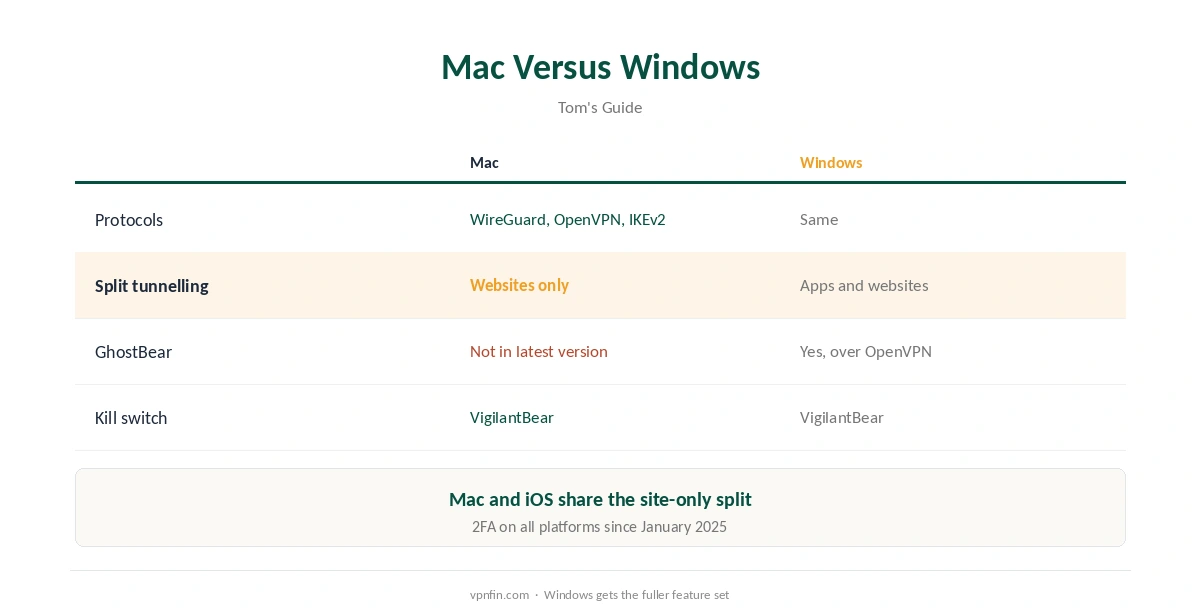
Tom’s Guide lists WireGuard, OpenVPN and IKEv2 across platforms, with IKEv2 missing only on Android. Holafly names VigilantBear as TunnelBear’s kill switch. Two-factor authentication arrived in January 2025, Tom’s Guide notes.
Split tunnelling on Mac and iOS covers websites only, while Windows handles both apps and websites. Our split tunnelling guide explains the difference.
What Is Missing on Mac
GhostBear, which disguises VPN traffic on restrictive networks, works on Windows and Android over OpenVPN but is unavailable on iOS and the latest Mac app, Tom’s Guide reports. On networks that block VPNs, that is a real gap. Our obfuscation guide explains what GhostBear-style features do.
Tom’s Guide sums up the Mac and iOS apps as having limited features compared with Windows.
Settings Worth Turning On
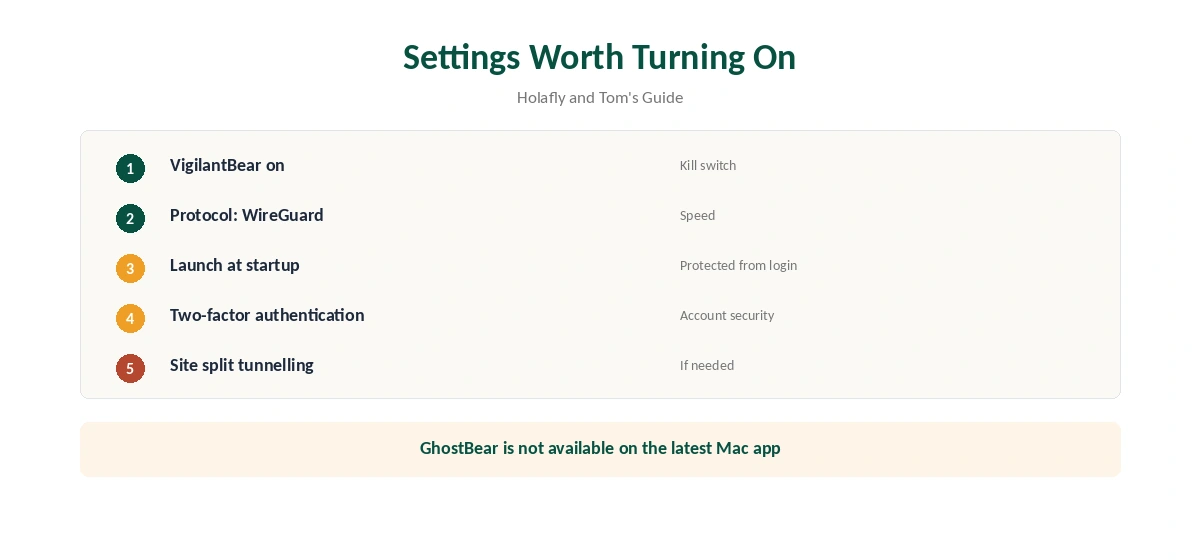
Turn on VigilantBear so traffic stops if the connection drops, as our kill switch guide explains. Choose WireGuard for speed. Enable launch at startup if you want the Mac protected from login.
TunnelBear Mac Use on Public Wi-Fi
On laptops that move between cafés and offices, a TunnelBear Mac connection protects every app, not just the browser. Turn on VigilantBear first so nothing leaks if the connection drops. Our public Wi-Fi guide explains the risks.
When the Connection Fails
If TunnelBear will not connect on a Mac, try another protocol, then another country, then reinstall the app. Our Mac VPN troubleshooting guide covers macOS-specific fixes, and our guide to turning off a VPN on a Mac covers removing profiles.
Several Macs and Devices
TunnelBear Unlimited sets no device limit, according to our device table, so one plan covers every Mac, iPhone and PC in a household. All devices on the account share the free plan’s 2 GB.
Buying Through the App Store
TunnelBear’s terms limit the 30-day guarantee to annual plans bought directly on its website; purchases through Apple’s or Google’s stores are excluded and follow their own refund rules. Mac users who want the guarantee should buy on tunnelbear.com. Our TunnelBear free alternatives guide lists options if you only want a free plan.
A Quick Rule
Everyday networks at home and in cafés? TunnelBear on Mac works well. Networks that block VPNs? Without GhostBear, look at a provider with obfuscation on macOS.
macOS Updates
After a major macOS update, the system may ask you to approve TunnelBear’s network extension again. Open System Settings, check privacy and security prompts, and reconnect. If the app still fails, reinstall it from TunnelBear’s website, then sign in again and test the connection.
Free Plan on Mac
The free plan gives 2 GB a month, resetting on your account anniversary, TunnelBear’s help pages say. Since early 2026, free users get a server assigned automatically, TheBestVPN reports, and split tunnelling is paid-only.
Privacy Record
TunnelBear has had annual Cure53 audits since 2017, according to our audit table, and operates from Toronto, inside the Five Eyes. It has belonged to McAfee since March 2018. Our VPN audit tracker and VPN ownership guide put that in context.
What TunnelBear Costs
TheBestVPN lists TunnelBear Unlimited at $3.33 a month on a three-year plan, $4 a month on one year and $9.99 month to month, with no device limit. Vpnprograms notes TunnelBear does not publish its renewal price. Refunds are limited: TunnelBear’s terms offer 30 days only on the first year of an annual plan bought directly, as our TunnelBear refund guide explains.
The free plan gives 2 GB a month, and since early 2026 it assigns your server automatically, TheBestVPN reports. Our TunnelBear free guide covers the limits.
How It Compares on Mac
For comparison, our NordVPN Mac guide and Surfshark Mac guide cover two rivals’ Mac apps; the two share an owner, Nord Security.
Our Mac VPN guide compares the wider field, including which apps offer obfuscation on macOS.
How We Research
This page draws on Tom’s Guide’s TunnelBear review, Holafly, TunnelBear’s help pages on the free plan, TheBestVPN and vpnprograms on pricing, TunnelBear’s terms and our audit table. We cross-checked these sources against each other, and where they conflict or something can’t be verified, we say so in the text rather than guessing. We checked time-sensitive figures, including prices in US dollars, on 6 October 2026. TunnelBear prices from TheBestVPN; renewal not published, per vpnprograms. The main source we relied on is Tom’s Guide’s TunnelBear review. Our full approach lives on the About Us page.
TunnelBear Mac FAQ
Yes, a native app with WireGuard, OpenVPN and IKEv2.
For websites only, per Tom’s Guide.
Not in the latest Mac version, Tom’s Guide reports.
Yes, VigilantBear.
Yes, with 2 GB a month and an automatically assigned server.
The Verdict
TunnelBear Mac use suits simple, audited privacy on everyday networks. The missing GhostBear and limited split tunnelling make it a weaker pick for restrictive networks than on Windows. TunnelBear has belonged to McAfee since March 2018.