
Disclosure: VPNFin is reader-supported. If you buy a VPN through links on this page, we may earn a commission at no extra cost to you. This never affects our ratings — here’s our full disclosure.
CyberGhost Android TV support looks simple on paper: install from Google Play, sign in, connect. Yet CyberGhost’s own download page sends two popular boxes, the Nvidia Shield TV and the Chromecast with Google TV, to a router setup instead of the app. That detail decides whether the app suits your device, so this guide starts there. Our page on CyberGhost on Chromecast covers the Google TV app and the router route for older models.
Below, you will find the devices CyberGhost names, the install steps and the fixes for the faults Android TV users report most. Prices and refund rules for Google Play purchases close the page.
Is CyberGhost Good on Android TV?
For a smart TV running Android TV or Google TV, yes. CyberGhost publishes a TV app in Google Play, and its download page lists Android TV 7.0 and newer. However, for a Shield or a Chromecast, the provider itself points to a VPN router. So the answer depends on the box more than on the app.
Which Devices CyberGhost Android TV Covers
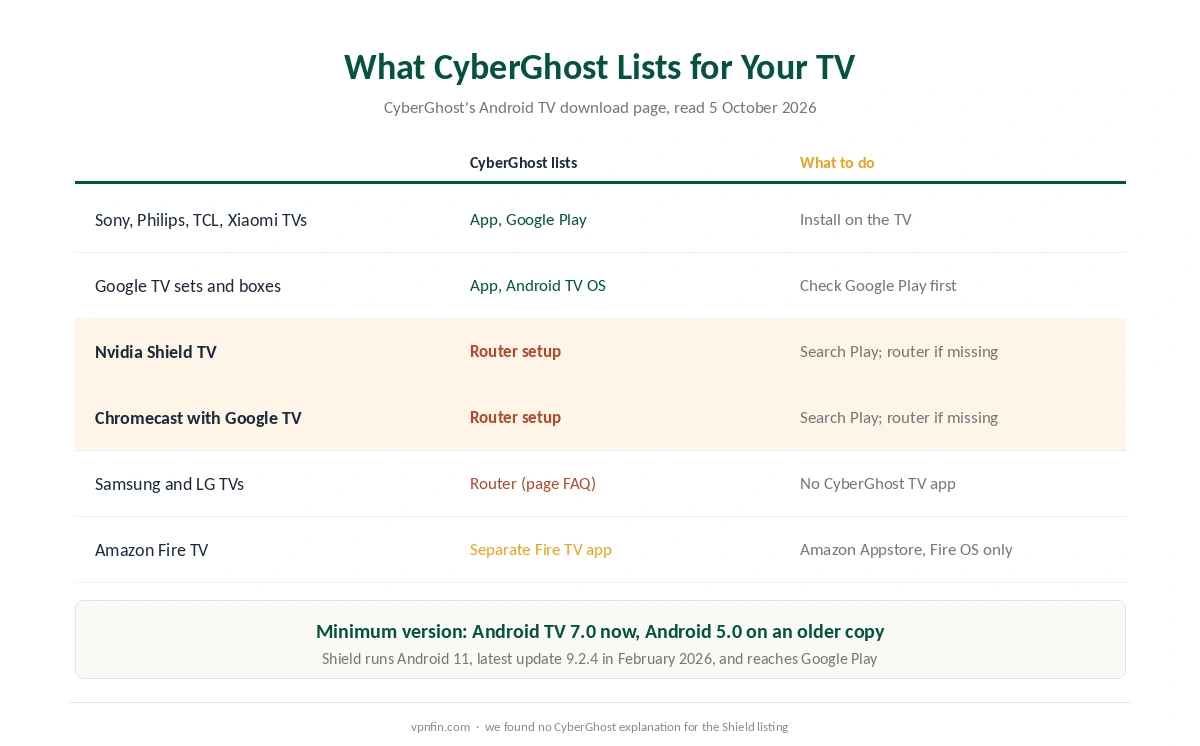
On 5 October 2026, CyberGhost’s Android TV page listed three groups. First come Android TV 7.0 and newer, Google TV and Android TV OS on smart TVs and set-top boxes. Next come smart TVs from Sony, Philips, TCL and Xiaomi. Finally, the same list names the Nvidia Shield TV and the Chromecast with Google TV, each marked as working through a VPN-compatible router.
The minimum version has moved, too. An earlier copy of the same page asked for Android 5.0, while the current one says Android TV 7.0. We print both figures, because search results still show the old one.
Fire TV is a separate case. Amazon’s sticks use their own app from the Amazon Appstore, and our CyberGhost Firestick guide covers that version and its Vega OS gap.
CyberGhost on Nvidia Shield and Google TV
The Shield listing is the oddest line on the page. The Shield TV runs Android 11, and its latest update, Shield Experience 9.2.4, arrived in February 2026. So it reaches Google Play like any Android TV box. Even so, CyberGhost files it under router setup. We could not verify whether the TV app installs on a Shield today, and we found no explanation from CyberGhost.
Therefore, the practical test is quick. Search Google Play on the Shield for CyberGhost. If the app appears, install it as described below. If it does not, a router is the fallback CyberGhost names. Our Nvidia Shield VPN guide lists providers whose apps do appear.
Google TV needs the same care. CyberGhost lists Google TV as supported, yet it lists the Chromecast with Google TV under the router. Google stopped making that Chromecast and replaced it with the Google TV Streamer, which runs Android TV 14. CyberGhost’s page does not name the Streamer either way, so check the store on the device itself.
How to Install CyberGhost on Android TV
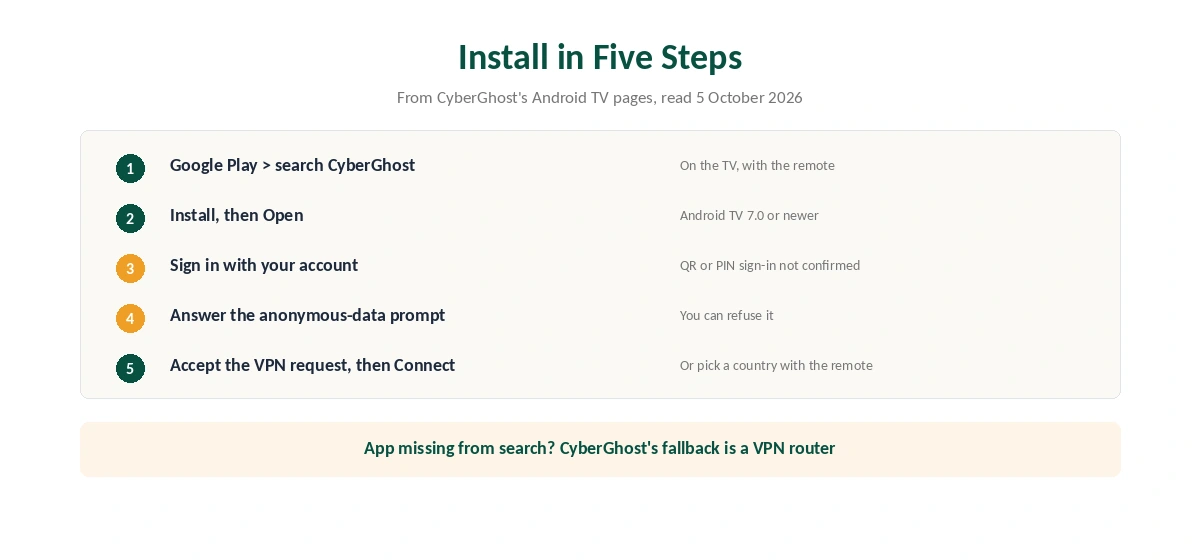
The steps follow CyberGhost’s own Android TV pages. First, open Google Play on the TV and search for CyberGhost. Then select the app and choose Install. When it finishes, choose Open.
Next, sign in with your CyberGhost account. According to CyberGhost’s install guide, the app then asks whether you agree to share anonymous data, and you can refuse. Finally, press Connect for the recommended server or pick a country with the remote. Android shows a permission prompt the first time, and you must accept it.
One gap remains. We could not confirm whether the TV app offers a QR code or PIN sign-in, as rivals do, so have your password ready. For comparison, NordVPN on Android TV and Proton VPN on Android TV both sign in by code.
What the CyberGhost Android TV App Offers
CyberGhost’s page promises servers in 100 countries and 126 cities, plus servers built for streaming. Beyond that, the TV app’s feature list is thin on detail. Tom’s Guide reports that the Android phone app supports WireGuard and OpenVPN and offers full split tunnelling by app. We could not verify that either feature carries over to the TV version.
That gap matters if you want only one app outside the tunnel. Our split tunnelling explainer covers how the feature works, and WireGuard vs OpenVPN explains the protocol choice.
CyberGhost Android TV Problems and Fixes
Start with the app list. If CyberGhost is missing from Google Play, the device may run an Android TV version below 7.0, or the maker may block VPN apps. In that case, the router is the route CyberGhost suggests, and our router setup guide walks through it.
Next, check the cable. Proton’s Android TV support notes that connecting a VPN can drop the Ethernet link on some Android TV builds, a platform bug that affects every VPN app. If that happens, update the firmware or switch to Wi-Fi. Then, if a streaming app still shows your home region, clear its cache in the TV’s app settings and reconnect.
Finally, restart the TV and update the CyberGhost app in Google Play, as VPNAlert’s guide suggests. If you need to rule the VPN out, our guide to turning off a TV VPN lists the steps.
App on the TV or VPN on the Router
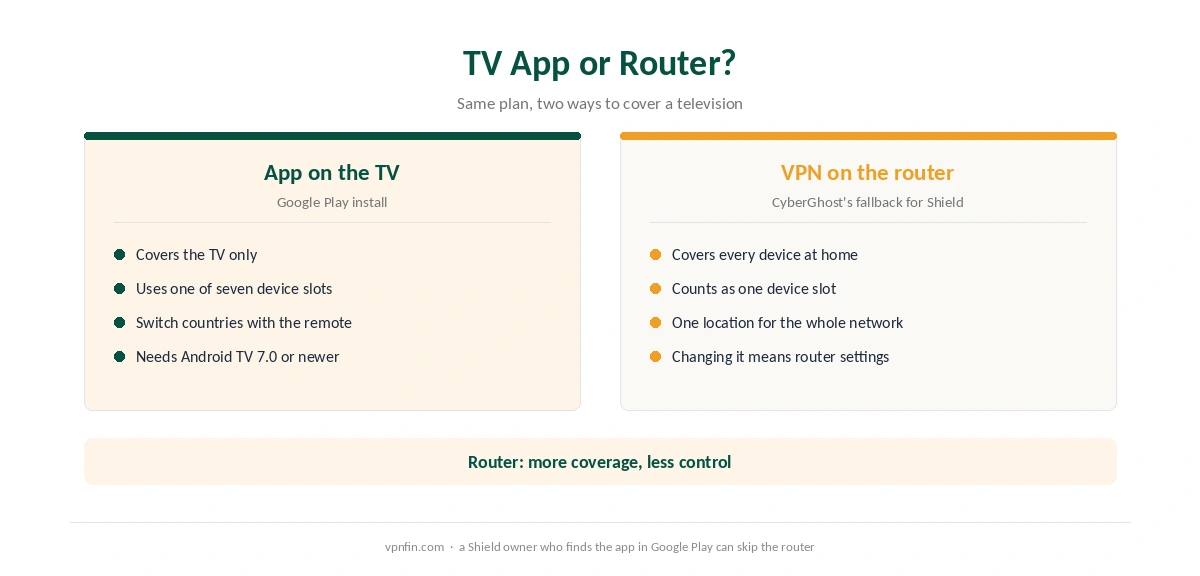
The router route has real advantages. One router covers every device on the network, and CyberGhost counts it as one of the 7 devices on a plan. On the other hand, every device then shares one location, and changing it means opening the router’s settings.
The TV app is the opposite. It covers only the TV, but you can switch countries with the remote in seconds. For TVs with no VPN app at all, CyberGhost has also mentioned Smart DNS, and our Smart DNS vs VPN page explains what that does and does not hide.
What CyberGhost Costs for Android TV
CyberGhost ran two prices for the 26-month plan on 5 October 2026. The Android TV page showed $2.19 a month, billed $56.94. By contrast, the iOS page ran $1.99, billed $51.74. After 26 months, the plan renews every year at its first bill. The 6-month plan costs $41.94 and the monthly plan $12.99.
Where you pay matters as much. CyberGhost’s refund policy gives 45 days on the 6-month and 2-year plans, 14 days on the monthly plan. However, it excludes purchases made through Google Play, which follow Google’s own rules. So if you might cancel, subscribe on the website and sign in on the TV. Our CyberGhost refund guide covers the request itself.
CyberGhost lists a 3-day free trial on Android, but we could not confirm that the TV app offers it. Our CyberGhost free trial guide lists each platform’s terms.
| Provider | Renewal price | Per month | Tier |
|---|---|---|---|
| NordVPN | $139.08/yr | ~$11.59 | Basic |
| Surfshark | ~$79/yr | ~$6.58 | Starter |
| ExpressVPN | $99.95/yr | ~$8.33 | Basic |
| CyberGhost | $56.94/yr | ~$4.75 | 2-year |
| PureVPN | $47.95/yr | ~$4.00 | Standard, 2-year (1-year renews $57.95) |
| IPVanish | $89.99/yr | ~$7.50 | Essential |
| Windscribe | ~$69/yr | ~$5.75 | Pro |
| Proton VPN | ~$83.88/yr | ~$6.99 | VPN Plus |
| Mullvad | ~$65/yr | ~$5.40 | flat, no tiers |
| Norton VPN | $79.99/yr | ~$6.67 | Standard |
| Hotspot Shield | ~$95.99/yr | ~$8.00 | Premium annual |
| Astrill | $300 every 2 yrs | ~$12.50 | 2-year, same at renewal |
Who Should Use CyberGhost on Android TV
CyberGhost Android TV suits owners of Sony, Philips, TCL or Xiaomi sets running Android TV 7.0 or later. It also suits a household that wants one plan across a TV, phones and laptops, since a plan covers seven devices. Our guide to PureVPN on Android TV covers code sign-in and three split tunnel modes.
Who Should Look Elsewhere
Look elsewhere if you own a Shield or a Chromecast and the app does not appear in Google Play. In that case, a provider with a listed app saves you a router project. Also, CyberGhost belongs to Kape Technologies, a London-based company that also owns ExpressVPN and Private Internet Access. Our smart TV VPN guide compares other options, and ExpressVPN on Android TV covers its QR sign-in.
How We Research
This page draws on CyberGhost’s Android TV download page and install guide, and Tom’s Guide’s CyberGhost review. We also used NVIDIA’s update notes, Proton’s Android TV support and VPNAlert’s guide. We cross-checked these sources against each other, and where they conflict or something can’t be verified, we say so in the text rather than guessing. We checked time-sensitive figures, including prices in US dollars, on 5 October 2026. That day, CyberGhost showed two price grids on different pages. The main source we relied on is CyberGhost’s Android TV download page. Our full approach lives on the About Us page.
CyberGhost on Android TV FAQ
CyberGhost’s own Android TV page lists the Shield TV under router setup rather than the app. The Shield runs Android 11 and reaches Google Play, so search the store first. If the app is missing, use a router.
CyberGhost lists Google TV as supported through the Android TV app. However, it lists the older Chromecast with Google TV under router setup, so check Google Play on the device itself.
The current download page says Android TV 7.0 or newer. An earlier copy of the same page said Android 5.0, so the newer figure is the one to trust.
CyberGhost’s 45-day guarantee does not cover Google Play purchases, which follow Google’s refund rules. Website purchases keep the 45-day window, or 14 days on the monthly plan.
Seven at the same time. A router running CyberGhost counts as one device, even though it covers everything connected to it.
The Verdict
On a mainstream Android TV set, CyberGhost is a straightforward install with a sensible price after the first term. Still, the Shield and Chromecast listings are a warning sign, and the TV app’s features are harder to verify than the phone app’s. Search Google Play on your device before paying. Then buy on the website so the 45-day refund applies.