
Disclosure: VPNFin is reader-supported. If you buy a VPN through links on this page, we may earn a commission at no extra cost to you. This never affects our ratings — here’s our full disclosure.
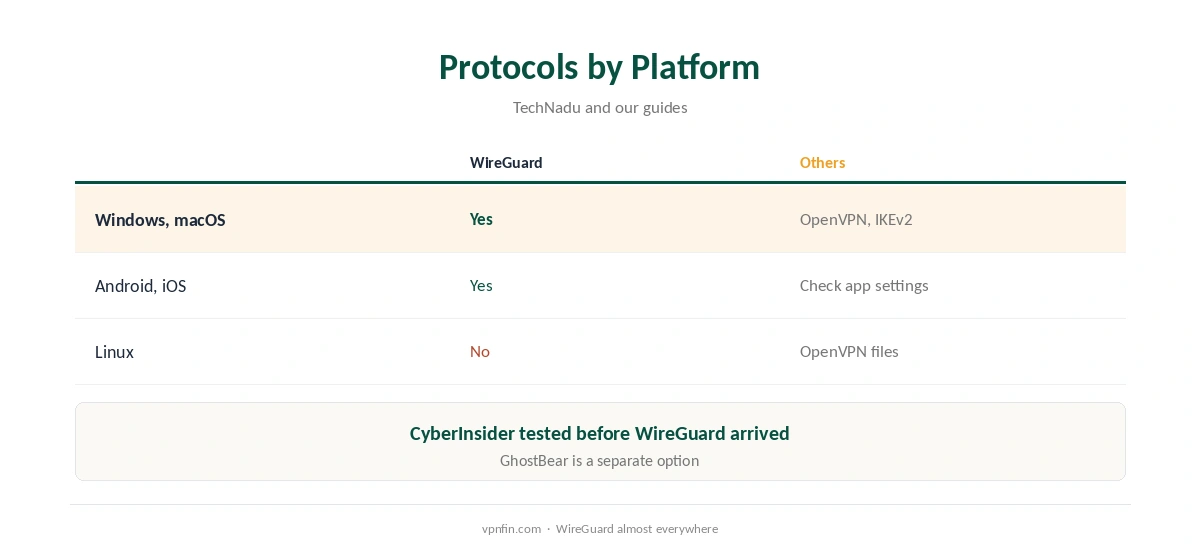
TunnelBear WireGuard support now sits in its apps alongside OpenVPN and IKEv2, WizCase and Gizmodo report; you switch protocol in the settings’ Connection tab. TechNadu lists all three on Windows and macOS. Linux is the exception: TunnelBear publishes only OpenVPN files there. Some older reviews say TunnelBear lacks WireGuard; those predate its arrival.
This guide covers where WireGuard is available, how to switch and when another protocol fits better.
Older Reviews Said No
CyberInsider tested TunnelBear on OpenVPN because WireGuard was not available at the time, and PrivacyJournal’s 2024 review called the missing WireGuard annoying. Newer reviews from this year by WizCase and Gizmodo describe it in the apps. Check the date on any review you read.
Switching to TunnelBear WireGuard
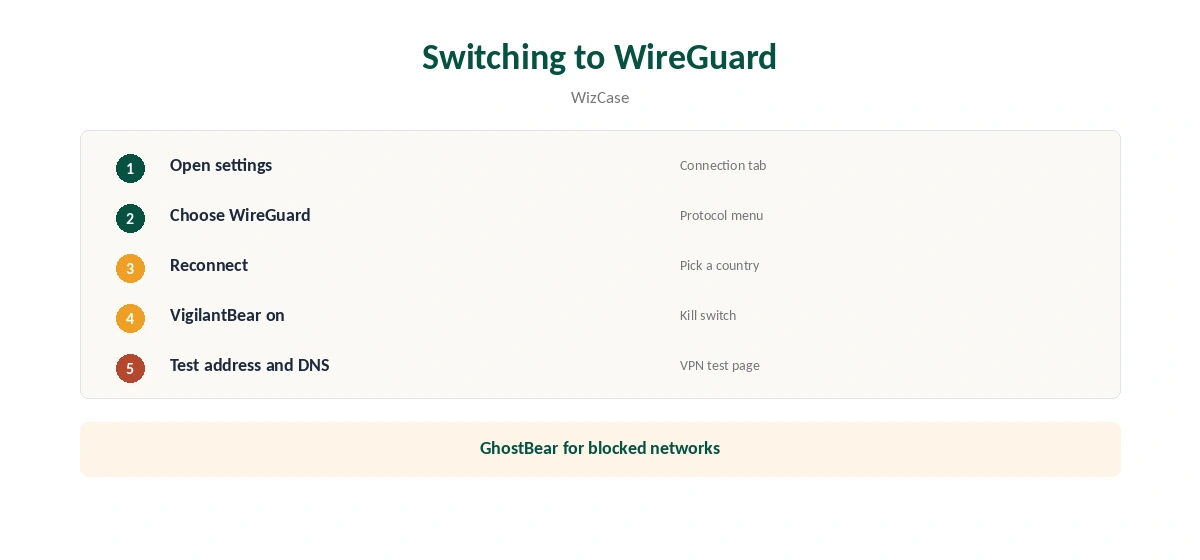
Open TunnelBear’s settings, go to the Connection tab, choose WireGuard and reconnect, WizCase explains. Keep VigilantBear, the kill switch, on. GhostBear, its obfuscation mode, is a separate option for networks that block VPNs.
When to Use Another Protocol
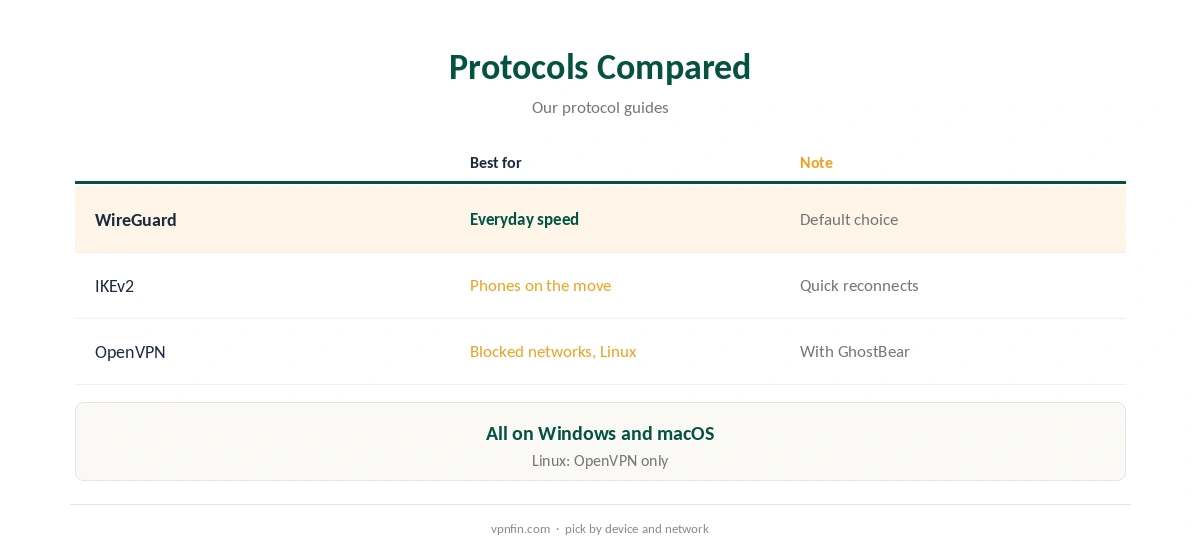
WireGuard suits most uses. IKEv2 reconnects quickly on phones moving between networks. OpenVPN, with GhostBear, helps where networks block VPN traffic. Our IKEv2 vs WireGuard guide and WireGuard vs OpenVPN guide compare them.
Speed in Practice
WizCase found its UK download quick, and Gizmodo’s tests ran on the newer protocol. Speeds still depend on distance and server load, so pick a nearby country for everyday use and test at your busiest time.
GhostBear and the Protocol
GhostBear, the obfuscation mode, makes VPN traffic harder for strict networks to spot. Check in the app whether it works with your chosen protocol; on blocked networks, switching protocol together with GhostBear is the first thing to try.
Phones
On phones that switch between Wi-Fi and mobile data, IKEv2 can reconnect faster. Try both on a walk between networks and keep the smoother one. Our TunnelBear Android guide covers the phone app.
Keeping It Updated
App updates can reset protocol choices. After updating, check the Connection tab and confirm your choice stayed the same.
A Quick Rule
Desktop at home? The newer protocol. Phone on the move? Try IKEv2. Blocked network? GhostBear. Linux? OpenVPN files.
Streaming
Low overhead helps HD streams, though TunnelBear’s streaming results vary by service. Connect before opening the streaming app and reopen it if the library looks wrong. Our Netflix VPN guide explains how services detect VPNs.
Is TunnelBear WireGuard Fast Enough?
For browsing, streaming and occasional downloads on a typical home line, yes. On long routes, any protocol slows, so choose a nearby country. Our guide to VPN speed explains why distance matters.
Several Devices
Unlimited sets no device limit, so every phone and laptop can connect at once, each with its own protocol choice.
Public Wi-Fi
On café and hotel networks, connect before signing in to anything. VigilantBear stops traffic if the tunnel drops. Our public Wi-Fi guide explains the risks.
Quick Check
After switching protocol, open our test page, then run a speed test. Switch to OpenVPN and repeat, so you know the gap on your own line. Note both results for later.
Browser Extensions
Browser extensions cover only the browser, not other apps. Our TunnelBear Chrome guide explains what the extension does and does not protect.
Torrenting
Reviewers disagree on torrenting with TunnelBear, as our TunnelBear torrenting guide explains. If you try it, the faster protocol with VigilantBear on is the sensible setup.
Testing on the Free Plan
Free users can compare protocols within 2 GB before paying for Unlimited, using the same apps and settings.
Why the Protocol Matters
The newer protocol uses a small, audited codebase and modern cryptography, which keeps overhead low on phones and laptops. OpenVPN’s longer track record and TCP option still help on strict networks. Having both in one app lets you switch when needed.
Kill Switch
VigilantBear works with any protocol you pick. Turn it on in settings before switching, so a reconnect during the change does not expose your address for a moment.
Several Devices
Unlimited sets no device limit, so each phone and laptop can run its own protocol choice at the same time.
Linux
On Linux, TunnelBear provides OpenVPN configuration files rather than an app, so WireGuard is not available there. Our TunnelBear Linux guide covers the OpenVPN route.
Free Plan and WireGuard
The free plan uses the same apps, so WireGuard works within its 2 GB a month. WireGuard’s lower overhead helps that allowance a little. Our TunnelBear free guide covers the limits.
Checking the Connection
After switching, confirm the address with our VPN test page and run our DNS leak guide.
TunnelBear’s Record
TunnelBear has had annual Cure53 audits since 2017 and belongs to McAfee, our tables record. Its free plan gives 2 GB a month, and Unlimited sets no device limit. Our TunnelBear safety guide covers the full picture.
How We Research
This page draws on WizCase’s, Gizmodo’s, TechNadu’s, CyberInsider’s and PrivacyJournal’s TunnelBear coverage and our TunnelBear tables. We cross-checked these sources against each other, and where they conflict or something can’t be verified, we say so in the text rather than guessing. We checked time-sensitive figures, including prices in US dollars, on 7 October 2026. The main source we relied on is WizCase’s TunnelBear review. Our full approach lives on the About Us page.
TunnelBear WireGuard FAQ
Yes, in its apps, per WizCase and Gizmodo.
Settings, Connection tab, then choose WireGuard.
No; Linux gets OpenVPN files only.
They were written before TunnelBear added it.
Yes; the free plan uses the same apps.
The Verdict
TunnelBear WireGuard is available in the apps and is the sensible default. Use IKEv2 on the move, GhostBear on blocked networks, and OpenVPN files on Linux.