
Disclosure: VPNFin is reader-supported. If you buy a VPN through links on this page, we may earn a commission at no extra cost to you. This never affects our ratings — here’s our full disclosure.
CyberGhost torrenting runs through a dedicated For Torrenting server list in the app, with P2P servers in more than 80 countries, CyberInsider reports. VPNAlert’s setup turns on DNS leak protection and the kill switch first. The gap is port forwarding, which CyberGhost does not offer, so heavy seeding stays limited.
This guide covers the setup, which servers to avoid, binding your client, the kill switch and what the missing port forwarding means. Our page on CyberGhost port forwarding covers why it is missing and how to torrent without it.
CyberGhost Torrenting Setup
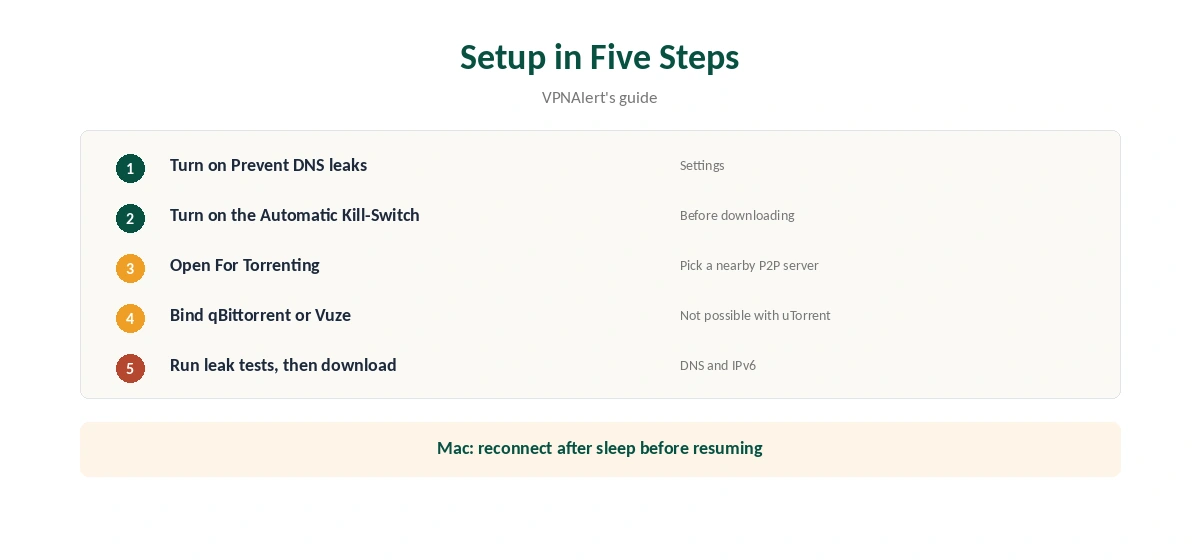
VPNAlert gives the order. Install CyberGhost on the device you download on. In the settings, turn on Prevent DNS leaks and the Automatic Kill-Switch. Then open the For Torrenting list and connect to a server there, rather than a regular one. Our page on CyberGhost and SOCKS5 covers why there is no proxy and the encrypted alternative.
Only then open your torrent client. Before the first download, run leak tests with our DNS leak guide and IPv6 leak guide.
Use the P2P Servers
VPNAlert reports that P2P traffic is blocked on CyberGhost servers in the US, Russia, Singapore, Australia and Hong Kong. Connecting to a regular server there and starting a torrent may simply fail. The For Torrenting list avoids that problem, and VPNAlert found a European P2P server fast in its test.
Pick a P2P server close to you for speed. CyberGhost torrenting opens many connections at once, so distance and server load matter.
The Kill Switch
BleepingComputer notes CyberGhost’s kill switch is always on in the Mac, iOS and Android apps, and on by default on Windows. CyberInsider confirmed it triggers when the connection drops, but found the macOS version unreliable after sleep. On a Mac, reconnect manually after waking before resuming downloads. Our kill switch guide explains why it matters.
Binding Your Client
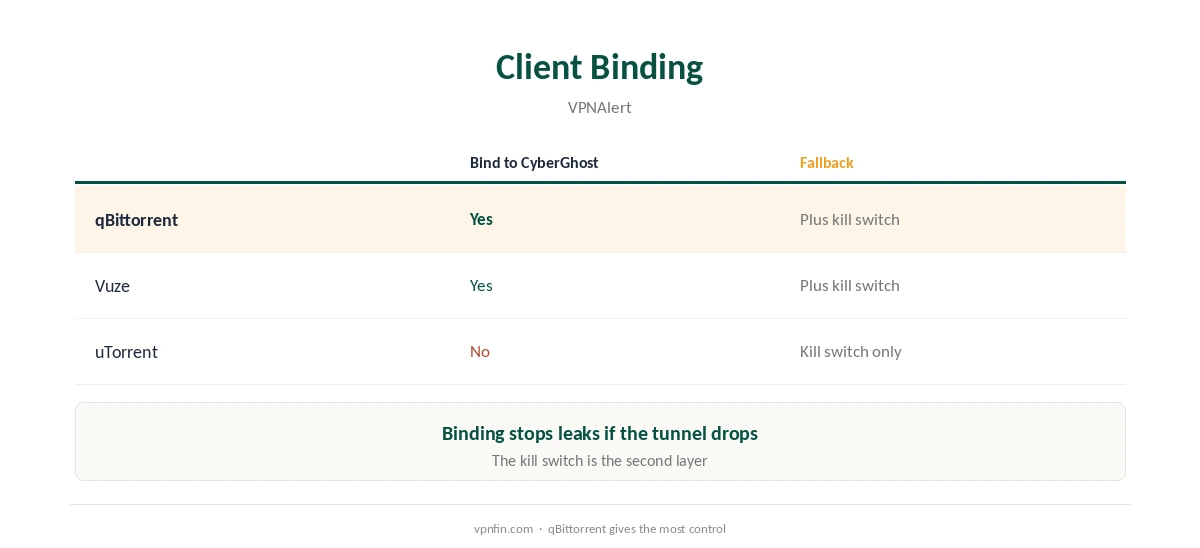
Binding a torrent client to the VPN’s network interface means it cannot use your normal connection, even if the tunnel drops. VPNAlert notes qBittorrent and Vuze can be bound to CyberGhost, but uTorrent cannot. With uTorrent, rely on the kill switch instead.
No Port Forwarding
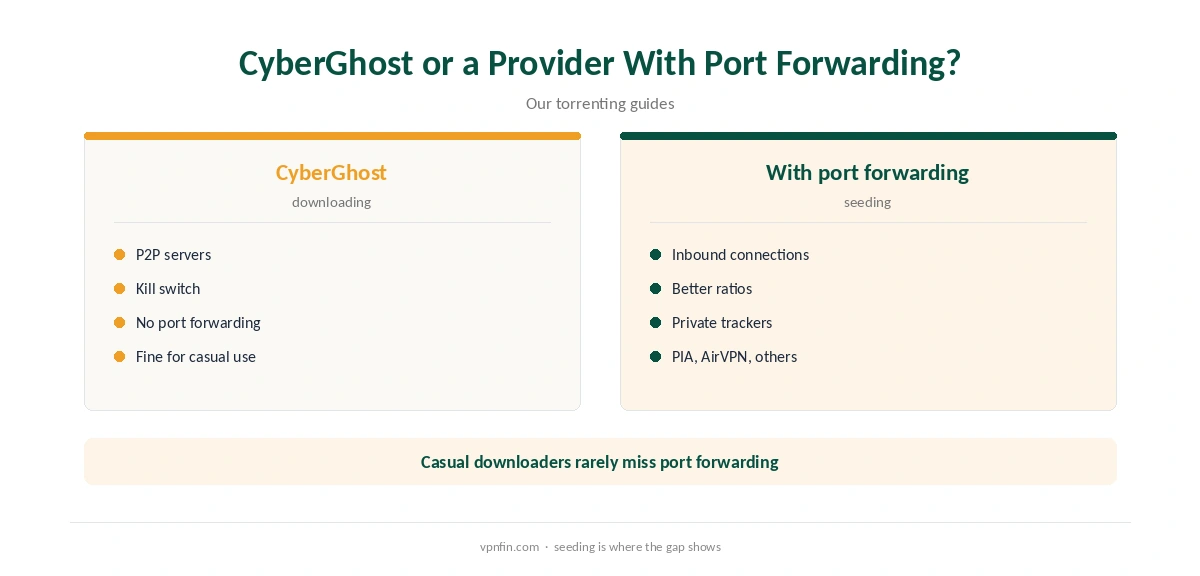
Every source we read agrees: CyberGhost does not offer port forwarding. VPNAlert notes that limits seeding and slows downloads on torrents with few peers. Private-tracker users with ratio rules will feel it most. Our port forwarding guide explains when it matters.
VPNAlert also notes CyberGhost’s dedicated IPs work only over OpenVPN, which is slower than WireGuard, and a dedicated IP does not add port forwarding either.
Checking the Torrent IP
Browser IP checks show the browser’s address, not necessarily the one your torrent client reports to peers. After connecting, use a torrent-specific IP check with the client open, which shows the address the swarm sees. It should be a CyberGhost address, not yours. Repeat the check after app updates and after changing servers, since settings can reset.
Split Tunnelling
Sources disagree here. CyberInsider and Netzwelt list split tunnelling among CyberGhost’s features, while BleepingComputer says it is missing. Check your app’s settings. Where it exists, it can keep a game or streaming app outside the VPN while the torrent client stays inside. Our split tunnelling guide explains the idea.
NAS Units and Seedboxes
Many people torrent from a NAS or a home server rather than a laptop. CyberGhost on Synology works through DSM’s OpenVPN client, as our CyberGhost Synology guide explains, and Linux servers can use the command-line app covered in our CyberGhost Linux guide.
Those manual and command-line setups lack some app features, so check the kill switch situation before leaving a machine downloading unattended.
Paying and Privacy
VPNAlert notes you can pay for CyberGhost with Bitcoin for extra anonymity. Gizmodo adds that Bitcoin purchases cannot include add-ons, so a dedicated IP needs another payment method. For most CyberGhost torrenting, a shared P2P server is the better privacy choice anyway, since it hides you among other users.
Protocol Choice
WireGuard is CyberGhost’s faster protocol in the tests we read, and it suits large downloads. VPNAlert notes OpenVPN performs better on some networks, so switch and compare if speeds disappoint. Our CyberGhost speed guide covers the other fixes.
What CyberGhost Costs
CyberGhost renews at $56.94 a year on its 2-year plan, according to our renewal table. It covers seven devices, and a computer takes one of them. The 45-day money-back guarantee applies to website purchases, as our CyberGhost refund guide explains.
| Provider | Renewal price | Per month | Tier |
|---|---|---|---|
| NordVPN | $139.08/yr | ~$11.59 | Basic |
| Surfshark | ~$79/yr | ~$6.58 | Starter |
| ExpressVPN | $99.95/yr | ~$8.33 | Basic |
| CyberGhost | $56.94/yr | ~$4.75 | 2-year |
| PureVPN | $47.95/yr | ~$4.00 | Standard, 2-year (1-year renews $57.95) |
| IPVanish | $89.99/yr | ~$7.50 | Essential |
| Windscribe | ~$69/yr | ~$5.75 | Pro |
| Proton VPN | ~$83.88/yr | ~$6.99 | VPN Plus |
| Mullvad | ~$65/yr | ~$5.40 | flat, no tiers |
| Norton VPN | $79.99/yr | ~$6.67 | Standard |
| Hotspot Shield | ~$95.99/yr | ~$8.00 | Premium annual |
| Astrill | $300 every 2 yrs | ~$12.50 | 2-year, same at renewal |
Related Guides
Our torrenting VPN guide compares providers, including those with port forwarding. Our PureVPN torrenting guide covers one that sells it as an add-on.
For another provider without port forwarding, see our Surfshark torrenting guide. The same CyberGhost torrenting checks apply there: kill switch first, then a leak test.
Torrenting copyrighted material without permission is illegal in many countries, VPN or not. CyberGhost belongs to Kape Technologies, which also owns ExpressVPN and Private Internet Access.
How We Research
This page draws on VPNAlert’s CyberGhost uTorrent and Vuze guides, CyberInsider’s 2026 CyberGhost review, BleepingComputer’s review, Netzwelt’s test and our renewal table. We cross-checked these sources against each other, and where they conflict or something can’t be verified, we say so in the text rather than guessing. We checked time-sensitive figures, including prices in US dollars, on 6 October 2026. Renewal from our renewal table. The main source we relied on is VPNAlert’s CyberGhost uTorrent guide. Our full approach lives on the About Us page.
CyberGhost Torrenting FAQ
Yes, through the For Torrenting server list, with P2P servers in 80+ countries, per CyberInsider.
VPNAlert reports blocks on servers in the US, Russia, Singapore, Australia and Hong Kong.
No. That limits seeding, VPNAlert notes.
No, per VPNAlert. qBittorrent and Vuze can be bound; use the kill switch with uTorrent.
On Mac, iOS and Android, yes; on Windows it is on by default, per BleepingComputer.
The Verdict
CyberGhost torrenting works well for downloading through the P2P server list, with a kill switch that triggers in tests. Avoid regular servers in the blocked countries, bind your client where possible, and look elsewhere for seeding.