
Disclosure: VPNFin is reader-supported. If you buy a VPN through links on this page, we may earn a commission at no extra cost to you. This never affects our ratings — here’s our full disclosure.
The best-known test of VPN apps on Apple’s tablets and phones used an iPad, which is where any NordVPN iPad guide has to start. Security researcher Michael Horowitz used a Wi-Fi-only iPad in 2022, logged every connection at his router, and found data leaving the device outside the VPN tunnel. He tried Proton VPN, OVPN and Windscribe across three protocols and three system versions, and got the same result each time.
That matters for anyone running NordVPN on an iPad, because the limits you meet there are mostly iPadOS limits rather than NordVPN’s. The app is the same one you would install on an iPhone. What differs is how you use an iPad: on Wi-Fi, shared around a household, and often left locked on a table.
NordVPN on iPad: The Short Answer
NordVPN runs on iPad through the same App Store app as on iPhone, on the same account. Each iPad counts as one of your ten simultaneous devices.
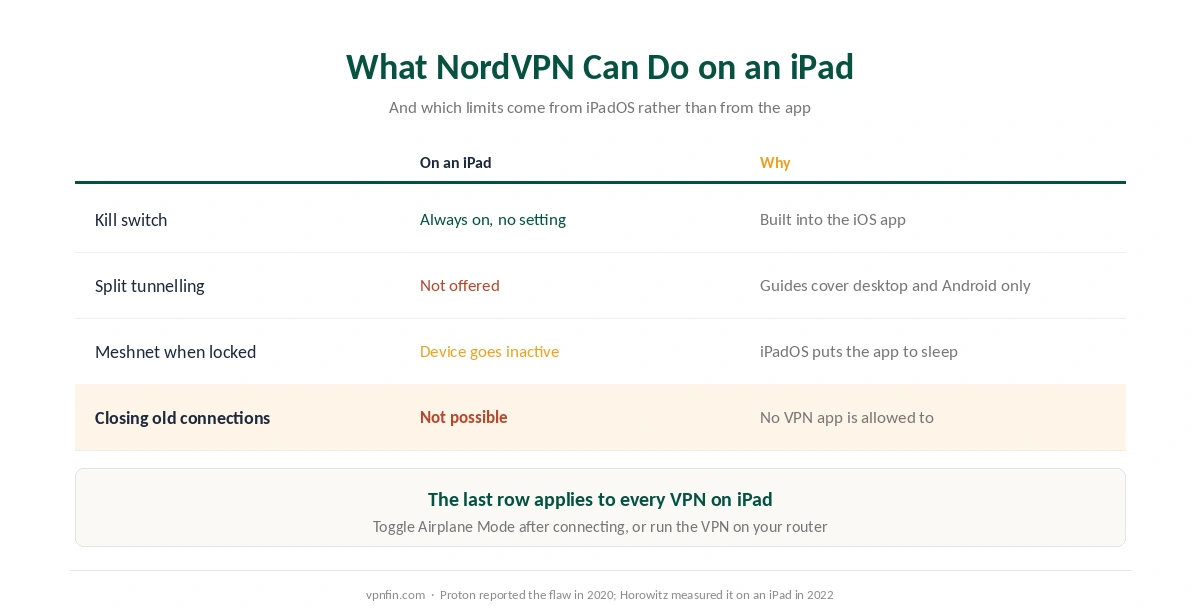
Some features work differently on iPadOS. The kill switch is always on and has no setting of its own. NordVPN offers no split tunnelling there. And Meshnet goes quiet whenever the iPad is locked, because the system puts the app to sleep.
No VPN app can close connections that were open before it started. That is an iPadOS rule, and it applies to every provider equally. Our iPhone guide explains the two-second workaround, and our NordVPN review covers the rest of the product.
The Leak Was Measured on an iPad
Horowitz chose a Wi-Fi-only iPad deliberately. It has a single network path, so anything leaving it outside the tunnel shows up cleanly in the router’s logs. An iPhone switches between Wi-Fi and mobile data, which makes the same test harder to read.
What he found matched a report Proton had published in March 2020, when it traced the flaw to iOS 13.3.1. Connections that were already open when the VPN started kept running outside the tunnel, sometimes for a long time. New connections went through the VPN as expected.
The workaround has limits. Proton suggested connecting the VPN and then switching Airplane Mode on and off, which forces open connections to restart inside the tunnel. Horowitz, however, did not consider it reliable. His own recommendation was a router running the VPN, so the iPad never sees an unprotected network at all. Our router setup guide covers that route.
What NordVPN Does on an iPad
The kill switch is built in and always on. NordVPN’s support pages state that on iOS it is enabled by default and not visible as a separate option. If the connection drops, it blocks internet access for the whole device and tries to reconnect to the last server. Our kill switch guide explains how that differs from desktop versions.
Threat Protection runs in its Lite form. On mobile it filters malicious sites and trackers at the DNS level, and it works only while you are connected to a VPN server.
Meshnet is available even without a subscription. NordVPN’s iOS download page says the free app includes it, so two of your own devices can link privately without paying.
What It Cannot Do on an iPad
NordVPN does not offer split tunnelling here. Its own split-tunnelling guide covers other platforms, not iPadOS. On an iPad, everything goes through the VPN or nothing does, so our split tunnelling guide applies to your other devices rather than this one.
A locked iPad drops out of Meshnet. NordVPN’s Meshnet documentation says that when an iPhone or iPad is locked, the app sleeps and the device appears inactive, and that the app cannot work around it. So an iPad left on a desk is not a dependable Meshnet node.
Always-on VPN is not available to you. Apple supports it only on supervised devices managed by an organisation, as our iPhone guide explains. On a personal iPad, the VPN stays on only as long as the app keeps it on.
⚠️ Several users on one device is a problem too. NordVPN’s support notes that where one device has several users set up, the app cannot run for them at the same time. That rarely affects a personal iPad, but it can matter on a managed one.
Wi-Fi iPad or Cellular iPad
A Wi-Fi-only iPad behaves like the one in Horowitz’s test: one network, one route out. The VPN protects it whenever it is connected, and the Airplane Mode toggle, used right after connecting, closes whatever was already open.
A cellular iPad adds a second route, the mobile network, and behaves more like an iPhone. The VPN covers both, yet switching between them is exactly when connections restart. Reconnecting cleanly after each switch matters more, so our guide to checking a VPN is worth running after the first few changes.
Where to Buy: App Store or NordVPN’s Website
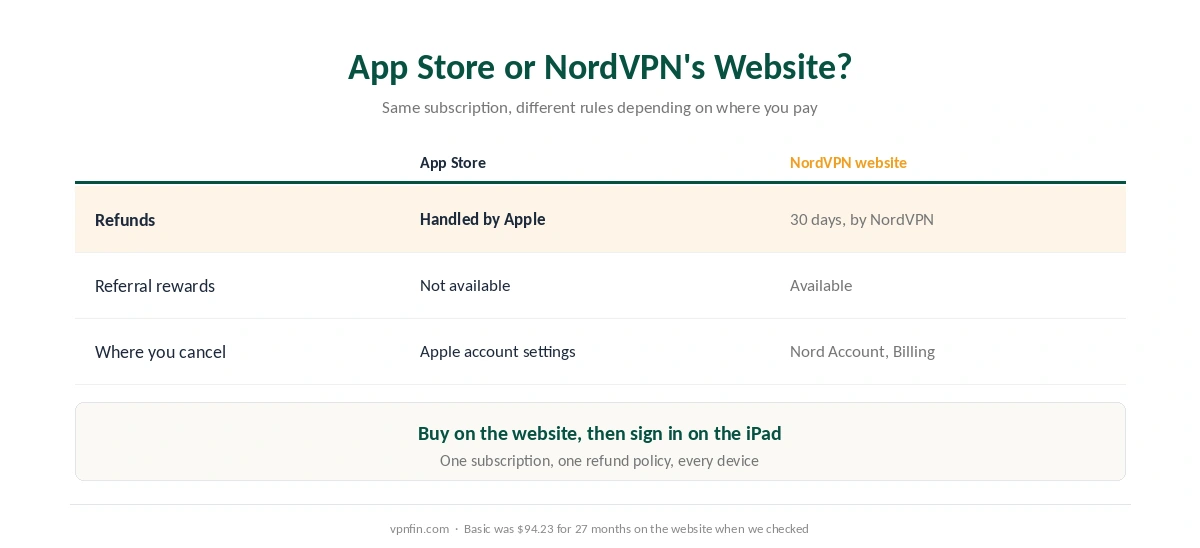
Refunds follow the place you paid. NordVPN’s 30-day money-back guarantee covers first purchases made on its website. For a subscription bought through the App Store, Apple handles the refund under its own rules. Our refund guide walks through both routes.
The referral programme excludes App Store purchases. NordVPN’s download page says you cannot refer others if you bought through the App Store or Google Play.
The price is the same product either way. On the website, Basic cost $94.23 for the first 27 months when we checked, then $139.08 a year. Our NordVPN pricing page lists every plan and term.
⚠️ Buying on the website and then signing in on the iPad keeps the subscription in one place for every device. It also keeps the refund with NordVPN rather than Apple.
One Account, Several iPads
NordVPN allows ten simultaneous connections on every plan, and an iPad counts as one. Its support pages add a condition: devices connected to the same server must use different protocols.
For a family with several iPads, phones and laptops, ten can run out. Surfshark, which belongs to the same parent company, Nord Security, allows unlimited devices. Our multi-device guide compares the options, and our Surfshark review covers the app itself.
Other VPNs Worth Running on an iPad
Proton VPN is the provider that first reported the iOS leak, and its apps are open source. Its free tier has no data cap, which suits an iPad used mostly at home. Our Proton VPN review covers it, and our free VPN guide explains why that free tier differs from others.
ExpressVPN ties its device limit to the tier you buy, from ten to fourteen. Our ExpressVPN review sets out what each tier includes.
Whichever you choose, the iPadOS limits above apply to it too. None of these apps can close connections that were open before they started, and none offers per-app split tunnelling on an iPad.
Setting Up NordVPN on an iPad
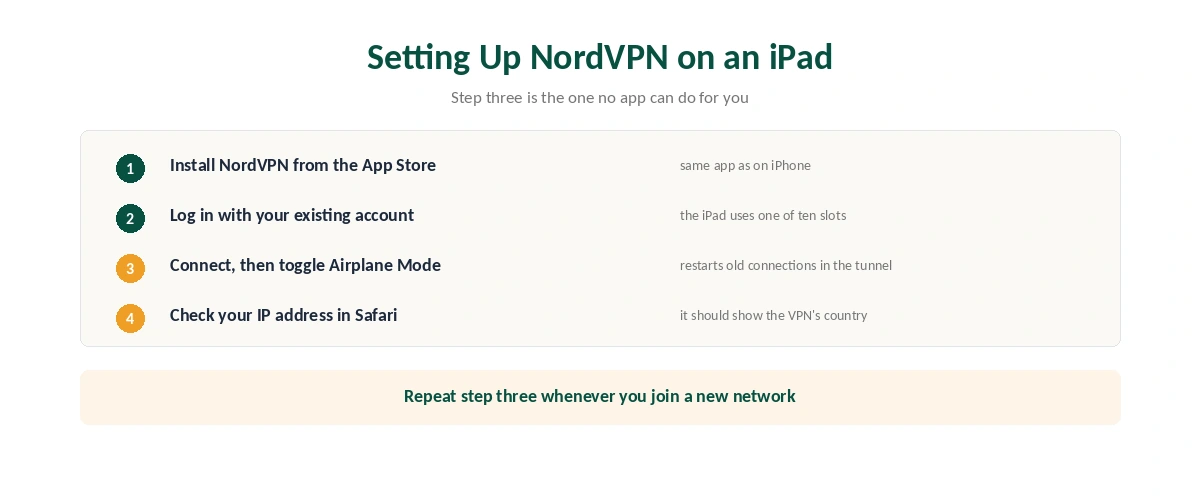
Install NordVPN from the App Store, open it, and choose your privacy preferences. Log in with your existing account, or create one if you are new.
Next, tap the quick-connect button to reach the nearest fast server. Then switch Airplane Mode on and off, so anything opened before the VPN restarts inside the tunnel.
Finally, check your address in Safari and confirm it shows the VPN’s country. If you later want the VPN off, our guide to turning a VPN off covers iPad as well as iPhone.
How We Research
The leak findings come from Michael Horowitz’s published write-up and from Proton’s 2020 report, both named where used. NordVPN’s behaviour on iPad comes from its own support pages, its Meshnet documentation and its iOS download page, read on 25 September 2026. The price comes from NordVPN’s pricing page, read the same day, and the device limits from our tables. We did not test NordVPN on an iPad ourselves. We do not run our own tests. Our full approach lives on the About Us page.
NordVPN on iPad FAQ
Yes. NordVPN uses the same App Store app on iPad as on iPhone, and the same account. An iPad counts as one of the ten devices you can connect at once. Some features, such as split tunnelling, are not available on iPadOS.
Yes, but you will not find a setting for it. NordVPN’s support pages say the iOS kill switch is enabled by default. It blocks internet access if the connection drops and tries to reconnect to the last server.
No. NordVPN’s split-tunnelling instructions cover Windows, macOS and Android only. On an iPad, all traffic goes through the VPN while it is connected.
Not completely. Connections open before the VPN starts can keep running outside it, a flaw Proton reported in 2020 and Michael Horowitz measured on an iPad in 2022. Toggling Airplane Mode after connecting helps; a VPN on your router avoids the problem.
You can, but refunds then go through Apple, and the referral programme is not available. Buying on NordVPN’s website keeps the 30-day refund with NordVPN.
The Verdict
NordVPN works on iPad exactly as it does on iPhone, with a built-in kill switch, Threat Protection Lite and free Meshnet. What it cannot do there, such as split tunnelling or closing old connections, iPadOS does not allow any VPN app to do.
So install it, buy on NordVPN’s website if the refund matters, and toggle Airplane Mode after connecting. If the iPad never leaves home, a VPN on the router protects it more completely than any app can.