
Disclosure: VPNFin is reader-supported. If you buy a VPN through links on this page, we may earn a commission at no extra cost to you. This never affects our ratings — here’s our full disclosure.
Surfshark on Roku now has two routes, not three. Roku devices cannot run VPN apps, and Surfshark retired Smart DNS, the quickest workaround, on 2 February 2026. Its own support page now lists the alternatives: a VPN-protected Wi-Fi hotspot from a Windows PC, or Surfshark set up on your router.
This guide covers both routes, the limit that applies to any VPN on Roku, and what breaks. If you used Smart DNS before, start with the clean-up section.
Surfshark on Roku: The Short Answer
For a permanent setup, put Surfshark on your router, ideally with WireGuard, as our Surfshark on a router guide explains. Every device on the network, including the Roku, is covered.
For occasional viewing, share Surfshark from a Windows PC. Surfshark’s Roku page describes switching the app to OpenVPN, turning on Mobile hotspot, and sharing the connection.
A VPN will not add Roku channels. It changes what plays inside apps you already have, because Roku ties its channel store to your account’s country. Our Roku VPN guide compares providers.
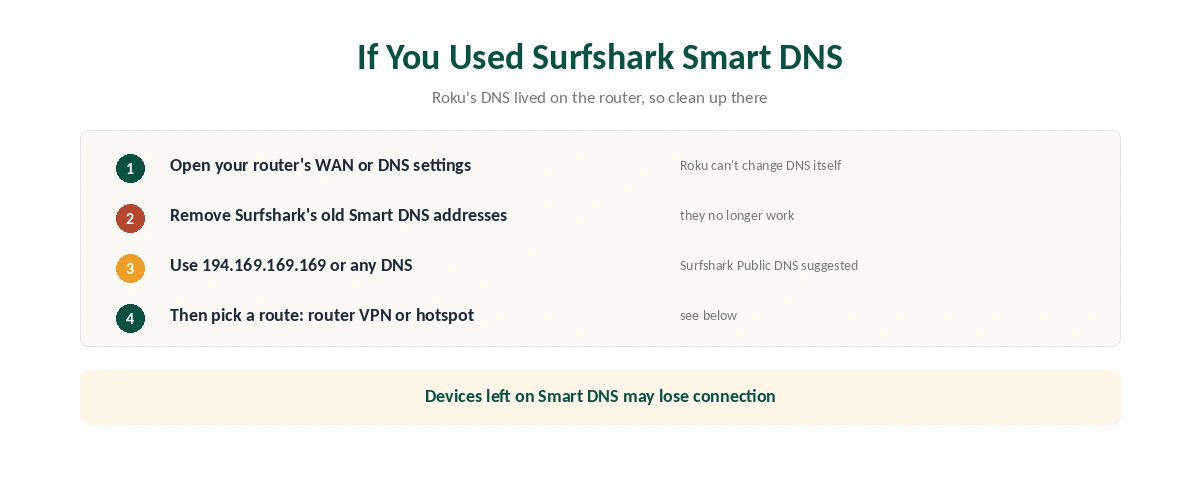
If You Used Surfshark Smart DNS
Remove the old addresses. Surfshark’s discontinuation notice says devices still set to its Smart DNS must be changed manually. It suggests replacing them with Surfshark Public DNS at 194.169.169.169, or any other DNS provider.
On a Roku, those settings lived on the router, since Roku does not let you change DNS on the device, Gizmodo notes. Check your router’s WAN or DNS settings. Smart TVs faced the same clean-up, as our Surfshark on Smart TV guide explains. Our Smart DNS comparison explains what changed.
Route 1: Surfshark on Your Router
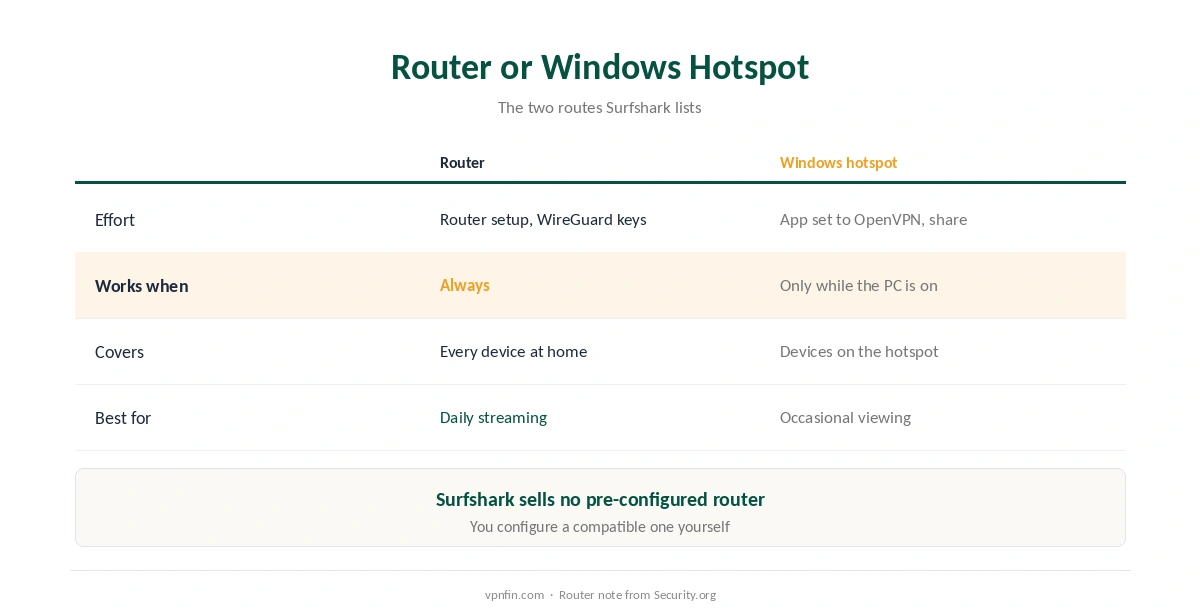
This is the permanent answer. Surfshark issues WireGuard keys for router setups, and its guides cover GL.iNet, OpenWRT, DD-WRT, Asus VPN Fusion and others. Security.org notes Surfshark does not sell a pre-configured router, so you set it up yourself.
Asus VPN Fusion can put only the Roku on the VPN, leaving other devices on your normal connection, which helps if a console or bank dislikes VPN addresses. WireGuard keeps router speeds up, as our WireGuard and OpenVPN comparison explains. Our router setup guide covers the general process.
Route 2: A Hotspot From a Windows PC
| Step | What to do | Note |
|---|---|---|
| 1 | Open Surfshark, set the protocol to OpenVPN, disconnect | Per Surfshark’s Roku page |
| 2 | Turn on Mobile hotspot in Windows settings | Set a name and password |
| 3 | Share the Surfshark adapter with the hotspot | Change adapter options, Sharing tab |
| 4 | Connect Surfshark to a server | Pick the country you need |
| 5 | Join the hotspot from the Roku | Network settings on the Roku |
| 6 | Open a streaming app and check | Restart it if the library doesn’t change |
It only works while the PC stays on, so it suits occasional viewing rather than daily use. Surfshark’s unlimited devices mean the PC and Roku use no extra slots, as our multi-device guide explains. TheBestVPN notes Surfshark publishes a detailed hotspot guide, which makes this route easier than with some providers.
What Breaks, and How to Fix It
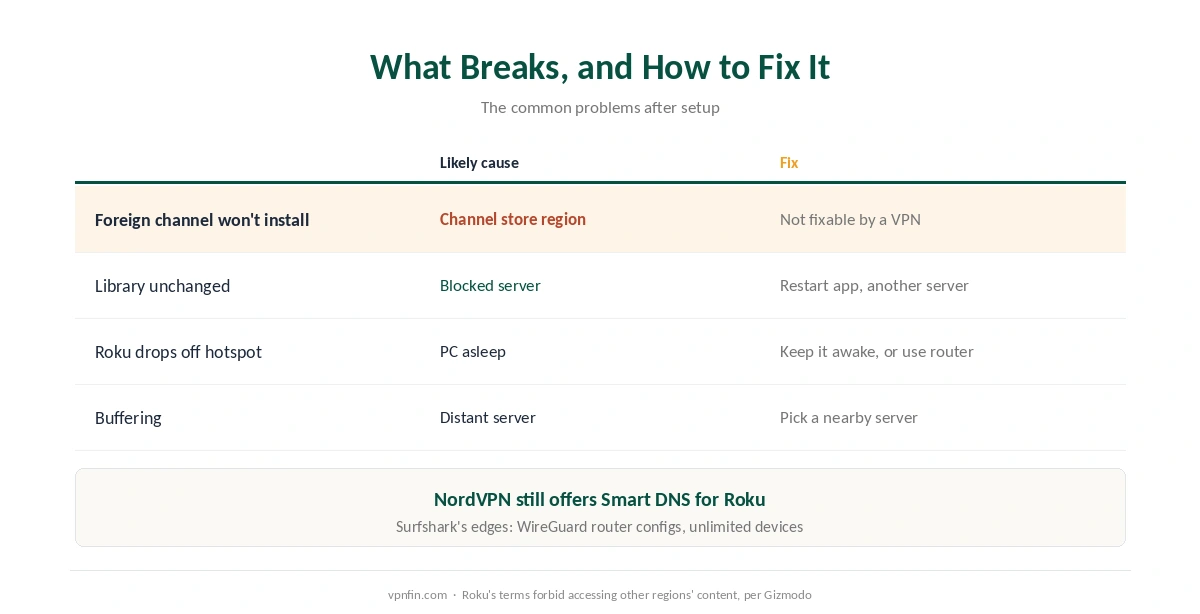
A foreign channel will not install. That is Roku’s channel store region, not the VPN, and Gizmodo notes Roku’s terms forbid accessing other regions’ content. A VPN cannot change it.
The streaming library does not change. Restart the streaming app, then try another server. Gizmodo counts more than 30 Netflix catalogues reachable with Surfshark. Our Surfshark and Netflix page covers recent results.
The Roku drops off the hotspot. The PC went to sleep or disconnected. Keep it awake while streaming, or move to the router route.
Buffering with Surfshark on Roku. Choose a nearby server, as our speed guide explains, and confirm the tunnel with our guide to checking a VPN.
Surfshark or NordVPN on Roku?
NordVPN still offers Smart DNS, which gives Roku owners a DNS-only option Surfshark no longer does, as our NordVPN on Roku guide explains. Surfshark’s advantages are WireGuard router configs and unlimited devices. The two share a parent, Nord Security. Our Surfshark review covers the service.
How We Research
The Smart DNS retirement and the alternatives come from Surfshark’s own support notice, the hotspot steps from Surfshark’s Roku page, and the channel store and Netflix details from Gizmodo’s Roku guide. Security.org and TheBestVPN supplied the router and hotspot notes. We name each source where used; all were read on 26 September 2026. We did not test on a Roku ourselves. Our full approach lives on the About Us page.
Surfshark on Roku FAQ
No. Roku does not support VPN apps. Use Surfshark on your router or share a VPN connection from a Windows PC.
Not any more. Surfshark retired Smart DNS on 2 February 2026. It suggests Surfshark Public DNS, 194.169.169.169, to replace old addresses.
No. Roku ties its channel store to your account’s country, and its terms forbid accessing other regions’ content. A VPN changes libraries inside installed apps.
A hotspot from a Windows PC for occasional use. For a permanent setup, Surfshark on your router.
No, according to Security.org. You configure a compatible router yourself, using Surfshark’s WireGuard guides.
The Verdict
Surfshark on Roku now runs through a router or a Windows hotspot, since Smart DNS is gone and Roku has no VPN apps.
The router is the permanent answer; the hotspot suits occasional use. Either way, a VPN changes what plays inside your apps, not which channels you can install.